


 本文介绍了如何在两台虚拟机上使用Nginx实现负载均衡,包括MySQL、JSK、Tomcat的部署,JDK、Tomcat、Nginx的安装,以及反向代理配置的具体步骤。重点讲述了如何配置Nginx进行轮询负载均衡,并讨论了SSO问题的出现。
负载均衡用到了发布项目,原本需要启动四台虚拟机,GTQ28的电脑配置带不动,就只能使用两台虚拟机进行实验了。
蓝色1号机安装:MySQL\JSK\Tomcat 及项目的打包部署
绿色2号机安装:JDK\Tomcat\Nginx 及项目的打包部署
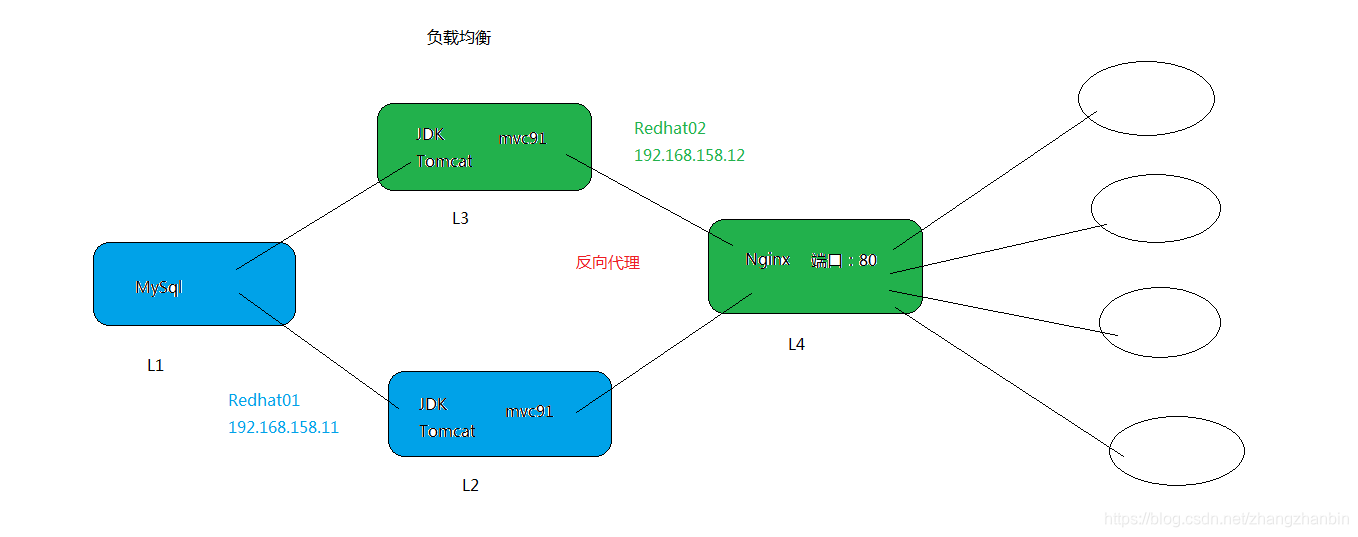
负载均衡
一号机:完成项目的打包部署即可
二号机:是完成了一号机的项目的打包部署基础上添加nginx
以下操作都是二号机的:
1>安装nginx -> C语言开发的
	cd ~/tools/

	//安装环境1
	rpm -ivh zlib-devel-1.2.7-17.el7.x86_64.rpm

	//和安装环境2
	tar -xzvf pcre-8.38.tar.gz -C ~/envs/
	cd ~/envs/pcre-8.38/
	//初始化
	./configure
	//编译
	make
	//安装
	make install


	cd ~/tools/
	//解压文件
	tar -xzvf nginx-1.15.6.tar.gz -C ~/envs/

	cd ~/envs/nginx-1.15.6/
	//初始化
	./configure


	//下列情况表示成功初始化
	/****************************************************/
	Configuration summary
	  + using system PCRE library
	  + OpenSSL library is not used
	  + using system zlib library

	  nginx path prefix: "/usr/local/nginx"
	  nginx binary file: "/usr/local/nginx/sbin/nginx"
	  nginx modules path: "/usr/local/nginx/modules"
	  nginx configuration prefix: "/usr/local/nginx/conf"
	  nginx configuration file: "/usr/local/nginx/conf/nginx.conf"
	  nginx pid file: "/usr/local/nginx/logs/nginx.pid"
	  nginx error log file: "/usr/local/nginx/logs/error.log"
	  nginx http access log file: "/usr/local/nginx/logs/access.log"
	  nginx http client request body temporary files: "client_body_temp"
	  nginx http proxy temporary files: "proxy_temp"
	  nginx http fastcgi temporary files: "fastcgi_temp"
	  nginx http uwsgi temporary files: "uwsgi_temp"
	  nginx http scgi temporary files: "scgi_temp"
	/****************************************************/


	//编译
	make
	//安装 默认路径安装  -> "/usr/local/nginx"
	make install
2>启动nginx服务
	cd /usr/local/nginx/sbin
	//启动
	./nginx
	//测试
	./nginx -t
	/******************************************************/
	nginx: the configuration file /usr/local/nginx/conf/nginx.conf syntax is ok
	nginx: configuration file /usr/local/nginx/conf/nginx.conf test is successful
	/******************************************************/
3>反向代理配置 实现负载均衡
	//当前服务结束
	[root@redhat02 sbin]# ps -ef | grep nginx
	root      26253      1  0 17:11 ?        00:00:00 nginx: master process ./nginx
	nobody    26254  26253  0 17:11 ?        00:00:00 nginx: worker process
	root      26259   1526  0 17:14 pts/0    00:00:00 grep --color=auto nginx
	[root@redhat02 sbin]# kill -9 26253
	[root@redhat02 sbin]# kill -9 26254

	cd /usr/local/nginx/conf
	vi nginx.conf
	/******************************************************/

	    35     upstream myweb.com{
 		36         server 192.168.11.12:8080 weight=2;
 		37         server 192.168.11.111:8080;
 		38     }
 		39
 		40
 		41     server {
 		42         listen       80;
 		43         server_name  myweb;
 		44
 		45         #charset koi8-r;
 		46
 		47         #access_log  logs/host.access.log  main;
 		48
 		49         location / {
 		50             proxy_pass   http://myweb.com;
 		51
 		52         }


	/******************************************************/

	重启服务
	cd /usr/local/nginx/sbin
	//启动
	./nginx

	改变本地域名 http -> 新的问题 SSO (单点登录)
	C:\Windows\System32\drivers\etc\hosts   添加:192.168.11.111 myweb.com
	作用:提高网站吞吐量
说明:
			35     upstream myweb.com{
     		36         server 192.168.11.12:8080 weight=2;
     		37         server 192.168.11.111:8080;
     		38     }
表示192.168.11.12:8080使用两次后server 192.168.11.111使用一次,一直轮询使用。
注意实现负载均衡(轮询使用)后:session是不能公用的,所以会出现 SSO (单点登录)问题
完成后效果图:
1)、有时候登录成功后立马进入另一台服务器,导致session信息丢失,导致没有登录成功

2)、有时候登录成功后立马进入还是原来这台服务器,登录成功






 扫一扫
扫一扫


 441
441

 被折叠的 条评论
为什么被折叠?
被折叠的 条评论
为什么被折叠?
 到【灌水乐园】发言





