yarn 安装依赖报错: error Error: getaddrinfo ENOTFOUND registry.nlark.com

yarn 安装依赖报错:

error Error: getaddrinfo ENOTFOUND registry.nlark.com

yarn.lock文件里的 registry.nlark.com 替换成 registry.npmmirror.com 即可
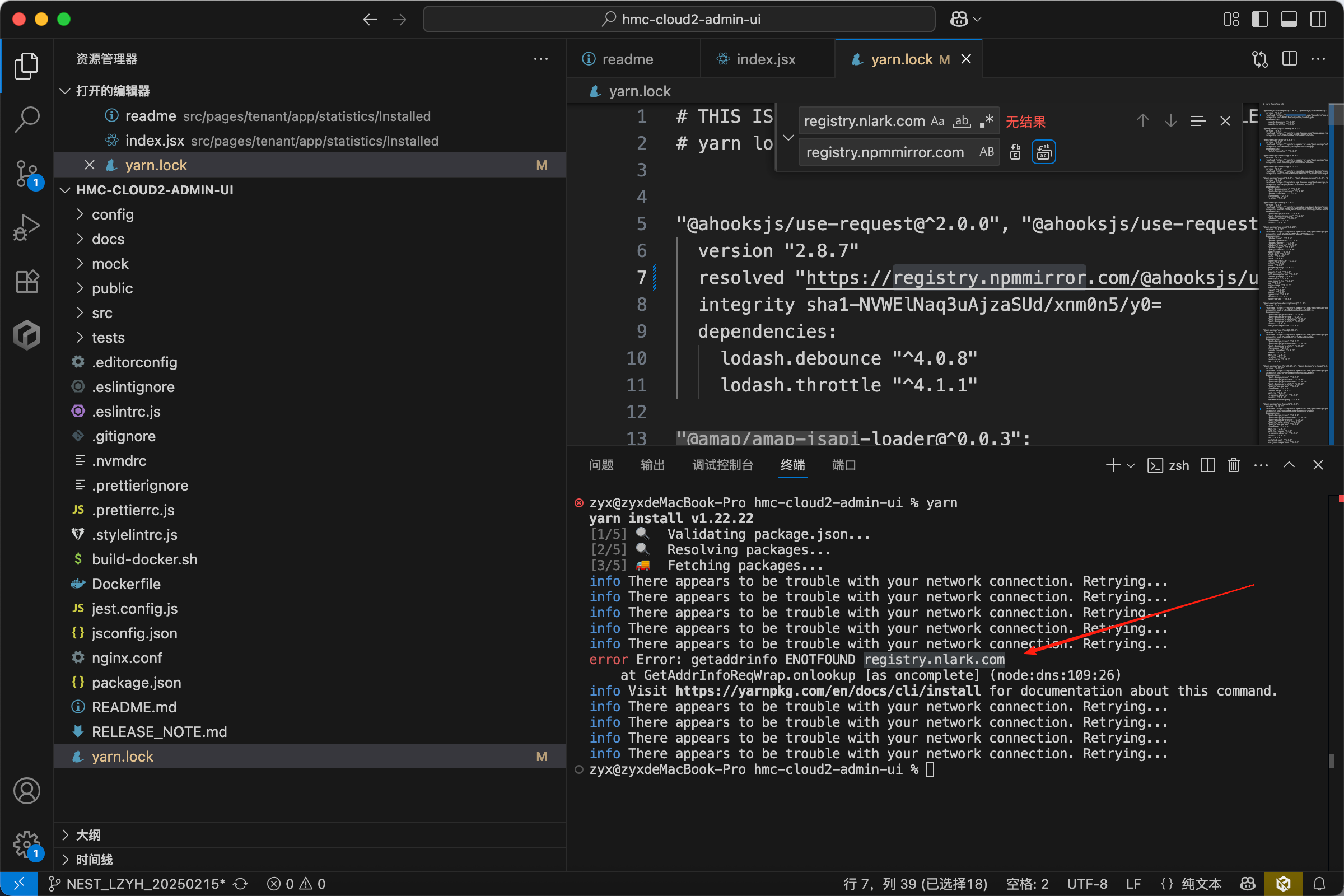
在这里插入图片描述

error Error: https://registry.npmjs.org/tinymce/-/tinymce-7.2.0.tgz: ETIMEDOUT

registry.npmjs.org 报错 也替换成 registry.npmmirror.com

你遇到的错误是: ``` npm ERR! network request to https://registry.nlark.com/... failed, reason: getaddrinfo ENOTFOUND registry.nlark.com ``` 这表示你的 **npm 配置使用了已失效的淘宝镜像地址 `registry.nlark.com`**,而该域名已无法解析,导致依赖安装失败。 --- ## ✅ 解决方案:切换 npm 镜像源 ### ✅ 方法一:切换为官方源(推荐) ```powershell npm config set registry https://registry.npmjs.org ``` 然后尝试安装依赖: ```powershell npm install ``` --- ### ✅ 方法二:切换为新的淘宝镜像源(推荐国内用户) 淘宝 npm 镜像已迁移到 `https://registry.npmmirror.com`,使用这个地址更稳定: ```powershell npm config set registry https://registry.npmmirror.com ``` 验证是否设置成功: ```powershell npm config get registry ``` 输出应为: ``` https://registry.npmmirror.com ``` 再执行: ```powershell npm install ``` --- ## ✅ 方法三:临时使用新镜像安装(无需更改配置) 你可以使用 `--registry` 参数在安装时指定源: ```powershell npm install --registry=https://registry.npmmirror.com ``` 或使用官方源: ```powershell npm install --registry=https://registry.npmjs.org ``` --- ## ✅ 方法四:使用 `nrm` 管理镜像源(推荐) 安装 `nrm`(npm registry manager)可以快速切换源: ```powershell npm install -g nrm ``` 查看可用源: ```powershell nrm ls ``` 输出类似: ``` npm ---- https://registry.npmjs.org/ yarn ------- https://registry.yarnpkg.com/ tnpm --- https://registry.npmmirror.com/ * taobao -- https://registry.npmmirror.com/ cnpm --- http://r.cnpmjs.org/ ``` 切换源示例: ```powershell nrm use taobao ``` 或切换为官方源: ```powershell nrm use npm ``` --- ## ✅ 方法五:清除缓存和代理设置 有时缓存或代理配置也会导致问题,可以尝试以下命令: ### 清除缓存: ```powershell npm cache clean --force ``` ### 删除代理配置(如果你没使用代理): ```powershell npm config delete proxy npm config delete https-proxy ``` --- ## ✅ 总结步骤: | 操作 | 命令 | |------|------| | 切换官方源 | `npm config set registry https://registry.npmjs.org` | | 切换淘宝源 | `npm config set registry https://registry.npmmirror.com` | | 临时指定源安装 | `npm install --registry=https://registry.npmmirror.com` | | 使用 nrm 管理源 | `npm install -g nrm` + `nrm use taobao` | | 清除缓存 | `npm cache clean --force` | | 删除代理配置 | `npm config delete proxy` & `npm config delete https-proxy` | --- ##
评论
成就一亿技术人!
拼手气红包6.0元
还能输入1000个字符
 
红包 添加红包
表情包 插入表情
 条评论被折叠 查看
添加红包

请填写红包祝福语或标题

红包个数最小为10个

红包金额最低5元

当前余额3.43前往充值 >
需支付:10.00
成就一亿技术人!
领取后你会自动成为博主和红包主的粉丝 规则
hope_wisdom
发出的红包
实付
使用余额支付
点击重新获取
扫码支付
钱包余额 0

抵扣说明:

1.余额是钱包充值的虚拟货币,按照1:1的比例进行支付金额的抵扣。
2.余额无法直接购买下载,可以购买VIP、付费专栏及课程。

余额充值


