






 本文介绍如何使用五种命令行工具(cu、screen、minicom、putty 和 tip)通过串口连接到 Linux/Unix/*BSD 和 MacOSX 系统。这些工具在没有显示器或键盘的情况下特别有用,例如在路由器、服务器和 NAS 设备上。
Most embedded Linux / BSD systems such as routers, servers and nas devices comes with console interface (serial port with RS-232). BIOS can uses this, and after boot BIOS screen I/O is redirected so that you can use the device. RS-232 is also used for communicating to headless server, where no monitor or keyboard is installed, during boot when operating system is not running yet and therefore no network connection is possible. You need to use a serial cable between your computer and embedded system or server. In this post I will cover five conman utilities used for serial communication under Linux / Unix / *BSD and Mac OS X.
Find out information about your serial ports
Type the following dmesg command:
$ dmesg | egrep --color 'serial|ttyS'
Sample outputs:
[    1.245258] serial8250: ttyS0 at I/O 0x3f8 (irq = 4) is a 16550A
[    1.265727] serial8250: ttyS1 at I/O 0x2f8 (irq = 3) is a 16550A
[    1.286713] 00:07: ttyS0 at I/O 0x3f8 (irq = 4) is a 16550A
[    1.307321] 00:08: ttyS1 at I/O 0x2f8 (irq = 3) is a 16550A
You can use setserial command which is designed to set and/or report the configuration information associated with a serial port:
$ setserial -g /dev/ttyS[0123]
Sample outputs:
/dev/ttyS0, UART: 16550A, Port: 0x03f8, IRQ: 4
/dev/ttyS1, UART: 16550A, Port: 0x02f8, IRQ: 3
/dev/ttyS2, UART: unknown, Port: 0x03e8, IRQ: 4
/dev/ttyS3, UART: unknown, Port: 0x02e8, IRQ: 3
#1 cu command
The cu command is used to call up another system and act as a dial in terminal. cu command is installed on many Unix like systems including OpenBSD/AIX/Solaris and so on. You can use it as follows:
cu -l /dev/device -s baud-rate-speed
In this example, I'm using /dev/ttyS0 with 19200 baud-rate:
cu -l /dev/ttyS0 -s 19200
Sample outputs:
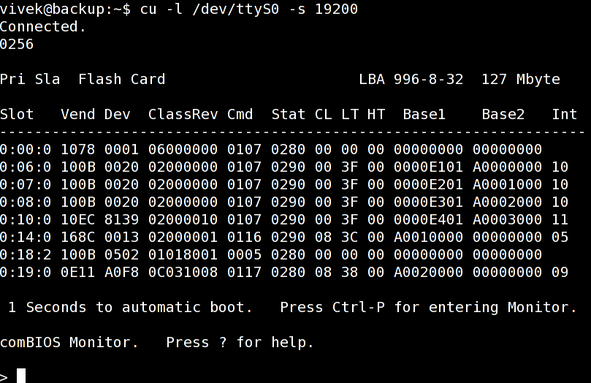
Fig.01: cu command in action
To exit enter tilde dot (~.).
#2 screen command
Use the screen command as follows:
$ screen /dev/device baud-rate
 $ screen /dev/ttyS0 19200
 $ screen /dev/ttySUSB0 19200,cs8
Sample outputs:
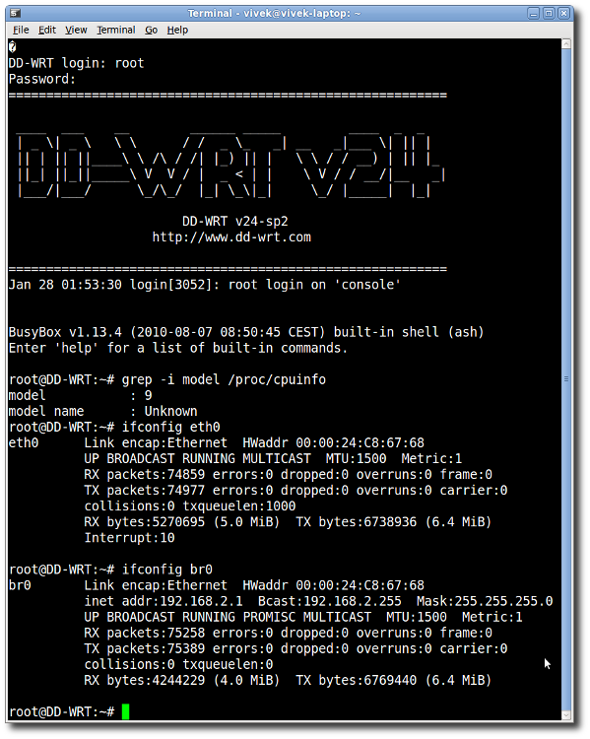
Fig.02: serial command connected to my personal router powered by dd-wrt
#3 minicom command
minicom command is a communication program which somewhat resembles the shareware program TELIX from old good MS-DOS days. Type minicom to connect:
$ minicom
Sample outputs:
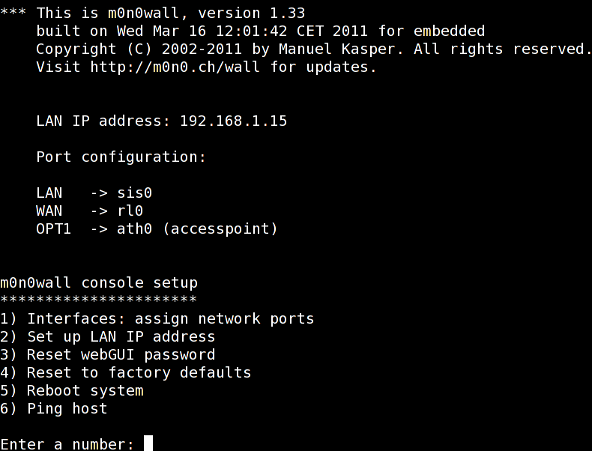
Fig.03: minicom connected to my m0n0wall embedded firewall
See how to install and use minicom under Linux operating systems.
#4 putty command
PuTTY is a free and open source gui X based terminal emulator client for the SSH, Telnet, rlogin, and raw TCP computing protocols and as a serial console client. It works under Linux, Unix, Mac OS X, MS-Windows and few other operating systems. See how to configure and use putty for cisco routers:

Fig.04: putty in action
You can use the apt-get or yum command to install putty:
$ sudo apt-get install putty
#5 tip command
The tip command is used as a serial terminal. tip command can be found under AIX/HP-UX/Solairs/*BSD/Linux operating systems. The syntax is:
tip -19200 device
 tip -19200 s0
 tip -19200 ttys0
http://www.cyberciti.biz/hardware/5-linux-unix-commands-for-connecting-to-the-serial-console/





 扫一扫
扫一扫


 1494
1494

 被折叠的 条评论
为什么被折叠?
被折叠的 条评论
为什么被折叠?
 到【灌水乐园】发言





