



问题
scp 文件或目录 无反应
rsync 报错
protocol version mismatch -- is your shell clean?
(see the rsync manpage for an explanation)
rsync error: protocol incompatibility (code 2) at compat.c(622) [sender=3.2.7]
以为是版本问题,其实根本不是(别问我是怎么知道,问就是我用了半天的时间手动安装升级成功了,但然并卵)
参考文章
protocol version mismatch — is your shell clean? – 月下博客
文中提到
仔细看命令参数,确认不存在错误。上网查了一下,似乎没说具体原因。于是根据错误提示,用
man查看rsync文档,搜索 “mismatch”,发现如下说明:rsync occasionally produces error messages that may seem a little cryptic. The one that seems to cause the most confusion is "protocol version mismatch -- is your shell clean?". This message is usually caused by your startup scripts or remote shell facility producing unwanted garbage on the stream that rsync is using for its transport. The way to diagnose this problem is to run your remote shell like this: ssh remotehost /bin/true > out.dat then look at out.dat. If everything is working correctly then out.dat should be a zero length file. If you are getting the above error from rsync then you will probably find that out.dat contains some text or data. Look at the contents and try to work out what is pro‐ ducing it. The most common cause is incorrectly configured shell startup scripts (such as .cshrc or .profile) that contain output statements for non-interactive logins.看来这个错误比较常见,因此特意说明了原因及测试方法。根据文档提示,原因可能是 .bashrc 等文件中输出了内容。登录到新买的vps,打开 .bashrc,果然看到这么一段:
cat /etc/motd。不管 /etc/motd 有没有内容,这条语句都会让shell连过去时输出一行。找到了原因,解决办法也很简单:注释掉输出语句。再回过头测试
rsync,按照预期进行文件同步,一切正常。
解决之道
这说明什么,当通过ssh远程同步或复制时,连上后,提示信息干扰了传输!
这个目标主机是欧拉服务器,有这么个信息,上图:
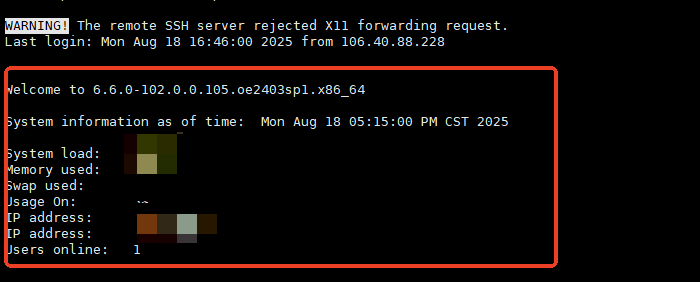
欧拉openEuler系统的关键点
找半天,终于:/etc/profile.d/system-info.sh 是这东西搞的鬼!
备份文件后世界核平~
cd /etc/profile.d/
mv system-info.sh system-info.shbak
其它可能产生干扰的地方:
~/.bash_profile
~/.bashrc
/etc/motd






 扫一扫
扫一扫


 2145
2145

 被折叠的 条评论
为什么被折叠?
被折叠的 条评论
为什么被折叠?
 到【灌水乐园】发言





