


1、组件基础
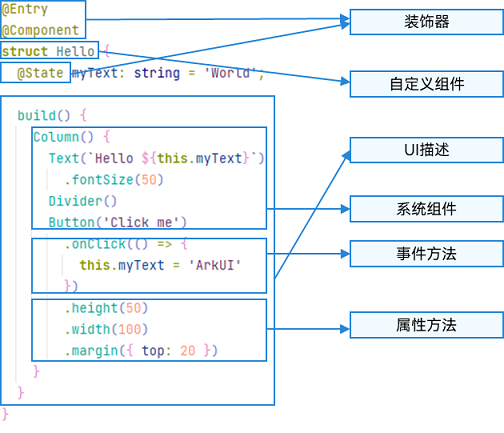
2、布局
2.1 基础布局
●Column,Row
2.2 堆叠布局 Stack()
●叠在一块,比如抖音是三层文字叠在一起,呈现出抖的样子
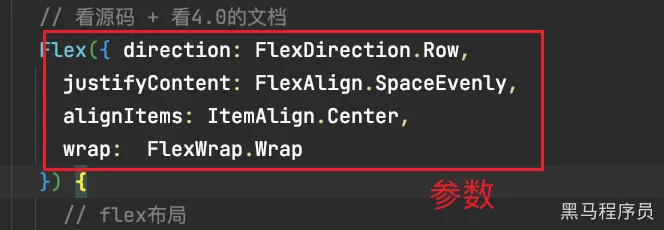
2.3 弹性布局
●Flex(){ }:设置属性和方向是用参数
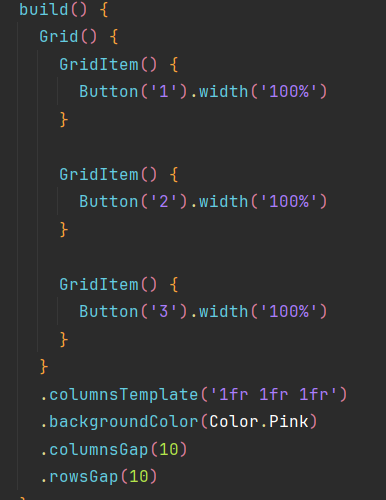
2.4 网络布局
●Grid组件下只能放置GridItem组件
2.5 相对布局
●需要两个组件做对比,容器id固定为 “ __container__ ”
TypeScript运行代码复制代码
@Entry
@Component
struct IndexNex {
build() {
RelativeContainer() {
Button('按钮')
.id('btn')
.alignRules({
right: { anchor: '__container__', align: HorizontalAlign.End },
bottom: { anchor: '__container__', align: VerticalAlign.Bottom }
})
Button('输入框')
.alignRules({
right: { anchor: 'btn', align: HorizontalAlign.Start },
top: { anchor: 'btn', align: VerticalAlign.Top }
})
}.width(300).height(300).backgroundColor(Color.Pink)
}
}
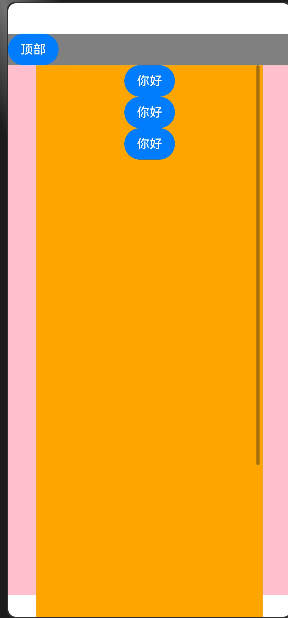
2.6 滚动条布局
出现滚动条的组件:
●Grid
●List(列表)
●Scroll(滚动条)
●Swiper(轮播)
●WaterFlow(瀑布流)
出现滚动条的前提条件是- 上述组件中的子组件的内容超出了父容器组件的宽度或者高度
TypeScript运行代码复制代码
@Entry
@Component
struct Lun {
scroller: Scroller = new Scroller
build() {
Column() {
Row() {
Button('顶部')
.onClick(() => {
this.scroller.scrollEdge(Edge.Top)
})
}.backgroundColor(Color.Gray).width('100%')
Scroll(this.scroller) {
Column() {
Button('你好')
Button('你好')
Button('你好')
}.width('80%').height(1000).backgroundColor(Color.Orange)
}
}
.backgroundColor(Color.Pink)
.width('100%')
}
}





 扫一扫
扫一扫


 1264
1264

 被折叠的 条评论
为什么被折叠?
被折叠的 条评论
为什么被折叠?
 到【灌水乐园】发言





