





 本文介绍了一个Spring MVC框架下的重定向示例,通过创建控制器实现从一个页面跳转到另一个页面的功能,并展示了如何配置DispatcherServlet以正确解析视图。
学习参考自易百教程
在这个例子springMVC static静态资源访问中修改完成
1、在controller包下添加RedirectController控制器
package com.controller;

import org.springframework.stereotype.Controller;
import org.springframework.web.bind.annotation.RequestMapping;

@Controller
@RequestMapping("/jsp")	//该类下所有方法的父级路径
public class RedirectController {

	@RequestMapping(value="/index")	//匹配为/jsp/index
	public String first(){
		return "index";
	}

	@RequestMapping(value="/redirect")
	public String two(){
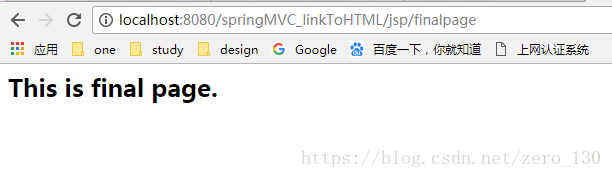
		return "redirect:finalpage"; //将访问路径/jsp/redirect重定向为/jsp/finalpage
	}

	@RequestMapping(value="/finalpage")
	public String three(){
		return "final";		//响应返回final.jsp
	}
}
2、修改dispatcher-servlet.xml文件,添加访问前缀/jsp/。更改后,dispatchservlet将
http://localhost:8080/springMVC_linkToHTML/index访问路径映射匹配到第二个新建的controller中,
  <bean class="org.springframework.web.servlet.view.InternalResourceViewResolver" id="internalResourceViewResolver">
              <property name="prefix" value="/jsp/" />
              <!-- 定义视图后缀 -->
              <property name="suffix" value=".jsp" />
       </bean>
3、在Web_Root下新建jsp文件夹添加index.jsp、final.jsp文件
	<%@ page language="java" import="java.util.*" pageEncoding="ISO-8859-1"%>
	<%@taglib uri="http://www.springframework.org/tags/form" prefix="form"%>
	<!DOCTYPE HTML PUBLIC "-//W3C//DTD HTML 4.01 Transitional//EN">
	<html>
	  <head>
	    <title>link to a another</title>
	  </head>

	  <body>
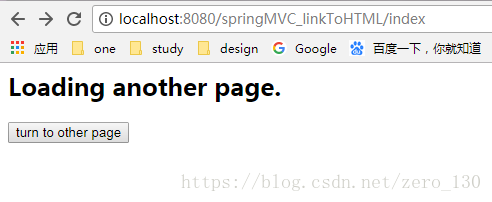
	   <h2>Loading a another page.</h2>
	   <form:form action="/springMVC_linkToHTML/jsp/redirect">
	   		<input type="submit" value="turn to other page"/>
	   </form:form>
	  </body>
	</html>
<%@ page language="java" import="java.util.*" pageEncoding="ISO-8859-1"%>
<%
String path = request.getContextPath();
String basePath = request.getScheme()+"://"+request.getServerName()+":"+request.getServerPort()+path+"/";
%>

<!DOCTYPE HTML PUBLIC "-//W3C//DTD HTML 4.01 Transitional//EN">
<html>
  <head>
    <base href="<%=basePath%>">

    <title> 'final.jsp'</title>

	<meta http-equiv="pragma" content="no-cache">
	<meta http-equiv="cache-control" content="no-cache">
	<meta http-equiv="expires" content="0">
	<meta http-equiv="keywords" content="keyword1,keyword2,keyword3">
	<meta http-equiv="description" content="This is my page">
	<!--
	<link rel="stylesheet" type="text/css" href="styles.css">
	-->

  </head>

  <body>
    <h2>This is final page. <br></h2>
  </body>
</html>
结果





 扫一扫
扫一扫


 7816
7816

 被折叠的 条评论
为什么被折叠?
被折叠的 条评论
为什么被折叠?
 到【灌水乐园】发言





