
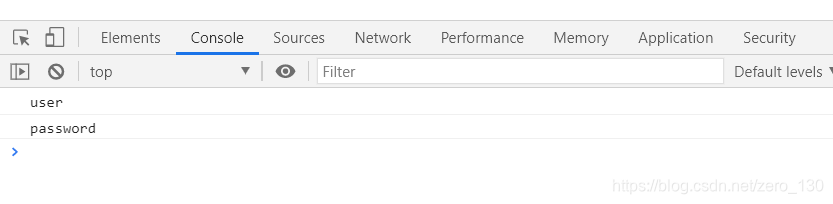
jquery,jsp页面定义onclick方法not defined

博客指出问题原因是未正确引入jQuery,虽未详细说明修改内容,但聚焦于jQuery引入问题。这属于前端开发中常见的技术问题。

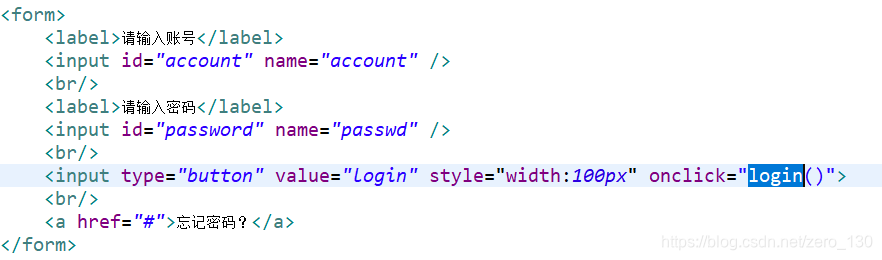
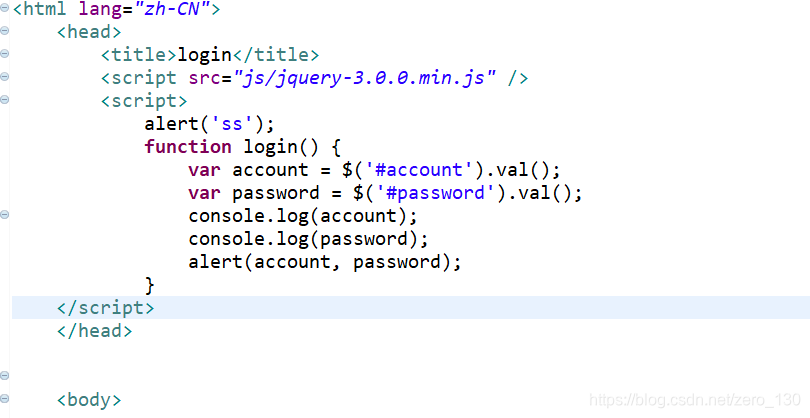
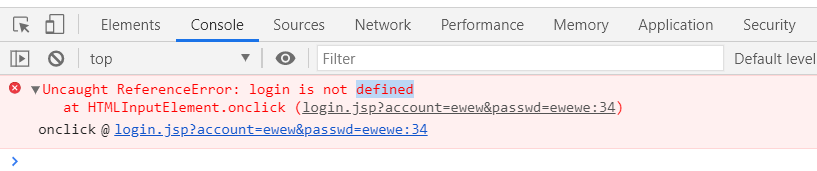
在这里插入图片描述在这里插入图片描述在这里插入图片描述
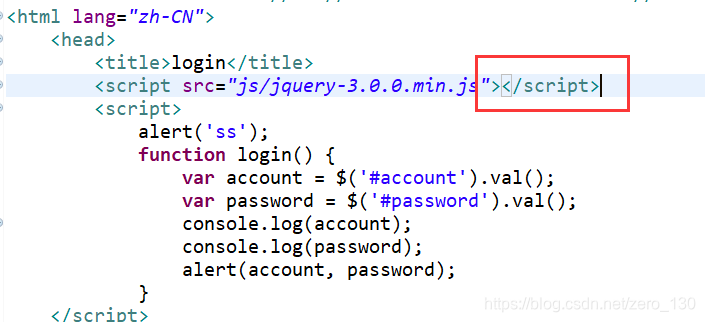
原因:未正确引入jquery
修改:
在这里插入图片描述

ok

<%@ page language="java" contentType="text/html;charset=UTF-8" pageEncoding="UTF-8"%> <!DOCTYPE html> <html> <head> <title></title> <%@ include file="/WEB-INF/views/commons/head.jsp"%> </head> <script type="text/javascript"> $(function() { $("#downloadForm").find("select").css("width", "134px"); $("#downloadForm").find("input").css("width", "134px"); //必须 $('.required').validatebox({ required : true }); }); function importAction(){ $("#downloadForm").attr("action","${ctx}newgrp/agent/AgentSpecialSetting/import.do"); $("#downloadForm").submit(); } </script> <body> <sfform:form modelAttribute="filterMask" id="downloadForm"> <div class="layout_div"> <div class="navigation_div"> <span class="font_heading1">人事管理>></span><a href="#">人员特殊设置</a> <input name="repName" id="repName" value="" type="hidden"/> </div> <fieldset class="fieldsetdefault"> <legend>查询</legend> <table class="layouttable" id="input_info"> <tr> <td class="layouttable_td_label">所属机构:</td> <td class="zTreeDemoBackground left"> <%@ include file="/WEB-INF/views/commons/organ.jsp" %> </td> <td class="layouttable_td_label">设置类型:</td> <td class="layouttable_td_widget"><select name="setType" id="setType" class="input_select reset required"> <option value="01">E行销账号维护</option> </select><strong style="color: red">*</strong></td> </tr> <tr> <td class="layouttable_td_label">人员代码: </td> <td class="layouttable_td_widget"> <sfform:input path="agentCode" id="agentCode" class="input_text" /> </td> <td class="layouttable_td_label">上载时间:</td> <td class="layouttable_td_widget"> <sfform:input path="startDate" id="startDate" class="input_text Wdate reset" readonly="true" onclick="WdatePicker({skin:'whyGreen',dateFmt:'yyyy-MM-dd'})" /> - <sfform:input path="endDate" id="endDate" class="input_text Wdate reset" readonly="true" onclick="WdatePicker({skin:'whyGreen',dateFmt:'yyyy-MM-dd'})" /> </td> </tr> </table> <table class="query_table"> <tr> <td class="td_right"> <a class="easyui-linkbutton" onclick="javascript:importAction()" iconCls="icon-xls" id="save">导入</a> </td> </tr> </table> </fieldset> <div class="layout_div_top_spance"> <table id="AgentFamilyInfoTable"></table> <%@ include file="/WEB-INF/views/commons/download.jsp" %> </div> </div> </sfform:form> <form id="editForm" method="post"></form> </body> </html>这个页面为什么加载不出来
12-17
<%@ page language="java" contentType="text/html;charset=UTF-8" pageEncoding="UTF-8"%> <!DOCTYPE html> <html> <head> <title></title> <%@ include file="/WEB-INF/views/commons/head.jsp"%> </head> <script type="text/javascript"> <%--新增--%> function importAction(){ $("#downloadForm").attr("action","${ctx}newgrp/agent/AgentSpecialSetting/import.do"); $("#downloadForm").submit(); } <%--导出--%> function exportData(){ if(!$('#paginateForm').form('validate')){ return false; } queryAction(); var downUrl = "${ctx}commons/download/downReport"; $("#paginateForm").attr("action", downUrl); $("#paginateForm").submit(); } <%--页面加载触发--%> $(function(){ $("#reset").bind("click",function(){ $("#paginateForm input").attr("value",""); $("#paginateForm select").combobox("setValue",""); }); }); </script> <body> <sfform:form modelAttribute="filterMask" id="paginateForm"> <div class="layout_div"> <div class="navigation_div"> <span class="font_heading1">人事管理>></span><a href="#">人员特殊设置</a> <input name="repName" id="repName" value="" type="hidden"/> </div> <fieldset class="fieldsetdefault"> <legend>查询</legend> <table class="layouttable" id="input_info"> </table> <table class="query_table"> <tr> <td class="td_right"> <a class="easyui-linkbutton" onclick="javascript:importAction()" iconCls="icon-xls" id="save">导入</a> <a class="easyui-linkbutton" onclick="javascript:exportData()" iconCls="icon-xls" id="search">数据导出</a> </td> </tr> </table> </fieldset> <div class="layout_div_top_spance"> <table id="GrpAgentSpecialSetTable"></table> </div> </div> </sfform:form> <form id="editForm" method="post"></form> </body> </html>这个页面为什么加载不出来
12-17
<%@ page language="java" contentType="text/html; charset=UTF-8" pageEncoding="UTF-8" %> <%@ taglib prefix="c" uri="http://java.sun.com/jsp/jstl/core" %> <!DOCTYPE html> <html> <head> <meta charset="UTF-8"> <title></title> <!-- <link rel="stylesheet" href="<%=request.getContextPath() %>/css2/index2.css" type="text/css"></link> --> <link rel="stylesheet" href="<%=request.getContextPath() %>/css/theme.blue.css" type="text/css"></link> <body> <form action="<%=request.getContextPath() %>/g?m=getList" method="post"> <table id="myTable" class="tablesorter-blue"> <thead> <tr> <th><select name="name" id="name" onchange="tian()"> <option value="0">请选择</option> </select></th> </tr> <tr> <th><input type="text" name="ta" id="ta"></th> </tr> <tr> <th><input type="button" value="确定" onclick="tian()"></th> </tr> </thead> <tbody> </tbody> </table> </form> </body> <script type="text/javascript" src="<%=request.getContextPath() %>/js/jquery-1.8.2.min.js"></script> <script type="text/javascript" src="<%=request.getContextPath() %>/js/random.js"></script> <script type="text/javascript" src="<%=request.getContextPath() %>/js/jquery.tablesorter.js"></script> <script type="text/javascript" src="<%=request.getContextPath() %>/My97DatePicker/WdatePicker.js"></script> <script src="https://unpkg.com/dayjs@1.8.21/dayjs.min.js"></script> <script src="https://cdn.staticfile.org/jquery-cookie/1.4.1/jquery.cookie.min.js"></script> <script type="text/javascript"> $.post("<%=request.getContextPath()%>/my?my=xia", {}, //(6) 异步请求获取商品类型下拉框(10分) function (obj){//(7) 正确追加【动态下拉框】(10分) for (let i = 0; i <obj.length; i++) { $("#name").append("<option value='"+obj[i].tid+"'>"+obj[i].name+"</option>") } },"json" ) function tian(tid){//(8) 使用异步请求完成【添加】功能(10分) let ta=$("#ta").val() let name=$("#name").val() $.post("<%=request.getContextPath()%>/my?my=tian", {"tname":ta,"name":name}, function (obj){ if (obj){//(9) 添加成功后,弹窗提示“添加成功”(10分) alert("添加成功") }else { alert("添加失败") } },"json" ) } </script> </html> 为啥没办法接到append的数据啊
最新发布
12-30
评论
添加红包

请填写红包祝福语或标题

红包个数最小为10个

红包金额最低5元

当前余额3.43前往充值 >
需支付:10.00
成就一亿技术人!
领取后你会自动成为博主和红包主的粉丝 规则
hope_wisdom
发出的红包
实付
使用余额支付
点击重新获取
扫码支付
钱包余额 0

抵扣说明:

1.余额是钱包充值的虚拟货币,按照1:1的比例进行支付金额的抵扣。
2.余额无法直接购买下载,可以购买VIP、付费专栏及课程。

余额充值



