


温故而知新。从其他页面访问时,如直接访问index页面,勾选过自动登录,从session/cookie获取用户信息,没有勾选,从session中获取用户信息,需要使用filter过滤器
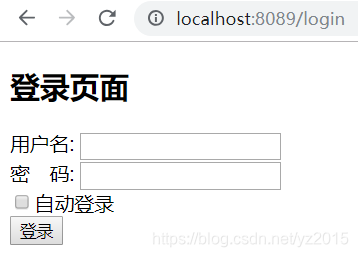
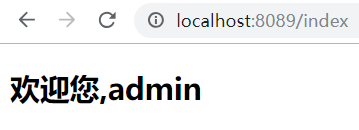
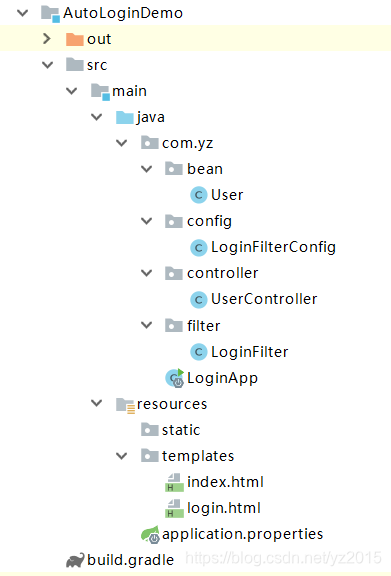
工程结构,采用gradle构建:
public class User {

    private String username;
    private String password;

    public User() {
    }

    public User(String username, String password) {
        this.username = username;
        this.password = password;
    }

    public String getUsername() {
        return username;
    }

    public void setUsername(String username) {
        this.username = username;
    }

    public String getPassword() {
        return password;
    }

    public void setPassword(String password) {
        this.password = password;
    }

    @Override
    public String toString() {
        return "User{" +
                "username='" + username + '\'' +
                ", password='" + password + '\'' +
                '}';
    }
}
import com.yz.filter.LoginFilter;
import org.springframework.boot.web.servlet.FilterRegistrationBean;
import org.springframework.context.annotation.Bean;
import org.springframework.context.annotation.Configuration;

/**
 * @description: springboot 登录拦截器配置
 * @author: yz
 * @create: 2018/11/7 18:11
 */
@Configuration
public class LoginFilterConfig {

    @Bean
    public FilterRegistrationBean registrationBean(){
        FilterRegistrationBean bean = new FilterRegistrationBean();
        bean.setFilter(new LoginFilter());
        bean.addUrlPatterns("/*");
        return bean;
    }
}
import com.yz.bean.User;
import org.springframework.stereotype.Controller;
import org.springframework.web.bind.annotation.GetMapping;
import org.springframework.web.bind.annotation.PostMapping;
import org.springframework.web.servlet.ModelAndView;

import javax.servlet.http.Cookie;
import javax.servlet.http.HttpServletRequest;
import javax.servlet.http.HttpServletResponse;
import javax.servlet.http.HttpSession;

/**
 * @description: 自动登录
 * @author: yz
 * @create: 2018/11/7 16:07
 */
@Controller
public class UserController {

    @GetMapping("login")
    public String login(){
        return "login";
    }

    @GetMapping("index")
    public String index(){
        return "index";
    }

    /**
     * @param request
     * @param response
     * @param user
     * @param auto
     * @return
     */
    @PostMapping("user_login")
    public ModelAndView userLogin(HttpServletRequest request,HttpServletResponse response,User user, String auto){
        ModelAndView mv = new ModelAndView("redirect:login");
        HttpSession session = request.getSession();
        // 登录成功
        if("admin".equals(user.getUsername()) && "123456".equals(user.getPassword())){
            // 存值
            session.setAttribute("user",user);
            // 判断是否勾选自动登录
            if("on".equals(auto)){
                System.out.println("有勾选自动登录");
                // 将用户账号密码保存到cookie中
                Cookie cookie = new Cookie("account",user.getUsername()+"#"+user.getPassword());
                cookie.setMaxAge(60*60*24*7);
                response.addCookie(cookie);
            }
            // 跳转
            mv.setViewName("redirect:index");
            return mv;
        }
        // 登录失败
        session.setAttribute("msg","用户名或者密码错误!");
        // 跳转到登录页面,显示数据
        return mv;
    }
}
import com.yz.bean.User;

import javax.servlet.*;
import javax.servlet.http.Cookie;
import javax.servlet.http.HttpServletRequest;
import javax.servlet.http.HttpServletResponse;
import javax.servlet.http.HttpSession;
import java.io.IOException;

/**
 * @description: 登录拦截器
 * 单独使用时,放开注解;使用拦截器配置时注掉注解
 * @author: yz
 * @create: 2018/11/7 17:34
 */
//@WebFilter("/*")
//@Component
//@Order
public class LoginFilter implements Filter {

    @Override
    public void init(FilterConfig filterConfig) throws ServletException {

    }

    /**
     * 有登录(session or cookie中有用户数据)放行,没有登录就去登录页面
     * @param request
     * @param response
     * @param chain
     * @throws IOException
     * @throws ServletException
     */
    @Override
    public void doFilter(ServletRequest request, ServletResponse response, FilterChain chain) throws IOException, ServletException {

        System.out.println("来到过滤器了。~!~开始拦截请求");
        HttpServletRequest req = (HttpServletRequest) request;
        HttpServletResponse resp = (HttpServletResponse) response;
        // 如果是登录有关操作的,不拦截
        String path = req.getRequestURI();
        System.out.println("path:"+path);
        if (path.contains("login") || path.endsWith(".ico")){
            // 放行
            chain.doFilter(request,response);
            return;
        }

        boolean isLogin = false;

        // 1. session还有效
        HttpSession session = req.getSession();
        User user = (User) session.getAttribute("user");
        if(user != null){
            isLogin = true;
        }else{
            // 2.session失效,看cookie
            // 获取cookie,遍历cookie,拿到账号密码进行判断,对了放行,并将用户对象存储到session中
            Cookie[] cookies = req.getCookies();
            if(cookies !=null){
                for (Cookie cookie : cookies) {
                    // account=admin#123456;
                    if("account".equals(cookie.getName())){
                        String[] accountArray = cookie.getValue().split("#");
                        if("admin".equals(accountArray[0]) && "123456".equals(accountArray[1])){
                            // 登录成功 , 将用户对象保存到session中,以便在会话有效期内访问,都会放行。
                            user = new User(accountArray[0], accountArray[1]);
                            req.getSession().setAttribute("user" , user);
                            isLogin = true;
                        }
                    }
                }
            }
        }

        // 统一对isLogin判断
        if(isLogin){
            chain.doFilter(request,response);
        }else{
            resp.sendRedirect("login");
        }
    }

    @Override
    public void destroy() {

    }
}
import org.springframework.boot.SpringApplication;
import org.springframework.boot.autoconfigure.SpringBootApplication;

/**
 * @description:
 * @author: yz
 * @create: 2018/11/7 16:07
 */
@SpringBootApplication
public class LoginApp {

    public static void main(String [] args){

        SpringApplication.run(LoginApp.class , args);
    }

}
index.html
<!DOCTYPE html>
<html xmlns:th="http://www.thymeleaf.org" >
<head>
    <meta charset="UTF-8"/>
    <title>Title</title>
</head>
<body>

    <h2>欢迎您,<span th:text="${session.user.username}"></span></h2>

</body>
</html>
login.html
<!DOCTYPE html>
<html xmlns:th="http://www.w3.org/1999/xhtml">
<head>
<meta charset="UTF-8"/>
<title>Title</title>
</head>
<body>
<h2>登录页面</h2>
<form action="user_login" method="post">
用户名: <input type="text" name="username"/><br/>
密 码: <input type="password" name="password"/><br/>
<input type="checkbox" name="auto"/>自动登录<br/>
<input type="submit" value="登录"/>
<!--用户名或者密码错误!!!-->
<span style="color:red" th:text="${session.msg}"></span>
</form>
</body>
</html>
application.properties
server.port=8089
build.gradle
plugins {
    id 'java'
}

group 'com.yz'
version '1.0-SNAPSHOT'

sourceCompatibility = 1.8

repositories {
    mavenCentral()
}

dependencies {
    testCompile group: 'junit', name: 'junit', version: '4.12'
    compile("org.springframework.boot:spring-boot-starter-web:1.5.10.RELEASE")
    compile("org.thymeleaf:thymeleaf-spring4:2.1.4.RELEASE")
}





 扫一扫
扫一扫


 1000
1000

 被折叠的 条评论
为什么被折叠?
被折叠的 条评论
为什么被折叠?
 到【灌水乐园】发言





