


 在Idea中直接运行项目遇到Thymeleaf模板找不到的问题,尝试了更新配置如添加spring.thymeleaf.*属性,改变Controller的@RequestMapping注解方式,以及检查target目录下资源是否生成。最终解决方案是在pom.xml中正确配置资源过滤,确保src/main/resources下的文件被正确处理并包含在构建中。
关于这个问题我断断续续花了一天时间才找到原因,在这里记录一下
在idea中直接运行而不是在打包时候发生模板找不到。
网上找到不适合答案有:
1.添加application.properties/application.yml配置
# 后缀
spring.thymeleaf.prefix=classpath:/templates
# 模板格式
spring.thymeleaf.mode=HTML5
spring.thymeleaf.encoding=UTF-8
spring.thymeleaf.content-type=text/html
spring.thymeleaf.suffix=.html
# 开发时关闭缓存,不然没法看到实时页面
spring.thymeleaf.cache=false

--------------------------------------------------
spring.thymeleaf.prefix=classpath:/templates
没有/就试试有斜杠
spring.thymeleaf.prefix=classpath:/templates/
--------------------------------------------------
spring.thymeleaf.suffix=.html
有点就不添加'.'
2.Controller问题,加斜杠或不加斜杠
@RequestMapping("/")
    public String indexs() {
        return "index";
    }
    --------------------------------------
    @RequestMapping("/")
    public String indexs() {
        return "/index";
    }
最后,我的问题:
查看target文件夹是否生成了文件
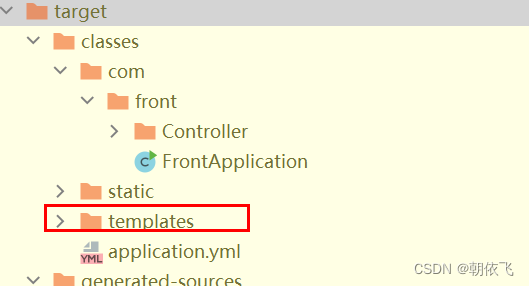
如果没有,则在pom文件中添加
		<resources>
            <resource>
                <directory>src/main/resources</directory>
                <includes>
                    <include>**/*.*</include>
                </includes>
                <filtering>true</filtering>
            </resource>
        </resources>
就解决了。





 扫一扫
扫一扫


 1万+
1万+

 被折叠的 条评论
为什么被折叠?
被折叠的 条评论
为什么被折叠?
 到【灌水乐园】发言





