


 这篇博客介绍了如何在Android应用中实现播放本地音乐和视频。首先,在strings.xml中设置必要资源,然后创建activity_main.xml布局文件,包含播放、暂停和重播按钮。在Activity中处理逻辑,并在AndroidManifest中添加相应权限。播放视频的实现与音乐类似。博主推荐使用ButterKnife Zelezny插件简化视图绑定,通过在build.gradle文件中配置实现。
播放本地音乐
按钮的话用的插件是butterknife 所以没有findViewById;
插件使用的话会放在最后;
strings.xml
   <string name="play">Play</string>
    <string name="pause">Pause</string>
    <string name="replay">Replay</string>
    <string name="music">Music</string>
    <string name="stop">Stop</string>
1.创建布局activity_main.xml:
布局就三个按钮:播放,暂停和重新播放
<?xml version="1.0" encoding="utf-8"?>
<LinearLayout xmlns:android="http://schemas.android.com/apk/res/android"
    xmlns:app="http://schemas.android.com/apk/res-auto"
    xmlns:tools="http://schemas.android.com/tools"
    android:layout_width="match_parent"
    android:orientation="vertical"
    android:layout_height="match_parent"
    tools:context=".MainActivity">
    <Button
        android:id="@+id/play"
        android:layout_width="match_parent"
        android:layout_height="wrap_content"
        android:text="@string/play"/>
    <Button
        android:id="@+id/pause"
        android:layout_width="match_parent"
        android:layout_height="wrap_content"
        android:text="@string/pause"/>
    <Button
        android:id="@+id/stop"
        android:layout_width="match_parent"
        android:layout_height="wrap_content"
        android:text="@string/stop"/>
</LinearLayout>
2.创建activity:
import android.Manifest;
import android.content.pm.PackageManager;
import android.media.MediaPlayer;
import android.net.Uri;
import android.os.Bundle;
import android.view.View;
import android.widget.Button;
import android.widget.Toast;

import androidx.annotation.NonNull;
import androidx.appcompat.app.AppCompatActivity;
import androidx.core.app.ActivityCompat;
import androidx.core.content.ContextCompat;
import java.io.IOException;
import butterknife.BindView;
import butterknife.ButterKnife;
import butterknife.OnClick;

public class MainActivity extends AppCompatActivity {
    private MediaPlayer mediaPlayer = new MediaPlayer();
    @BindView(R.id.play)
    Button play;
    @BindView(R.id.pause)
    Button pause;
    @BindView(R.id.stop)
    Button stop;

    @Override
    protected void onCreate(Bundle savedInstanceState) {
        super.onCreate(savedInstanceState);
        setContentView(R.layout.activity_music);
        ButterKnife.bind(this);
        if (ContextCompat.checkSelfPermission(this, Manifest.permission.WRITE_EXTERNAL_STORAGE) != PackageManager.PERMISSION_GRANTED) {
            ActivityCompat.requestPermissions(this, new String[]{
                    Manifest.permission.WRITE_EXTERNAL_STORAGE
            }, 1);
        } else {
            initMediaPlayer();
        }
    }
	// 获取音乐路径
    private void initMediaPlayer() {
        String uri = ("android.resource://" + getPackageName() + "/" + R.raw.music);
        try {
        //设置数据源
            mediaPlayer.setDataSource(getApplicationContext(),Uri.parse(uri));
            //异步缓存到内存 还有一个方法是media.prepareAsync();
            mediaPlayer.prepare();
        } catch (IOException e) {
            e.printStackTrace();
        }
    }

    /**
     *
     * @param requestCode  请求码
     * @param permissions   请求的权限
     * @param grantResults  结果
     */
    @Override
    public void onRequestPermissionsResult(int requestCode, @NonNull String[] permissions, @NonNull int[] grantResults) {
        switch (requestCode) {
            case 1:
                if (grantResults.length > 0 && grantResults[0] == PackageManager.PERMISSION_GRANTED) {
                    initMediaPlayer();
                } else {
                    Toast.makeText(this, "拒绝权限将无法使用应用程序", Toast.LENGTH_SHORT).show();
                    finish();
                }
                break;
            default:
                super.onRequestPermissionsResult(requestCode, permissions, grantResults);

        }

    }
    @OnClick({R.id.play, R.id.pause, R.id.stop})
    public void onViewClicked(View view) {
        switch (view.getId()) {
            case R.id.play:
                if (!mediaPlayer.isPlaying()){
                    mediaPlayer.start();
                }
                break;
            case R.id.pause:
//                判断视频是否在播放,如果是播放状态,点击按钮可以重新播放
                if (mediaPlayer.isPlaying()){
                    mediaPlayer.pause();
                }
                break;
            case R.id.stop:
//                判断视频是否在播放,如果是播放状态,点击按钮可以重新播放
                if (mediaPlayer.isPlaying()){
                    mediaPlayer.reset();
                    initMediaPlayer();
                }
                break;
            default:
        }
    }
// 活动销毁时,调用stop();和release();释放资源
    @Override
    protected void onDestroy() {
        super.onDestroy();
        if (mediaPlayer !=null){
            mediaPlayer.release();
        }
    }
}
3.AndroidManifest里添加权限
<uses-permission android:name="android.permission.WRITE_EXTERNAL_STORAGE" />
播放本地视频的实现:
视频的代码和音乐的代码差不多,所以直接上代码了
1.activity_main.xml:
<?xml version="1.0" encoding="utf-8"?>
<LinearLayout xmlns:android="http://schemas.android.com/apk/res/android"
    xmlns:app="http://schemas.android.com/apk/res-auto"
    xmlns:tools="http://schemas.android.com/tools"
    android:layout_width="match_parent"
    android:orientation="vertical"
    android:layout_height="match_parent"
    tools:context=".MainActivity">


   <LinearLayout
       android:layout_width="match_parent"
       android:layout_height="wrap_content">
       <Button
           android:id="@+id/play"
           android:layout_width="0dp"
           android:layout_height="wrap_content"
           android:layout_weight="1"
           android:textAllCaps="false"
           android:text="@string/play"/>

       <Button
           android:id="@+id/pause"
           android:layout_width="0dp"
           android:layout_height="wrap_content"
           android:layout_weight="1"
           android:textAllCaps="false"
           android:text="@string/pause"/>
       <Button
           android:id="@+id/replay"
           android:layout_width="0dp"
           android:layout_height="wrap_content"
           android:layout_weight="1"
           android:textAllCaps="false"
           android:text="@string/replay"/>
       <Button
           android:id="@+id/music"
           android:layout_width="0dp"
           android:layout_height="wrap_content"
           android:layout_weight="1"
           android:textAllCaps="false"
           android:text="@string/music"/>
   </LinearLayout>
    <VideoView
        android:id="@+id/video_view"
        android:layout_width="match_parent"
        android:layout_height="wrap_content"/>
</LinearLayout>
MainActivity:
package com.example.mediavideo;

import android.Manifest;
import android.content.Intent;
import android.content.pm.PackageManager;
import android.net.Uri;
import android.os.Bundle;
import android.view.View;
import android.widget.Button;
import android.widget.Toast;
import android.widget.VideoView;

import androidx.annotation.NonNull;
import androidx.appcompat.app.AppCompatActivity;
import androidx.core.app.ActivityCompat;
import androidx.core.content.ContextCompat;

import butterknife.BindView;
import butterknife.ButterKnife;
import butterknife.OnClick;

/**
 * @author feiyu
 * @date 2020/5/12
 */
public class MainActivity extends AppCompatActivity {

    @BindView(R.id.play)
    Button play;
    @BindView(R.id.pause)
    Button pause;
    @BindView(R.id.replay)
    Button replay;
    @BindView(R.id.video_view)
    VideoView videoView;
    @BindView(R.id.music)
    Button music;

    @Override
    protected void onCreate(Bundle savedInstanceState) {
        super.onCreate(savedInstanceState);
        setContentView(R.layout.activity_main);
        ButterKnife.bind(this);
        if (ContextCompat.checkSelfPermission(MainActivity.this, Manifest.permission.WRITE_EXTERNAL_STORAGE) != PackageManager.PERMISSION_GRANTED) {
            ActivityCompat.requestPermissions(MainActivity.this, new String[]{
                    Manifest.permission.WRITE_EXTERNAL_STORAGE
            }, 1);
        } else {
            initVideoPath();
        }
    }

    private void initVideoPath() {
//        File file = new File(getExternalCacheDir(),"movie.mp4");
//        videoView.setVideoPath(file.getPath());
        String uri = ("android.resource://" + getPackageName() + "/" + R.raw.movie);

        videoView.setVideoURI(Uri.parse(uri));
        videoView.start();
    }

    @Override
    public void onRequestPermissionsResult(int requestCode, @NonNull String[] permissions, @NonNull int[] grantResults) {
        switch (requestCode) {
            case 1:
                if (grantResults.length > 0 && grantResults[0] == PackageManager.PERMISSION_GRANTED) {
                    initVideoPath();
                } else {
                    Toast.makeText(this, "拒绝权限将无法使用应用程序", Toast.LENGTH_SHORT).show();
                    finish();
                }
                break;
            default:
                super.onRequestPermissionsResult(requestCode, permissions, grantResults);

        }

    }

    @OnClick({R.id.play, R.id.pause, R.id.replay,R.id.music})
    public void onViewClicked(View view) {
        switch (view.getId()) {
            case R.id.play:
                if (!videoView.isPlaying()) {
                    //开始播放
                    videoView.start();
                }
                break;
            case R.id.pause:
                if (videoView.isPlaying()) {
                    //暂停播放
                    videoView.pause();
                }
                break;
            case R.id.replay:
                if (videoView.isPlaying()) {
                    //重新播放
                    videoView.resume();
                }
                break;
            case R.id.music:
                Intent intent = new Intent(MainActivity.this,MusicActivity.class);
                startActivity(intent);
            default:
        }
    }

    @Override
    protected void onDestroy() {
        super.onDestroy();
        if (videoView != null) {
            videoView.suspend();
        }
    }

}
ButterKnife Zelezny使用
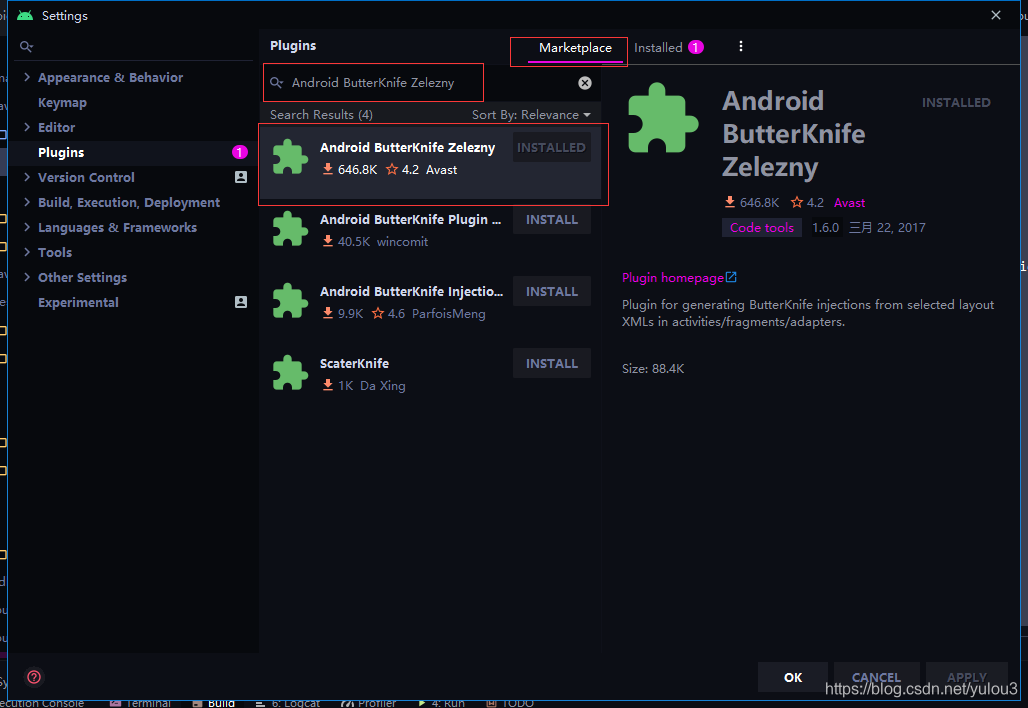
1.File->setting->Plugins->Marketplace输入
Android ButterKnife Zelezny
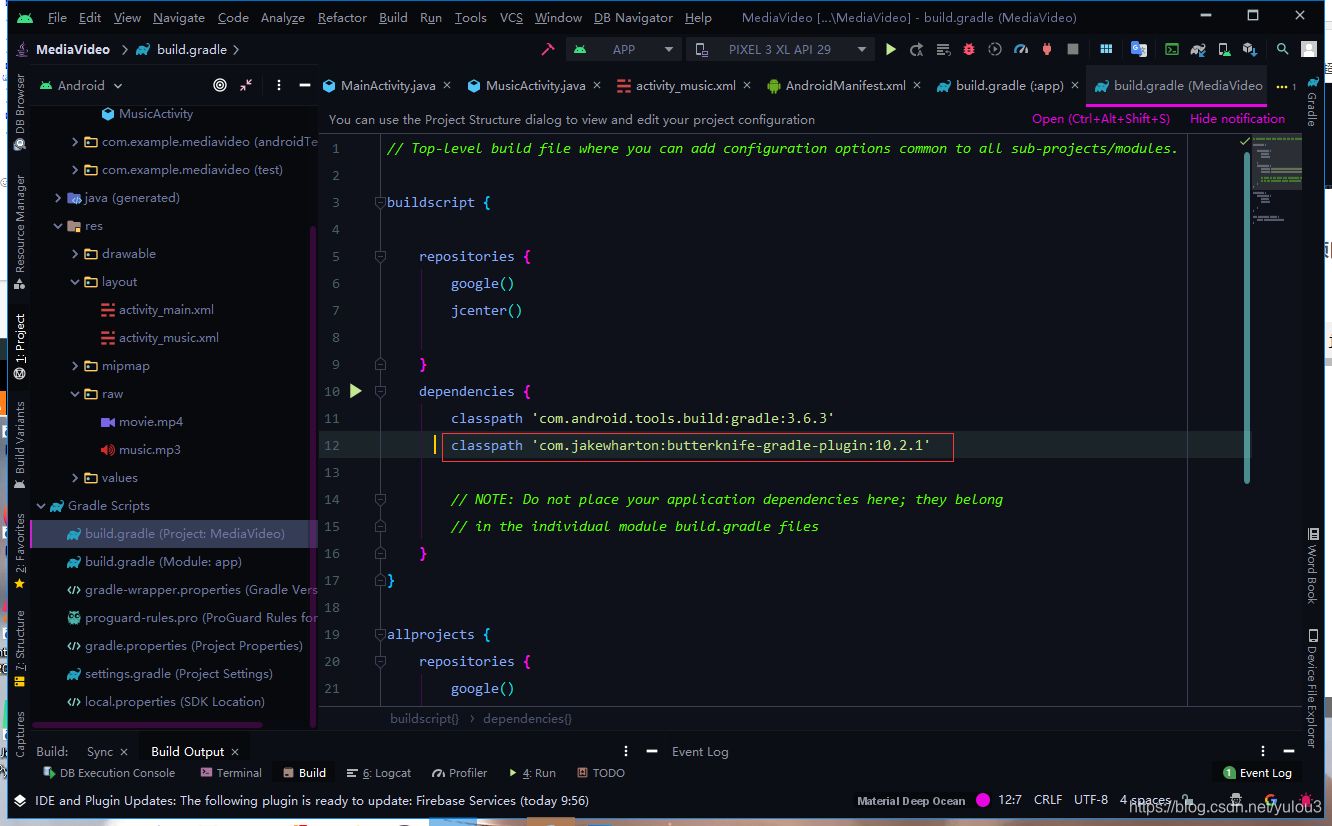
2.build.gradle项目的build.gradle不是app的:
添加:
classpath 'com.jakewharton:butterknife-gradle-plugin:10.2.1'
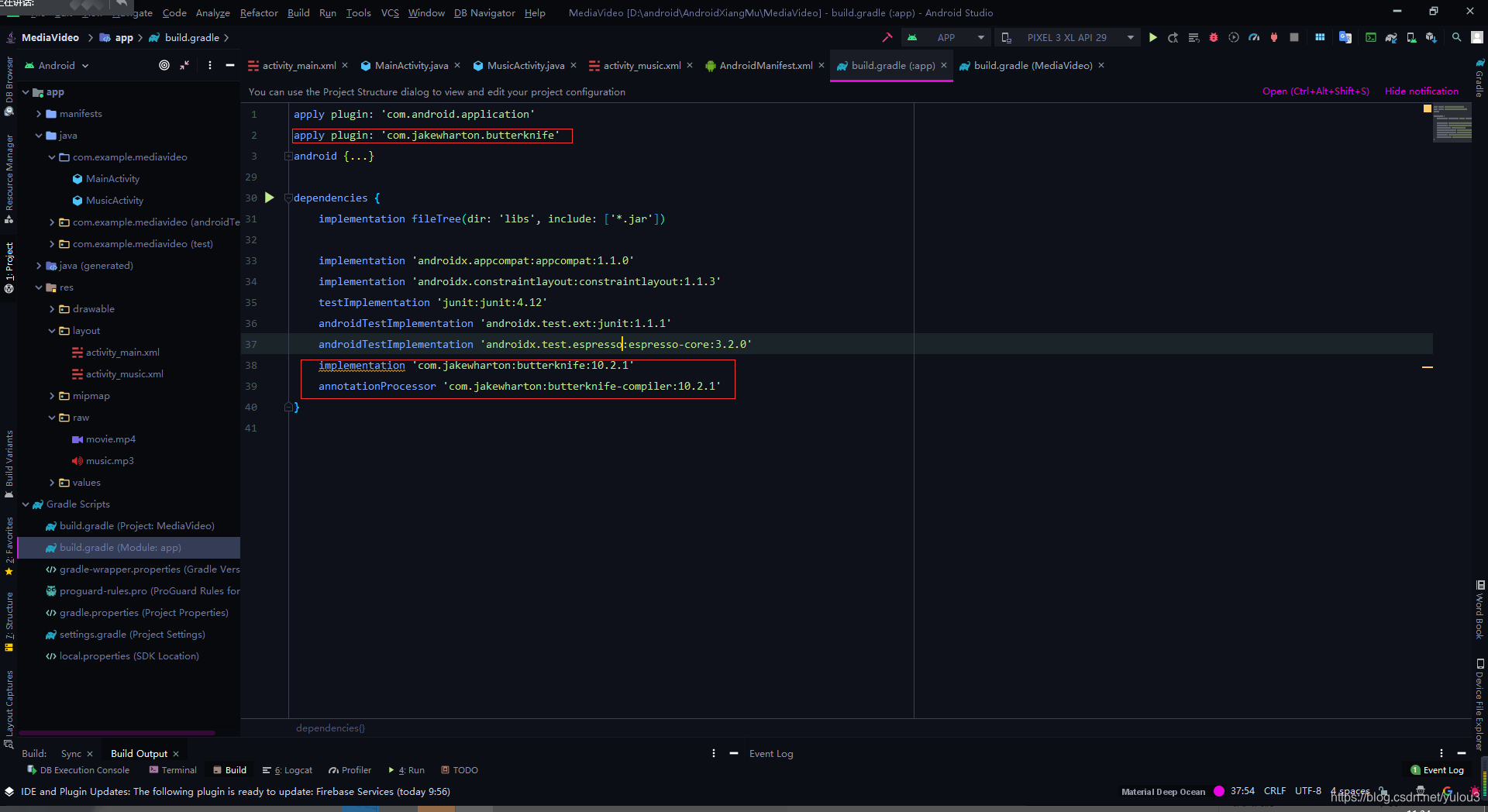
3.在build.gradle(Module:app)这次是APP的添加下面的代码:
   implementation 'com.jakewharton:butterknife:10.2.1'
    annotationProcessor 'com.jakewharton:butterknife-compiler:10.2.1'
apply plugin: 'com.jakewharton.butterknife'





 扫一扫
扫一扫


 791
791

 被折叠的 条评论
为什么被折叠?
被折叠的 条评论
为什么被折叠?
 到【灌水乐园】发言





