



 本文详细介绍了在Windows服务器上安装JDK1.8.211,部署WebLogicServer,配置环境变量,以及如何为WebLogic打补丁和配置SSL证书的步骤。整个过程包括下载Oracle软件,安装JDK,设置环境变量,执行WebLogic安装脚本,创建和配置管理服务器,最后演示了如何升级OPatch并应用补丁到WebLogic实例。
前瞻:
其实weblogic在windows服务器上部署特别简单,但是因为下周要去客户现场升级weblogic,所以需要在本地测试一下安装包和补丁包,那既然都重新部署了。我就想着发这篇文章主要针对与小白或者新手进行分享。除了部署weblogic我还会演示windows环境如何给weblogic打补丁,还有weblogicSSL证书的配置。那么废话不多说我们现在开始:
JDK安装·:
1.下载JDK:
首先你要有Oracle账号,才能下载。如果没有的话我建议你创建一个,因为以后下载个包什么的都很方便。
最新版下载地址:https://www.oracle.com/cn/java/technologies/downloads/
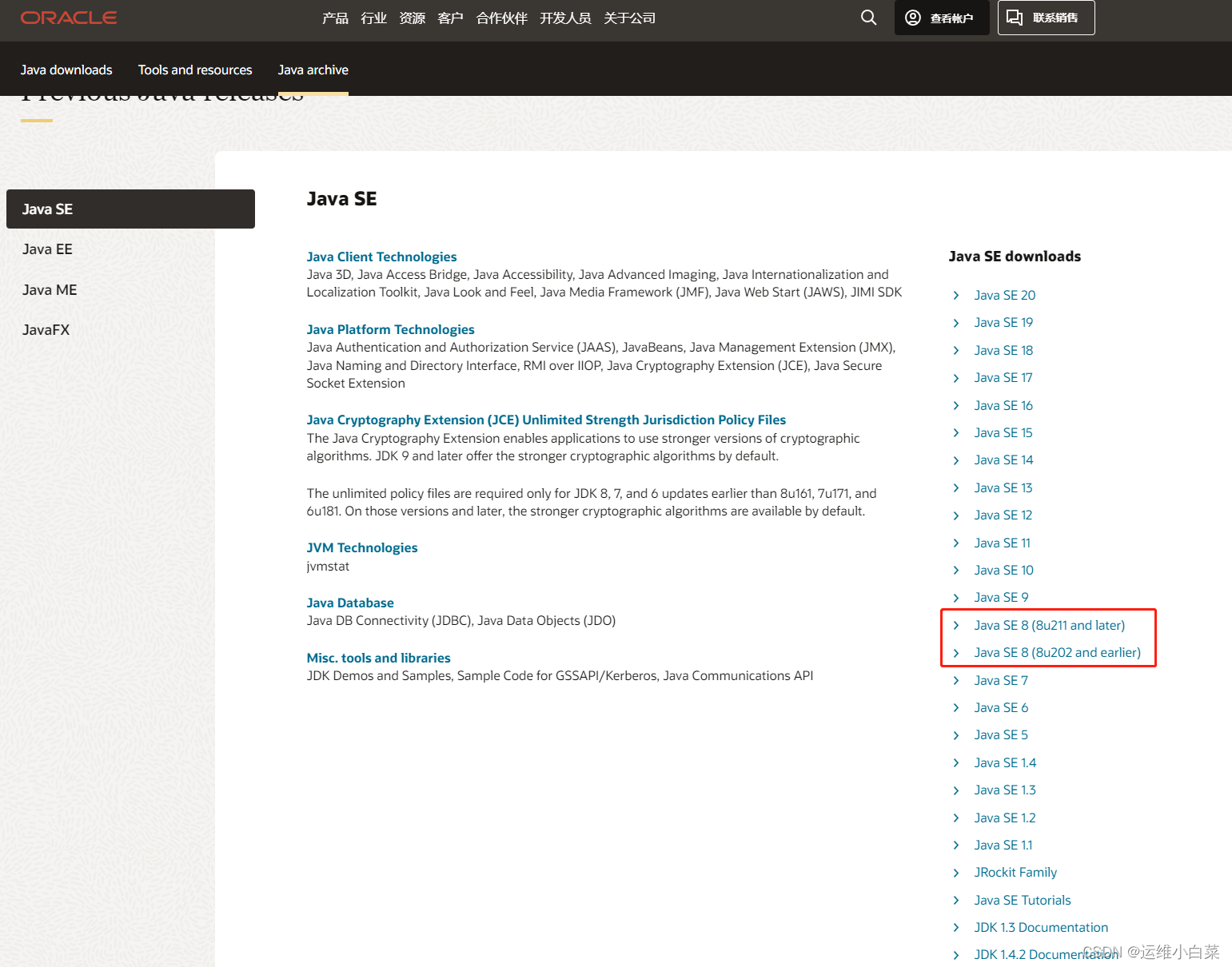
历史版本下地址:https://www.oracle.com/cn/java/technologies/downloads/archive/
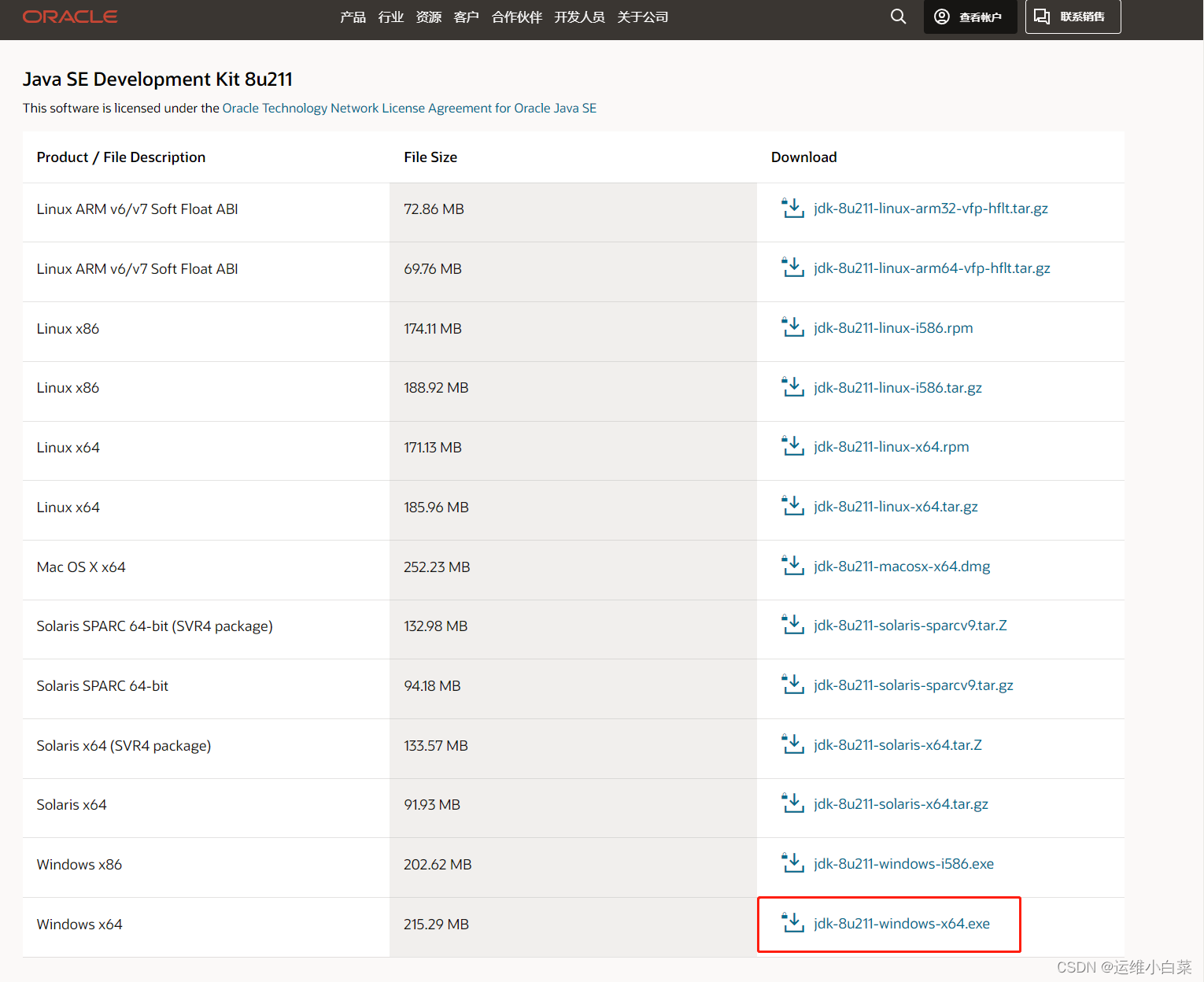
因为客户JDK指定版本为1.8.211,需要在历史版本里下载,而在这里要注意,JDK1.8分了两个区域大家要注意看自己需要那个版本就去哪里下载。
2.安装JDK:
双击打开,下一步下一步安装就好了。
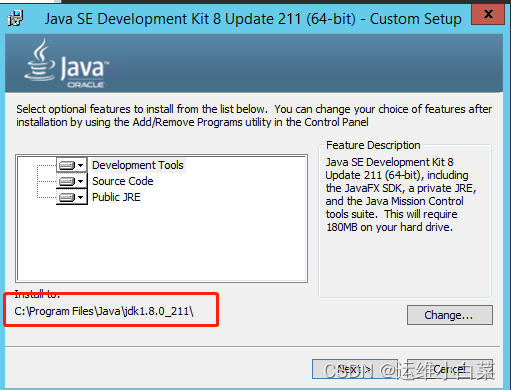
这个是你JDK的默认安装路径,请一定记住等下要用。
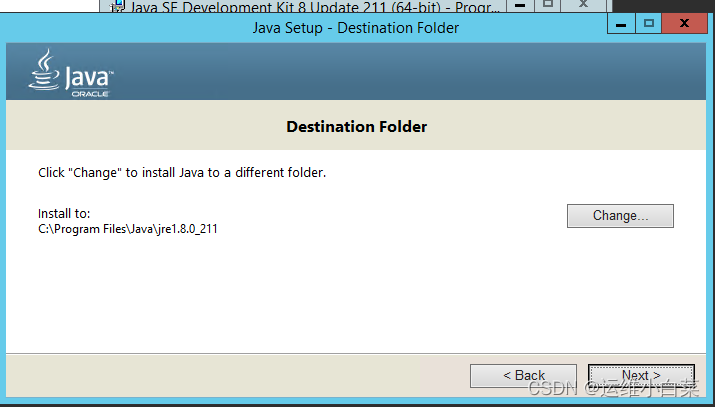
继续下一步,完成。
3.配置环境变量
右键我的电脑 ——属性——高级系统设置——环境变量
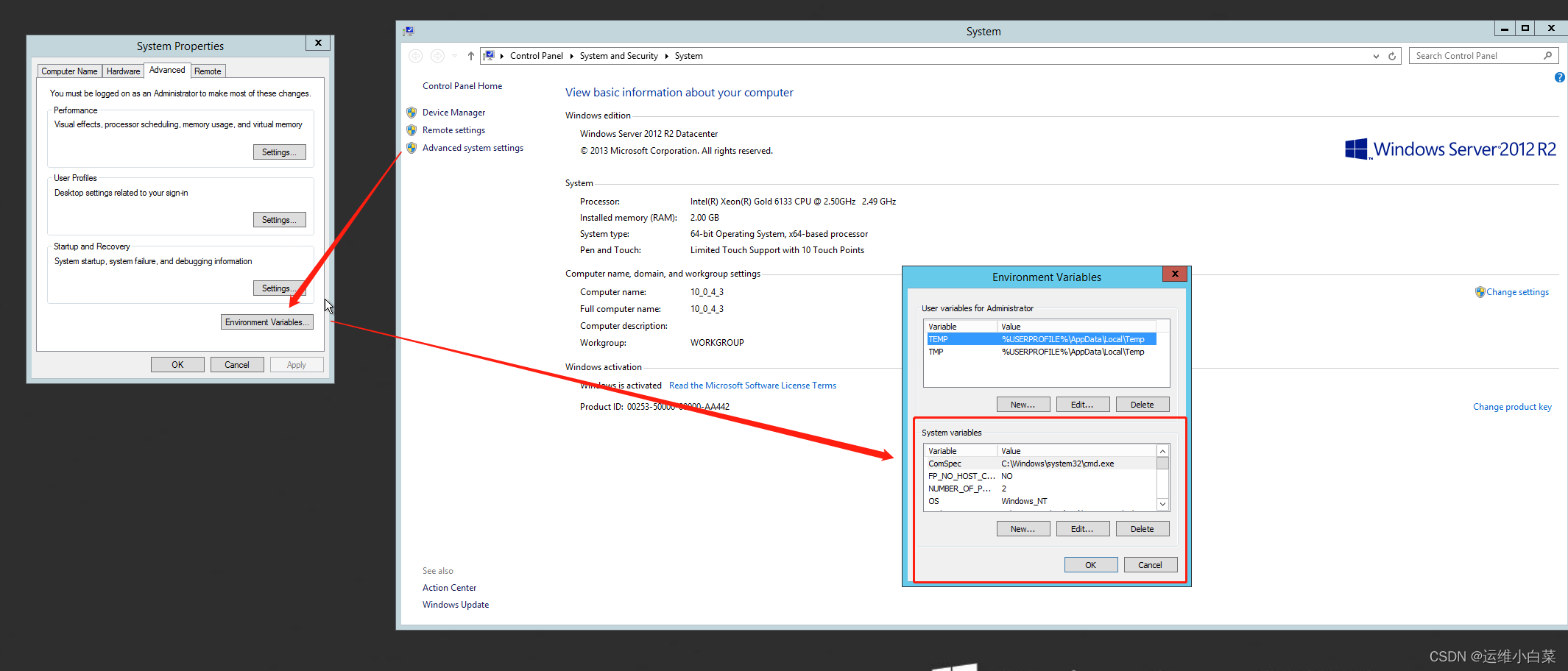
在这里新建环境变量(记住是系统变量(下面的),不是用户变量(上面的)
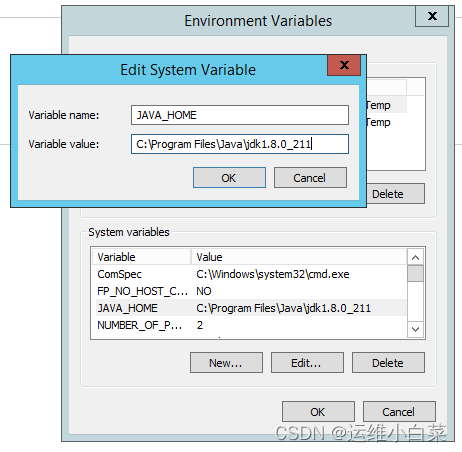
JAVA_HOME
C:\Program Files\Java\jdk1.8.0_211
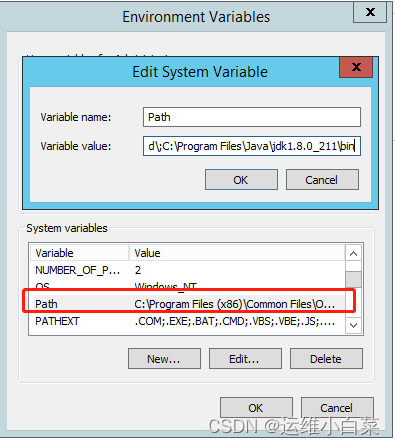
找到PATH,点开;C:\Program Files\Java\jdk1.8.0_211\bin,要加上英文;隔开前面的字段。
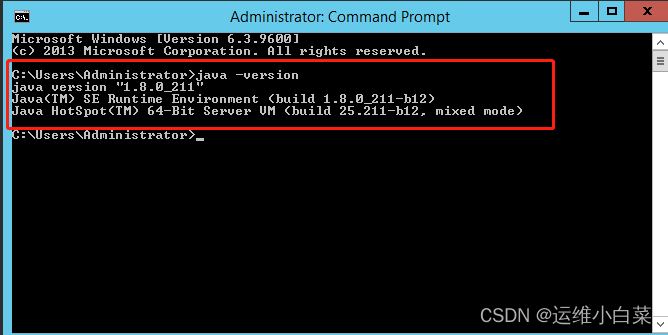
win+R输入cmd打开命令行输入java -version 显示JDK信息证明安装成功。
如果都这么详细了,你还能安装失败,我劝你还是不要往下看了(开个玩笑)
weblogic安装:
1.下载weblogic:
首先你要有Oracle账号,才能下载。如果没有的话我建议你创建一个,因为以后下载个包什么的都很方便
weblogic官方下载地址:WebLogic Server 12c (12.2.1), WebLogic Server 11g (10.3.6) and Previous Releases
如果真的没有账号那我给你发一个
https://pan.baidu.com/s/1EQG97gGJg_E_P2dEdBTY1Q?pwd=0m5h
提取码:0m5h
2.开始安装
打开命令行,切换至安装包目录。(因为我的服务器是Windows Server 2012R2 所以就放到jdk目录下安装)java -jar fmw_12.2.1.4.0_wls.jar
Microsoft Windows [Version 6.3.9600]
(c) 2013 Microsoft Corporation. All rights reserved.

C:\Program Files\Java\jdk1.8.0_211\bin>java -jar fmw_12.2.1.4.0_wls.jar
Launcher log file is C:\Users\Administrator\AppData\Local\Temp\2\OraInstall2023-
06-05_11-57-33PM\launcher2023-06-05_11-57-33PM.log.
Extracting the installer . . . . . . . . . . . . . . . . . Done
Checking if CPU speed is above 300 MHz.   Actual 2494    Passed
Checking monitor: must be configured to display at least 256 colors.   Actual 42
94967296    Passed
Checking swap space: must be greater than 512 MB    Passed
Checking if this platform requires a 64-bit JVM.   Actual 64    Passed (64-bit n
ot required)
Checking temp space: must be greater than 300 MB.   Actual 10488 MB    Passed
Preparing to launch the Oracle Universal Installer from C:\Users\Administrator\A
ppData\Local\Temp\2\OraInstall2023-06-05_11-57-33PM
Log: C:\Users\Administrator\AppData\Local\Temp\2\OraInstall2023-06-05_11-57-33PM
\install2023-06-05_11-57-33PM.log
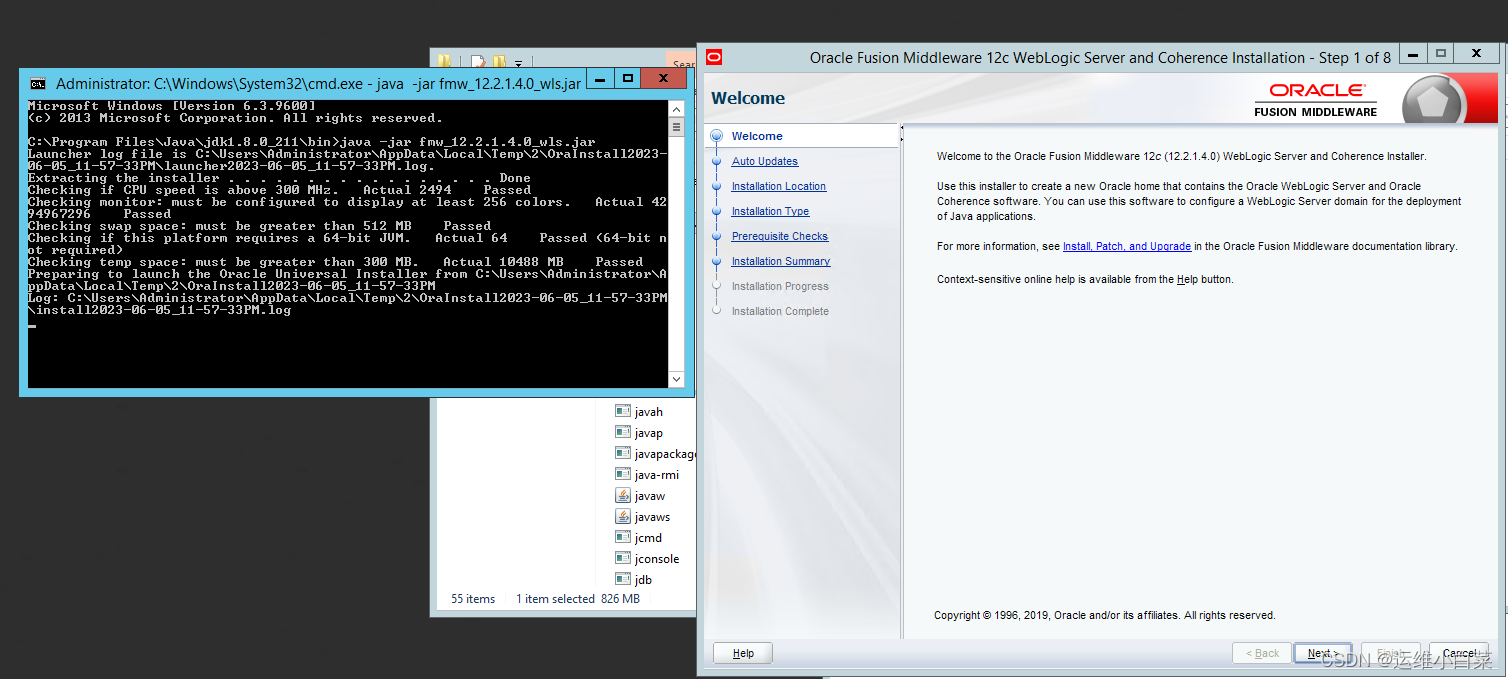
出现weblogic安装界面点击下一步,下一步就到了选择安装路径的地方,这个自己选择
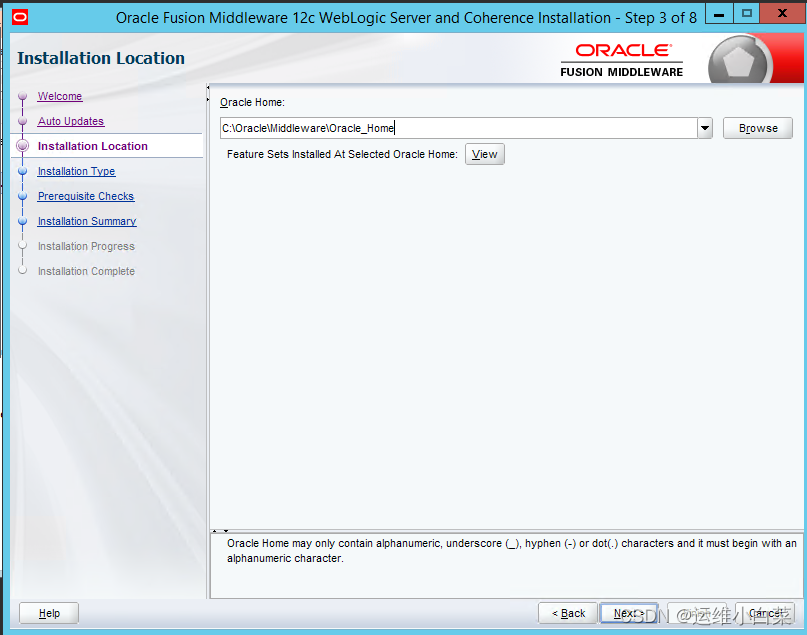
一直下一步直到等待安装完成。
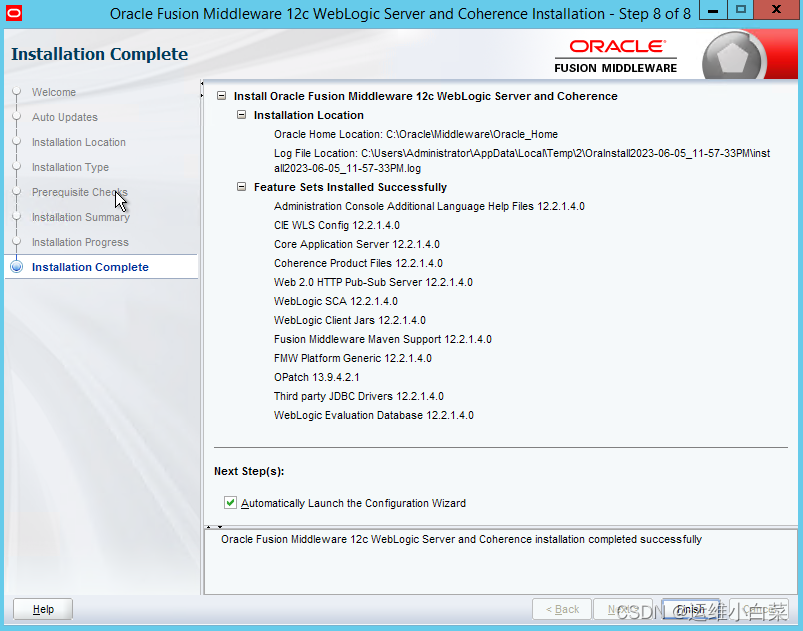
到不要关闭。这里点击完成,开始跳转创建域的窗口。
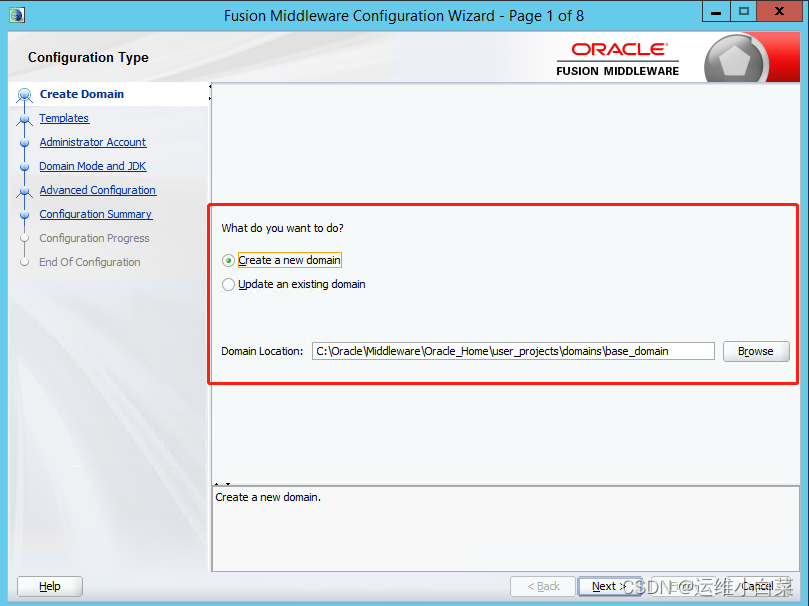
这里是创建域的路径,默认是base_domain。
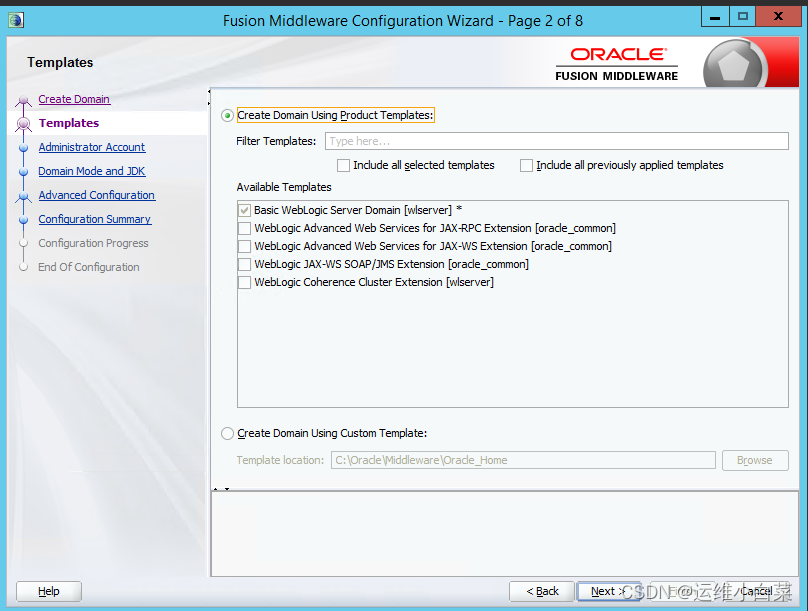
下一步
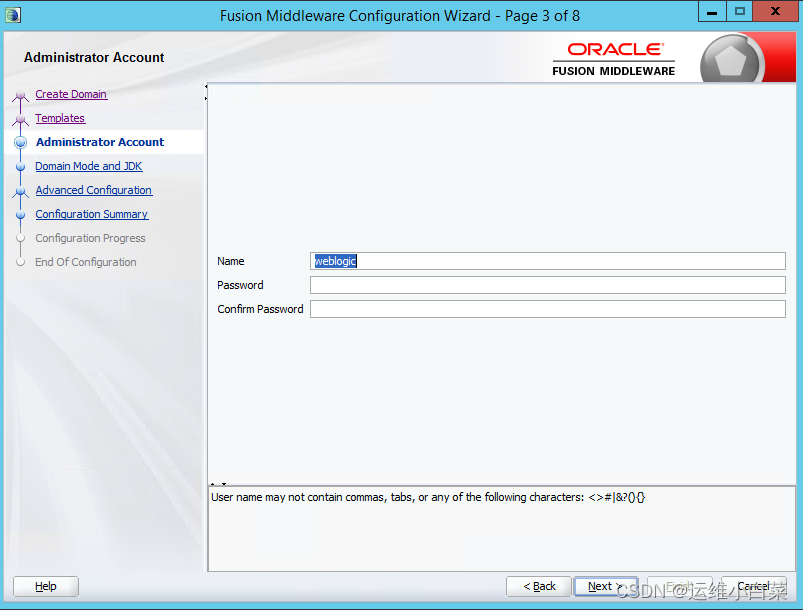
创建weblogic控制台用户名和密码 如果是自己测试环境一般用户名:weblogic密码:weblogic123
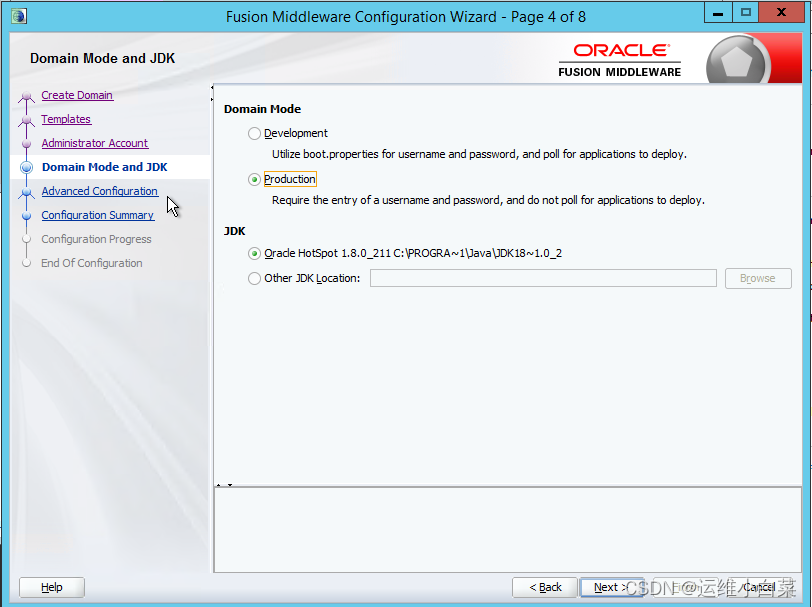
这里分两个模式开发模式和生产模式我一般选择生产模式(第二个),使用刚才安装的jdk,下一步
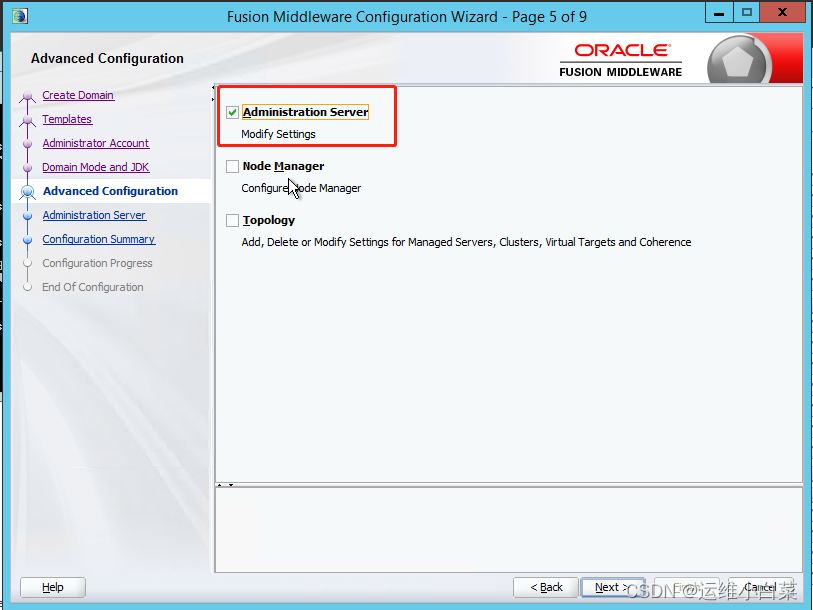
选中系统管理员服务,下一步
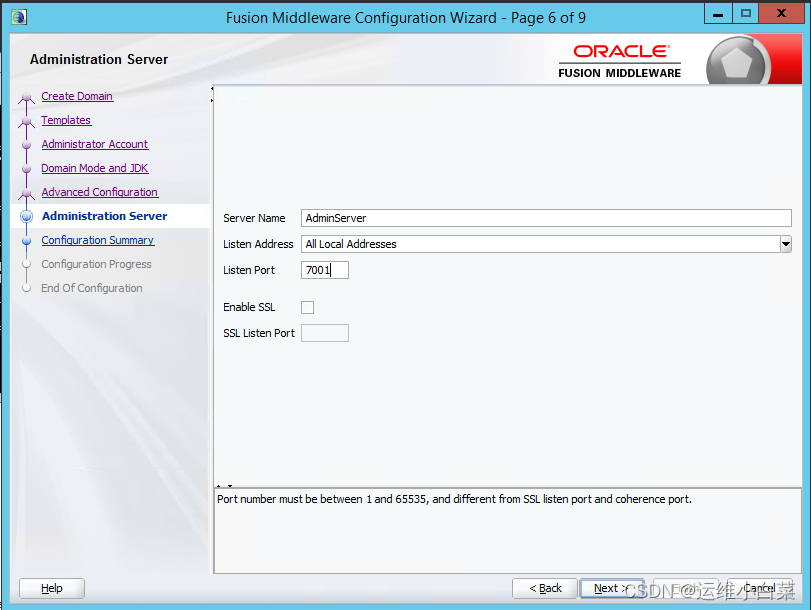
配置adminserver,默认端口7001,可以修改成自己设置的端口。下一步,直接开始安装
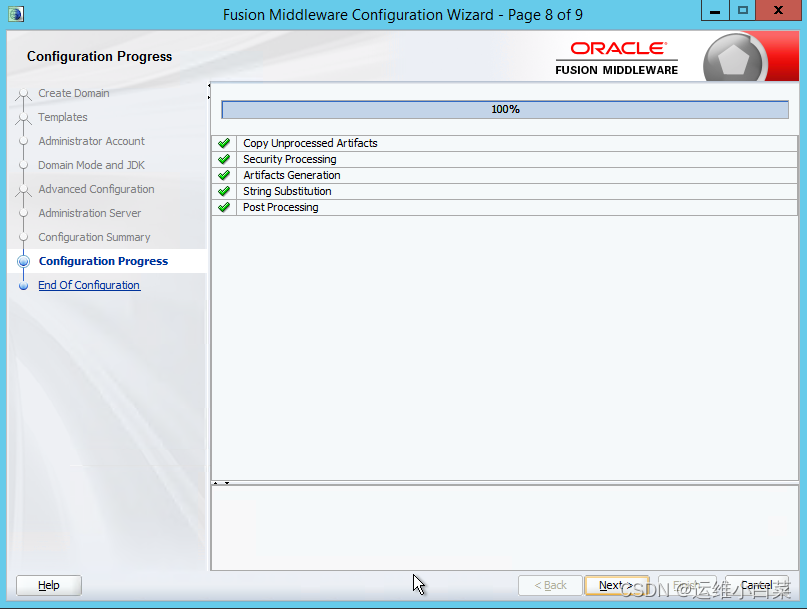
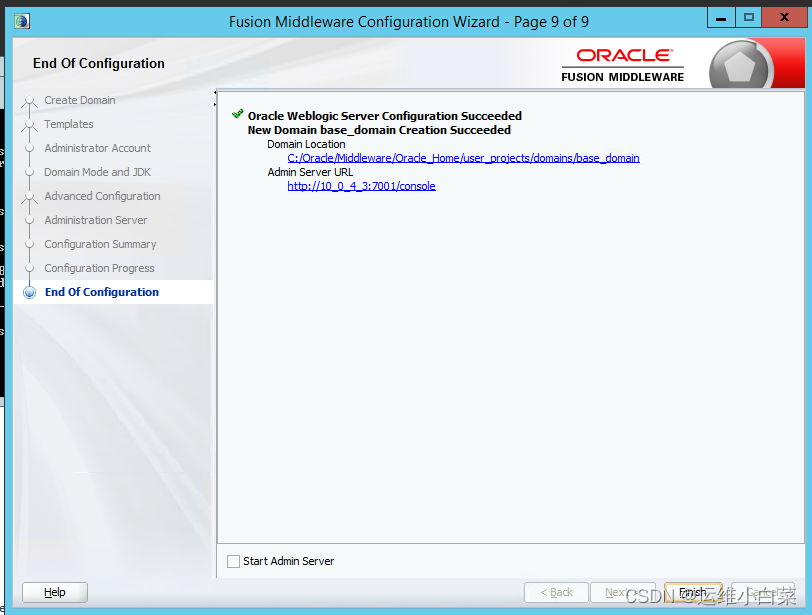
weblogic安装成功。
测试一下是否可以启动成功:
进入安装目录:C:\Oracle\Middleware\Oracle_Home\user_projects\domains\base_domain\bin
启动:startWebLogic.cmd
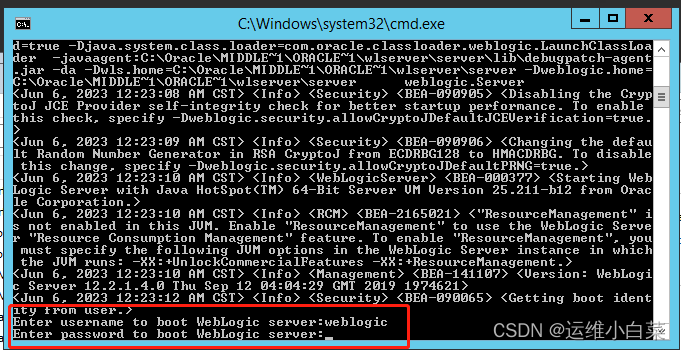
这里会让输入用户名和密码,用户名输入之后会显示,而密码输入之后不会显示。直接回车就行了。
在浏览器上输入:http://IP:7001/console/
输入账号密码 进入控制台 成功!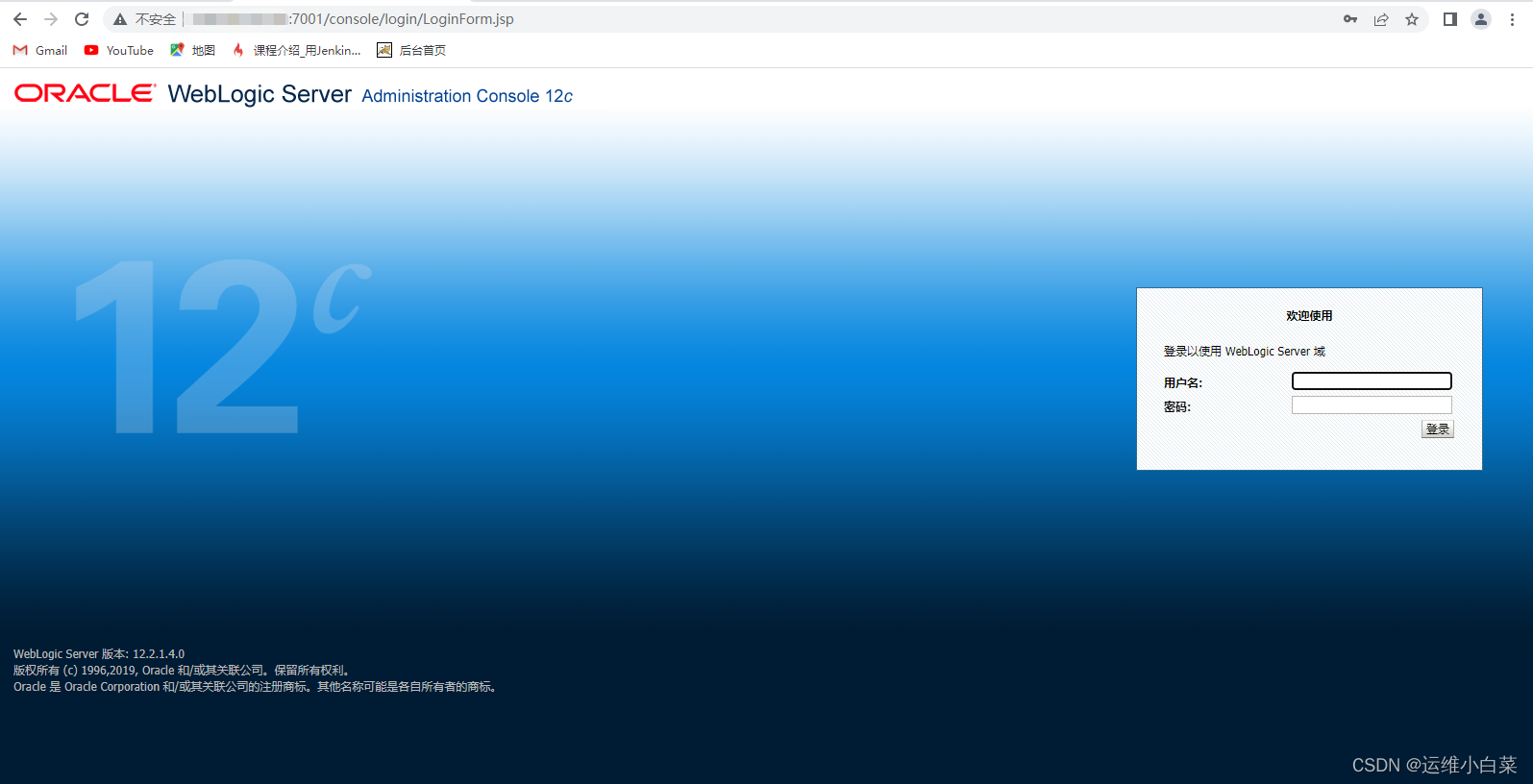
优化
1.添加boot文件,在登陆的时候不用输入密码:
C:\Oracle\Middleware\Oracle_Home\user_projects\domains\base_domain\servers\AdminServer
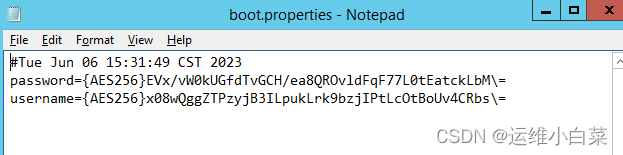
新建security文件夹,并在其中创建boot.properties文件,填入如下内容:
username=weblogic
password=weblogic123
重启
如果账号和密码变成密文就证明成功。
2.增加启动内存
修改
C:\Oracle\Middleware\Oracle_Home\user_projects\domains\base_domain\bin\setDomainEnv.cmd文件根据项目扩大启动内存。
默认为:-Xmx512m根据项目需求和环境配置。
打补丁
首先需要去官网下载最新的weblogic补丁包,官方在每年的1、4、7、10月份会提供最新的weblogic反序列化补丁,但是需要有mos账号才有权限下载。

根据官方要求,我们需要将opatch升级到13.9.4.2.11版本以上,目前opatch最新的版本是13.9.4.2.12,所以就一步到位,升级到最新。
1.创建补丁包文件夹
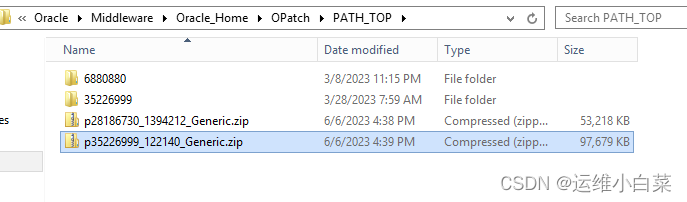
C:\Oracle\Middleware\Oracle_Home\OPatch下新建文件夹PATH_TOP用来放置补丁文件。
2.将文件解压至当前文件夹
3.升级opatch(保证weblogic关闭)
我是在jdk目录里升级的,这样会保证不会出现This installer must be executed using a Java Development Kit (JDK)这样的报错,因为在环境中会有很多程序或者应用用到各种版本的jdk,可能会出现jdk版本不一致或者是环境变量修改导致出现报错。
C:\Program Files\Java\jdk1.8.0_211\bin>java -jar C:\Oracle\Middleware\Oracle_Hom
e\OPatch\PATH_TOP\6880880\opatch_generic.jar -silent oracle_home=C:\Oracle\Middl
eware\Oracle_Home
等待成功后查询opatch是否升级成功
C:\Oracle\Middleware\Oracle_Home\OPatch>opatch lsinventory
Oracle Interim Patch Installer version 13.9.4.2.12
Copyright (c) 2023, Oracle Corporation.  All rights reserved.


Oracle Home       : C:\Oracle\MIDDLE~1\ORACLE~1
Central Inventory : C:\Program Files\Oracle\Inventory
   from           :
OPatch version    : 13.9.4.2.12
OUI version       : 13.9.4.0.0
Log file location : C:\Oracle\MIDDLE~1\ORACLE~1\cfgtoollogs\opatch\opatch2023-0
-06_17-12-28PM_1.log


OPatch detects the Middleware Home as "C:\Oracle\Middleware\Oracle_Home"

Lsinventory Output file location : C:\Oracle\MIDDLE~1\ORACLE~1\cfgtoollogs\opat
h\lsinv\lsinventory2023-06-06_17-12-28PM.txt

-------------------------------------------------------------------------------

Local Machine Information::
Hostname: 10_0_4_3
ARU platform id: 233
ARU platform description:: Microsoft Windows Server 2003 (64-bit AMD)


There are no Interim patches installed in this Oracle Home.


-------------------------------------------------------------------------------


OPatch succeeded.
可以看到升级成功 OPatch version : 13.9.4.2.12
4.升级补丁
C:\Oracle\Middleware\Oracle_Home\OPatch\PATH_TOP\35226999>C:\Oracle\Middleware\O
racle_Home\OPatch\opatch apply
Oracle Interim Patch Installer version 13.9.4.2.12
Copyright (c) 2023, Oracle Corporation.  All rights reserved.


Oracle Home       : C:\Oracle\MIDDLE~1\ORACLE~1
Central Inventory : C:\Program Files\Oracle\Inventory
   from           :
OPatch version    : 13.9.4.2.12
OUI version       : 13.9.4.0.0
Log file location : C:\Oracle\MIDDLE~1\ORACLE~1\cfgtoollogs\opatch\opatch2023-06
-06_17-17-30PM_1.log


OPatch detects the Middleware Home as "C:\Oracle\Middleware\Oracle_Home"

Verifying environment and performing prerequisite checks...
OPatch continues with these patches:   35226999

Do you want to proceed? [y|n]
y
User Responded with: Y
All checks passed.

Please shutdown Oracle instances running out of this ORACLE_HOME on the local sy
stem.
(Oracle Home = 'C:\Oracle\MIDDLE~1\ORACLE~1')


Is the local system ready for patching? [y|n]
y
User Responded with: Y
Backing up files...
Applying interim patch '35226999' to OH 'C:\Oracle\MIDDLE~1\ORACLE~1'
ApplySession: Optional component(s) [ oracle.jrf.thirdparty.jee, 12.2.1.4.0 ] ,
[ oracle.jrf.thirdparty.jee, 12.2.1.4.0 ] , [ oracle.org.codehaus.groovy.groovy.
all, 2.5.6.0.0 ] , [ oracle.org.codehaus.groovy.groovy.all, 2.5.6.0.0 ] , [ orac
le.toplink.doc, 12.2.1.4.0 ] , [ oracle.fmwconfig.common.wls.shared, 12.2.1.4.0
] , [ oracle.webservices.wls.jaxrpc, 12.2.1.4.0 ] , [ oracle.webservices.jrf, 12
.2.1.4.0 ]  not present in the Oracle Home or a higher version is found.

Patching component oracle.org.bouncycastle.bcprov.ext.jdk15on, 1.60.0.0.0...

Patching component oracle.org.bouncycastle.bcprov.ext.jdk15on, 1.60.0.0.0...

Patching component oracle.wls.admin.console.en, 12.2.1.4.0...

Patching component oracle.wls.admin.console.en, 12.2.1.4.0...

Patching component oracle.fmwconfig.common.config.shared, 12.2.1.4.0...

Patching component oracle.rsa.crypto, 12.2.1.4.0...

Patching component oracle.rsa.crypto, 12.2.1.4.0...

Patching component oracle.org.apache.commons.commons.compress, 1.9.0.0.0...

Patching component oracle.org.apache.commons.commons.compress, 1.9.0.0.0...

Patching component oracle.wls.jrf.tenancy.common.sharedlib, 12.2.1.4.0...

Patching component oracle.wls.jrf.tenancy.common.sharedlib, 12.2.1.4.0...

Patching component oracle.wls.jrf.tenancy.common.sharedlib, 12.2.1.4.0...

Patching component oracle.jse.dms, 12.2.1.4.0...

Patching component oracle.wls.jrf.tenancy.ee.only.sharedlib, 12.2.1.4.0...

Patching component oracle.wls.jrf.tenancy.ee.only.sharedlib, 12.2.1.4.0...

Patching component oracle.com.fasterxml.jackson.jaxrs.jackson.jaxrs.json.provide
r, 2.9.9.0.0...

Patching component oracle.com.fasterxml.jackson.jaxrs.jackson.jaxrs.json.provide
r, 2.9.9.0.0...

Patching component oracle.com.fasterxml.jackson.core.jackson.core, 2.9.9.0.0...

Patching component oracle.com.fasterxml.jackson.core.jackson.core, 2.9.9.0.0...

Patching component oracle.org.bouncycastle.bcprov.jdk15on, 1.60.0.0.0...

Patching component oracle.org.bouncycastle.bcprov.jdk15on, 1.60.0.0.0...

Patching component oracle.xerces.xercesimpl, 2.12.0.0.0...

Patching component oracle.xerces.xercesimpl, 2.12.0.0.0...

Patching component oracle.com.fasterxml.jackson.dataformat.jackson.dataformat.xm
l, 2.9.9.0.0...

Patching component oracle.com.fasterxml.jackson.dataformat.jackson.dataformat.xm
l, 2.9.9.0.0...

Patching component oracle.commons.collections.commons.collections, 3.2.2.0.0...

Patching component oracle.commons.collections.commons.collections, 3.2.2.0.0...

Patching component oracle.com.fasterxml.jackson.core.jackson.databind, 2.9.9.0.0
...

Patching component oracle.com.fasterxml.jackson.core.jackson.databind, 2.9.9.0.0
...

Patching component oracle.com.fasterxml.jackson.module.jackson.module.jsonschema
, 2.9.9.0.0...

Patching component oracle.com.fasterxml.jackson.module.jackson.module.jsonschema
, 2.9.9.0.0...

Patching component oracle.com.fasterxml.jackson.module.jackson.module.jaxb.annot
ations, 2.9.9.0.0...

Patching component oracle.com.fasterxml.jackson.module.jackson.module.jaxb.annot
ations, 2.9.9.0.0...

Patching component oracle.fmwconfig.common.shared, 12.2.1.4.0...

Patching component oracle.fmwconfig.common.shared, 12.2.1.4.0...

Patching component oracle.wls.evaluation.database, 12.2.1.4.0...

Patching component oracle.wls.evaluation.database, 12.2.1.4.0...

Patching component oracle.wls.jrf.tenancy.common, 12.2.1.4.0...

Patching component oracle.wls.jrf.tenancy.common, 12.2.1.4.0...

Patching component oracle.fmwconfig.common.wls.shared.internal, 12.2.1.4.0...

Patching component oracle.webservices.wls, 12.2.1.4.0...

Patching component org.codehaus.woodstox, 4.2.0.0.0...

Patching component org.codehaus.woodstox, 4.2.0.0.0...

Patching component oracle.org.apache.xmlgraphics.batik.all, 1.11.0.0.1...

Patching component oracle.org.apache.xmlgraphics.batik.all, 1.11.0.0.1...

Patching component oracle.wls.common.nodemanager, 12.2.1.4.0...

Patching component oracle.mysql, 8.0.14.0.0...

Patching component oracle.mysql, 8.0.14.0.0...

Patching component oracle.wls.wlsportable.mod, 12.2.1.4.0...

Patching component oracle.wls.wlsportable.mod, 12.2.1.4.0...

Patching component oracle.com.google.guava.guava, 27.1.0.0.0...

Patching component oracle.com.google.guava.guava, 27.1.0.0.0...

Patching component oracle.log4j.log4j, 2.11.1.0.0...

Patching component oracle.log4j.log4j, 2.11.1.0.0...

Patching component oracle.org.bouncycastle.bcpkix.jdk15on, 1.60.0.0.0...

Patching component oracle.org.bouncycastle.bcpkix.jdk15on, 1.60.0.0.0...

Patching component oracle.wls.security.core.sharedlib, 12.2.1.4.0...

Patching component oracle.webservices.base, 12.2.1.4.0...

Patching component oracle.wls.shared.with.cam, 12.2.1.4.0...

Patching component oracle.com.fasterxml.jackson.core.jackson.annotations, 2.9.9.
0.0...

Patching component oracle.com.fasterxml.jackson.core.jackson.annotations, 2.9.9.
0.0...

Patching component oracle.wls.common.cam.wlst, 12.2.1.4.0...

Patching component oracle.wls.security.core, 12.2.1.4.0...

Patching component oracle.wls.security.core, 12.2.1.4.0...

Patching component oracle.datadirect, 12.2.1.4.0...

Patching component oracle.datadirect, 12.2.1.4.0...

Patching component oracle.jrf.toplink, 12.2.1.4.0...

Patching component oracle.org.jboss.logging.jboss.logging.vfinal, 3.3.0.0.0...

Patching component oracle.org.jboss.logging.jboss.logging.vfinal, 3.3.0.0.0...

Patching component oracle.wls.admin.console.nonen, 12.2.1.4.0...

Patching component oracle.wls.admin.console.nonen, 12.2.1.4.0...

Patching component com.bea.core.xml.xmlbeans, 2.6.0.6.0...

Patching component com.bea.core.xml.xmlbeans, 2.6.0.6.0...

Patching component oracle.com.fasterxml.jackson.jaxrs.jackson.jaxrs.base, 2.9.9.
0.0...

Patching component oracle.com.fasterxml.jackson.jaxrs.jackson.jaxrs.base, 2.9.9.
0.0...

Patching component oracle.wls.libraries, 12.2.1.4.0...

Patching component oracle.wls.libraries, 12.2.1.4.0...

Patching component oracle.wls.libraries, 12.2.1.4.0...

Patching component oracle.wls.core.app.server, 12.2.1.4.0...

Patching component oracle.wls.core.app.server, 12.2.1.4.0...

Patching component oracle.wls.core.app.server, 12.2.1.4.0...

Patching component oracle.thirdparty.maven, 3.2.5.0.0...

Patching component oracle.wls.admin.console.en, 12.2.1.4.0...
Patch 35226999 successfully applied.
Log file location: C:\Oracle\MIDDLE~1\ORACLE~1\cfgtoollogs\opatch\opatch2023-06-
06_17-17-30PM_1.log

OPatch succeeded.
成功,有两种方式可以验证
第一种 还是使用opatch lsinventory
C:\Oracle\Middleware\Oracle_Home\OPatch>opatch lsinventory
Oracle Interim Patch Installer version 13.9.4.2.12
Copyright (c) 2023, Oracle Corporation.  All rights reserved.


Oracle Home       : C:\Oracle\MIDDLE~1\ORACLE~1
Central Inventory : C:\Program Files\Oracle\Inventory
   from           :
OPatch version    : 13.9.4.2.12
OUI version       : 13.9.4.0.0
Log file location : C:\Oracle\MIDDLE~1\ORACLE~1\cfgtoollogs\opatch\opatch2023-06
-06_17-22-28PM_1.log


OPatch detects the Middleware Home as "C:\Oracle\Middleware\Oracle_Home"

Lsinventory Output file location : C:\Oracle\MIDDLE~1\ORACLE~1\cfgtoollogs\opatc
h\lsinv\lsinventory2023-06-06_17-22-28PM.txt

--------------------------------------------------------------------------------

Local Machine Information::
Hostname: 10_0_4_3
ARU platform id: 233
ARU platform description:: Microsoft Windows Server 2003 (64-bit AMD)


Interim patches (1) :

Patch  35226999     : applied on Tue Jun 06 17:20:01 CST 2023
Unique Patch ID:  25170306
Patch description:  "WLS PATCH SET UPDATE 12.2.1.4.230328"
   Created on 28 Mar 2023, 07:59:20 hrs PST8PDT
   Bugs fixed:
     27703270, 31316252, 34647286, 32937538, 32228507, 30589563, 30068341
     31913015, 31770512, 30624882, 30912052, 34545736, 33660731, 31483446
     29940841, 33666810, 34160183, 34803124, 34031093, 35136876, 31657139
     33170754, 30718589, 34072490, 31583896, 29769772, 33562620, 33964662
     32069620, 34779739, 32077694, 34082912, 26528855, 34465980, 34494177
     33670829, 30670689, 34096039, 31470145, 30459026, 33329852, 32415913
     31567049, 31359854, 34132210, 32651810, 33676277, 30469341, 33287665
     33791665, 33890487, 29878681, 31160218, 35039991, 29026751, 34270452
     31873968, 34026019, 32497814, 33245345, 33360349, 33703897, 31475287
     34778989, 34629758, 32893667, 31510290, 30801769, 31247235, 34978707
     34033370, 30153412, 30510407, 34469079, 32883876, 30563848, 33671762
     33422662, 32235275, 30362026, 32503912, 32519960, 34918591, 33261059
     33362866, 33671996, 33216541, 33045273, 33560373, 33171421, 32153389
     34069658, 31332264, 32054481, 31353368, 34069324, 30692988, 30964331
     32016868, 30362086, 34326008, 31157988, 32649503, 34487796, 30245934
     30341541, 31441174, 30729141, 32520971, 26547727, 30285053, 34315592
     31207149, 30633620, 33560637, 35038260, 34469121, 28294508, 34636587
     33730691, 25900775, 34469162, 30958807, 33034990, 34338696, 34401252
     34332330, 33207639, 33180718, 34469106, 31498405, 33735326, 31765567
     31765550, 32875528, 30814590, 32211968, 30478451, 34361462, 34753363
     34232804, 31118905, 30318955, 31742292, 30740009, 32118304, 32953480
     30739376, 30885217, 30467554, 34338584, 34470569, 33775386, 32832099
     30342923, 26444945, 32959063, 33355727, 33114718, 32508456, 32064362
     33015183, 33293539, 31232471, 34087946, 32891581, 30230430, 33770799
     33166329, 33636224, 32557722, 33876615, 34185325, 31234666, 32950042
     31975423, 33145710, 34182793, 32214441, 32408938, 35118583, 31091695
     33876465, 30326976, 32425607, 32431772, 33617787, 33542139, 31671559
     34945769, 32228228, 32373306, 34515267, 31808363, 31918617, 34362971
     34805433, 34429695, 30468443, 34044945, 30597194, 33277149, 33270137
     32201179, 29630055, 33297017, 32976692, 30718312, 34016065, 34339878
     31088577, 34191025, 32371861, 31679103, 31047981, 31142740, 34520786
     32230661, 34268334, 32068710, 32593893, 34918696, 33890469, 33380581
     31724565, 34817386, 34384670, 31332368, 34102404, 31234573, 25973136
     32097062, 27291550, 30558254, 33586390, 29247835, 30465861, 32373197
     33767326, 33666033, 34677232, 30734182, 29971088, 32248716, 33005860
     34522036, 34469090, 30067299, 30866037, 34181077, 34489481, 30874677
     32875564, 32108759, 33270388, 31380363, 34130143, 34092344, 31816475
     32697451, 33580024, 33613719, 35219161, 34469147, 33821029, 33839608
     30284059, 31199699, 34814295, 30469093, 30961904, 32560780, 31875573
     32312961, 32965618, 34373063, 30543380, 31526201, 33691381, 30615058
     31184158, 33349324, 34803129, 31525147, 34190890, 31502307, 33164116
     30885114, 25348765, 33379618, 33181541, 32412974, 31011293, 28852411
     30155056, 32962304, 34157256, 32235872, 33494788, 34858275, 34791059
     30885128, 28431008, 30568713, 32639821, 33828242, 33691226, 34857677
     33152312, 35170849, 33446922, 18183882, 33480646, 34769671, 31401659
     30771358, 34197839, 29671344, 31877533, 34508901, 32847474, 33470327
     33625910, 29660156, 33628018, 33798087, 31833635, 32244262, 33063225
     34166452, 29742586, 31287540, 30652362, 34513377, 29906301, 34055705
     30580458, 33722659, 34992651, 31564423, 30143011, 29449188, 33019953
     30885237, 32920991, 31113242, 34881912, 34806277, 33287555, 33825902
     25219796, 33792809, 30998532, 21891358, 32868847, 30965440, 30884852
     32528774, 30028126, 31297042, 30837932, 34172370, 30838007, 30295025
     30656708, 32301793, 33328978, 32307656


--------------------------------------------------------------------------------


OPatch succeeded.
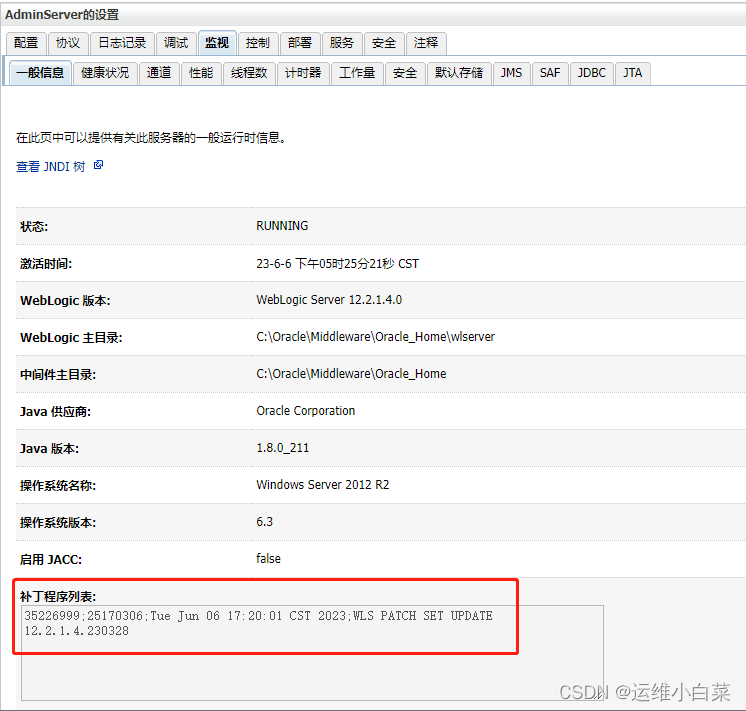
第二种是需要启动weblogic控制台
环境—服务器—AdminServer—监视—一般信息






 扫一扫
扫一扫


 被折叠的 条评论
为什么被折叠?
被折叠的 条评论
为什么被折叠?
 到【灌水乐园】发言





