



Thumbnailator 是 Google 开源的图片处理库,支持:图片缩放,区域裁剪,水印,旋转,保持比例。详细介绍可以百度或官网,话不多说,直接上代码,具体要结合自己的业务需要进行使用(有些复杂场景比如 旋转+缩放+裁剪+水印 难吗?)。
Google开源图片工具
1.代码示例
1.1 新建一个 springboot 项目
1.2 引入依赖 thumbnailator
        <dependency>
            <groupId>net.coobird</groupId>
            <artifactId>thumbnailator</artifactId>
            <version>0.4.8</version>
        </dependency>
1.3 controller
@RestController
public class ThumbnailsController {
    @Resource
    private IThumbnailsService thumbnailsService;

    /**
     * 指定大小缩放
     */
    @GetMapping("/changeSize")
    public String changeSize(MultipartFile resource, int width, int height) {
        String toFile = "C:\\Users\\Administrator\\Desktop\\thumbnailator\\changeSize";
        return thumbnailsService.changeSize(resource, width, height, toFile);
    }

    /**
     * 指定比例缩放
     */
    @GetMapping("/changeScale")
    public String changeScale(MultipartFile resource, double scale) {
        String toFile = "C:\\Users\\Administrator\\Desktop\\thumbnailator\\changeScale";
        return thumbnailsService.changeScale(resource, scale, toFile);
    }

    /**
     * 添加水印 watermark(位置,水印,透明度)
     */
    @GetMapping("/watermark")
    public String watermark(MultipartFile resource, Positions center, MultipartFile watermark, float opacity) {
        String toFile = "C:\\Users\\Administrator\\Desktop\\thumbnailator\\watermark";
        return thumbnailsService.watermark(resource, Positions.CENTER, watermark, opacity, toFile);
    }

    /**
     * 图片旋转 rotate(度数),顺时针旋转
     */
    @GetMapping("/rotate")
    public String rotate(MultipartFile resource, double rotate) {
        String toFile = "C:\\Users\\Administrator\\Desktop\\thumbnailator\\rotate";
        return thumbnailsService.rotate(resource, rotate, toFile);
    }

    /**
     * 图片裁剪
     */
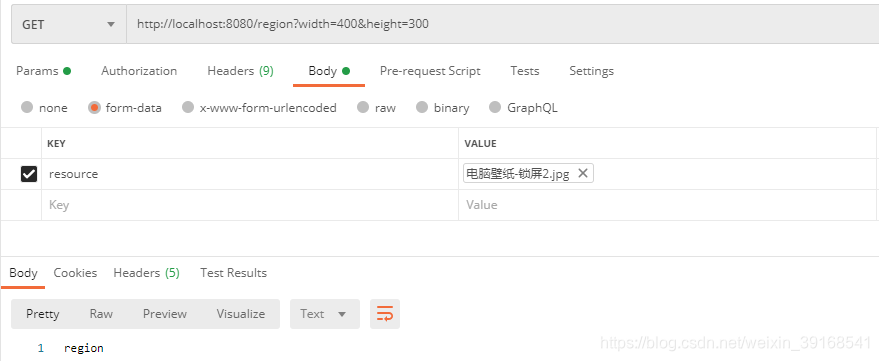
    @GetMapping("/region")
    public String region(MultipartFile resource, Positions center, int width, int height) {
        String toFile = "C:\\Users\\Administrator\\Desktop\\thumbnailator\\region";
        return thumbnailsService.region(resource, Positions.CENTER, width, height, toFile);
    }
}
2.功能实现
这是实现类里每个方法的代码+postman测试(测试结果不再贴出来了,大家可以自行测试)。
2.1 指定大小缩放
/**
 * 指定大小缩放 若图片横比width小,高比height小,放大
 * 若图片横比width小,高比height大,高缩小到height,图片比例不变
 * 若图片横比width大,高比height小,横缩小到width,图片比例不变
 * 若图片横比width大,高比height大,图片按比例缩小,横为width或高为height
 *
 * @param resource  源文件路径
 * @param width     宽
 * @param height    高
 * @param tofile    生成文件路径
 */
    @Override
    public String changeSize(MultipartFile resource, int width, int height, String toFile) {
        try {
            Thumbnails.of(resource.getInputStream()).size(width, height).outputFormat("jpg").toFile(toFile);
        } catch (IOException e) {
            e.printStackTrace();
        }
        return "changeSize";
    }

2.2 指定比例缩放
/**
 * 指定比例缩放 scale(),参数小于1,缩小;大于1,放大
 *
 * @param resource   源文件路径
 * @param scale      指定比例
 * @param tofile     生成文件路径
 */
    @Override
    public String changeScale(MultipartFile resource, double scale, String toFile) {
        try {
            Thumbnails.of(resource.getInputStream()).scale(scale).toFile(toFile);
        } catch (IOException e) {
            e.printStackTrace();
        }
        return "changeScale";
    }

2.3 添加水印
/**
 * 添加水印 watermark(位置,水印,透明度)
 *
 * @param resource  源文件路径
 * @param center    水印位置
 * @param shuiyin   水印文件路径
 * @param opacity   水印透明度
 * @param tofile    生成文件路径
 */
    @Override
    public String watermark(MultipartFile resource, Positions center, MultipartFile watermark, float opacity, String toFile) {
        try {
            Thumbnails.of(resource.getInputStream()).scale(1).watermark(center, ImageIO.read(watermark.getInputStream()), opacity).toFile(toFile);
        } catch (IOException e) {
            e.printStackTrace();
        }
        return "watermark";
    }

2.4 图片旋转
/**
 * 图片旋转 rotate(度数),顺时针旋转
 *
 * @param resource  源文件路径
 * @param rotate    旋转度数
 * @param tofile    生成文件路径
 */
    @Override
    public String rotate(MultipartFile resource, double rotate, String toFile) {
        try {
            Thumbnails.of(resource.getInputStream()).scale(1).rotate(rotate).toFile(toFile);
        } catch (IOException e) {
            e.printStackTrace();
        }
        return "rotate";
    }

2.5 图片裁剪
/**
 * 图片裁剪 sourceRegion()有多种构造方法,示例使用的是sourceRegion(裁剪位置,宽,高)
 *
 * @param resource  源文件路径
 * @param center    裁剪位置
 * @param width     裁剪区域宽
 * @param height    裁剪区域高
 * @param tofile    生成文件路径
 */
    @Override
    public String region(MultipartFile resource, Positions center, int width, int height, String toFile) {
        try {
            Thumbnails.of(resource.getInputStream()).scale(1).sourceRegion(center, width, height).toFile(toFile);
        } catch (IOException e) {
            e.printStackTrace();
        }
        return "region";
    }
说明:
- 1.
keepAspectRatio(boolean arg0)图片是否按比例缩放(宽高比保持不变)默认true - 2.
outputQuality(float arg0)图片质量 - 3.
outputFormat(String arg0)格式转换
3.小结
需要注意的是,若 png、gif 格式图片中含有透明背景,使用该工具压缩处理后背景会变成黑色。






 扫一扫
扫一扫


 被折叠的 条评论
为什么被折叠?
被折叠的 条评论
为什么被折叠?
 到【灌水乐园】发言





