
开启feignPOM找不到spring-cloud-starter-openfeign

文章讲述了在使用SpringCloud开启Feign服务时,如何在POM文件中正确引入依赖,以及遇到的问题——找不到依赖,通过更换至阿里云镜像并设置Maven配置得以解决。

spring cloud 开启feign的时候需要再POM中引入

<dependencies>
    <dependency>
        <groupId>org.springframework.cloud</groupId>
        <artifactId>spring-cloud-starter-netflix-eureka-client</artifactId>
        <version>2.0.2.RELEASE</version>
    </dependency>
    <dependency>
        <groupId>org.springframework.cloud</groupId>
        <artifactId>spring-cloud-starter-openfeign</artifactId>
        <version>2.0.2.RELEASE</version>
    </dependency>
</dependencies>

但是

    <dependency>
        <groupId>org.springframework.cloud</groupId>
        <artifactId>spring-cloud-starter-openfeign</artifactId>
        <version>2.0.2.RELEASE</version>
    </dependency>

会一直爆红找不到更换阿里云镜像也不行

之后设置mean可以找到

设置方法如下
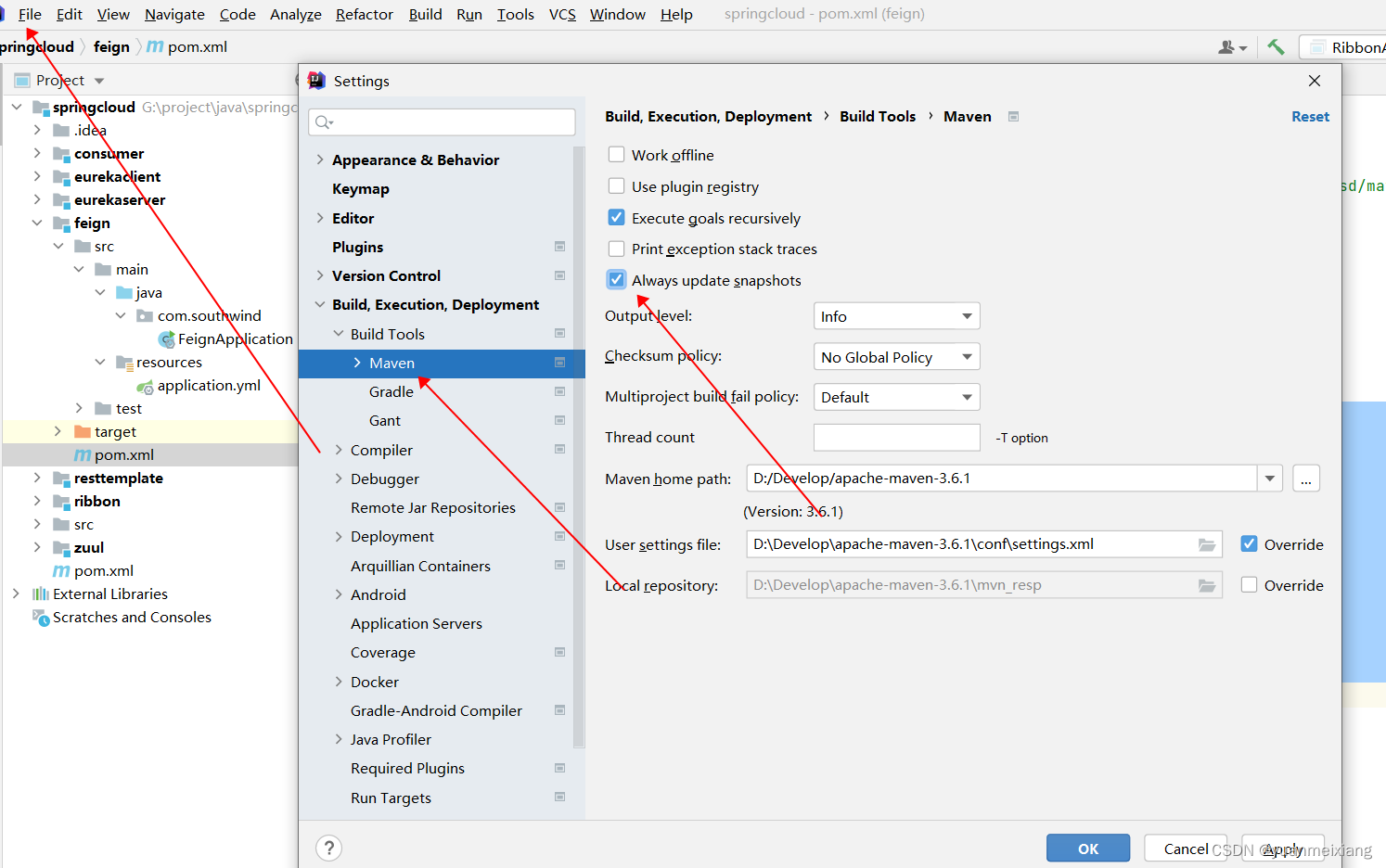
 

点击确定后错误消失。 

### Spring Cloud Starter OpenFeign 版本信息及其兼容性 对于 `spring-cloud-starter-openfeign` 的版本管理,通常遵循 Spring Cloud 发布列车(Release Train)的版本策略。每当一个新的 Spring Cloud 版本发布时,会附带一系列更新过的依赖库版本,其中包括 `spring-cloud-starter-openfeign`。 #### 明确版本关系 在 Maven 或 Gradle 中声明 `spring-cloud-dependencies` 后,再引入 `spring-cloud-starter-openfeign` 作为子模块时,默认情况下会自动获取与当前使用的 Spring Cloud 版本相匹配的最佳实践版本[^1]。 例如,在 pom.xml 文件中配置如下: ```xml <dependencyManagement> <dependencies> <!-- 使用Hoxton.SR8版本 --> <dependency> <groupId>org.springframework.cloud</groupId> <artifactId>spring-cloud-dependencies</artifactId> <version>Hoxton.SR8</version> <type>pom</type> <scope>import</scope> </dependency> </dependencies> </dependencyManagement> <!-- 自动适配对应版本 --> <dependency> <groupId>org.springframework.cloud</groupId> <artifactId>spring-cloud-starter-openfeign</artifactId> </dependency> ``` 这样做的好处是可以减少手动维护各个组件之间复杂版本组合的工作量,并确保整体系统的稳定性[^3]。 #### 查看具体版本列表 要查看具体的 `spring-cloud-starter-openfeign` 及其他相关项目的版本历史记录,可以通过访问官方文档页面来了解不同 Spring Cloud 发布版所支持的具体版本号。此外,也可以通过浏览 [Maven Central Repository](https://search.maven.org/) 来查询最新的可用版本以及它们之间的关联性[^2]。 #### 兼容性注意事项 当项目依赖于某个特定版本的 Spring Cloud 并且该版本已经包含了 `spring-cloud-starter-openfeign` 的最新稳定版本,则无需额外指定 Feign 客户端的具体版本;但如果希望利用某些新功能或是修复了的问题,则应当考虑升级至更高版本并注意检查是否存在潜在不兼容之处。
评论 1
添加红包

请填写红包祝福语或标题

红包个数最小为10个

红包金额最低5元

当前余额3.43前往充值 >
需支付:10.00
成就一亿技术人!
领取后你会自动成为博主和红包主的粉丝 规则
hope_wisdom
发出的红包
实付
使用余额支付
点击重新获取
扫码支付
钱包余额 0

抵扣说明:

1.余额是钱包充值的虚拟货币,按照1:1的比例进行支付金额的抵扣。
2.余额无法直接购买下载,可以购买VIP、付费专栏及课程。

余额充值


