


概述
1、JAVA8 引入的一种处理数据的API,声明式方式处理数据集,写法更加简洁。
2、类似于数据库的视图,不会修改原数据,不存储数据
3、延迟执行,指导你需要结果时才会自动计算
三个操作步骤
1、创建Stream
通过数据源 集合,列表 创建一个数据流
Stream.of(List)
List.Stream()
2、中间操作
过滤,循环,比较,每次操作都保持一个新的Stream,可以链式操作,多个操作链接到一起,对数据进行多次处理
3、中断操作
中断操作就是需要最终的结果,一旦执行整个Stream 就结束了。
Stream 创建方式
1、集合创建
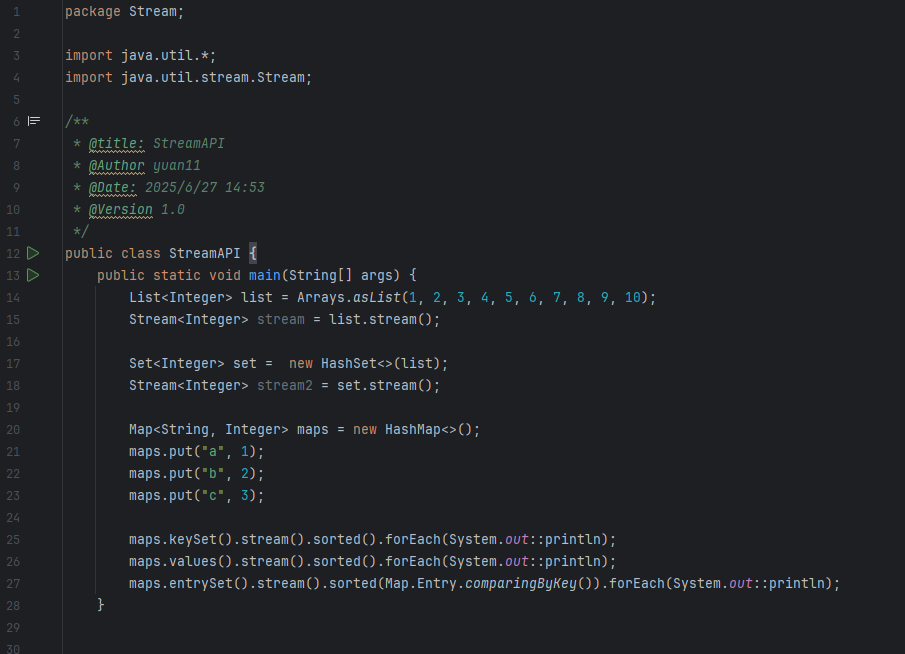
2、数组创建
` String[] arr = {“a”, “b”, “c”, “d”, “e”};
Arrays.stream(arr).forEach(System.out::println);
Arrays.stream(arr,1,3).forEach(System.out::println);
Stream.of(arr).forEach(System.out::println);
3、其他Stream
数值流
IntStream
LongStream
DoubleStream
IntStream intStream = IntStream.rangeClosed(1, 10);
LongStream longStream = LongStream.rangeClosed(1, 10);
DoubleStream doubleStream = DoubleStream.of(1, 10); `
无限流
Stream integerStream = Stream.iterate(0, i -> i<10,i -> i + 2);
Stream.generate(Math::random).limit(10).forEach(System.out::println);
Stream操作
@Data
public class Student {
    private String name;
    private Integer age;
    private String gender;
    private String Course;


    public Student(String alice, int i, String female, String math) {
        this.name = alice;
        this.age = i;
        this.gender = female;
        this.Course = math;
    }
}

public static void test() {
        List<Student> students = Arrays.asList(
                new Student("Alice",16, "female", "Math"),
                new Student("Bob",20, "male", "English"),
                new Student("Charlie", 19, "male", "Science"),
                new Student("Diana", 19, "female", "Math"),
                new Student("Eve", 20,"male", "English"),
                new Student("Frank",21, "male", "Science"),
                new Student("Frank",17, "male", "Science")
        );
        // 1. 获取所有学生的年龄大于20的学生
        List<Student> filteredStudents = students.stream()
                .filter(student -> student.getAge() > 20)
                .collect(Collectors.toList());
        System.out.println("年龄大于20的学生: " + filteredStudents);

        // 2. 获取所有学生的姓名
        List<String> names = students.stream()
                .map(Student::getName)
                .collect(Collectors.toList());
        System.out.println("所有学生的姓名: " + names);

        // 3. 截断limit  获取前3个学生
        List<Student> limitedStudents = students.stream()
                .limit(3)
                .collect(Collectors.toList());
        System.out.println("前3个学生: " + limitedStudents);

        // 4. 跳过skip 跳过前2个学生
        List<Student> skippedStudents = students.stream()
                .skip(2)
                .collect(Collectors.toList());
        System.out.println("跳过前2个学生: " + skippedStudents);

        // 5. 排序sorted 按照年龄排序
        List<Student> sortedStudents = students.stream()
                .sorted(Comparator.comparing(Student::getAge))
                .collect(Collectors.toList());
        System.out.println("按照年龄排序的学生: " + sortedStudents);

        // 6. 去重distinct 按照去重
        List<Student> distinctStudents = students.stream()
                .distinct()
                .collect(Collectors.toList());
        System.out.println("去重后的学生: " + distinctStudents);

        // 7. 统计count 统计学生数量
        long count = students.stream()
                .count();
        System.out.println("学生数量: " + count);

        // 8. 求和sum 获取所有学生的年龄总和
        int totalAge = students.stream()
                .mapToInt(Student::getAge)
                .sum();
        System.out.println("所有学生的年龄总和: " + totalAge);

        // 9. 平均值average 获取所有学生的年龄平均值
        double averageAge = students.stream()
                .mapToInt(Student::getAge)
                .average()
                .orElse(0.0);
        System.out.println("所有学生的年龄平均值: " + averageAge);

        // 10. 分组groupingBy 按照性别分组
        Map<String, List<Student>> groupedByGender = students.stream()
                .collect(Collectors.groupingBy(Student::getGender));
        System.out.println("按照性别分组的学生: " + groupedByGender);

        // 11. 分区partitioningBy 按照年龄是否大于20分区
        Map<Boolean, List<Student>> partitionedByAge = students.stream()
                .collect(Collectors.partitioningBy(student -> student.getAge() > 20));
        System.out.println("按照年龄是否大于20分区的学生: " + partitionedByAge);

        // 12. 连接joining 将所有学生的姓名连接成一个字符串
        String joinedNames = students.stream()
                .map(Student::getName)
                .collect(Collectors.joining(", "));
        System.out.println("所有学生的姓名连接成的字符串: " + joinedNames);

        //13 flatmap 主要是用于将多个集合扁平化为一个集合
        List<List<String>> listOfLists = Arrays.asList(
                Arrays.asList("a", "b", "c"),
                Arrays.asList("d", "e", "f"),
                Arrays.asList("g", "h", "i")
        );
        List<String> flatList = listOfLists.stream()
                .flatMap(List::stream)
                .collect(Collectors.toList());
        System.out.println("扁平化后的列表: " + flatList);

        //14 peek 主要是用于在流的每个元素上执行操作,通常用于调试或日志记录
        List<String> peekedNames = students.stream()
                .peek(student -> System.out.println("处理学生: " + student.getName()))
                .map(Student::getName)
                .collect(Collectors.toList());
        // 15 allMatch 检查是否所有学生的年龄都大于18
        boolean allMatch = students.stream()
                .allMatch(student -> student.getAge() > 18);
        System.out.println("所有学生的年龄都大于18: " + allMatch);

        // 16 anyMatch 检查是否有学生的年龄大于20
        boolean anyMatch = students.stream()
                .anyMatch(student -> student.getAge() > 20);
        System.out.println("有学生的年龄大于20: " + anyMatch);

        // 17 noneMatch 检查是否没有学生的年龄小于18
        boolean noneMatch = students.stream()
                .noneMatch(student -> student.getAge() < 18);
        System.out.println("没有学生的年龄小于18: " + noneMatch);

        // 18 findFirst 获取第一个学生
        Optional<Student> firstStudent = students.stream()
                .findFirst();
        firstStudent.ifPresent(student -> System.out.println("第一个学生: " + student.getName()));

        // 19 findAny 获取任意一个学生
        Optional<Student> anyStudent = students.stream()
                .findAny();
        anyStudent.ifPresent(student -> System.out.println("任意一个学生: " + student.getName()));

        // 20 reduce 使用reduce方法计算所有学生的年龄总和
        int ageSum = students.stream()
                .map(Student::getAge)
                .reduce(0, Integer::sum);
        System.out.println("所有学生的年龄总和(使用reduce): " + ageSum);

        // 21 collect 使用collect方法将学生转换为一个Map
        Map<String, Integer> studentMap = students.stream()
                .collect(Collectors.toMap(Student::getName, Student::getAge));
        System.out.println("学生转换为Map: " + studentMap);

        // 22 toList 使用toList方法将学生转换为一个List
        List<Student> studentList = students.stream()
                .collect(Collectors.toList());
        System.out.println("学生转换为List: " + studentList);

        // 23 toSet 使用toSet方法将学生转换为一个Set
        Set<Student> studentSet = students.stream()
                .collect(Collectors.toSet());
        System.out.println("学生转换为Set: " + studentSet);

        //24 max
        Optional<Student> oldestStudent = students.stream()
                .max(Comparator.comparing(Student::getAge));
        oldestStudent.ifPresent(student -> System.out.println("年龄最大的学生: " + student.getName() + ", 年龄: " + student.getAge()));
        //25 min
        Optional<Student> youngestStudent = students.stream()
                .min(Comparator.comparing(Student::getAge));
        youngestStudent.ifPresent(student -> System.out.println("年龄最小的学生: " + student.getName() + ", 年龄: " + student.getAge()));

        // 26 parallelStream 并行流
        List<Student> parallelStudents = students.parallelStream()
                .filter(student -> student.getAge() > 18)
                .collect(Collectors.toList());
        System.out.println("并行流处理年龄大于18的学生: " + parallelStudents);
    }
Optional
Optional 类的主要特点:
1、防止 NullPointerException:使用 Optional 可以明确地要求用户在使用变量之前处理 null 情况
2、增强代码可读性:通过使用 Optional 的方法,代码的可读性和意图更加明确
3、集成到 Java 的流 API 中:Optional 类型在 Java 8 的流(Stream)操作中被广泛使用,提供了更复杂的条件查询和变换功能
Java 8 中 Optional 类的主要方法
tional<String> optional = Optional.ofNullable(null);// 会报NullPointerException
        Optional<String> optional2 = Optional.of("Hello"); // 不会报错
        // empty() 方法创建一个空的 Optional 对象
        Optional<String> emptyOptional = Optional.empty(); // 创建一个空的 Optional 对象
        // isPresent() 方法检查 Optional 是否包含值
        if (optional2.isPresent()) {
            System.out.println("Optional contains: " + optional2.get());
        } else {
            System.out.println("Optional is empty");
        }
        // orElse() 方法提供一个默认值
        String value = optional2.orElse("Default Value");
        System.out.println("Value: " + value);
        // orElseGet() 方法提供一个 Supplier 来生成默认值
        String value2 = optional.orElseGet(() -> "Generated Default Value");
        System.out.println("Value from orElseGet: " + value2);

        // orElseThrow() 方法抛出异常
        try {
            String value3 = optional.orElseThrow(() -> new IllegalArgumentException("Value is missing"));
        } catch (IllegalArgumentException e) {
            System.out.println("Caught exception: " + e.getMessage());
        }
        // map() 方法对 Optional 中的值进行转换
        Optional<String> mappedOptional = optional2.map(String::toUpperCase);
        mappedOptional.ifPresent(value4 -> System.out.println("Mapped value: " + value4));
        // flatMap() 方法用于嵌套 Optional

        Optional<Optional<String>> nestedOptional = Optional.of(optional2);
        Optional<String> flatMappedOptional = nestedOptional.flatMap(opt -> opt);
        flatMappedOptional.ifPresent(value5 -> System.out.println("FlatMapped value: " + value5));
        // filter() 方法用于条件过滤
        Optional<String> filteredOptional = optional2.filter(value6 -> value6.startsWith("H"));
        filteredOptional.ifPresent(value7 -> System.out.println("Filtered value: " + value7));
Optional 类使用时的注意事项
1、不要在类的字段中使用 Optional 使用 Optional 作为类的字段通常不推荐,因为 Optional 旨在作为方法的返回类型,用于有效地表示可空的结果。使用它作为字段类型会增加内存开销,同时也违反了其用作临时包装器的设计初衷。
2、避免使用 Optional 作为参数将 Optional 用作方法参数通常是多余的。这种做法迫使调用者使用 Optional,而不是允许他们以更自然的方式传递值或 null。更好的方法是允许传递 null 并在方法内部使用 Optional.ofNullable() 进行处理。
3、不要仅为了避免 null 检查而使用 OptionalOptional 的过度使用可能导致代码质量下降,特别是当它被用来包装几乎从不为 null 的值时。它应该用在真正可能为空的情况,否则会导致不必要的复杂性。
4、避免在 Optional 上进行显式的 null 检查Optional 的目的是为了消除代码中的 null 检查。对 Optional 对象本身进行 null 检查是没有必要的,也违背了使用 Optional 的初衷。
5、在使用 get() 方法之前总是检查是否有值直接调用 Optional.get() 而不先检查是否有值,可能会引发 NoSuchElementException。应该使用 isPresent() 或更好的方法是 orElse(), orElseGet(), 或 orElseThrow() 等,以更安全的方式访问值。





 扫一扫
扫一扫


 被折叠的 条评论
为什么被折叠?
被折叠的 条评论
为什么被折叠?
 到【灌水乐园】发言





