小白学习 gRPC官方快速上手学习笔记(c#版)

本文详细介绍如何在Windows、OSX和Linux环境下搭建gRPC应用,包括开发环境配置、官方demo下载、gRPC代码生成及服务与客户端的运行流程。
Seed-Coder-8B-Base

Seed-Coder-8B-Base

文本生成
Seed-Coder

Seed-Coder是一个功能强大、透明、参数高效的 8B 级开源代码模型系列,包括基础变体、指导变体和推理变体,由字节团队开源

上手前准备工作

支持操作系统:windows、OS X、Linux。实例采用.net、.net core sdk。

  • The .NET Core SDK command line tools.
  • The .NET framework 4.5 (for OS X and Linux, the open source .NET Framework implementation, “Mono”, at version 4+, is suitable)
  • Git (to download the sample code)

在windows系统开发环境, 采用 Visual Studio开发工具, 需要满足以下要求:

  • .NET Framework 4.5+
  • Visual Studio 2013 or 2015.
  • Git (to download the sample code)

    在OS X 系统开发环境, 采用Xamarin Studio开发工具, 需要满足以下要求:

  • Mono 4.4.2+ (or Mono 4+ is sufficient if you manually update NuGet to version 2.12+)
  • Xamarin Studio 6.0+
  • Git (to download the sample code)

    在 Linux 系统开发环境, 采用 the Monodevelop IDE,需要满足以下要求 :

  • Mono 4.4.2+ (or Mono 4+ is sufficient if you manually update nuget to version 2.12+)
  • MonoDevelop 5.9+
  • A NuGet executable, at version 2.12+ (you’ll need to restore NuGet package dependencies from the command line)
  • Git (to download the sample code)

下载官方demo

git clone -b v1.6.x https://github.com/grpc/grpc
  1. 打开下载的demo文C:\Users\YPF\Desktop\grpc
  2. 进入目录examples/csharp/helloworld

Build the example

  1. 使用Visual Studio打开Greeter.sln
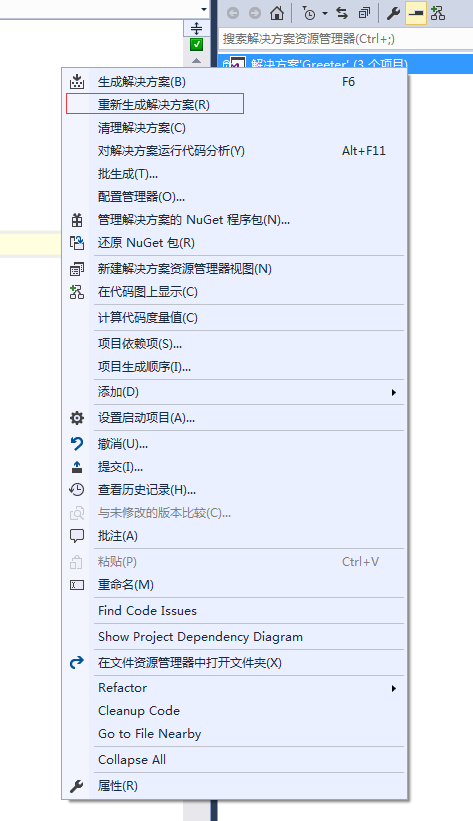
  2. 在该项目的解决右键重新生成解决方案
    439779-20170928143833653-66585942.png

项目会自动使用NuGet进行必要的package的安装。

运行 a gRPC application

  1. 运行服务
> cd GreeterServer/bin/Debug
> GreeterServer.exe
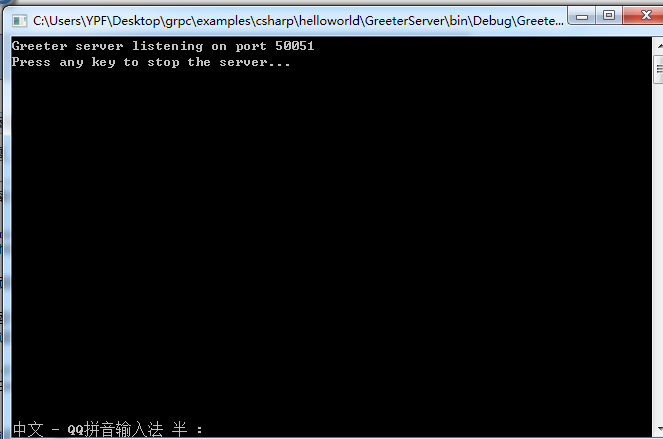
439779-20170928144014122-1497764621.png

  1. 运行客户端
> cd GreeterClient/bin/Debug
> GreeterClient.exe

439779-20170928144026184-443054984.png

更新 a gRPC service

打开目录examples/protos/helloworld.proto
将原来的文件修改为如下并保存:

// The greeting service definition.
service Greeter {
  // Sends a greeting
  rpc SayHello (HelloRequest) returns (HelloReply) {}
  // Sends another greeting
  rpc SayHelloAgain (HelloRequest) returns (HelloReply) {}
}

// The request message containing the user's name.
message HelloRequest {
  string name = 1;
}

// The response message containing the greetings
message HelloReply {
  string message = 1;
}

生成 gRPC code

在demo的根目录(examples/csharp/helloworld)下执行如下命令:

packages\Grpc.Tools.1.6.1\tools\windows_x86\protoc.exe -I../../protos --csharp_out Greeter --grpc_out Greeter ../../protos/helloworld.proto --plugin=protoc-gen-grpc=packages/Grpc.Tools.1.6.1/tools/windows_x86/grpc_csharp_plugin.exe

439779-20170928144048637-1425923015.png

这里的Grpc.Tools.1.6.1这个命令必须是跟项目中使用NuGet安装的版本一致,否则会报错。

更新并从新运行

修改服务端代码

GreeterServer/Program.cs

class GreeterImpl : Greeter.GreeterBase
{
    // Server side handler of the SayHello RPC
    public override Task<HelloReply> SayHello(HelloRequest request, ServerCallContext context)
    {
        return Task.FromResult(new HelloReply { Message = "Hello " + request.Name });
    }

    // Server side handler for the SayHelloAgain RPC
    public override Task<HelloReply> SayHelloAgain(HelloRequest request, ServerCallContext context)
    {
        return Task.FromResult(new HelloReply { Message = "Hello again " + request.Name });
    }
}

修改服务端代码

GreeterClient/Program.cs

public static void Main(string[] args)
{
    Channel channel = new Channel("127.0.0.1:50051", ChannelCredentials.Insecure);

    var client = new Greeter.GreeterClient(channel);
    String user = "you";

    var reply = client.SayHello(new HelloRequest { Name = user });
    Console.WriteLine("Greeting: " + reply.Message);
    
    var secondReply = client.SayHelloAgain(new HelloRequest { Name = user });
    Console.WriteLine("Greeting: " + secondReply.Message);

    channel.ShutdownAsync().Wait();
    Console.WriteLine("Press any key to exit...");
    Console.ReadKey();
}

运行 a gRPC application

  • 运行服务

    cd GreeterServer/bin/Debug
    GreeterServer.exe

  • 运行客户端

    cd GreeterClient/bin/Debug
    GreeterClient.exe

参考文章:

您可能感兴趣的与本文相关的镜像

Seed-Coder-8B-Base

Seed-Coder-8B-Base

文本生成
Seed-Coder

Seed-Coder是一个功能强大、透明、参数高效的 8B 级开源代码模型系列,包括基础变体、指导变体和推理变体,由字节团队开源

### C++ gRPC 学习教程和示例代码 #### 一、环境搭建 为了能够顺利运行C++中的gRPC程序,需要先完成开发环境的配置。这通常涉及到安装必要的依赖库以及设置编译工具链。具体来说,可以按照官方文档指导来准备所需的软件包,比如Protocol Buffers编译器`protoc`及其对应的C++插件,还有gRPC核心库等[^1]。 ```bash sudo apt-get install build-essential autoconf libtool pkg-config git clone https://github.com/protocolbuffers/protobuf.git cd protobuf ./autogen.sh && ./configure && make -j$(nproc) && sudo make install ``` 对于gRPC本身,则可以通过如下命令获取并构建: ```bash git clone --recurse-submodules -b v1.48.x https://github.com/grpc/grpc cd grpc mkdir -p cmake/build && cd cmake/build cmake ../.. make -j$(nproc) sudo make install ``` #### 二、创建Protobuf文件 接下来就是定义服务接口,在`.proto`文件里描述消息结构和服务方法。这里给出一个简单的例子——HelloWorld服务,其中包含了一个名为SayHello的方法用于接收请求并向客户端返回响应信息。 ```protobuf syntax = "proto3"; option cc_enable_arenas = true; package helloworld; // The greeting service definition. service Greeter { // Sends a greeting rpc SayHello (HelloRequest) returns (HelloReply) {} } // The request message containing the user's name. message HelloRequest { string name = 1; } // The response message containing the greetings message HelloReply { string message = 1; } ``` 保存上述内容到`helloworld.proto`之后,利用之前提到过的`protoc`命令行工具将其转换成相应的头文件与源码文件以便后续使用。 #### 三、编写服务器端逻辑 基于前面所生成的服务类模板,现在可以在项目中实现具体的业务处理函数了。下面展示的是如何继承自动生成出来的基类,并重写虚函数以提供实际功能的部分代码片段。 ```cpp #include <iostream> #include "helloworld.grpc.pb.h" using namespace std; using grpc::Server; using grpc::ServerBuilder; using grpc::ServerContext; using grpc::Status; using helloworld::Greeter; using helloworld::HelloReply; using helloworld::HelloRequest; class GreeterServiceImpl final : public Greeter::Service { public: Status SayHello(ServerContext* context, const HelloRequest* request, HelloReply* reply) override { string prefix("Hello "); reply->set_message(prefix + request->name()); return Status::OK; } }; ``` 这段代码实现了当接收到客户端发起的调用时会执行的操作:拼接字符串形成回复文本并通过参数传递给对方。 #### 四、启动监听进程 有了完整的协议声明加上对应的功能模块后就可以着手建立网络连接等待远端访问啦! ```cpp void RunServer() { string server_address("0.0.0.0:50051"); GreeterServiceImpl service; ServerBuilder builder; // Listen on the given address without any authentication mechanism. builder.AddListeningPort(server_address, grpc::InsecureServerCredentials()); // Register "service" as the instance through which we'll communicate with // clients. In this case it corresponds to an *synchronous* service. builder.RegisterService(&service); // Finally assemble the server. unique_ptr<Server> server(builder.BuildAndStart()); cout << "Server listening on " << server_address << endl; // Wait for the server to shutdown. Note that some other thread must be // responsible for shutting down the server for this call to ever return. server->Wait(); } ``` 此部分负责初始化HTTP/2传输层设施并将指定地址开放出去供外界联系;同时注册好先前定义好的处理器对象使得每次有新链接进来都能找到合适的地方去解析数据流进而触发相应动作。 #### 五、客户端编程指南 最后一步自然是要让应用程序具备主动出击的能力咯~即构造出能向远程主机发出请求的消息体格式化为wire format再经由socket发送过去得到回应为止的过程。 ```cpp void RunClient() { string target_str("localhost:50051"); // Instantiate the client. It requires a channel, out of which the actual RPCs // are created. This channel models a connection to an endpoint specified by // the argument; you may provide extra arguments to indicate credentials, // compression Level etc. shared_ptr<Channel> channel = CreateChannel(target_str, InsecureChannelCredentials()); // Stub acts like a proxy object representing remote side entity. unique_ptr<Greeter::Stub> stub(Greeter::NewStub(channel)); // Data we are sending to the server. HelloRequest request; request.set_name("you"); // Container for the data we expect from the server. HelloReply reply; // Context for the client. It could be used to convey extra information to // the server and/or tweak certain RPC behaviors. ClientContext context; // The actual RPC. Status status = stub->SayHello(&context, request, &reply); // Act upon its status. if (status.ok()) { cout << "Greeter received: " << reply.message() << endl; } else { cerr << status.error_code() << ": " << status.error_message() << endl; } } ``` 以上便是整个流程的大致介绍,当然这只是冰山一角而已,更多高级特性和最佳实践还需要读者朋友们自行探索学习哦~
评论
成就一亿技术人!
拼手气红包6.0元
还能输入1000个字符
 
红包 添加红包
表情包 插入表情
 条评论被折叠 查看
添加红包

请填写红包祝福语或标题

红包个数最小为10个

红包金额最低5元

当前余额3.43前往充值 >
需支付:10.00
成就一亿技术人!
领取后你会自动成为博主和红包主的粉丝 规则
hope_wisdom
发出的红包
实付
使用余额支付
点击重新获取
扫码支付
钱包余额 0

抵扣说明:

1.余额是钱包充值的虚拟货币,按照1:1的比例进行支付金额的抵扣。
2.余额无法直接购买下载,可以购买VIP、付费专栏及课程。

余额充值