






 本文介绍了如何将整数转换为罗马数字的方法,并提供了一种高效的实现方案。此外,还详细讲解了Spring框架中JdbcTemplate的基本用法,包括其优势及简单的数据库操作示例。
一、力扣打卡
今天做的是将数字转换为罗马数字,其实前两天做了将罗马数字转换为数字,罗马数字转换为数字的规则是由于罗马数字中间的规律就是,只要是正确的罗马数字,就一定有,当左边的小于右边的就减去,大于右边的就加上,使用一些小的循环就可以得到结果了!
对于罗马数字转为数字其实要简单一点,然后对于数字转换为罗马数字,其实我们只需要将特殊情况列举出来,然后使用枚举法很容易求解,这里使用的是另外一种方式
根据规则

我们可以知道存在以下情况
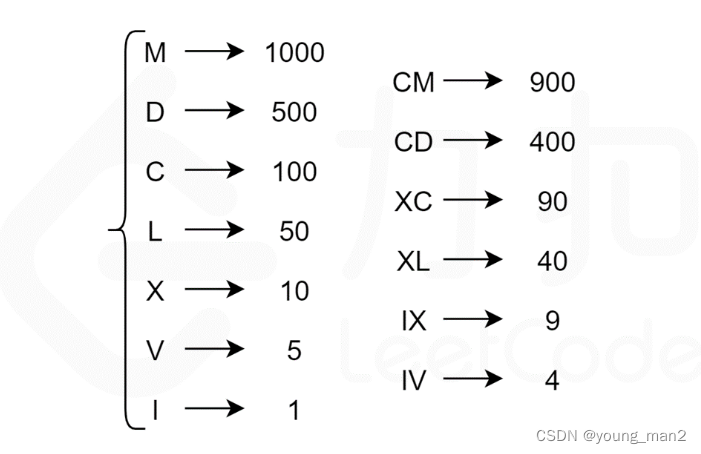
根据罗马数字的唯一表示法,为了表示一个给定的整数 \textit{num}num,我们寻找不超过 num 的最大符号值,将num 减去该符号值,然后继续寻找不超过num 的最大符号值,将该符号拼接在上一个找到的符号之后,循环直至 num 为 00。最后得到的字符串即为num 的罗马数字表示。
代码如下所示
class Solution {
    int[] values = {1000, 900, 500, 400, 100, 90, 50, 40, 10, 9, 5, 4, 1};
    String[] symbols = {"M", "CM", "D", "CD", "C", "XC", "L", "XL", "X", "IX", "V", "IV", "I"};

    public String intToRoman(int num) {
        StringBuffer roman = new StringBuffer();
        for (int i = 0; i < values.length; ++i) {
            int value = values[i];
            String symbol = symbols[i];
            while (num >= value) {
                num -= value;
                roman.append(symbol);
            }
            if (num == 0) {
                break;
            }
        }
        return roman.toString();
    }
}
二、SpinrgJdbc Template的基本使用
1.JdbcTemplate概述
是Spring框架中提供的一个对象,是对原始繁琐的jdbc API对象的简单封装。spring为我们提供了很多的操作模板类。比如:操作关系数据库的JdbcTemplate和HibernateTemplate
2. JdbcTemplate的开发步骤
①导入Spring-jdbc和spring-tx的坐标
②创建数据库表和实体
③创建Jdbc Template对象
④执行数据库操作
代码如下所示:
pom.xml
<dependencies>
        <dependency>
            <groupId>mysql</groupId>
            <artifactId>mysql-connector-java</artifactId>
            <version>5.1.45</version>
        </dependency>
        <dependency>
            <groupId>com.mchange</groupId>
            <artifactId>c3p0</artifactId>
            <version>0.9.5.2</version>
        </dependency>

        <dependency>
            <groupId>com.alibaba</groupId>
            <artifactId>druid</artifactId>
            <version>1.1.6</version>
        </dependency>

        <dependency>
            <groupId>junit</groupId>
            <artifactId>junit</artifactId>
            <version>4.12</version>
        </dependency>
        <dependency>
            <groupId>junit</groupId>
            <artifactId>junit</artifactId>
            <version>RELEASE</version>
            <scope>compile</scope>
        </dependency>

        <dependency>
            <groupId>org.springframework</groupId>
            <artifactId>spring-context</artifactId>
            <version>4.3.17.RELEASE</version>
        </dependency>

        <dependency>
            <groupId>org.springframework</groupId>
            <artifactId>spring-test</artifactId>
            <version>4.3.17.RELEASE</version>
        </dependency>

        <dependency>
            <groupId>org.springframework</groupId>
            <artifactId>spring-context</artifactId>
            <version>4.3.17.RELEASE</version>
            <scope>compile</scope>
        </dependency>
        <dependency>
            <groupId>org.springframework</groupId>
            <artifactId>spring-context</artifactId>
            <version>4.3.17.RELEASE</version>
            <scope>compile</scope>
        </dependency>
        <dependency>
            <groupId>org.springframework</groupId>
            <artifactId>spring-jdbc</artifactId>
            <version>4.3.17.RELEASE</version>
        </dependency>
        <dependency>
            <groupId>org.springframework</groupId>
            <artifactId>spring-tx</artifactId>
            <version>4.3.17.RELEASE</version>
        </dependency>
    </dependencies>
JdbcTemplateTest.java
public class JdbcTeplateTest {
    @Test
    //测试JdbcTemplate开发步骤
    public void test1() throws PropertyVetoException {

        //创建数据源对象
        ComboPooledDataSource dataSource=new ComboPooledDataSource();
        dataSource.setDriverClass("com.mysql.jdbc.Driver");
        dataSource.setJdbcUrl("jdbc:mysql://localhost:3306/test?serverTimezone=GMT%2B8");
        dataSource.setUser("root");
        dataSource.setPassword("546871893wxy.");

        JdbcTemplate jdbcTemplate=new JdbcTemplate();
        //设置数据源对象 知道数据库在哪里
        jdbcTemplate.setDataSource(dataSource);

        //执行操作
        int tom = jdbcTemplate.update("insert into account values(?,?) ", "tom", 5000);
        System.out.println(tom);

    }
}
然后在执行的时候出现了错误,可以参考本人这篇博客
还有一些内容记得看自己的代码【提醒自己的,嘿嘿嘿】

最后放上今天的美文
Gratitude is not only the greatest of virtues, but the parent of all others.
感恩不仅是最好的美德,还是其他美德之母
最后就是图片啦!






 扫一扫
扫一扫


 被折叠的 条评论
为什么被折叠?
被折叠的 条评论
为什么被折叠?
 到【灌水乐园】发言





