



 本文详细介绍了HiveWebInterface(HWI)和WebHCat的使用方法、特性及配置步骤,包括如何通过它们进行Hive命令操作、查询执行、应用部署等,并提供了启动、访问和安装指南。
The Hive Web Interface, abbreviated as HWI, is a simple graphical user interface (GUI). HWI is an alternative to using the Hive command line interface.
Another web interface that can be used for Hive commands is WebHCat, a REST API (not GUI). With WebHCat, applications can make HTTP requests to access the Hive metastore (HCatalog DDL) or to create and queue Hive queries and commands, Pig jobs, and MapReduce or YARN jobs (either standard or streaming). WebHCat was formerly named Templeton.
Features of HWI
-
Schema Browsing
-
Detached Query Execution
-
No Local Installation
Configuration
You should not need to edit the defaults for the Hive Web Interface. HWI uses:
<property>
<name>hive.hwi.war.file</name>
<value>lib/hive-hwi-0.12.0.war</value>
<description>This sets the path to the HWI war file, relative to ${HIVE_HOME}. </description>
</property>
<property>
<name>hive.hwi.listen.host</name>
<value>0.0.0.0</value>
<description>This is the host address the Hive Web Interface will listen on</description>
</property>
<property>
<name>hive.hwi.listen.port</name>
<value>9999</value>
<description>This is the port the Hive Web Interface will listen on</description>
</property>
Start Up
export ANT_LIB=/usr/local/apache-ant-1.9.3/lib
bin/hive --service hwinohup bin/hive --service hwi > /dev/null 2> /dev/null &
bin/hive --service hwi --help Note:Normally, when running a command using & and exiting the shell afterwards, the shell will terminate the sub-command with the hangup signal (kill -SIGHUP <pid>). This can be prevented using nohup, as it catches the signal and ignores it so that it never reaches the actual application.
Access
http://192.168.122.1:9999/hwi
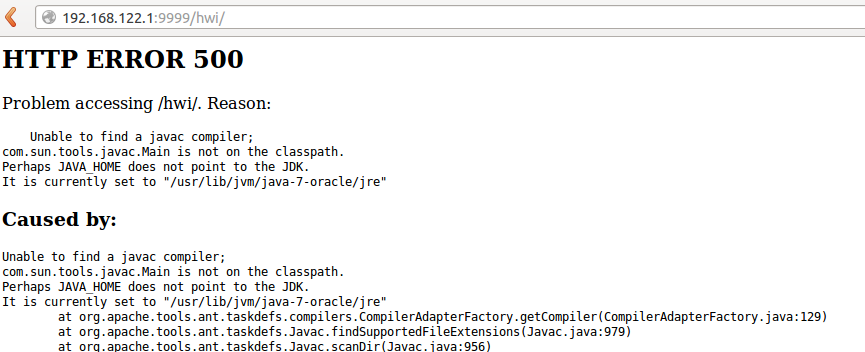
A: My hive server has not install java jdk.
a. download jdk-7u51-linux-x64.tar.gz
b. cp download/jdk-7u51-linux-x64.tar.gz to /usr/lib/jvm
d. untar it to /usr/lib/jvm/jdk/jdk1.7.0_51
e. change JAVA_HOME=/usr/lib/jvm/jdk/jdk1.7.0_51 in /etc/bash.bashrc
f. cp /usr/lib/jvm/jdk/jdk1.7.0_51/lib/tools.jar hive/lib/
References
https://cwiki.apache.org/confluence/display/Hive/HiveWebInterface





 扫一扫
扫一扫


 8866
8866

 被折叠的 条评论
为什么被折叠?
被折叠的 条评论
为什么被折叠?
 到【灌水乐园】发言





