



 本文详细介绍了如何在 Ubuntu 12.04 上安装配置 Hue 3.5.0,并提供了针对依赖包安装、编译错误解决方法及配置文件示例等内容。适用于希望使用 Hue 进行 Hadoop 集群管理的用户。
EVN: ubuntu 12.04/13.01 hadoop2.x.0 hue3.5.0 pig0.12.0 hive0.12.0 sqoop1.99.3
oozie4.0.0 hbase0.98.0
-
- Prepare evn
-----------------
#sudo apt-get update
#sudo apt-get install libxml2-dev
#sudo apt-get install libxslt-dev
#sudo apt-get install libsasl2-dev
#sudo apt-get install libsasl2-modules-gssapi-mit
#sudo apt-get install libmysqlclient-dev
#sudo apt-get install python-dev
#sudo apt-get install python-setuptools
#sudo apt-get install python-simplejson
#sudo apt-get install libsqlite3-dev
the remaining packages can't be installed (uable to locate package)
cyrus-sasl-devel cyrus-sasl-gssapi krb5-devel libtidy openldap-devel
but the similar packages can be installed correctly.
libsasl2-dev libsasl2-modules-gssapi-mit libtidy-0.99-0 libkrb5-dev libldap2-dev
The dependency relations are wrong in the official site. Using the dependencies listed in the left column in
http://cloudera.github.io/hue/docs-3.5.0/manual.html
- Install
#tar -xzvf hue-3.5.0.tar.gz
#cd hue-3.5.0
#PREFIX=/usr/share make install
produce errors, can't install sucessfully.
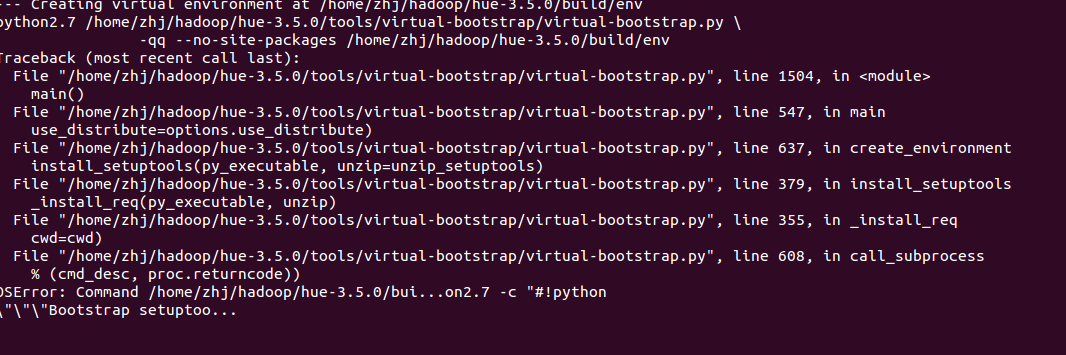
solution:
32位 sudo ln -fs /usr/lib/python2.7/plat-i386-linux-gnu/_sysconfigdata_nd.py /usr/lib/python2.7/ 64位sudo ln -fs /usr/lib/python2.7/plat-x86_64-linux-gnu/_sysconfigdata_nd.py /usr/lib/python2.7/
similar errors:
http://www.marshut.com/irrnwm/hue-make-error.html#irtpyi
https://issues.cloudera.org/browse/HUE-1672
https://github.com/pypa/virtualenv/issues/410
but there still has an error:
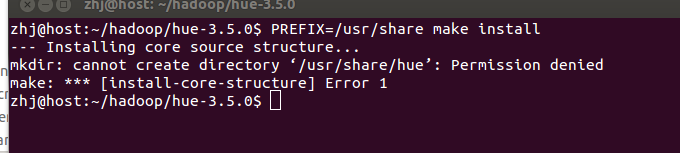
solution:
#PREFIX=/home/zhj make install
------------------
- Configuration
Listing all Configuration Options
$ /path/to/hue/build/env/bin/hue config_help | less
Hue configuration fie dir is: /path/to/hue/desktop/conf
hue.ini log4j.properties log.conf
-------------------------- hue conf hue.ini ------------------------------
# Configuration for HDFS NameNode
fs_defaultfs=hdfs://192.168.122.1:2014
logical_name=hdfs://192.168.122.1:2014
webhdfs_url=http://192.168.122.1:50070/webhdfs/v1
# Configuration for YARN (MR2)
resourcemanager_host=192.168.122.1
resourcemanager_port=2015
resourcemanager_api_url=http://192.168.122.1:2019
history_server_api_url=http://192.168.122.1:10020 // => mapreduce.jobhistory.address (mapred-site.xml)
# Settings to configure Sqoop
server_url=http://192.168.122.1:12000/sqoop
# Settings to configure Pig
local_sample_dir=/home/zhaohj/hadoop/pig-0.12.0/contrib/piggybank/java
remote_data_dir=/user/hue/pig/piggybank
# Settings to configure Beeswax with Hive
hive_server_host=192.168.122.1
hive_server_port=10000
hive_conf_dir=/home/zhaohj/hadoop/hive-0.12.0-bin/conf
hive_home_dir=/home/zhaohj/hadoop/hive-0.12.0-bin
hive_server_bin=/home/zhaohj/hadoop/hive-0.12.0-bin/bin/hiveserver2
# Settings for the User Admin application
default_user_group=supergroup
# Settings to configure the Zookeeper application.
host_ports=host.dataminer:2181,f1.zhj:2181,f2.zhj:2181
rest_url=http://host.dataminer:9998
---------------- hadoop conf hdfs-site.xml -------------
<property>
  <name>dfs.webhdfs.enabled</name>
  <value>true</value>
</property>
---------------- hadoop conf core-site.xml -------------
<property>
  <name>hadoop.proxyuser.hue.hosts</name>
  <value>*</value>
</property>
<property>
  <name>hadoop.proxyuser.hue.groups</name>
  <value>*</value>
</property>
If you place your Hue Server outside the Hadoop cluster, you can run an HttpFS server to provide Hue access to HDFS. The HttpFS service requires only one port to be opened to the cluster.
---------------- hadoop conf httpfs-site.xml -------------
<property>
  <name>httpfs.proxyuser.hue.hosts</name>
  <value>*</value>
</property>
<property>
  <name>httpfs.proxyuser.hue.groups</name>
  <value>*</value>
</property>
- Set Path and Start Hue
append the following two lines to the end of ~/.bashrc
export HUE_HOME=/home/zhaohj/hadoop/hue
export PATH=$HUE_HOME/build/env/bin:$PATH
#source ~/.bashrc
You maybe need to install sqoop, pig, hive, hbase,spark,impala,zookeeper,ooize or others related software
#sqoop.sh server start
#hiveserver2
-------
start Hue by command:
#supervisor
You can now access Hue by the url
http://localhost:8888/
---------------------------------------------------------------------------------------------------------
The above steps succues on ubuntu12.04 but faild on Centos 6
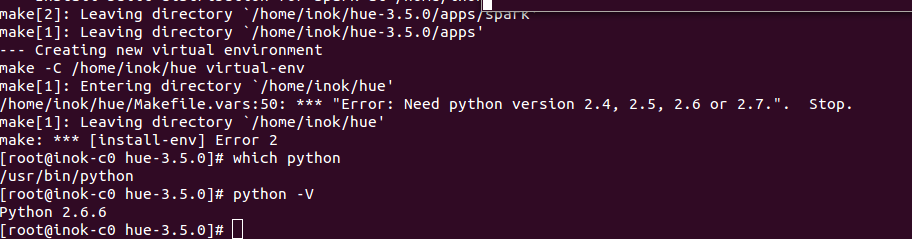
some dependencies han't installed.

# yum install cyrus-sasl-plain
http://grokbase.com/p/cloudera/hue-user/13aq9ntmg8/hiveserver2-configuration-for-hue-3-0
references:
http://cloudera.github.io/hue/docs-3.5.0/manual.html
http://doc.mapr.com/display/MapR/Installing+Hue
https://help.ubuntu.com/10.04/serverguide/kerberos.html
http://archive.cloudera.com/cdh/3/hue/manual.html





 扫一扫
扫一扫


 929
929

 被折叠的 条评论
为什么被折叠?
被折叠的 条评论
为什么被折叠?
 到【灌水乐园】发言





