



 本文详细介绍了Java JDBC的核心组件,包括DriverManager、Driver、Connection、Statement、ResultSet和SQLException。讲解了如何导入JDBC包、注册驱动、配置数据库URL和创建连接。还阐述了Statement和PreparedStatement的使用,以及结果集的处理和数据的检索。此外,提到了数据库事务的管理以及JDBC的批处理操作。最后,提到了工具类的设计以及数据库信息的配置方式。
核心组件:
DriverManager: 此类管理数据库驱动程序列表。使用通信子协议将来自java应用程序的连接请求
与适当的数据库驱动程序匹配。
Driver:此接口处理与数据库服务器的通信,我们很少会直接与Driver对象进行交互。而是使用
DriverManager对象来管理这种类型的对象。
Connection:该界面具有用于联系数据库的所有方法。连接对象表示通信上下文,即,与数据库
的所有通信仅通过连接对象。
Statement:使用从此接口创建的对象将SQL语句提交到数据库。除了执行存储过程之外,一些派
生接口还接受参数。
ResultSet:在使用Statement对象执行SQL查询后,这些对象保存从数据库检索的数据。它作为一 个迭代器,允许我们移动其数据。
SQLException:此类处理数据库应用程序中发生的任何错误
步骤:
- 导入JDBC包:将Java语言的*import*语句添加到Java代码中导入所需的类。
- 注册JDBC驱动程序:此步骤将使JVM将所需的驱动程序实现加载到内存中,以便它可以满足您的JDBC 请求。
- 数据库URL配置:这是为了创建一个格式正确的地址,指向要连接到的数据库。
- 创建连接对象:最后,调用DriverManager对象的getConnection()方法来建立实际的数据库连 接。
- 导入JDBC包:
import java.sql.*
- 注册JDBC驱动程序:
Class.forName("com.mysql.cj.jdbc.Driver); //方法1
Driver myDriver = new com.mysql.cj.jdbc.Driver(); //方法2
DriverManager.registerDriver( myDriver );
- 数据库URL配置:

- 创建连接对象:
Connection conn =DriverManager.getConnection(String url,String user,String password);
- getConnection(String url)
- getConnection(String url,Properties prop) //可通过文件生成prop
- getConnection(String url,String user,String password)
- 关闭数据库连接:
conn.close();
- JDBC执行SQL语句
-创建Statement对象
通过JDBC Statement和PreparedStatement接口
Statement:在运行时使用静态SQL语句时很有用。Statement接口不能 接受参数。
PreparedStatement :多次使用SQL语句时使用。PreparedStatement接口在运行时接受输入参数。
Statement stmt = null; //状态通道
try {
stmt = conn.createStatement( );
。。。。。
String sql = "update employee set age = ? where name = ? ";
PreparedStatement pstmt = conn.prepareStatement(sql);
pstmt.setInt(1,18);
pstmt.setString(2,"小明");
resultSet = pstmt.executeQuery();
- 通过Statement对象执行SQL语句得到结果集ResultSet:
stmt.executeXXX("select * form 表名");
- boolean execute(String SQL):如果可以检索到ResultSet对象,则返回一个布尔值true; 否则返回false。使用此方法执行SQL DDL语句或需要使用真正的动态SQL时。
- int executeUpdate(String SQL):返回受SQL语句执行影响的行数。使用此方法执行预期会影响 多个行的SQL语句,例如INSERT,UPDATE或DELETE语句。
- ResultSet executeQuery(String SQL):返回一个ResultSet对象。当您希望获得结果集时,请使用此方法,就像使用SELECT语句一样。
- 关闭Statement对象
stmt.close();
-通过ResultSet.getXXX()方法从结果集中检索数据:
while(resoultset.next()){
String name = resultSet.getString("name"); //括号里加列名
}
JAVA操作两表关系
四种:双向一对一,一对多,多对一,多对多
多表关系处理数据
(1) 数据库通过外键建立两表关系
(2) 实体类通过属性的方式建立两表关系
实体类要求:类名=表名,列名=属性名
bean包:存放实体类
dao包:存放处理数据的Dao接口和接口的实现类 DaoImpl
测试包:存放测试类Test
数据库事务:
1、要取消掉JDBC的自动提交:void setAutoCommit(boolean autoCommit)
2、执行各个SQL语句,加入到批处理之中
3、如果所有语句执行成功,则提交事务 commit();如果出现了错误,则回滚:rollback()
conn.setAutoCommit(false); //关闭自动提交
conn.commit( ); //提交
conn.rollback(savepointName); //回滚到保存点
setSavepoint(String savepointName); //设置保存点
JDBC批处理
Statement批处理
- 使用createStatement()方法创建Statement对象。
- 使用setAutoCommit()将auto-commit设置为false 。
- 使用addBatch()方法在创建的语句对象上添加您喜欢的SQL语句到批处理中。
- 在创建的语句对象上使用executeBatch()方法执行所有SQL语句。
- 最后,使用commit()方法提交所有更改
PreparedStatement批处理
1. 使用占位符创建SQL语句。
2. 使用prepareStatement() 方法创建PrepareStatement对象。
3. 使用setAutoCommit()将auto-commit设置为false 。
4. 使用addBatch()方法在创建的语句对象上添加您喜欢的SQL语句到批处理中。
5. 在创建的语句对象上使用executeBatch()方法执行所有SQL语句。
6. 最后,使用commit()方法提交所有更改。
工具类的定义
1.定义需要的工具类对象
protected Connection connection=null;
protected PreparedStatement pps=null;
protected ResultSet rs=null;
protected int k=0;//受影响的行数
private String url="jdbc:mysql://localhost:3306/yhp";
private String username="root";
private String password="123456";
2.加载驱动 static{ }
3.获得连接 protected Connection getConnection(){ }
4.创建通道 protected PreparedStatement getPps(String sql){ }
5.给占位符赋值 list中保存的是给占位符所赋的值
private void setParams(List list){ }
6.增删改调取的方法 protected int update(String sql,List params){ }
7.查询的时候调取一个方法 protected ResultSet query(String sql,List list){ }
8.关闭资源
protected void closeall(){
try {
if (rs != null) {
rs.close();
}
if (pps != null) {
pps.close();
}
if (connection != null) {
connection.close();
}
} catch (SQLException e) {
e.printStackTrace();
}
}
properties文件保存数据库信息
db.properties
driver=com.mysql.jdbc.Driver
url=jdbc:mysql://localhost:3306/yhp
user=root
password=123456
方法一:
InputStream inputStream =
当前类名.class.getClassLoader().getResourceAsStream("db.properties");
Properties properties = new Properties();
properties.load(inputStream);
dirverName = properties.getProperty("driver");
url = properties.getProperty("url");
username = properties.getProperty("user");
password = properties.getProperty("password");
方法二:
static{
//参数只写属性文件名即可,不需要写后缀
ResourceBundle bundle = ResourceBundle.getBundle("db");
driver = bundle.getString("driver");
url = bundle.getString("url");
username = bundle.getString("user");
password = bundle.getString("password");
}
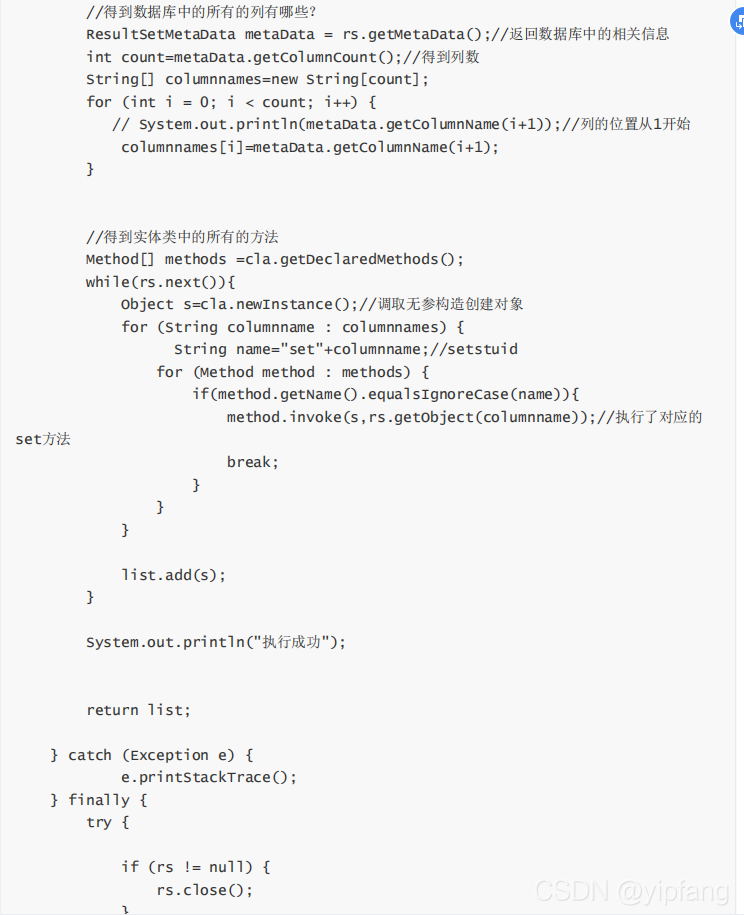
反射处理结果集:
ResultSetMetaData metaData = rs.getMetaData();//返回数据库中的相关信息
int count=metaData.getColumnCount();//得到列数
//得到实体类中的所有的方法
Method[] methods =cla.getDeclaredMethods();
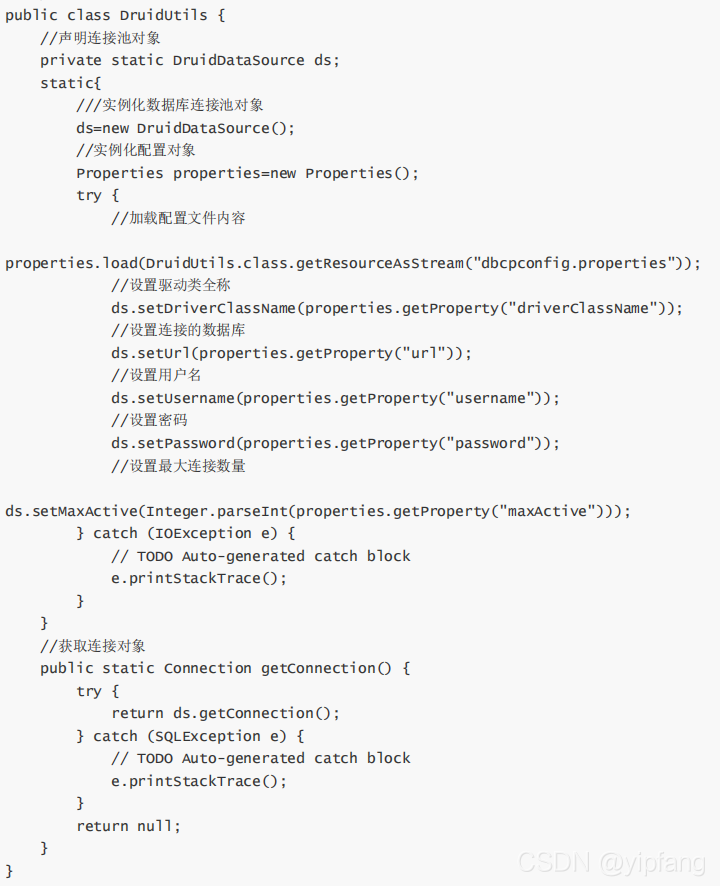
Druid(德鲁伊)连接池





 扫一扫
扫一扫


 397
397

 被折叠的 条评论
为什么被折叠?
被折叠的 条评论
为什么被折叠?
 到【灌水乐园】发言





