


 本文展示了如何使用Java的JDBC进行数据库操作,包括加载MySQL驱动、建立连接、预编译SQL语句以及执行增、删、改、查操作。示例代码详细演示了查询所有学生信息、添加新学生、删除指定ID学生和更新学生信息的过程。
 代码:
代码:
@Test
    public void testSelectAll() {
        try {
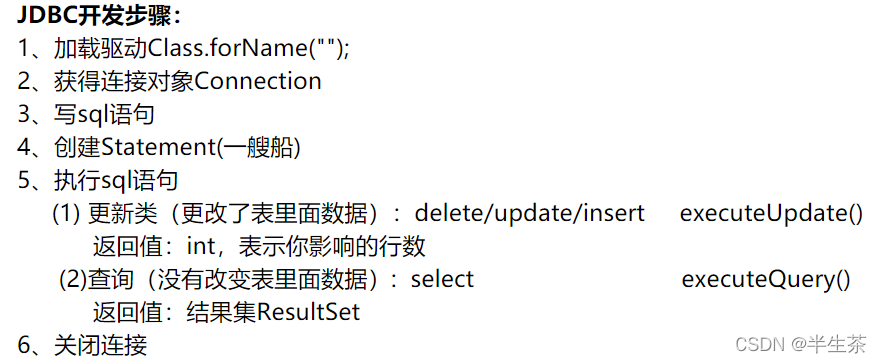
            //        1、加载驱动Class.forName("");
            Class.forName("com.mysql.jdbc.Driver");
            //        2、获得连接对象Connection
            Connection connection = DriverManager.getConnection(
                    "jdbc:mysql://localhost:3306/java211202?userUnicode=true&characterEncoding=UTF-8", "root", "1234");
            //        3、写sql语句
            String sql = "SELECT id,`name`,age,gender FROM student";
            //        4、预编译Statement
            PreparedStatement statement = connection.prepareStatement(sql);
            //        5、执行sql语句
//                (1) 更新类(更改了表里面数据):delete/update/insert    executeUpdate()
//        返回值:int,表示你影响的行数
//                (2)查询(没有改变表里面数据):  select                  executeQuery()
//        返回值:结果集ResultSet
            ResultSet resultSet = statement.executeQuery(sql);
            ArrayList<Student> list = new ArrayList<>();
            while (resultSet.next()) {
                int id = resultSet.getInt("id");
                String name = resultSet.getString("name");
                int age = resultSet.getInt("age");
                String gender = resultSet.getString("gender");
                Student student = new Student(id, name, age, gender);
                list.add(student);
            }
            for (Student student : list) {
                System.out.println(student);
            }
            connection.close();
        } catch (ClassNotFoundException e) {
            e.printStackTrace();
        } catch (SQLException throwables) {
            throwables.printStackTrace();
        }
    }
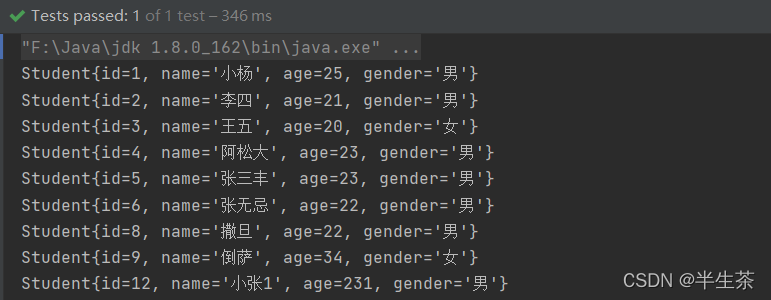
查询结果:
增:
@Test
public void testAdd() {
    try {
        Class.forName("com.mysql.jdbc.Driver");
        Connection connection = DriverManager.getConnection("jdbc:mysql://localhost:3306/java211202?useUnicode=true&characterEncoding=UTF-8","root","1234");
        String sql = "INSERT INTO student(`name`,age,gender) VALUES(?,?,?)";
        PreparedStatement statement = connection.prepareStatement(sql);
        statement.setString(1,"小八");
        statement.setInt(2,25);
        statement.setString(3,"女");
        int count = statement.executeUpdate();
        System.out.println("count: " + count);
    } catch (ClassNotFoundException e) {
        e.printStackTrace();
    } catch (SQLException throwables) {
        throwables.printStackTrace();
    }
}
删除:
@Test
public void testDelete() {
    try {
        Connection connection = JDBCUtil.getConnection();
        String sql = "DELETE FROM student WHERE id=? ";
        PreparedStatement statement = connection.prepareStatement(sql);
        statement.setInt(1, 27);
        System.out.println(statement);
        int count = statement.executeUpdate();
        System.out.println("count" + count);
    } catch (SQLException throwables) {
        throwables.printStackTrace();
    }
改:
Test
public void testUpdate() {
    try {
        Connection connection = JDBCUtil.getConnection();
        String sql = "UPDATE student set name=?,age=?,gender=? WHERE id=?";
        PreparedStatement statement = connection.prepareStatement(sql);
        statement.setString(1, "小张");
        statement.setInt(2, 23);
        statement.setString(3, "男");
        statement.setInt(4, 4);
        System.out.println(statement);
        int count = statement.executeUpdate();
        System.out.println("count" + count);
    } catch (SQLException throwables) {
        throwables.printStackTrace();
    }
}





 扫一扫
扫一扫


 1687
1687

 被折叠的 条评论
为什么被折叠?
被折叠的 条评论
为什么被折叠?
 到【灌水乐园】发言





