Missing permissions required by ConnectivityManager.getActiveNetworkInfo: android.permission.ACCESS_

本文介绍在Android应用中监听网络状态变化时遇到的权限缺失问题及解决方案。当使用ConnectivityManager.getActiveNetworkInfo()方法时,若未在AndroidManifest.xml中声明相应权限,将导致运行时崩溃。文中详细说明了如何通过添加网络状态访问权限来解决此问题。
在学习Android的广播接收器的时候,监听网络变化,告知用户是有网络还是无网络。
在onReceive方法中调用getActiveNetworkInfo()时报错

报错信息:Missing permissions required by ConnectivityManager.getActiveNetworkInfo: android.permission.ACCESS_NETWORK_STATE less... (Ctrl+F1) 
This check scans through your code and libraries and looks at the APIs being used, and checks this against the set of permissions required to access those APIs. If the code using those APIs is called at runtime, then the program will crash.  Furthermore, for permissions that are revocable (with targetSdkVersion 23), client code must also be prepared to handle the calls throwing an exception if the user rejects the request for permission at runtime.  Issue id: MissingPermission

解决办法:
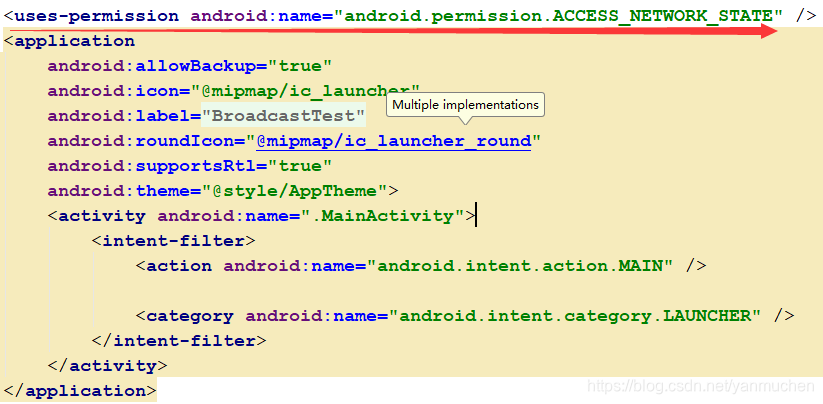
在app/src/main/AndroidManifest.xml里添加权限,如下:
<uses-permission android:name="android.permission.ACCESS_NETWORK_STATE" />

其实点击小灯泡也可以自动帮你加

 

分析/* * Copyright (C) 2016 The Android Open Source Project * * Licensed under the Apache License, Version 2.0 (the "License"); you may not use this file * except in compliance with the License. You may obtain a copy of the License at * * http://www.apache.org/licenses/LICENSE-2.0 * * Unless required by applicable law or agreed to in writing, software distributed under the * License is distributed on an "AS IS" BASIS, WITHOUT WARRANTIES OR CONDITIONS OF ANY * KIND, either express or implied. See the License for the specific language governing * permissions and limitations under the License. */ package com.android.settings.datausage; import android.app.settings.SettingsEnums; import android.content.Context; import android.content.Intent; import android.content.res.TypedArray; import android.net.ConnectivityManager; import android.net.NetworkTemplate; import android.os.Bundle; import android.util.AttributeSet; import androidx.annotation.VisibleForTesting; import androidx.core.content.res.TypedArrayUtils; import androidx.preference.Preference; import com.android.settings.R; import com.android.settings.core.SubSettingLauncher; import com.android.settingslib.net.DataUsageController; public class DataUsagePreference extends Preference implements TemplatePreference { private NetworkTemplate mTemplate; private int mSubId; private int mTitleRes; public DataUsagePreference(Context context, AttributeSet attrs) { super(context, attrs); final TypedArray a = context.obtainStyledAttributes( attrs, new int[] {com.android.internal.R.attr.title}, TypedArrayUtils.getAttr( context, androidx.preference.R.attr.preferenceStyle, android.R.attr.preferenceStyle), 0); mTitleRes = a.getResourceId(0, 0); a.recycle(); } @Override public void setTemplate(NetworkTemplate template, int subId, NetworkServices services) { mTemplate = template; mSubId = subId; final DataUsageController controller = getDataUsageController(); if (mTemplate.isMatchRuleMobile()) { setTitle(R.string.app_cellular_data_usage); } else { final DataUsageController.DataUsageInfo usageInfo = controller.getDataUsageInfo(mTemplate); setTitle(mTitleRes); setSummary(getContext().getString(R.string.data_usage_template, DataUsageUtils.formatDataUsage(getContext(), usageInfo.usageLevel), usageInfo.period)); } final long usageLevel = controller.getHistoricalUsageLevel(template); if (usageLevel > 0L) { setIntent(getIntent()); } else { setIntent(null); setEnabled(false); } } @Override public Intent getIntent() { final Bundle args = new Bundle(); final SubSettingLauncher launcher; args.putParcelable(DataUsageList.EXTRA_NETWORK_TEMPLATE, mTemplate); args.putInt(DataUsageList.EXTRA_SUB_ID, mSubId); args.putInt(DataUsageList.EXTRA_NETWORK_TYPE, mTemplate.isMatchRuleMobile() ? ConnectivityManager.TYPE_MOBILE : ConnectivityManager.TYPE_WIFI); launcher = new SubSettingLauncher(getContext()) .setArguments(args) .setDestination(DataUsageList.class.getName()) .setSourceMetricsCategory(SettingsEnums.PAGE_UNKNOWN); if (mTemplate.isMatchRuleMobile()) { launcher.setTitleRes(R.string.app_cellular_data_usage); } else { launcher.setTitleRes(mTitleRes); } return launcher.toIntent(); } @VisibleForTesting DataUsageController getDataUsageController() { return new DataUsageController(getContext()); } } 关闭WIFI流量用量
最新发布
08-26
评论 4
成就一亿技术人!
拼手气红包6.0元
还能输入1000个字符
 
红包 添加红包
表情包 插入表情
 条评论被折叠 查看
添加红包

请填写红包祝福语或标题

红包个数最小为10个

红包金额最低5元

当前余额3.43前往充值 >
需支付:10.00
成就一亿技术人!
领取后你会自动成为博主和红包主的粉丝 规则
hope_wisdom
发出的红包
实付
使用余额支付
点击重新获取
扫码支付
钱包余额 0

抵扣说明:

1.余额是钱包充值的虚拟货币,按照1:1的比例进行支付金额的抵扣。
2.余额无法直接购买下载,可以购买VIP、付费专栏及课程。

余额充值