


 本文主要讲述了作者在使用ExpReport类生成包含温湿度曲线图的PDF报告过程中遇到的问题,如控制图例位置和隐藏x轴标签,以及如何设置图表样式和数据展示。
个人重点关注的是生成曲线图的部分,浪费了我很多时间
chart.Legend.Position = LegendPosition.Top;
控制图形的显示位置,这个地方好像必须要选一个位置,否则会内容显示不全,我开始用的LegendPosition.None,他就显示不了那几条线的颜色和名称说明文字。为了搞出这个效果浪费了我一天时间。
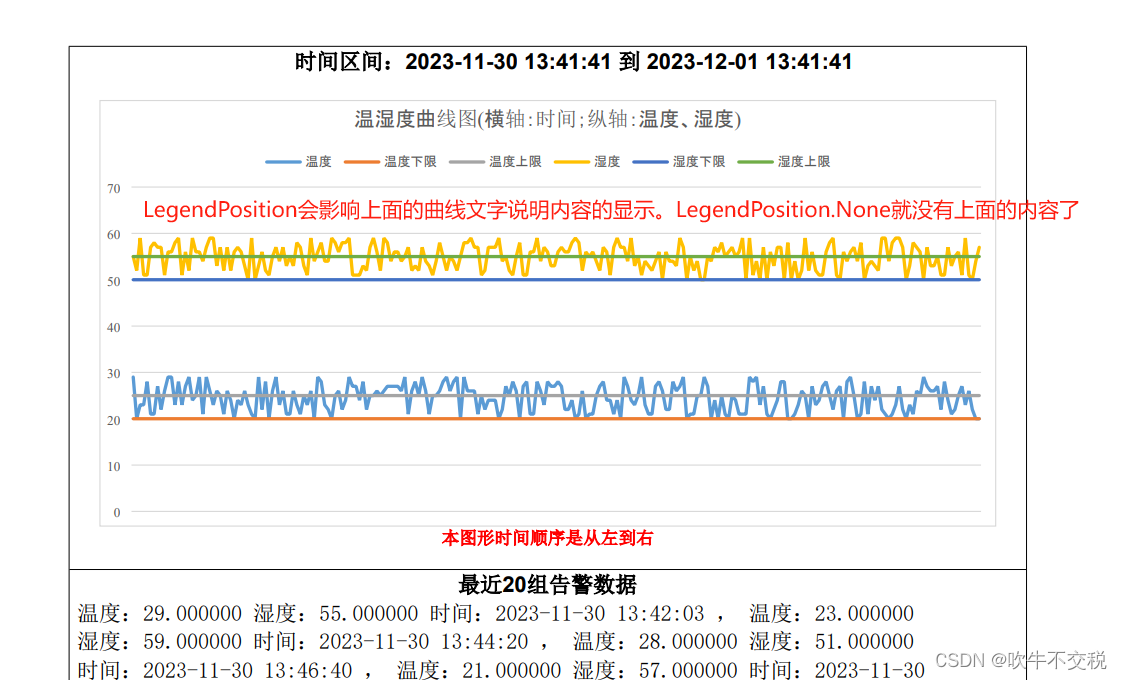
xAxis.Hidden = true;//隐藏x轴标签
public class ExpReport
{
//IWebHostEnvironment _webHostEnvironment;
//public ExpReport(IWebHostEnvironment webHostEnvironment)
//{
// _webHostEnvironment = webHostEnvironment;
//}
public static string ReportChartPdf(List<TahmCJ_wdDto> Listdto, ExpReportDto ReportDto)
{
try
{
IConfiguration myconfiguration = new ConfigurationBuilder().SetBasePath(Directory.GetCurrentDirectory()).AddJsonFile("appsettings.json").Build();
Document doc = new Document();
DocumentBuilder builder = new DocumentBuilder(doc);
builder.PageSetup.Orientation = Orientation.Portrait;
//var parentPath = AppContext.BaseDirectory.ToString()+@"\wwwroot\";
var parentPath = Path.Combine(IOCProvider.GetService<IHostEnvironment>().ContentRootPath,"wwwroot");
//
string strReportFileUrl = myconfiguration["Report:ReportFileUrl"].ToString();
string dateDir = DateTime.Now.Date.ToString("yyyyMMdd");
string saveFileStr = "温湿度曲线报表_" + DateTime.Now.Date.ToString("yyyyMMddHHmmss") + new Random().Next(1, 1000).ToString() + ".docx";
// 你用path
string strSavePath = Path.Combine(parentPath, strReportFileUrl, dateDir);
FolderAndFile.FolderCreate(strSavePath);
strSavePath = Path.Combine(strSavePath, saveFileStr);
string strCompanyLogo = myconfiguration["Report:CompanyLogo"].ToString();
string Logpicurl = Path.Combine(parentPath, strCompanyLogo);
string ComLogoWidth = myconfiguration["Report:CompanyLogoWidth"].ToString();
string ComLogoHeight = myconfiguration["Report:CompanyLogoHeight"].ToString();
//Logpicurl = FolderAndFile.SetImageSize(float.Parse(ComLogoWidth), float.Parse(ComLogoHeight), Logpicurl, "");
string RepImageWidth = myconfiguration["Report:ReportImageWidth"].ToString();
string RepImageHeight = myconfiguration["Report:ReportImageHeight"].ToString();
ReportDto.LogoPicUrl = Logpicurl;
ReportDto.aveWD = Math.Round((decimal)Listdto.Average(x => x.wd1), 1).ToString("0.0");
ReportDto.aveSD = Math.Round((decimal)Listdto.Average(x => x.sd1), 1).ToString("0.0");
ReportDto.highWD = Listdto.Max(x => (decimal)x.wd1).ToString("0.0");
ReportDto.highSD = Listdto.Max(x => (decimal)x.sd1).ToString("0.0");
ReportDto.lowWD = Listdto.Min(x => (decimal)x.wd1).ToString("0.0");
ReportDto.lowSD = Listdto.Min(x => (decimal)x.sd1).ToString("0.0");
ReportDto.WDLimit = ((decimal)Listdto[0].wdlowLimit).ToString("0.0") + "--" + ((decimal)Listdto[0].wdHghLimit).ToString("0.0");
ReportDto.SDLimit = ((decimal)Listdto[0].sdLowLimit).ToString("0.0") + "--" + ((decimal)Listdto[0].sdHghLimit).ToString("0.0");
var alarmList = Listdto.Select(x => new { x.wd1, x.sd1, x.dt }).Where(x => x.wd1 < ((decimal)Listdto[0].wdlowLimit) || x.wd1 > ((decimal)Listdto[0].wdHghLimit) 最低0.47元/天 解锁文章






 扫一扫
扫一扫


 1067
1067

 被折叠的 条评论
为什么被折叠?
被折叠的 条评论
为什么被折叠?
 到【灌水乐园】发言





