


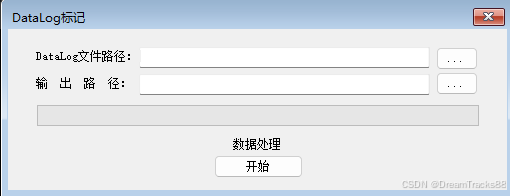
FrmMarkData.cs
public partial class FrmMarkData : Form
{
string pdsFile = "";
string SaveFile = "";
string FileName = "";
int totel = 0;
int time = 0;
bool closeFrm = false;
string titel = "数据转换...";
Dictionary<int, Iterm> ItermFTMaxMin = new Dictionary<int, Iterm>();
Dictionary<int, Iterm> ItermQCMaxMin = new Dictionary<int, Iterm>();
List<MarrkInfoCell> marrkInfos = new List<MarrkInfoCell>();//需要标颜色的cell
public FrmMarkData()
{
InitializeComponent();
lb_tiltl.Text = "";
ProBar.Visible = false;
}
private void btn_start_Click(object sender, EventArgs e)
{
// PdsToExcel();
//CsvToExcel();
ItermFTMaxMin.Clear();
ItermQCMaxMin.Clear();
marrkInfos.Clear();
btn_start.Enabled = false;
btn_select.Enabled = false;
btn_OutPut.Enabled = false;
Tbox_OutPath.Enabled = false;
TBox_Path.Enabled = false;
ProBar.Visible = true;
closeFrm = true;//静止关闭窗口
time = 0;
timer1.Enabled = true;
BackgroundWorker bgwA = new BackgroundWorker();
bgwA.WorkerReportsProgress = true;
bgwA.DoWork += bgwA_DoWork;
bgwA.ProgressChanged += bgwA_ProgressChanged;
bgwA.RunWorkerCompleted += bgwA_Completed;
bgwA.RunWorkerAsync();
}
private void btn_select_Click(object sender, EventArgs e)
{
if (Tools.Open_FlieDialog(ref pdsFile, "*.csv|*.csv", "选择csv格式的文件") == true)
{
TBox_Path.Text = pdsFile;
FileName = Path.GetFileName(pdsFile);//获取路劲中带文件类型的文件名
FileName = FileName.Substring(0, FileName.Length - 4);//获取路劲的文件名
Tbox_OutPath.Text = Path.GetDirectoryName(pdsFile)+"\\"+ FileName+ ".xlsx";
SaveFile = FileName;
}
}
private void btn_OutPut_Click(object sender, EventArgs e)
{
if (Tools.Open_SaveFlieDialog(ref SaveFile, "excel文件|*.xlsx", "xlsx"))
{
Tbox_OutPath.Text = SaveFile;
}
}
//获取测试项的最大值或最小值
void getMaxMin(string MaxText,string MinText,bool isFT)
{
String[] MaxRows = MaxText.Split(',');
String[] MinRows = MinText.Split(',');
float MaxResult,MinResult;
if (isFT)//FT
{
for (int i = 0; i < MaxRows.Length; i++)
{
Iterm iterm = new Iterm();
//最大值
if (float.TryParse(MaxRows[i], out MaxResult))
{
iterm.max = MaxResult;
iterm.MaxFlg = true;
}
else
{
iterm.MaxFlg = false; ;
}
//最小值
if (float.TryParse(MinRows[i], out MinResult))
{
iterm.min = MinResult;
iterm.MinFlg = true;
}
else
{
iterm.MinFlg = false;
}
ItermFTMaxMin.Add(i, iterm);
}
}
else//QC
{
for (int i = 0; i < MaxRows.Length; i++)
{
Iterm iterm = new Iterm();
//最大值
if (float.TryParse(MaxRows[i], out MaxResult))
{
iterm.max = MaxResult;
iterm.MaxFlg = true;
}
else
{
iterm.MaxFlg = false; ;
}
//最小值
if (float.TryParse(MinRows[i], out MinResult))
{
iterm.min = MinResult;
iterm.MinFlg = true;
}
else
{
iterm.MinFlg = false;
}
ItermQCMaxMin.Add(i, iterm);
}
}
}
//做任务
private void bgwA_DoWork(object sender, DoWorkEventArgs e)
{
float result;
var bgworker = sender as BackgroundWorker;
int line = 1;
bool FTDataFlg = false;
bool QCDataFlg = false;
//int DataLine = 0;//标记数据在哪一行开始
int FTDataStr = 0;//FT开始的行数
int FTDataEnd = 0;//FT结束的行数
int QCDataStr = 0;//FT开始的行数
int QCDataEnd = 0;//FT结束的行数
string statement = "";
ExcelPackage.LicenseContext = OfficeOpenXml.LicenseContext.NonCommercial;
pdsFile = TBox_Path.Text;
if (File.Exists(pdsFile))
{
if (pdsFile.EndsWith(".csv") == false)
{
MessageBox.Show("文件格式不正确!");
}
}
else
{
MessageBox.Show("文件不存在!");
return;
}
SaveFile = Tbox_OutPath.Text;
if (SaveFile.EndsWith(".xlsx"))
{
string[] lines = File.ReadAllLines(pdsFile, Encoding.GetEncoding("gb2312"));
totel = lines.Length;
FTDataEnd = totel;
QCDataEnd = totel;
try
{
using (FileStream fileStream = new FileStream(SaveFile, FileMode.Create))
using (ExcelPackage package = new ExcelPackage(fileStream))
{
var sheet = package.Workbook.Worksheets.Add("Data");//添加一个sheet
var cells = sheet.Cells;
//添加数据
for(int row=0; row< totel; row++)
{
String[] rows = lines[row].Split(',');
for (int col = 0; col < rows.Length; col++)
{
MarrkInfoCell marrk = new MarrkInfoCell();
if (float.TryParse(rows[col], out result))
{
cells[line, col + 1].Value = result;
//marrk.row = row + 1;
//if (FTDataFlg && row >= DataLine)
//{
// if (ItermFTMaxMin[col].MaxFlg &&result > ItermFTMaxMin[col].max)
// {
// marrk.col = col + 1;
// marrk.isMaxMin = true;
// marrkInfos.Add(marrk);
// }
// else if (ItermFTMaxMin[col].MinFlg && result < ItermFTMaxMin[col].min)
// {
// marrk.col = col + 1;
// marrk.isMaxMin = false;
// marrkInfos.Add(marrk);
// }
//}
//else if (FTDataFlg && row >= DataLine)
//{
//
// if (ItermFTMaxMin[col].MaxFlg && result > ItermFTMaxMin[col].max)
// {
// marrk.col = col + 1;
// marrk.isMaxMin = true;
// marrkInfos.Add(marrk);
// }
// else if (ItermFTMaxMin[col].MinFlg && result < ItermFTMaxMin[col].min)
// {
// marrk.col = col + 1;
// marrk.isMaxMin = false;
// marrkInfos.Add(marrk);
// }
//}
}
else
{
cells[line, col + 1].Value = rows[col];
//查找数据在哪一行开始的
if (FTDataFlg == false && rows[0] == "[Data]")
{
FTDataFlg = true; //找到Data数据
QCDataFlg = false;
//DataLine =col + 5;
FTDataStr = row + 6;
getMaxMin(lines[row + 4], lines[row + 3], true);
}
//查找下是否有QC数据
else if (QCDataFlg == false && rows[0] == "[QAData]")
{
QCDataFlg = true; //找到Data数据
FTDataFlg = false;
//DataLine = col + 5;
FTDataEnd = row;
QCDataStr = row + 6;
getMaxMin(lines[row + 4], lines[row + 3], false);
}
}
}
line++;
bgworker.ReportProgress(row);
}
//列自适应宽度
//sheet.Cells.AutoFitColumns();
titel = "添加条件格式...";
bgworker.ReportProgress(line - 1);
//for (int k = 0; k < marrkInfos.Count; k++)
//{
// // 选择一个单元格
// var cell = sheet.Cells[marrkInfos[k].row, marrkInfos[k].col];
// // 为单元格设置背景色
// cell.Style.Fill.PatternType = ExcelFillStyle.Solid;
// cell.Style.Fill.BackgroundColor.SetColor(System.Drawing.Color.Red);
//}
//FT数据添加条件格式
if (FTDataStr != 0)
{
for (int k = 0; k < ItermFTMaxMin.Count; k++)
{
//地址
ExcelAddress excelAddress = new ExcelAddress(FTDataStr, k + 1, FTDataEnd, k + 1);
statement = "";//清楚上次的表达式
if (ItermFTMaxMin[k].MaxFlg && ItermFTMaxMin[k].MinFlg)
{
//var NotBetween = sheet.ConditionalFormatting.AddNotBetween(excelAddress);
//NotBetween.Formula = ItermFTMaxMin[k].min.ToString(); // 设置下限
//NotBetween.Formula2 = ItermFTMaxMin[k].max.ToString(); // 设置上限
// //设置样式,例如填充颜色为红色
//NotBetween.Style.Fill.PatternType = ExcelFillStyle.Solid;
//NotBetween.Style.Fill.BackgroundColor.SetColor(Color.Red);
/**************************表达式***********************/
//=AND($KI579<>"",OR($KI579>7,$KI579<3))
//statement = string.Format(CultureInfo.InvariantCulture, "AND({0}>={1},{0}<={2})", new ExcelCellAddress(3, 4).Address, 1, 8);
statement = string.Format(CultureInfo.InvariantCulture, "AND(${0}<>\"\",OR(${0}<{1},${0}>{2}))", new ExcelCellAddress(FTDataStr, k+1).Address, ItermFTMaxMin[k].min, ItermFTMaxMin[k].max);
}
else if (ItermFTMaxMin[k].MaxFlg)
{
//var GreaterThan = sheet.ConditionalFormatting.AddGreaterThan(excelAddress);//添加小于规则
//GreaterThan.Formula = ItermFTMaxMin[k].max.ToString();
////设置样式,例如填充颜色为红色
//GreaterThan.Style.Fill.PatternType = ExcelFillStyle.Solid;
//GreaterThan.Style.Fill.BackgroundColor.SetColor(Color.Red);
/**************************表达式***********************/
//=AND($KI579<>"",OR($KI579>7,$KI579<3))
//statement = string.Format(CultureInfo.InvariantCulture, "AND({0}>={1},{0}<={2})", new ExcelCellAddress(3, 4).Address, 1, 8);
statement = string.Format(CultureInfo.InvariantCulture, "AND(${0}<>\"\",${0}>{1})", new ExcelCellAddress(FTDataStr, k + 1).Address, ItermFTMaxMin[k].max);
}
else if (ItermFTMaxMin[k].MinFlg)
{
//var LessThan = sheet.ConditionalFormatting.AddLessThan(excelAddress);//添加小于规则
//LessThan.Formula = ItermFTMaxMin[k].min.ToString();
////设置样式,例如填充颜色为红色
//LessThan.Style.Fill.PatternType = ExcelFillStyle.Solid;
//LessThan.Style.Fill.BackgroundColor.SetColor(Color.Red);
/**************************表达式***********************/
//=AND($KI579<>"",OR($KI579>7,$KI579<3))
//statement = string.Format(CultureInfo.InvariantCulture, "AND({0}>={1},{0}<={2})", new ExcelCellAddress(3, 4).Address, 1, 8);
statement = string.Format(CultureInfo.InvariantCulture, "AND(&{0}<>\"\",${0}<{1})", new ExcelCellAddress(FTDataStr, k + 1).Address, ItermFTMaxMin[k].min);
}
if(statement!="")
{
//表达式
var Expression = sheet.ConditionalFormatting.AddExpression(excelAddress);
Expression.Formula = statement;
//设置样式,例如填充颜色为红色
Expression.Style.Fill.PatternType = ExcelFillStyle.Solid;
Expression.Style.Fill.BackgroundColor.SetColor(System.Drawing.Color.Red);
}
}
}
//QC数据添加条件格式
if (QCDataStr != 0)
{
for (int k = 0; k < ItermQCMaxMin.Count; k++)
{
ExcelAddress excelAddress = new ExcelAddress(QCDataStr, k + 1, QCDataEnd, k + 1);
statement = "";//清楚上次的表达式
if (ItermQCMaxMin[k].MaxFlg && ItermQCMaxMin[k].MinFlg)
{
// var NotBetween = sheet.ConditionalFormatting.AddNotBetween(excelAddress);
// NotBetween.Formula = ItermQCMaxMin[k].min.ToString(); // 设置下限
// NotBetween.Formula2 = ItermQCMaxMin[k].max.ToString(); // 设置上限
// //设置样式,例如填充颜色为红色
// NotBetween.Style.Fill.PatternType = ExcelFillStyle.Solid;
// NotBetween.Style.Fill.BackgroundColor.SetColor(System.Drawing.Color.Red);
/**************************表达式***********************/
//=AND($KI579<>"",OR($KI579>7,$KI579<3))
//statement = string.Format(CultureInfo.InvariantCulture, "AND({0}>={1},{0}<={2})", new ExcelCellAddress(3, 4).Address, 1, 8);
statement = string.Format(CultureInfo.InvariantCulture, "AND(${0}<>\"\",OR(${0}<{1},${0}>{2}))", new ExcelCellAddress(QCDataStr, k + 1).Address, ItermQCMaxMin[k].min, ItermQCMaxMin[k].max);
}
else if (ItermQCMaxMin[k].MaxFlg)
{
//var GreaterThan = sheet.ConditionalFormatting.AddGreaterThan(excelAddress);//添加小于规则
//GreaterThan.Formula = ItermQCMaxMin[k].max.ToString();
////设置样式,例如填充颜色为红色
//GreaterThan.Style.Fill.PatternType = ExcelFillStyle.Solid;
//GreaterThan.Style.Fill.BackgroundColor.SetColor(System.Drawing.Color.Red);
/**************************表达式***********************/
//=AND($KI579<>"",OR($KI579>7,$KI579<3))
//statement = string.Format(CultureInfo.InvariantCulture, "AND({0}>={1},{0}<={2})", new ExcelCellAddress(3, 4).Address, 1, 8);
statement = string.Format(CultureInfo.InvariantCulture, "AND(${0}<>\"\",${0}>{1})", new ExcelCellAddress(QCDataStr, k + 1).Address, ItermQCMaxMin[k].max);
}
else if (ItermQCMaxMin[k].MinFlg)
{
// var LessThan = sheet.ConditionalFormatting.AddLessThan(excelAddress);//添加小于规则
// LessThan.Formula = ItermQCMaxMin[k].min.ToString();
// //设置样式,例如填充颜色为红色
// LessThan.Style.Fill.PatternType = ExcelFillStyle.Solid;
// LessThan.Style.Fill.BackgroundColor.SetColor(System.Drawing.Color.Red);
/**************************表达式***********************/
//=AND($KI579<>"",OR($KI579>7,$KI579<3))
//statement = string.Format(CultureInfo.InvariantCulture, "AND({0}>={1},{0}<={2})", new ExcelCellAddress(3, 4).Address, 1, 8);
statement = string.Format(CultureInfo.InvariantCulture, "AND(&{0}<>\"\",${0}<{1})", new ExcelCellAddress(QCDataStr, k + 1).Address, ItermQCMaxMin[k].min);
}
if (statement != "")
{
//表达式
var Expression = sheet.ConditionalFormatting.AddExpression(excelAddress);
Expression.Formula = statement;
//设置样式,例如填充颜色为红色
Expression.Style.Fill.PatternType = ExcelFillStyle.Solid;
Expression.Style.Fill.BackgroundColor.SetColor(System.Drawing.Color.Red);
}
}
}
//1.列文本水平居中显示
//sheet.Cells.Style.HorizontalAlignment = ExcelHorizontalAlignment.Center;
//2.这是乘法的公式,意思是第三列乘以第四列的值赋值给第五列
//sheet.Cells["E2:E4"].Formula = "C2*D2";
//3.这是求和公式,意思是第二行第三列的值到第四行第三例的值求和后赋给第五行第三列。
//sheet.Cells[5, 3, 5, 5].Formula = string.Format("SUBTOTAL(9,{0})", new ExcelAddress(2, 3, 4, 3).Address);
//4.获取一个区域,并对该区域进行样式设置
//using (var range = sheet.Cells[1, 1, 1, 5]) //获取一个区域,区域范围是第一行第一列到第一行第五列
//{
// range.Style.Font.Bold = true;
// range.Style.Fill.PatternType = ExcelFillStyle.Solid;
// range.Style.Fill.BackgroundColor.SetColor(Color.DarkBlue);
// range.Style.Font.Color.SetColor(Color.White);
//}
//5.设置单元格样式
//sheet.Cells["A5:E5"].Style.Border.Top.Style = ExcelBorderStyle.Thin;//设置单元格上边框,同理,右、下、左也一样的设置即可
//sheet.Cells["A5:E5"].Style.Font.Bold = true;//设置单元格字体加粗
//6.设置筛选器
//sheet.Cells["A1:E4"].AutoFilter = true;//第一行第一列到第四行第五列的数据设置筛选器
//7.冻结表头
// sheet.View.FreezePanes(4, 1);
//8.合并行列
//sheet.Cells[1, 1, 3, 5].Merge = true;
//sheet.Cells[1, 6, 3, 11].Merge = true;
//9.负数则红色字体显示
//ExcelAddress excelAddress = new ExcelAddress(579, 1, 628, 1);
//var cond = sheet.ConditionalFormatting.AddLessThan(excelAddress);//添加小于规则
//cond.Style.Font.Color.Color = Color.Red;
//cond.Formula = "5";
//10.不在-1到1范围背景为红色
//ExcelAddress excelAddress1 = new ExcelAddress(579, 22, 628, 22);
//var cond1 = sheet.ConditionalFormatting.AddNotBetween(excelAddress1);
//cond1.Formula= "9.95"; // 设置下限
//cond1.Formula2 = "9.96"; // 设置上限
////设置样式,例如填充颜色为红色
//cond1.Style.Fill.PatternType = ExcelFillStyle.Solid;
//cond1.Style.Fill.BackgroundColor.SetColor(Color.Red);
titel = "保存数据中...";
bgworker.ReportProgress(line - 1);
package.Save();//保存
//MessageBox.Show("保存成功");
}
}
catch (Exception ex)
{
MessageBox.Show(ex.Message);
}
}
else
{
MessageBox.Show("保存文件格式不正确!");
}
}
//任务进度
private void bgwA_ProgressChanged(object sender, ProgressChangedEventArgs e)
{
lb_tiltl.Text = titel;
ProBar.Maximum = totel;
ProBar.Value = e.ProgressPercentage;
}
//任务完成
private void bgwA_Completed(object sender, RunWorkerCompletedEventArgs e)
{
timer1.Enabled = false;
closeFrm = false;
btn_start.Enabled = true;
btn_select.Enabled = true;
btn_OutPut.Enabled = true;
Tbox_OutPath.Enabled = true;
TBox_Path.Enabled = true;
lb_tiltl.Text = "标记完成,耗时"+ time+"S";
}
private void timer1_Tick(object sender, EventArgs e)
{
time++;
}
private void FrmMarkData_FormClosing(object sender, FormClosingEventArgs e)
{
e.Cancel = closeFrm;
}
}
internal class Iterm
{
public float max;
public float min;
public bool MaxFlg = false;
public bool MinFlg = false;
}
internal class MarrkInfoCell
{
public int col;
public int row;
public bool isMaxMin;//true:max false:min
}
tool.cpp
namespace CC_Tools.Tool
{
    internal class Tools
    {
        [DllImport("User32.dll", CharSet = CharSet.Auto)]
        public static extern int GetWindowThreadProcessId(IntPtr hwnd, out int ID);
        public static bool Open_FolderSelect_Dialog(ref string path)
        {
            FolderBrowserDialog fb = new FolderBrowserDialog();
            fb.SelectedPath = Properties.Settings.Default.LastFolderPath;//设置上次打开的路径
            if (fb.ShowDialog() == DialogResult.OK)
            {
                path = fb.SelectedPath;
                Properties.Settings.Default.LastFolderPath = path;//记录本次打开的路径
                Properties.Settings.Default.Save();//保存本次打开的路径
                return true;
            }
            return false;
        }

        public static bool Open_FlieDialog(ref string fileName,string filter,string Title)
        {
            OpenFileDialog openFileDialog = new OpenFileDialog();
            openFileDialog.FileName = "";
            openFileDialog.Filter = filter;
            openFileDialog.Title = Title;
            openFileDialog.RestoreDirectory=true;
            if (openFileDialog.ShowDialog() == DialogResult.OK)
            {
                fileName = openFileDialog.FileName;
                return true;
            }
            return false;
        }

        public static bool Open_SaveFlieDialog(ref string fileName, string filter, string Default)
        {
            SaveFileDialog saveDialog = new SaveFileDialog();
            saveDialog.DefaultExt = Default;
            saveDialog.Filter = filter;
            saveDialog.FileName = fileName;
            saveDialog.RestoreDirectory = true;
            if (saveDialog.ShowDialog() == DialogResult.OK)
            {
                fileName = saveDialog.FileName;
                return true;
            }
            return false;
        }

    }
}





 扫一扫
扫一扫


 1333
1333

 被折叠的 条评论
为什么被折叠?
被折叠的 条评论
为什么被折叠?
 到【灌水乐园】发言





