





 本文详细介绍如何下载并安装Nexus工具,配置私有Maven仓库,并通过Gradle将项目模块发布到该仓库中。此外,还介绍了如何从项目中引用这些私有仓库中的依赖。
1.下载Nexus工具:https://help.sonatype.com/repomanager3/download
2.安装工具: 指到..\nexus-3.15.2-01-win64\nexus-3.15.2-01\bin\ 目录下 cmd
.\nexus.exe /run
3.等待一段时间:出现
时间字样就ok了;
4.再回到\nexus-3.15.2-01-win64\nexus-3.15.2-01\etc目录下,打开nexus-default.properties文件,里面的
application-port=8081 然后打开浏览器,访问:http://127.0.0.1:8081 登录: 用户名:admin 密码:admin123
5.点击设置图标>>点击右侧栏目中的Repository/Repositories/:
创建自己的仓库,设置仓库名称(注意名称为小写字母组合,否则会上传不成功报400错误),选择maven2(hosted) 本地仓库,
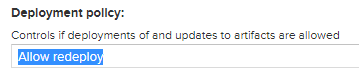
选择可以重复提交上传;
6.创建完成copy 就是你的maven仓库地址 添加到 你的项目中的build.gradle
eg: http://127.0.0.1:8081/repository/test_Maven/
7.新建自己需要上传到Maven仓库的module,在build.gradle增加
/**②.发布到私有服务器maven仓库*/
apply plugin: 'maven'

//打包main目录下代码和资源的 task
task androidSourcesJar(type: Jar) {
    classifier = 'sources'
    from android.sourceSets.main.java.srcDirs
}
//配置需要上传到maven仓库的文件
artifacts {
    archives androidSourcesJar
}
//上传到Maven仓库的task
uploadArchives {
    repositories {
        mavenDeployer {
            // 配置本地仓库路径,项目根目录下的repository目录中
//        repository(url: uri('../xxx'))
            //指定maven仓库url
            repository(url: "http://127.0.0.1:8081/repository/example/") {
                //nexus登录默认用户名和密码
                authentication(userName: "admin", password: "admin123")
            }
            pom.groupId = "com.mapscloud.pluginlib"// 唯一标识(通常为模块包名,也可以任意)
            pom.artifactId = "PluginLib" // 项目名称(通常为类库模块名称,也可以任意)
            pom.version = "1.0.0" // 版本号
        }
    }
}
8.Sysny now 同步,在gradle project中对应得模块下会出现upload文件
uploadArchives 双击,则自动上传到远程Maven仓库
9. 在nexus 网页中选择

选择browse 选择自己的仓库,可以查看到上传成功与否
10.引用依赖
在app/build.gradle中设置
repositories {
    google()
    jcenter()
    //本地仓库地址
    // maven { url 'file://E://ASWorkSpace//openxu//OXChart//repository' }
    //私有服务器仓库地址
    maven {
        url 'http://127.0.0.1:8081/repository/example/'
    }
    maven {
        url 'http://127.0.0.1:8081/repository/aaa/'
    }
}
allprojects {
    repositories {
        google()
        jcenter()
        maven { url 'https://jitpack.io' }
        //本地仓库地址
        // maven { url 'file://E://ASWorkSpace//openxu//OXChart//repository' }
        //私有服务器仓库地址
        maven {
            url 'http://127.0.0.1:8081/repository/example/'
        }
        maven {
            url 'http://127.0.0.1:8081/repository/aaa/'
        }
    }
}
然后在你项目build.gradle的
dependencies中添加依赖 pom.groupId:pom.artifactId:pom.version 组成implementation "com.mapscloud.pluginlib:PluginLib:1.0.0"11.同步 可以正常使用





 扫一扫
扫一扫


 3075
3075

 被折叠的 条评论
为什么被折叠?
被折叠的 条评论
为什么被折叠?
 到【灌水乐园】发言





