





 本文介绍如何在Bootstrap-Fileinput中实现文件上传后删除并回显的完整实例,通过递归构建文件输入框解决删除问题,提供HTML、JS代码示例及后台处理方法。
bootstrap-fileinput 文件上传非常方便,但连续上传后想删除之前上传的文件,有些复杂。
总体思路是,上传一个文件后,销毁原先的文件输入框,再重新构建文件预览,重新构建需要些技巧,就是递归调用创建文件输入框,否则删除函数会无法调用。中途走了些弯路,最后总算是完成了,希望能给做bootstrap-fileinput 文件上传与删除的开发者有些启示,有更好的实现方法欢迎指导。
hmtl页面代码
<div class="row" id="fileinput-div-id">
                <div class="col-sm-6">
                    <div class="form-group ">
                        <input id="fileIds" name="fileIds" type="text" hidden>
                        <label class="col-sm-3 control-label">附件路径:</label>
                        <div class="col-sm-8">
                            <input id="fileInputProduct" type="file" name="fileInputName" multiple>
                        </div>
                    </div>
                </div>
            </div>
js实现代码
//上传附件
        var uploadFileUrl = ctx + "system/attachment/addAttachment";
        //删除附件
        var deleteFileUrl = ctx + "system/attachment/deleteAttachment";
        // 上传插件参数
        var urlsArr = [], infosArr = [], allowedFileExt = ["txt", "pdf", "xls", "doc"];
        $(function () {
            var needAttacthmentVal = $('input:radio[name="needAttachment"]:checked').val();
            if (needAttacthmentVal == 'N') {
                $("#fileinput-div-id").hide();
            }
            $("#fileInputProduct").fileinput({
                // 'theme': 'explorer-fas',
                uploadUrl: uploadFileUrl,
                //maxFileCount: 3,
                initialPreview: urlsArr,
                initialPreviewAsData: true,
                initialPreviewConfig: infosArr,
                overwriteInitial: false,
                //allowedFileExtensions: allowedFileExt,
                //showUpload: false,
                enctype: 'multipart/form-data',
                showRemove: false,
                showUpload: false,
                showPreview: true
                //initialPreviewAsData: true
            }).on('fileuploaded', function (event, data, previewId, index) {
                //设置插入的文件id
                $("#fileIds").val("#" + data.response.fileId + "#");
                console.log("uploaded========previewId:" + previewId + "----index:" + index);
                $('#fileInputProduct').fileinput('clear');
                $('#fileInputProduct').fileinput('destroy');
                getNewPreviewInfos($("#fileIds").val());
                //重新初始化
                reCreateFileInput();

            });
        });

        /**
         * 获取上传最新的初始化的url和config的值
         */
        function getNewPreviewInfos(fileIds) {
            var data = new FormData();
            data.append("fileIds", fileIds);
            $.ajax({
                type: "POST",
                async: false,
                url: ctx + "system/attachment/getNewPreviewInfos",
                data: data,
                cache: false,
                contentType: false,
                processData: false,
                dataType: 'json',
                success: function (result) {
                    var urls = result.urls;
                    var infos = result.infos;
                    if (urls != "") {
                        urlsArr = urls.split(",");
                    } else {
                        urlsArr = [];
                    }
                    if (infos != "") {
                        infosArr = $.parseJSON(infos);
                    } else {
                        infosArr = [];
                    }
                },
                error: function (error) {
                    $.modal.alertWarning("操作失败。");
                }
            });
        }

        /**
         * 重新构建文件上传框
         */
        function reCreateFileInput() {
            var divParent = $('#fileInputProduct').parents('.col-sm-8').empty();
            var newFileInput = $("<input id='fileInputProduct' type='file' name='fileInputName' multiple>");
            divParent.append(newFileInput);
            $("#fileInputProduct").fileinput({
                //'theme': 'explorer-fas',
                uploadUrl: uploadFileUrl,
                deleteUrl: deleteFileUrl,
                //uploadAsync: true,
                //maxFileCount: 3,
                initialPreview: urlsArr,
                initialPreviewAsData: true,
                initialPreviewConfig: infosArr,
                overwriteInitial: false,
                //allowedFileExtensions: allowedFileExt,
                //showUpload: false,
                enctype: 'multipart/form-data',
                showRemove: false,
                showUpload: false,
                showPreview: true
                //initialPreviewAsData: true
            }).on('fileuploaded', function (event, data, previewId, index) {
                //重新组织id串
                $("#fileIds").val($("#fileIds").val() + "#" + data.response.fileId + "#");
                //index = data.response.fileId;
                console.log("1uploaded======previewId:" + previewId + "----index:" + index + "-----fileId" + $("#fileIds").val());
                $('#fileInputProduct').fileinput('clear');
                $('#fileInputProduct').fileinput('destroy');
                getNewPreviewInfos($("#fileIds").val());
                reCreateFileInput();

            }).on('filedeleted', function (event, key) {
                //预览
                //先重新组装input的id
                console.log($("#fileIds").val());
                console.log('1filedeleted--Key = ' + key);
                $("#fileIds").val($("#fileIds").val().replace("#" + key + "#", ""));
                console.log("---result----" + $("#fileIds").val());
            });
        }
后台接收
  @PostMapping("/addAttachment")
    @ResponseBody
    public AjaxResult addAttachment(@RequestParam("fileInputName") MultipartFile file, HttpServletRequest request, HttpServletResponse response) throws IOException {
        try {

            SysAttachment sysAttachment = new SysAttachment();
            String filePath = Global.getUploadPath();
            Map<String, String> fileInfo = FileUploadUtils.uploadExt(filePath, file);
            sysAttachment.setAttName(fileInfo.get("fileName"));

            //文件相对路径
            sysAttachment.setAttPath(fileInfo.get("filePath"));
            sysAttachment.setFileExt(fileInfo.get("fileExt"));
            sysAttachment.setFileSize(fileInfo.get("fileSize"));
            sysAttachment.setUuid(UUID.randomUUID().toString());
            sysAttachmentService.insertSysAttachment(sysAttachment);
            String url = serverConfig.getUrl() + fileInfo.get("filePath");
            fileInfo.put("fileId", String.valueOf(sysAttachment.getAttId()));

            AjaxResult ajax = AjaxResult.success();
            ajax.put("fileName", fileInfo.get("fileName"));
            ajax.put("fileId", sysAttachment.getAttId());
            ajax.put("url", url);
            return ajax;
        } catch (Exception e) {
            return AjaxResult.error(e.getMessage());
        }
    }
 @PostMapping("/getNewPreviewInfos")
    @ResponseBody
    public AjaxResult getNewPreviewInfos(@RequestParam("fileIds") String fileIds) throws IOException {
        try {
            //上传插件需要的参数
            String infos = "", urls = "";
            if (StringUtils.isNotBlank(fileIds)) {
                SysAttachment sysAttachment = new SysAttachment();
                sysAttachment.setAttIds(fileIds.substring(1, fileIds.length() - 1).split("##"));
                List<SysAttachment> sysAttachmentList = sysAttachmentService.selectSysAttachmentList(sysAttachment);
                urls = sysAttachmentService.getAttachmentUrlsByAttList(sysAttachmentList);
                infos = sysAttachmentService.getAttachmentInfosByAttList(sysAttachmentList);
            }
            AjaxResult ajax = AjaxResult.success();
            ajax.put("urls", urls);
            ajax.put("infos", infos);
            return ajax;
        } catch (Exception e) {
            return AjaxResult.error(e.getMessage());
        }
    }
返回给预览框的参数处理
 @Override
    public String getAttachmentInfosByAttList(List<SysAttachment> sysAttachments) {
        JSONArray infoArr = new JSONArray();
        for (SysAttachment sysAttachment : sysAttachments) {
            JSONObject info = new JSONObject();
            info.put("caption", sysAttachment.getAttName());
            info.put("size", sysAttachment.getFileSize());
            info.put("width", "120px");
            info.put("type", "other");
            info.put("key", sysAttachment.getAttId());
            infoArr.add(info);
        }
        return sysAttachments.size() > 0 ? infoArr.toJSONString() : "";
    }
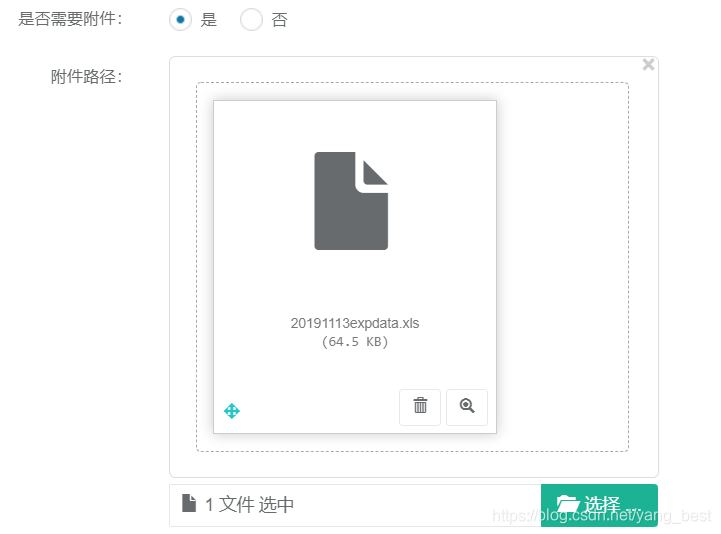
实现效果如下:可以连续上传,上传成功后,随意删除上传后的任意一个。





 扫一扫
扫一扫


 3万+
3万+


 到【灌水乐园】发言



