


 本文详细介绍了如何整合Spring、MyBatis和SpringMVC(SSM)框架。首先,需要整合相关jar包,包括MyBatis、Spring、SpringMVC及数据源等。接着配置文件的整合涉及Spring、MyBatis、SpringMVC和web.xml,包括数据源、SqlSessionFactoryBean、Mapper接口扫描、事务管理等。然后,通过Action、Service、Mapper接口实现数据处理流程。最后,展示了查询所有用户为例的完整代码实现,包括Controller、Service、Mapper接口及实体类。通过这个过程,读者能理解并掌握SSM框架的整合步骤和实践应用。
SSM整合
框架说明:
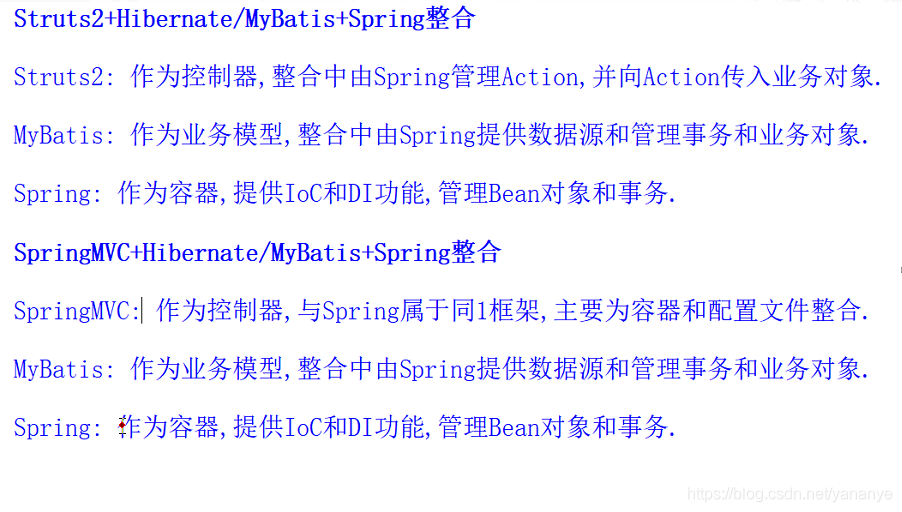
MyBatis-Spring-SpringMVC框架整合
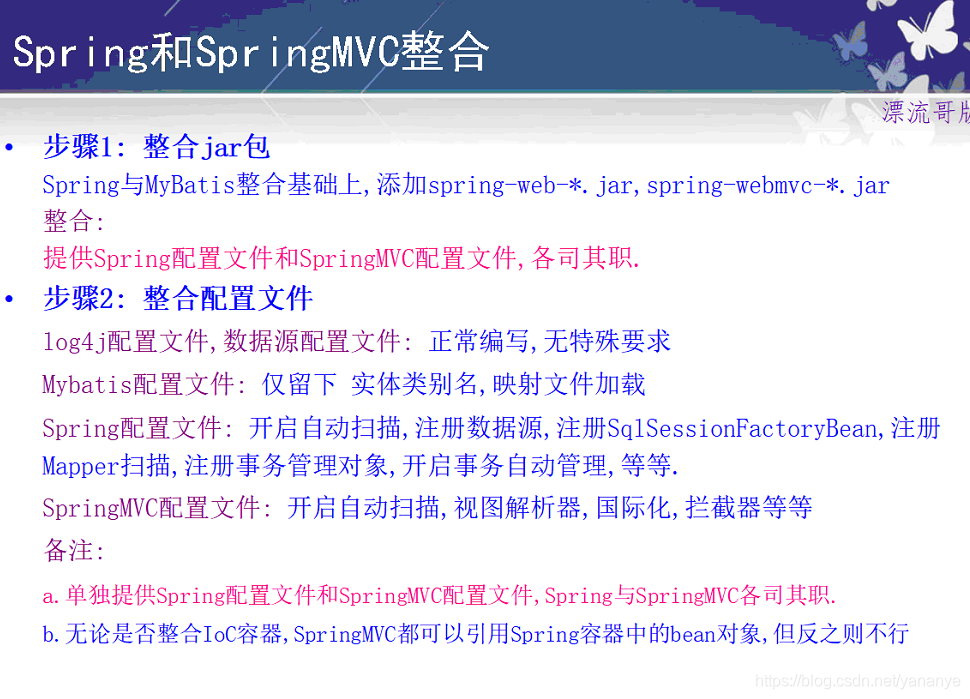
整体思路: 先整合Spring与MyBatis,然后整合Spring与SpringMVC
整合Spring与MyBatis:
整合jar包{Mybatis基本jar,spring基本jar,mybatis-spring-*.jar,日志,驱动器}
整合配置文件[spring配置文件(数据源,SqlSessionFactoryBean,Mapper接口扫描对象,事务管理对象,开启事务管理) ,mybatis配置文件(别名设置,加载映射文件), 映射文件,properties文件,log4j.xml ]
整合java代码[Service中以"依赖注入"的方式获得SqlSessionFactory或Mapper接口对象]
SpringMVC整合Spring:
基本思想: Spring与SpringMVC,各司其职.
SpringMVC基于Spring,因此SpringMVC中也含有1个IoC容器[Spring容器:管理对象].
通过设置Spring与SpringMVC管理不同的对象,实现2个Spring容器的分类.[SpringMVC扫描action, Spring扫描service,mapper…]
SpringMVC中可以引用Spring框架中IOC容器,而Spring中无法引用SpringMVC中的IoC容器.
页面—请求–>Action—>Service—>Mapper接口/SqlSession—>映射文件:SQL命令—>数据库:数据表。
整合步骤:
1.整合jar包
    MyBatis相关jar
    Spring相关jar
    数据源相关jar: 驱动器,dbcp...
    Spring与MyBatis整合相关jar

    新增1: SpringMVC相关jar: spring-web-*.jar,spring-webmvc-*.jar

2.整合配置文件
    涉及到的配置文件: spring配置文件,mybatis配置文件,log4j配置文件,数据源配置文件,映射文件,         springmvc配置文件,web.xml

    log4j配置文件,数据源配置文件:  不需要更改
    Mybatis配置文件: 仅留下 别名,映射文件加载
    Spring配置文件: 开启自动扫描,注册数据源,注册SqlSessionFactoryBean,注册Mapper扫描,注册事务管理对象,开启事务自动管理

    新增2: SpringMVC配置文件: 开启自动扫描,注册视图解析器..........

    新增3: web.xml:
            注册SpringMVC前端控制器
            注册编码过滤器
            注册静态资源处理方法
            注册Spring web方式启动


3.整合Java代码:
    请求-->Action程序--->Service程序--->SqlSessionFactory或Mapper接口--->映射文件: SQL命令

    新增4: Action: 声明Service对象,基于该对象实现处理方法的功能
    Service: 声明SqlSessionFactory或Mapper接口,基于该对象实现业务功能.
    SqlSessionFactory或Mapper接口: 读取数据源和映射文件,连接数据库,执行SQL  [MyBatis自动完成]
总结:
SSM整合下,当Spring与MyBatis整合完成后,整合SpringMVC时,只需操作 新增1-4 内容即可.
示例:以查询所有用户为例
整合jar包:
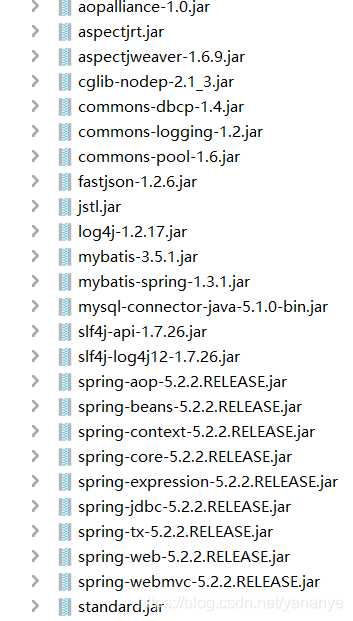
整合配置文件:
mybatis配置文件: 别名设置,加载映射文件:
<?xml version="1.0" encoding="UTF-8" ?>
<!DOCTYPE configuration
        PUBLIC "-//mybatis.org//DTD Config 3.0//EN"
        "http://mybatis.org/dtd/mybatis-3-config.dtd">
<configuration>
    <typeAliases>
        <package name="cn.user.pojo"/>
    </typeAliases>

    <mappers>
        <mapper resource="cn/user/dao/mapper/UserMapper.xml"/>
    </mappers>
</configuration>
spring配置文件: 开启扫描,注册数据源,注册SqlSessionFactoryBean,注册Mapper扫描对象,注册事务管理对象,开启事务管理:
<?xml version="1.0" encoding="UTF-8"?>
<beans xmlns="http://www.springframework.org/schema/beans"
       xmlns:xsi="http://www.w3.org/2001/XMLSchema-instance"
       xmlns:context="http://www.springframework.org/schema/context"
       xmlns:mvc="http://www.springframework.org/schema/tx"
       xsi:schemaLocation="http://www.springframework.org/schema/beans
        https://www.springframework.org/schema/beans/spring-beans.xsd http://www.springframework.org/schema/context https://www.springframework.org/schema/context/spring-context.xsd http://www.springframework.org/schema/tx http://www.springframework.org/schema/tx/spring-tx.xsd">
    <!--开启组件扫描-->
    <context:component-scan base-package="cn.user.dao,cn.user.service"/>
    <!--配置数据源-->
    <context:property-placeholder location="classpath:database.properties"/>
    <bean class="org.apache.commons.dbcp.BasicDataSource" id="dataSource">
        <property name="driverClassName" value="${db.driver}"/>
        <property name="url" value="${db.url}"/>
        <property name="username" value="${db.username}"/>
        <property name="password" value="${db.password}"/>
    </bean>
    <!--配置SqlSessionFactoryBean-->
    <bean class="org.mybatis.spring.SqlSessionFactoryBean" id="sqlSessionFactory">
        <property name="configLocation" value="classpath:mybatis-config.xml"/>
        <property name="dataSource" ref="dataSource"/>
    </bean>

    <!--扫描dao接口自动生成实现类-->
    <bean class="org.mybatis.spring.mapper.MapperScannerConfigurer">
        <property name="sqlSessionFactoryBeanName" value="sqlSessionFactory"/>
        <property name="basePackage" value="cn.user.dao"/>
    </bean>

    <!--配置事务处理对象-->
    <bean class="org.springframework.jdbc.datasource.DataSourceTransactionManager" id="transactionManager">
        <property name="dataSource" ref="dataSource"/>
    </bean>
    <!--注解方式开启事务管理-->
    <mvc:annotation-driven transaction-manager="transactionManager"/>
</beans>
springmvc配置文件: 照旧[开启扫描,注册视图解析器]:
<?xml version="1.0" encoding="UTF-8"?>
<beans xmlns="http://www.springframework.org/schema/beans"
       xmlns:xsi="http://www.w3.org/2001/XMLSchema-instance"
       xmlns:context="http://www.springframework.org/schema/context"
       xmlns:mvc="http://www.springframework.org/schema/mvc"
       xsi:schemaLocation="http://www.springframework.org/schema/beans
        https://www.springframework.org/schema/beans/spring-beans.xsd http://www.springframework.org/schema/context https://www.springframework.org/schema/context/spring-context.xsd http://www.springframework.org/schema/mvc https://www.springframework.org/schema/mvc/spring-mvc.xsd">
    <!--开启组件扫描扫描controller包-->
    <context:component-scan base-package="cn.user.controller"/>
    <!--开启映射注解-->
    <mvc:annotation-driven/>
    <!--定义视图解析器-->
    <bean class="org.springframework.web.servlet.view.InternalResourceViewResolver" id="internalResourceViewResolver">
        <property name="prefix" value="/WEB-INF/jsp/"/>
        <property name="suffix" value=".jsp"/>
    </bean>
    <!--加载nvc配置文件时一同加载spring的配置文件-->
    <import resource="classpath:application.xml"/>
</beans>
log4.xml: 照旧:
log4j.rootLogger=debug,stdout

log4j.appender.stdout=org.apache.log4j.ConsoleAppender
log4j.appender.stdout.Target=System.err
log4j.appender.stdout.layout=org.apache.log4j.PatternLayout
log4j.appender.stdout.layout.ConversionPattern=%d %l %m %n


log4j.appender.logfile=org.apache.log4j.FileAppender
log4j.appender.logfile.File=jbit.log
log4j.appender.logfile.layout=org.apache.log4j.PatternLayout
log4j.appender.logfile.layout.ConversionPattern=%d{yyyy-MM-dd HH:mm:ss} %l %m %n
数据源文件: 照旧
db.driver=com.mysql.jdbc.Driver
db.url=jdbc:mysql://localhost:3306/mydb
db.username=root
db.password=root
映射文件: 照旧
<?xml version="1.0" encoding="UTF-8" ?>
<!DOCTYPE mapper
        PUBLIC "-//mybatis.org//DTD Mapper 3.0//EN"
        "http://mybatis.org/dtd/mybatis-3-mapper.dtd">
<mapper namespace="cn.user.dao.UserMapper">
    <resultMap id="BaseresultMap" type="user">
        <id property="id" column="id"/>
        <result property="name" column="name"/>
        <result property="age" column="age"/>
        <result property="sex" column="sex"/>
        <result property="address" column="address"/>
    </resultMap>
    <select id="list" resultMap="BaseresultMap">
        select * from user;
    </select>
</mapper>
web.xml: 注册SpringMVC[前端控制器],处理静态资源,注册编码过滤器 :
<?xml version="1.0" encoding="UTF-8"?>
<web-app xmlns="http://xmlns.jcp.org/xml/ns/javaee"
         xmlns:xsi="http://www.w3.org/2001/XMLSchema-instance"
         xsi:schemaLocation="http://xmlns.jcp.org/xml/ns/javaee http://xmlns.jcp.org/xml/ns/javaee/web-app_4_0.xsd"
         version="4.0">
    <!--定义前端控制器-->
    <servlet>
        <servlet-name>springmvc</servlet-name>
        <servlet-class>org.springframework.web.servlet.DispatcherServlet</servlet-class>
        <init-param>
            <param-name>contextConfigLocation</param-name>
            <param-value>classpath:springmvc.xml</param-value>
        </init-param>
        <load-on-startup>1</load-on-startup>
    </servlet>
    <servlet-mapping>
        <servlet-name>springmvc</servlet-name>
        <url-pattern>/</url-pattern>
    </servlet-mapping>
    <!--处理中文乱码-->
    <filter>
        <filter-name>CharacterEncodingFilter</filter-name>
        <filter-class>org.springframework.web.filter.CharacterEncodingFilter</filter-class>
        <init-param>
            <param-name>encoding</param-name>
            <param-value>UTF-8</param-value>
        </init-param>
    </filter>
    <filter-mapping>
        <filter-name>CharacterEncodingFilter</filter-name>
        <url-pattern>/*</url-pattern>
    </filter-mapping>
    <!--静态资源处理-->
    <servlet-mapping>
        <servlet-name>default</servlet-name>
        <url-pattern>*.js</url-pattern>
        <url-pattern>*.html</url-pattern>
        <url-pattern>*.jpg</url-pattern>
        <url-pattern>*.png</url-pattern>
        <url-pattern>*.css</url-pattern>
    </servlet-mapping>
整合java
页面—请求–>Action—>Service: SqlSessionFactory或Mapper对象---->SqlSessionFactory或Mapper对象—>映射文件:SQL —>数据库
以: 查询所有数据为例,“http://…/user/list”。
编写User实体类
@Component
public class User {
    private Integer id;
    private String name;
    private String sex;
    private Integer age;
    private String address;
    @Override
    public String toString() {
        return "\nUser{" +
                "id=" + id +
                ", name='" + name + '\'' +
                ", sex=" + sex +
                ", age=" + age +
                ", address='" + address + '\'' +
                '}';
    }
//省略get set 构造方法 有参无参
编写Mapper接口:
public interface UserMapper {
//查询所有用户
    public List<User> list();
}
编写Service接口及实现类
public interface UserService {
    public List<User> list();
}
实现类:
@Service("userService")
@Transactional
public class UserServiceImpl implements UserService {
    @Resource(name = "userMapper")
    private UserMapper mapper;
    @Override
    public List<User> list() {
        return mapper.list();
    }
}
编写UserController控制器,和查询用户的方法:
@Controller
@RequestMapping("/user")
public class UserController {
    @Resource(name = "userService")//注解方法注入UserService实现类
    private UserService userService;
    @RequestMapping("/list")
    public String listUser(Model model){
        List<User> list = userService.list();
        //查出的数据存入模型对象中
        model.addAttribute("users",list);
        //经过视图解析器返回到main.jsp页面中
        return "main";
    }
}
mian.jsp页面:
<%@ page contentType="text/html;charset=UTF-8" language="java" %>
<html>
<head>
    <title>所有用户</title>
</head>
<body>
${requestScope.users}
</body>
</html>
运行结果:






 扫一扫
扫一扫


 8051
8051

 被折叠的 条评论
为什么被折叠?
被折叠的 条评论
为什么被折叠?
 到【灌水乐园】发言





