
Java之toString方法

本文探讨了Java中使用System.out.println打印对象时,实际上调用了对象的toString方法。默认情况下,Object类的toString返回全类名加@加哈希值,但子类通常会重写此方法以提供对象属性的详细信息。在IDEA中,可以快捷重写toString。如果对象未重写toString,则会调用Object的默认实现。理解并适当地重写toString对于调试和日志记录至关重要。

每当System.out.println(对象);

都是相当于调用这个对象的toString方法

enum有自己的toString方法

Object的toString
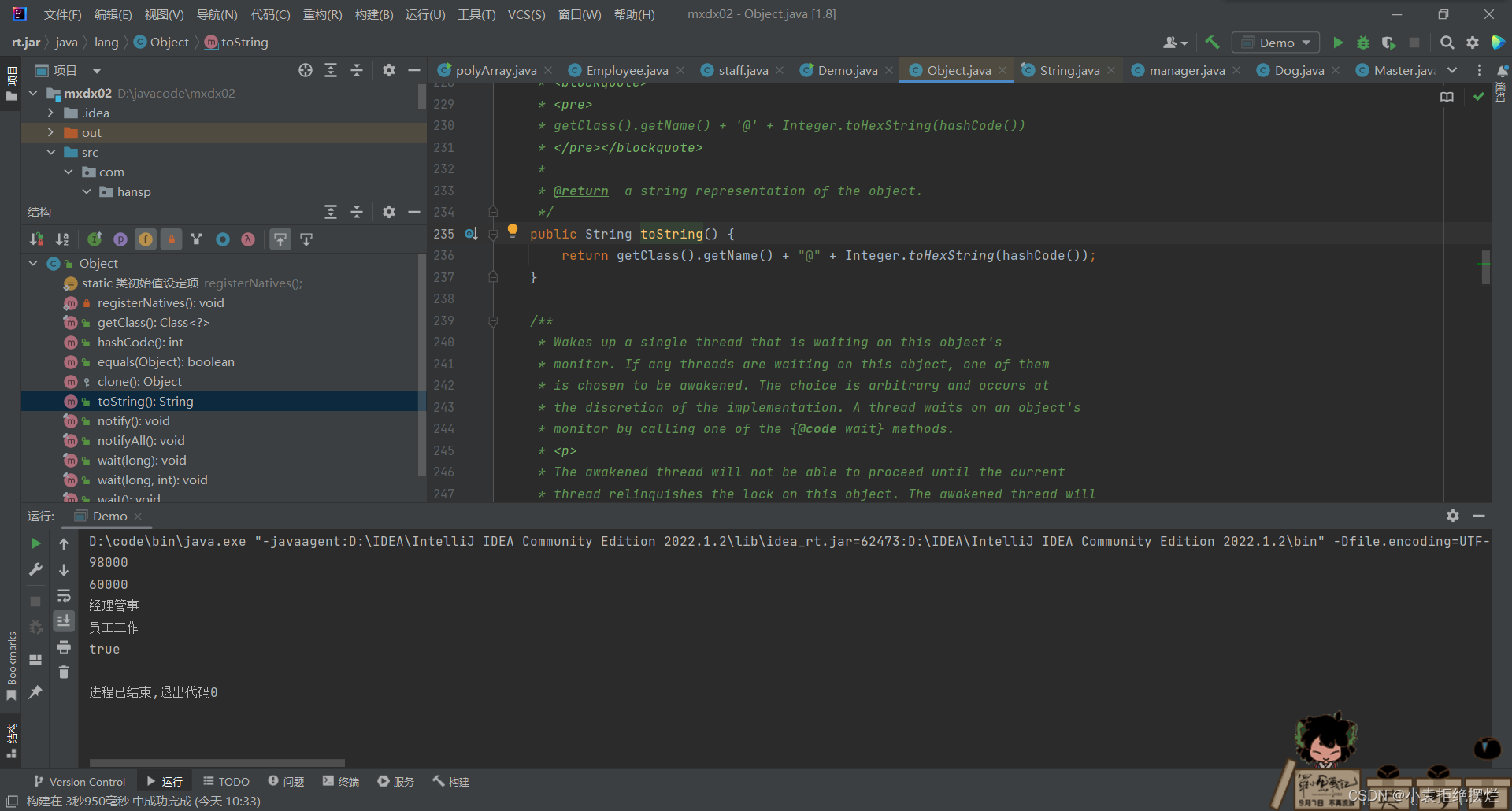
返回值是:全类名+ @+哈希值的十六进制

字类往往重写toString方法来返回对象的属性信息

一般在IDEA

里按alt+insert可以直接重写
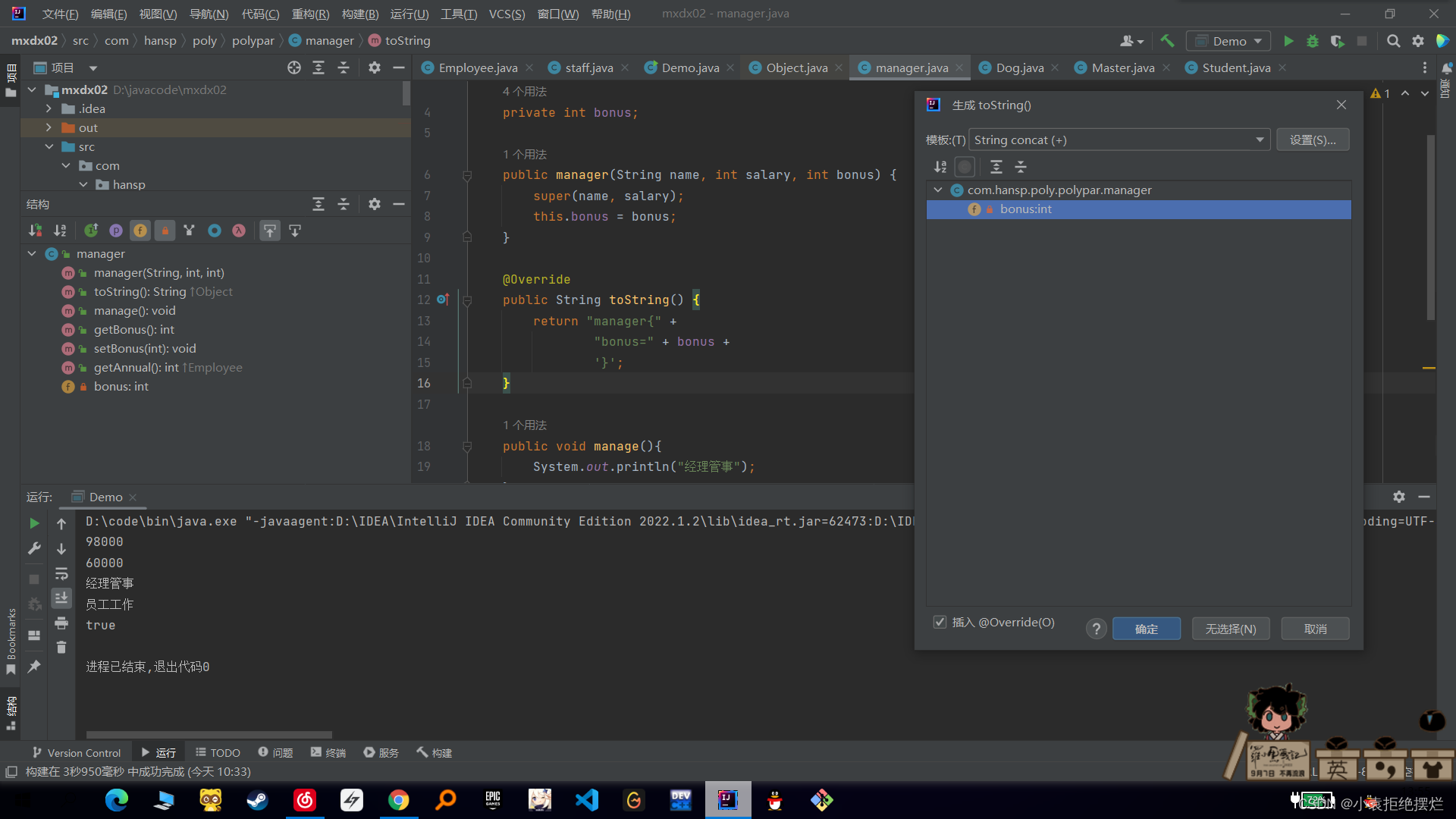
重写后默认是把本类的所有对象输出,当然我们可以自己进行修改指定输出

 要是对应对象有重写就调用输出

没有的话最后就调用Object的

package com.json; import java.text.SimpleDateFormat; import java.util.ArrayList; import java.util.Date; import java.util.List; import net.sf.ezmorph.object.DateMorpher; import net.sf.json.JSONArray; import net.sf.json.JSONObject; import net.sf.json.JsonConfig; import net.sf.json.processors.JsonValueProcessor; import net.sf.json.util.CycleDetectionStrategy; import net.sf.json.util.JSONUtils; public class TestJsonServlet { /** * 从一个JSON 对象字符格式中得到一个java对象 * * @param jsonString * @param pojoCalss * @return */ @SuppressWarnings("unchecked") public static <T> T jsonToObject(String jsonString, Class<T> pojoCalss) { Object pojo; JSONObject jsonObject = JSONObject.fromObject(jsonString); pojo = JSONObject.toBean(jsonObject, pojoCalss); return (T) pojo; } /** * json字符串转换成集合 * * @param jsonString * @param pojoClass * @return */ @SuppressWarnings("unchecked") public static <T> List<T> jsonToList(String jsonString, Class<T> pojoClass) { JSONArray jsonArray = JSONArray.fromObject(jsonString); JSONObject jsonObject; Object pojoValue; List<T> list = new ArrayList<T>(); for (int i = 0; i < jsonArray.size(); i++) { jsonObject = jsonArray.getJSONObject(i); pojoValue = JSONObject.toBean(jsonObject, pojoClass); list.add((T) pojoValue); } return list; } /** * json字符串转换成集合 * * @param jsonString * @param pojoClass * @return */ @SuppressWarnings("unchecked") public static <T> List<T> jsonToList(String jsonString, Class<T> pojoClass, String dataFormat) { JsonConfig jsonConfig = configJson(dataFormat); JSONArray jsonArray = JSONArray.fromObject(jsonString, jsonConfig); JSONObject jsonObject; Object pojoValue; List<T> list = new ArrayList<T>(); for (int i = 0; i < jsonArray.size(); i++) { jsonObject = jsonArray.getJSONObject(i); pojoValue = JSONObject.toBean(jsonObject, pojoClass); list.add((T) pojoValue); } return list; } /** * 将java对象转换成json字符串 * * @param javaObj * @return */ public static String objectToJson(Object javaObj) { JSONObject json; json = JSONObject.fromObject(javaObj); return json.toString(); } /** * 将java对象转换成json字符串,并设定日期格式 * * @param javaObj * 要转换的java对象 * @param dataFormat * 制定的日期格式 * @return */ public static String objectToJson(Object javaObj, String dataFormat) { JSONObject json; JsonConfig jsonConfig = configJson(dataFormat); json = JSONObject.fromObject(javaObj, jsonConfig); return json.toString(); } /** * list变成json * * @param list * @return */ public static <T> String listToJson(List<T> list) { JSONArray json; json = JSONArray.fromObject(list); return json.toString(); } /** * list变成json * * @param list * @return */ public static <T> String listToJson(List<T> list, String dataFormat) { JSONArray json; JsonConfig jsonConfig = configJson(dataFormat); json = JSONArray.fromObject(list, jsonConfig); return json.toString(); } /** * JSON 时间解析器 * * @param datePattern * @return */ public static JsonConfig configJson(final String datePattern) { JSONUtils.getMorpherRegistry().registerMorpher(new DateMorpher(new String[] { datePattern })); JsonConfig jsonConfig = new JsonConfig(); jsonConfig.setIgnoreDefaultExcludes(false); jsonConfig.setCycleDetectionStrategy(CycleDetectionStrategy.LENIENT); jsonConfig.registerJsonValueProcessor(Date.class, new JsonValueProcessor() { @Override public Object processObjectValue(String key, Object value, JsonConfig jsonConfig) { if (value instanceof Date) { String str = new SimpleDateFormat(datePattern).format((Date) value); return str; } return value == null ? null : value.toString(); } @Override public Object processArrayValue(Object value, JsonConfig jsonConfig) { String[] obj = {}; if (value instanceof Date[]) { SimpleDateFormat sf = new SimpleDateFormat(datePattern); Date[] dates = (Date[]) value; obj = new String[dates.length]; for (int i = 0; i < dates.length; i++) { obj[i] = sf.format(dates[i]); } } return obj; } }); return jsonConfig; } }
评论
添加红包

请填写红包祝福语或标题

红包个数最小为10个

红包金额最低5元

当前余额3.43前往充值 >
需支付:10.00
成就一亿技术人!
领取后你会自动成为博主和红包主的粉丝 规则
hope_wisdom
发出的红包

打赏作者

小袁拒绝摆烂

你的鼓励将是我创作的最大动力

¥1 ¥2 ¥4 ¥6 ¥10 ¥20
扫码支付:¥1
获取中
扫码支付

您的余额不足,请更换扫码支付或充值

打赏作者

实付
使用余额支付
点击重新获取
扫码支付
钱包余额 0

抵扣说明:

1.余额是钱包充值的虚拟货币,按照1:1的比例进行支付金额的抵扣。
2.余额无法直接购买下载,可以购买VIP、付费专栏及课程。

余额充值


