



 本文详细介绍如何使用SuperSocket库创建一个简单的Telnet服务器。包括创建控制台应用程序、定义请求处理逻辑、启动服务器及通过CMD连接测试。文章涵盖SuperSocket的基础使用、事件处理及常见请求类型处理。
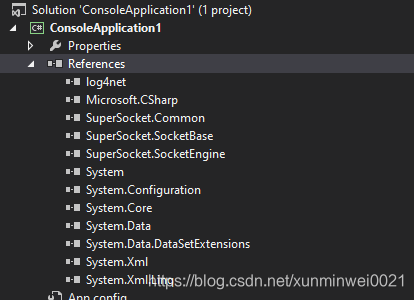
第一步:新建一个console应用,然后导入一下引用:
第二步:代码如下
using SuperSocket.SocketBase;
using SuperSocket.SocketBase.Protocol;
using System;
using System.Collections.Generic;
using System.Linq;
using System.Text;
using System.Threading.Tasks;

namespace ConsoleApplication1
{
    class Program
    {


        //send a welcome message to client in the handler
        static void AppServer_NewSessionConnected(AppSession session){
            session.Send("weclome to supersocket telnet Server");
        }

        //Implement request handler
        static void appServer_NewRequestReceived(AppSession session, StringRequestInfo requestInfo)
        {
            switch(requestInfo.Key.ToUpper())
            {
                case ("ECHO"):
                    session.Send(requestInfo.Body);
                    break;

                case ("ADD"):
                    session.Send(requestInfo.Parameters.Select(p => Convert.ToInt32(p)).Sum().ToString());
                    break;

                case ("MULT"):

                    var result = 1;

                    foreach (var factor in requestInfo.Parameters.Select(p => Convert.ToInt32(p)))
                    {
                        result *= factor;
                    }

                    session.Send(result.ToString());
                    break;
            }
        }

        static void Main(string[] args)
        {
            Console.WriteLine("press any key to start the server!");
            Console.ReadKey();
            Console.WriteLine();
            var appServer = new AppServer();
            if(!appServer.Setup(2012))//Setup with listening port
            {
                Console.WriteLine("failed to setup");
                Console.ReadKey();
                return;
            }
            Console.WriteLine();
            //try to start the appServer
            if (!appServer.Start())
            {
                Console.WriteLine("failed to Start");
                Console.ReadKey();
                return;
            }
            //Register new session connected event handler
            appServer.NewSessionConnected += new SessionHandler<AppSession>(AppServer_NewSessionConnected);
            //register request handler
            //appServer.NewRequestReceived += new RequestHandler<AppSession, StringRequestInfo>(appServer_NewRequestReceived);
            Console.WriteLine("the server started successfully,press key 'q' to stop it!");
            while (Console.ReadKey().KeyChar != 'q')
            {
                Console.WriteLine();
                continue;
            }
            //stop the server
            appServer.Stop();
            Console.WriteLine("the server was stopped");
            Console.ReadKey();
        }
    }
    //you can define a class named "ADD" to process the requests with the requestInfo's key equals"ADD"
    public class ADD : CommandBase<AppSession, StringRequestInfo>
    {
        public override void ExecuteCommand(AppSession session, StringRequestInfo requestInfo)
        {
            //throw new NotImplementedException();
            session.Send(requestInfo.Parameters.Select(p => Convert.ToInt32(p)).Sum().ToString());
        }
    }
    //same as the previous Instance;
    public class MULT : CommandBase<AppSession, StringRequestInfo>
    {
        public override void ExecuteCommand(AppSession session, StringRequestInfo requestInfo)
        {
            var result = 1;

            foreach (var factor in requestInfo.Parameters.Select(p => Convert.ToInt32(p)))
            {
                result *= factor;
            }

            session.Send(result.ToString());
        }
    }
}
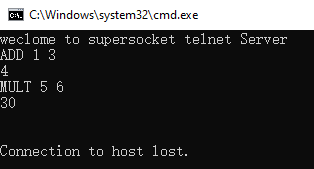
第三步:win+R,输入cmd;(打开command prompt),输入:
Telnet localhost 2012;enter后就可以连接服务器;





 扫一扫
扫一扫


 258
258

 被折叠的 条评论
为什么被折叠?
被折叠的 条评论
为什么被折叠?
 到【灌水乐园】发言





