


<!-- 连线题 -->
  <div class="question-line">
    <div
      class="item"
      v-for="(list, index) in data.line_group_a"
      :key="index"
    >
      <div class="item-left">
        <div class="text" v-if="list.text" :id="`node-a-${index}`">
          {{ list.text }}
        </div>
        <div class="img-box" v-else :id="`node-a-${index}`">
          <a-image :src="list.image" :alt="list.rename" />
        </div>
      </div>
      <div class="item-right">
        <div
          class="text"
          :id="`node-b-${index}`"
          v-if="data.line_group_b[index].text"
        >
          {{ data.line_group_b[index].text }}
        </div>
        <div class="img-box" v-else :id="`node-b-${index}`">
          <a-image
            :src="data.line_group_b[index].image"
            :alt="data.line_group_b[index].rename"
          />
        </div>
      </div>
    </div>
    <div v-if="answerResult" class="connector-line" ref="connectorLine"></div>
  </div>
<script setup>
import { ref, onMounted, onUnmounted, nextTick } from 'vue'
import { cloneDeep } from 'lodash-es'
import { jsPlumb } from 'jsplumb'
const connectorLine = ref(null)
let jsPlumbInstance = ref(null)
const data =ref({
line_group_a: [
{
text: '',
image:
'https://images-towin.tao2bao.com/resource/image/5/DFQStQd1qnaf8233b4a4cdaddf6f3932168be1af9c.jpeg',
rename: 'DFQStQd1qnaf8233b4a4cdaddf6f3932168be1af9c.jpeg',
line: '1',
},
{
text: '',
image:
'https://images-towin.tao2bao.com/resource/image/5/DICfx3QD2f1bc08e6840aeeb64dec90110921e3769.jpg',
rename: 'DICfx3QD2f1bc08e6840aeeb64dec90110921e3769.jpg',
line: '3',
},
{
text: '',
image:
'https://images-towin.tao2bao.com/resource/image/5/15rjpgMf042479056ea49dd44168cd96ac25a85dc7.jpeg',
rename: '15rjpgMf042479056ea49dd44168cd96ac25a85dc7.jpeg',
line: '2',
},
{
text: '',
image:
'https://images-towin.tao2bao.com/resource/image/5/hu6EQSWvMZapple.jpg',
rename: 'hu6EQSWvMZapple.jpg',
line: '0',
},
],
line_group_b: [
{
text: 'orange',
image: '',
rename: '',
line: '1',
},
{
text: 'apple',
image: '',
rename: '',
line: '0',
},
{
text: 'durian',
image: '',
rename: '',
line: '3',
},
{
text: 'banana',
image: '',
rename: '',
line: '2',
},
],})
onMounted(() => {
nextTick(() => {
setTimeout(() => {
if (props.answerResult) {
initJsPlumb()
createConnections()
}
}, 1000)
})
})
const initJsPlumb = () => {
jsPlumbInstance.value = jsPlumb.getInstance({
Connector: 'Straight',
Endpoint: 'Dot',
EndpointStyle: { radius: 2, fill: '#1bd17b' },
PaintStyle: { stroke: '#1bd17b', strokeWidth: 1 },
Anchors: ['Right', 'Left'],
})
}
const createConnections = () => {
// 需要确保connectorLine的dom元素已经渲染完毕
// if (connectorLineElement) {
// const rectA = jsPlumbInstance.value
// .getContainer(lastNodeA)
// .getBoundingClientRect()
// const rectB = jsPlumbInstance.value
// .getContainer(firstNodeB)
// .getBoundingClientRect()
//
// // 设置connectorLine的样式以连接两个节点
// connectorLineElement.style.position = 'absolute'
// connectorLineElement.style.left = `${rectA.right}px`
// connectorLineElement.style.top = `${
// Math.min(rectA.bottom, rectB.top) - 5
// }px` // 减5是为了让线稍微偏上一点,看起来更美观
// connectorLineElement.style.width = `${Math.abs(rectB.left - rectA.right)}px`
// connectorLineElement.style.height = '2px' // 线的宽度
// connectorLineElement.style.backgroundColor = '#ff0000' // 线的颜色
// }
const groupA = data.line_group_a
const groupB = data.line_group_b
if (connectorLine?.value) {
groupA.forEach((nodeA, index) => {
groupB.forEach((nodeB, count) => {
if (nodeA.line === nodeB.line) {
jsPlumbInstance.value.connect({
source: `node-a-${index}`,
target: `node-b-${count}`,
endpoint: 'Dot',
paintStyle: { stroke: '#1bd17b', strokeWidth: 3 },
anchors: ['Right', 'Left'],
})
}
})
})
}
}
onUnmounted(() => {
if (jsPlumbInstance.value) {
jsPlumbInstance.value.deleteEveryEndpoint()
jsPlumbInstance.value.unbind()
jsPlumbInstance.value = null
}
})
</script>效果图: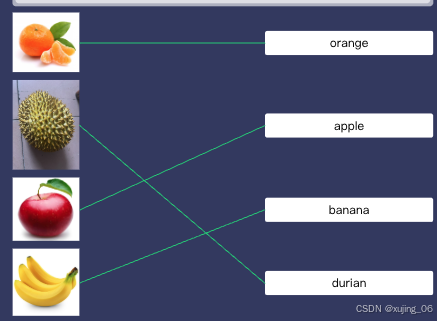





 扫一扫
扫一扫


 768
768

 被折叠的 条评论
为什么被折叠?
被折叠的 条评论
为什么被折叠?
 到【灌水乐园】发言





