


Unity打包apk报错, Plugin [id: ‘com.android.application’, version: ‘7.4.2’, apply: false] was not found in any of the following sources:
Unity打包apk报错
报错的主要内容是:
FAILURE: Build failed with an exception.
-
Where:
Build file ‘/Users/aaa/my_unity/AliSpeech/Library/Bee/Android/Prj/IL2CPP/Gradle/build.gradle’ line: 6 -
What went wrong:
Plugin [id: ‘com.android.application’, version: ‘7.4.2’, apply: false] was not found in any of the following sources:
尝试重新安装unity,升级unity都无效
在遇到这个报错后,我尝试了重新安装unity、升级unity、重新安装了unityhub,都无效。从内容看主要是gradle相关模块不能正常工作,然后我删除了gradle的缓存也无效。
最终的解决方法
找到gradle的全局配置文件,移除里面关于代理的设置。因为我的是MacOS,在用户根目录的 .gradle/gradle.properties文件中
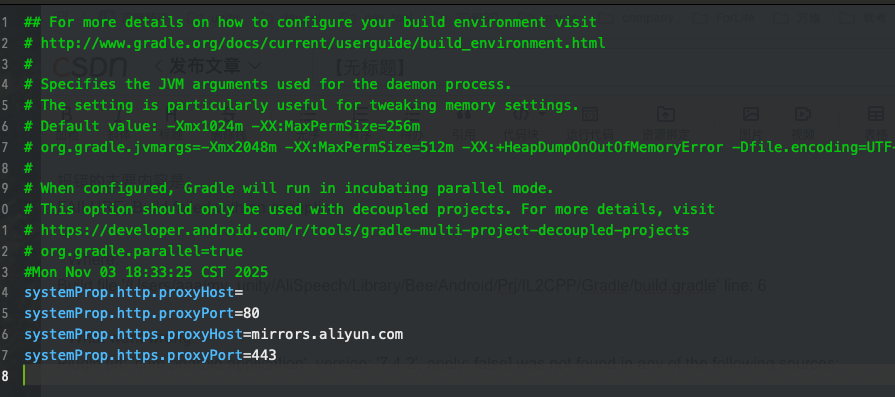
删除这4行蓝色文字,然后就可以正常打包了。





 扫一扫
扫一扫


 3367
3367

 被折叠的 条评论
为什么被折叠?
被折叠的 条评论
为什么被折叠?
 到【灌水乐园】发言





