


 本文介绍了如何解决在Mac上安装brew时遇到的Error错误,问题源于国外镜像源无法使用。通过删除Homebrew缓存、更换国内镜像源、修改环境变量以及取消自动更新等步骤,成功解决安装失败的问题。
背景:电脑安装brew时,安装依赖包时,一直报错,无法快捷安装依赖包。需要解决该问题。
go get github.com/Masterminds/glide

https://glide.sh/
curl https://glide.sh/get | sh
Mac安装brew报错
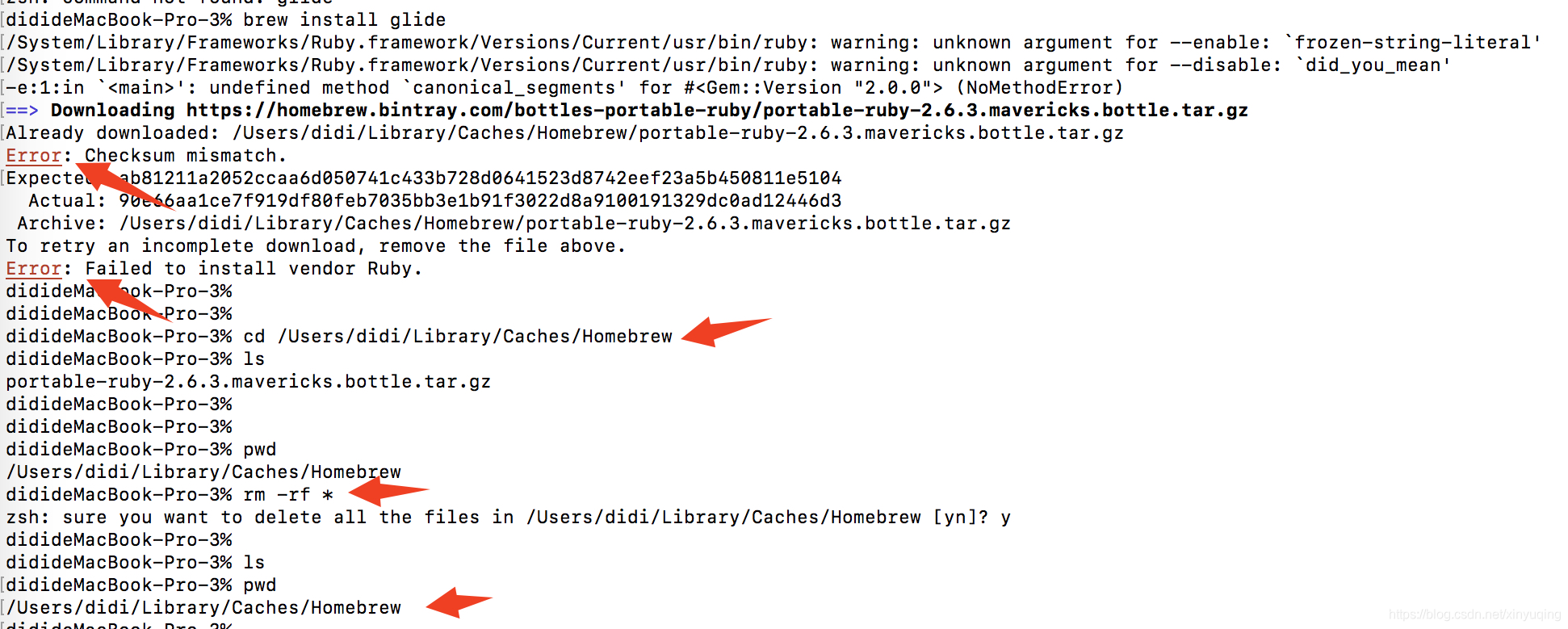
1、删除Homebrew文件夹下所有文件 cd /Users/xinyuqing/Library/Caches/Homebrew
2、重新下载homebrew,命令:/usr/bin/ruby -e "$(curl -fsSL https://raw.githubusercontent.com/Homebrew/install/master/install)"
3、还是报错:报错原因:国外镜像源无法使用导致
Error: Failure while executing; `git clone https://github.com/Homebrew/homebrew-core /usr/local/Homebrew/Library/Taps/homebrew/homebrew-core` exited with 128.
Error: Failure while executing; `/usr/local/bin/brew tap homebrew/core` exited with 1.

这个方法仍然没有办法解决:
1、HomeBrew安装替换国内镜像源,但是仍然有问题
// 执行下面这句命令,更换为中科院的镜像:
git clone git://mirrors.ustc.edu.cn/homebrew-core.git/ /usr/local/Homebrew/Library/Taps/homebrew/homebrew-core --depth=1
// 把homebrew-core的镜像地址也设为中科院的国内镜像
cd "$(brew --repo)"
git remote set-url origin https://mirrors.ustc.edu.cn/brew.git
cd "$(brew --repo)/Library/Taps/homebrew/homebrew-core"
git remote set-url origin https://mirrors.ustc.edu.cn/homebrew-core.git
2、环境变量配置:~/.bash_profile,替换以下镜像源,问题解决,安装成功。
# HomeBrew
export HOMEBREW_BOTTLE_DOMAIN=https://mirrors.tuna.tsinghua.edu.cn/homebrew-bottles
export PATH="/usr/local/bin:$PATH"
export PATH="/usr/local/sbin:$PATH"
# HomeBrew END
使用 brew doctor 查看,安装成功。
3、取消brewHome自动更新
export HOMEBREW_NO_AUTO_UPDATE=true
解决方法:
执行:/bin/zsh -c "$(curl -fsSL https://gitee.com/cunkai/HomebrewCN/raw/master/Homebrew.sh)"
文件目录不存在,新建文件目录:sudo mkdir /usr/local/Homebrew/Library/Taps/homebrew
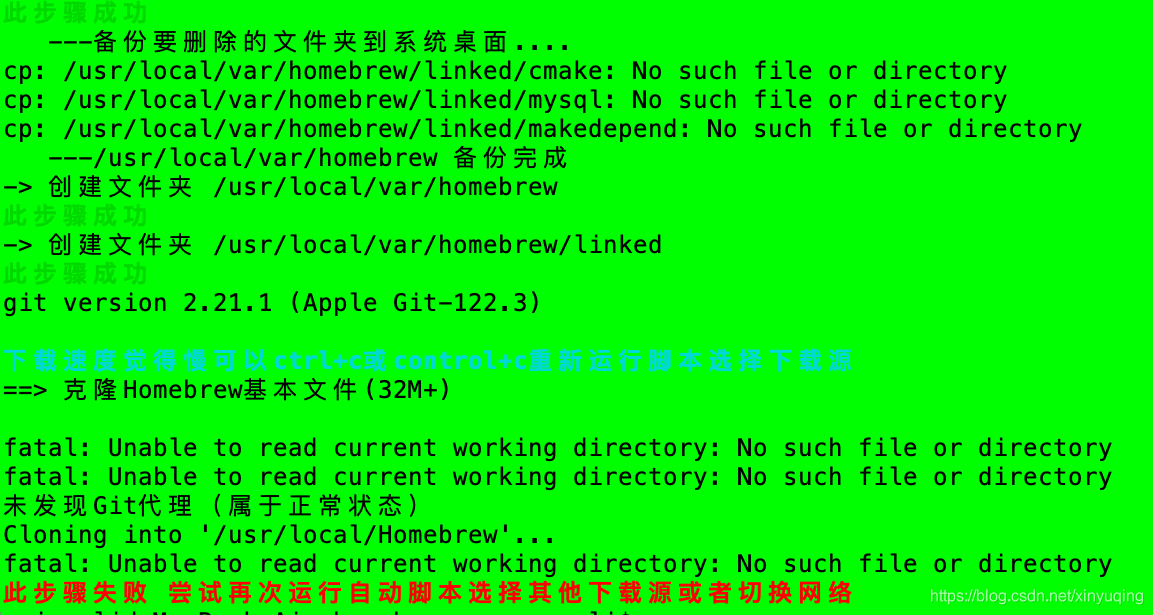
然后下载源 3

安装完成
/bin/zsh -c "$(curl -fsSL https://gitee.com/cunkai/HomebrewCN/raw/master/Homebrew.sh)"

              开始执行Brew自动安装程序
             [cunkai.wang@foxmail.com]
           [2020-09-05 10:14:53][10.15]
       https://zhuanlan.zhihu.com/p/111014448


请选择一个下载镜像,例如中科大,输入1回车。
源有时候不稳定,如果git克隆报错重新运行脚本选择源。cask非必须,有部分人需要。
1、中科大下载源 2、清华大学下载源 3、北京外国语大学下载源 4、腾讯下载源(不显示下载进度) 5、阿里巴巴下载源(缺少cask源)
请输入序号: 3

    北京外国语大学下载源

!!!此脚本将要删除之前的brew(包括它下载的软件),请自行备份。
->是否现在开始执行脚本(N/Y)Y

--> 脚本开始执行
==> 通过命令删除之前的brew、创建一个新的Homebrew文件夹
(设置开机密码:在左上角苹果图标->系统偏好设置->"用户与群组"->更改密码)
(如果提示This incident will be reported. 在"用户与群组"中查看是否管理员)
请输入开机密码,输入过程不显示,输入完后回车
Password:
开始执行
   ---备份要删除的文件夹到系统桌面....
   ---/usr/local/Homebrew 备份完成
-> 创建文件夹 /usr/local/Homebrew
此步骤成功
   ---备份要删除的文件夹到系统桌面....
   ---/usr/local/Caskroom 备份完成
-> 创建文件夹 /usr/local/Caskroom
此步骤成功
   ---备份要删除的文件夹到系统桌面....
   ---/usr/local/Cellar 备份完成
-> 创建文件夹 /usr/local/Cellar
此步骤成功
   ---备份要删除的文件夹到系统桌面....
   ---/usr/local/var/homebrew 备份完成
-> 创建文件夹 /usr/local/var/homebrew
此步骤成功
-> 创建文件夹 /usr/local/var/homebrew/linked
此步骤成功
git version 2.21.1 (Apple Git-122.3)

下载速度觉得慢可以ctrl+c或control+c重新运行脚本选择下载源
==> 克隆Homebrew基本文件(32M+)

未发现Git代理(属于正常状态)
Cloning into '/usr/local/Homebrew'...
remote: Enumerating objects: 152305, done.
remote: Counting objects: 100% (152305/152305), done.
remote: Compressing objects: 100% (40816/40816), done.
remote: Total 152305 (delta 112239), reused 146505 (delta 108014)
Receiving objects: 100% (152305/152305), 38.22 MiB | 10.33 MiB/s, done.
Resolving deltas: 100% (112239/112239), done.
Checking out files: 100% (2144/2144), done.
此步骤成功
==> 创建brew的替身
此步骤成功
==> 克隆Homebrew Core(224M+)
此处如果显示Password表示需要再次输入开机密码,输入完后回车
Cloning into '/usr/local/Homebrew/Library/Taps/homebrew/homebrew-core'...
remote: Enumerating objects: 789331, done.
remote: Counting objects: 100% (789331/789331), done.
remote: Compressing objects: 100% (284066/284066), done.
remote: Total 789331 (delta 522320), reused 758390 (delta 502191)
Receiving objects: 100% (789331/789331), 249.82 MiB | 8.90 MiB/s, done.
Resolving deltas: 100% (522320/522320), done.
Checking out files: 100% (5467/5467), done.
此步骤成功
==> 克隆Homebrew Cask(248M+) 类似AppStore
此处如果显示Password表示需要再次输入开机密码,输入完后回车
Cloning into '/usr/local/Homebrew/Library/Taps/homebrew/homebrew-cask'...
remote: Enumerating objects: 475858, done.
remote: Counting objects: 100% (475858/475858), done.
remote: Compressing objects: 100% (145380/145380), done.
remote: Total 475858 (delta 337055), reused 466597 (delta 329916)
Receiving objects: 100% (475858/475858), 206.95 MiB | 9.11 MiB/s, done.
Resolving deltas: 100% (337055/337055), done.
Checking out files: 100% (3741/3741), done.
此步骤成功
==> 配置国内镜像源HOMEBREW BOTTLE
此步骤成功

==> 安装完成,brew版本

10.15
brew -v

Homebrew 2.4.16-135-g537a93c-dirty
Homebrew/homebrew-core (git revision 6022e3; last commit 2020-09-04)
Homebrew/homebrew-cask (git revision f680e; last commit 2020-09-04)
Brew前期配置成功

==> brew update

==> Homebrew has enabled anonymous aggregate formula and cask analytics.
Read the analytics documentation (and how to opt-out) here:
  https://docs.brew.sh/Analytics
No analytics have been recorded yet (or will be during this `brew` run).

==> Homebrew is run entirely by unpaid volunteers. Please consider donating:
  https://github.com/Homebrew/brew#donations
Already up-to-date.

        上一句如果提示Already up-to-date表示成功
            Brew自动安装程序运行完成
              国内地址已经配置完成

                初步介绍几个brew命令

        本地软件库列表:brew ls
        查找软件:brew search google(其中google替换为要查找的软件关键字)
        查看brew版本:brew -v  更新brew版本:brew update

现在可以输入命令open ~/.zshrc -e 或者 open ~/.bash_profile -e 整理一下重复的语句(运行 echo $SHELL 可以查看应该打开那一个文件修改)

        https://zhuanlan.zhihu.com/p/111014448  欢迎来给点个赞
使用 brew doctor 查看,安装成功。
3、取消brewHome自动更新
export HOMEBREW_NO_AUTO_UPDATE=true





 扫一扫
扫一扫


 1795
1795


 到【灌水乐园】发言



