	var start = laydate.render({
		elem : "#dateTime",
		type : 'datetime',
		value:start_time+' ~ '+end_time,
		range: '~' ,
		max : Format.dateFormat(new Date(), 'YYYY-MM-DD hh:mm:ss'),
		change: function(value, date, endDate){
			var d = value.split(' ~ ');
			var s = new Date(d[0]);
			var e = new Date(d[1]);
            //计算两个时间间隔天数
			var d=(e-s)/(1000*60*60*24);
			if(d>30){
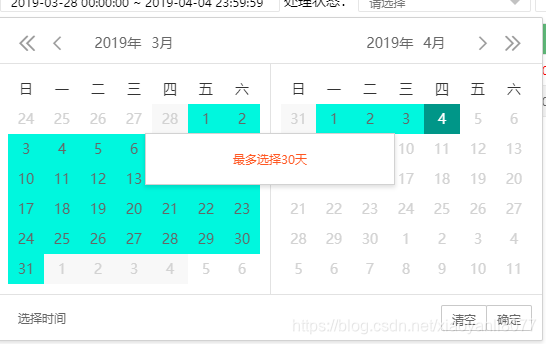
				start.hint('最多选择30天');
			}
		}
	});
[reply]xiaoyanli8077[/reply]自己解决方案可以看下,给后来人铺路
change: function(value, date, endDate){
var pattern = /(\d{4})(\d{2})(\d{2})/;
var d = value.split(' - ');
var s = new Date(d[0].replace(pattern, '$1-$2-$3'));
var e = new Date(d[1].replace(pattern, '$1-$2-$3'));
//计算两个时间间隔天数
var d=(e-s)/(1000*60*60*24);
let curMonthDays = 1;
if(d>curMonthDays){
$('.laydate-btns-confirm').hide()
laydateS.hint('最多选择'+curMonthDays+'天时间范围');
return;
}
$('.laydate-btns-confirm').show()
}
[reply]weixin_45570798[/reply]
var now = new Date();//当前时间
var before = Format.getBeforeDate(v);//7天前
start_time = Format.dateFormat(before, 'YYYY-MM-DD');
end_time = Format.dateFormat(now,"YYYY-MM-DD");
[reply]weixin_44498785[/reply]
var now = new Date();//当前时间
var before = Format.getBeforeDate(7);//7天前
var start_time = Format.dateFormat(before, 'YYYY-MM-DD 00:00:00');
var end_time = Format.dateFormat(now,"YYYY-MM-DD 23:59:59");
自定义个格式化函数
 layui时间选择器限制





 本文介绍如何使用layui时间选择器并设置最多选择30天的时间范围。通过具体代码示例展示了如何实现这一功能。





 扫一扫
扫一扫


 1111
1111


 到【灌水乐园】发言



