





 本文详细介绍了如何使用Apache HttpClient进行HTTP GET和POST请求,包括参数设置、响应处理等,并提供了完整的代码示例和Spring MVC服务端的实现。
项目开发中经常存在各个服务间相互调用。比如我们开发的是服务端提供方,但是我们也会去访问其他内部系统服务获取想要的数据返回给调用我们服务的消费者。为了便于学习,我重新整理了HttpClient。
HttpClient这个类的jar包是commons.httpclient-3.1.jar这个jar包是依赖了httpcore,commons-logging,commons-codec这三个jar包
commons-httpclient不在更新和维护了,建议使用org.apache.http.client.HttpClient,依赖jar包httpclient.jar。
但是一些老的项目中还是在用commons-httpclient。
所以首先整理一下org.apache.commons.httpclient.HttpClient类的常用使用方式,主要介绍一下get 和post一些常见的访问调用方式。
一、DOGET方式
1、第一种方式

http://127.0.0.1:8080/SpringMvcService/dogetserver1?MulStr=tttt
注意特殊字符处理
2、第二种方式使用setQueryString方法,注意编码格式
httpMethod.setQueryString(URIUtil.encodeQuery(resquest,charset));
package com.client.Utils;

import java.io.BufferedReader;
import java.io.IOException;
import java.io.InputStreamReader;
import java.io.UnsupportedEncodingException;
import java.net.URLEncoder;
import java.nio.charset.Charset;


import org.apache.commons.httpclient.DefaultHttpMethodRetryHandler;
import org.apache.commons.httpclient.HttpClient;
import org.apache.commons.httpclient.HttpMethod;
import org.apache.commons.httpclient.HttpStatus;
import org.apache.commons.httpclient.methods.GetMethod;
import org.apache.commons.httpclient.params.HttpConnectionManagerParams;
import org.apache.commons.httpclient.params.HttpMethodParams;
import org.apache.commons.httpclient.util.URIUtil;
import org.apache.commons.lang.StringUtils;
import org.slf4j.Logger;
import org.slf4j.LoggerFactory;
import org.springframework.util.StreamUtils;

/**
 * ClientUtilsByGet get方式实际开发不常用
 * @author Administrator
 *
 */


public class ClientUtilsByGet{
	 private static final Logger logger = LoggerFactory.getLogger(ClientUtilsByGet.class);
	 /**
	 * 	执行一个带参数的HTTP GET请求,返回请求响应的JSON字符串
     *
     * @param url 请求的URL地址
     * @param param 请求参数 可以不传
     * @return 返回请求响应的JSON字符串
	 * @throws UnsupportedEncodingException
     */
    public static String doGet(String url,String param) throws UnsupportedEncodingException {
    	String headerName=null;
    	String Response=null;
        // 构造HttpClient的实例
        HttpClient client = new HttpClient();
        //设置参数
        if(StringUtils.isNotBlank(param)) {
        	url=url+"?"+param;
        }
        // 创建GET方法的实例
        GetMethod method = new GetMethod(url );
        // 使用系统提供的默认的恢复策略
        method.getParams().setParameter(HttpMethodParams.RETRY_HANDLER,new DefaultHttpMethodRetryHandler());
        try {
            // 执行getMethod
            client.executeMethod(method);
            System.out.println("返回的状态码为:" +method.getStatusCode());
            if (method.getStatusCode() == HttpStatus.SC_OK) {
               Response=StreamUtils.copyToString(method.getResponseBodyAsStream(), Charset.forName("utf-8"));
            }
        } catch (IOException e) {
            logger.error("执行HTTP Get请求" + url + "时,发生异常!", e);
            return Response;
        } finally {
            method.releaseConnection();
        }
        return Response;
    }
    /**
     * 执行一个HTTP GET请求,返回请求响应的HTML
     *
     * @param url         请求的URL地址
     * @param queryString 请求的查询参数,可以为null
     * @param charset     字符集
     * @param pretty      是否美化
     * @return 返回请求响应的HTML
     */
    public static String DogetBystr(String url,String resquest, String charset, boolean pretty) {
    	StringBuffer response=new StringBuffer();
    	HttpClient httpClient=new HttpClient();
    	GetMethod httpMethod=new GetMethod(url);
    	HttpConnectionManagerParams httpConnectionManagerParams=httpClient.getHttpConnectionManager().getParams();
    	// 设置连接的超时时间
    	httpConnectionManagerParams.setConnectionTimeout(300000);
    	// 设置读取数据的超时时间
    	httpConnectionManagerParams.setSoTimeout(300000);
    	try {
        	if(StringUtils.isNotBlank(resquest)) {
        		httpMethod.setQueryString(URIUtil.encodeQuery(resquest,charset));
        	}
			httpClient.executeMethod(httpMethod);
			System.out.println("返回的状态码为:" +httpMethod.getStatusCode());
			BufferedReader reader = new BufferedReader(new InputStreamReader(httpMethod.getResponseBodyAsStream(), charset));
			    String line;
			    while ((line = reader.readLine()) != null) {
			        if (pretty) {
			            response.append(line).append(System.getProperty("line.separator"));
			    } else {
			        response.append(line);
			    }
			}

			reader.close();
		} catch (Exception e) {
	           logger.error("执行HTTP Get请求" + url + "时,发生异常!" + e);
	            return response.toString();
		}
    	finally {
    		httpMethod.releaseConnection();
    	}
        logger.info("http的请求地址为:" + url + ",返回的状态码为" + httpMethod.getStatusCode());
    	return response.toString();
    }
}
调用主程序:
package com.client.test;

import java.io.UnsupportedEncodingException;
import java.util.HashMap;
import java.util.Map;

import org.apache.commons.httpclient.URI;
import org.apache.commons.httpclient.URIException;
import org.apache.commons.httpclient.methods.multipart.Part;
import org.apache.commons.httpclient.methods.multipart.StringPart;

import com.alibaba.fastjson.JSONObject;
import com.client.Utils.ClientUtilsByGet;
import com.client.Utils.ClientUtilsByPost;


/**
 * Hello world!
 *
 */
public class ClientTest
{
    public static void main( String[] args ) throws URIException, NullPointerException

    {
//    	String url="http://127.0.0.1:8081/SpringMvcService/dogetserver2?MulStr=111";
//    	URI u= new URI(url, true, "utf-8");
//    	System.out.println(urlbyget());
//    	System.out.println(urlbyget2());

    }
    public  static String urlbyget() {
    	String url="http://127.0.0.1:8081/SpringMvcService/dogetserver1";
    	String contentType="application/json";
    	String charset="UTF-8";
    	String req="MulStr=tttt";
    	String resp="";
        /*doGet*/
    	try {
			 resp=ClientUtilsByGet.doGet(url,req);
		} catch (UnsupportedEncodingException e) {
			// TODO Auto-generated catch block
			e.printStackTrace();
		}
    	return resp;
    }
    public  static String urlbyget2() {
    	String url="http://127.0.0.1:8081/SpringMvcService/dogetserver1";
    	String reqStr=null;
    	String contentType="application/json";
    	String charset="UTF-8";
    	String resp=null;
    	Map<String, Object> map= new HashMap<String, Object>();
    	map.put("name", "liqiaorui");
    	map.put("age", "25");
    	JSONObject jsonObject=new JSONObject(map);
    	reqStr=jsonObject.toJSONString();
    	System.out.println("发送报文:"+reqStr);
    	resp=ClientUtilsByGet.DogetBystr(url, reqStr, charset,false);
    	System.out.println("返回报文:"+resp);
    	return resp;
    }

}
服务端使用SpringMvc实现:
 /*DOGET请求方式*/
   @RequestMapping(value = "/dogetserver1" ,produces={"text/html;charset=UTF-8;","application/json;charset=UTF-8;"},method = RequestMethod.GET)
   @ResponseBody
   public String dogetserver1(@RequestParam(required=false, defaultValue="-1")  String MulStr) {
		Map<String, Object> map= new HashMap<String, Object>();
		map.put("name", "李俏蕊");
		map.put("age", "25");
		JSONObject jsonObject=new JSONObject(map);
		String response=jsonObject.toJSONString();
		System.out.println("请求报文:"+MulStr);
		System.out.println("返回报文:"+response);
	   return response;
   }
   @RequestMapping(value = "/dogetserver2",produces={"text/html;charset=UTF-8;","application/json;charset=UTF-8;"}, method = RequestMethod.GET)
   @ResponseBody
   public String dogetserver2() {
		Map<String, Object> map= new HashMap<String, Object>();
		map.put("name", "李俏蕊");
		map.put("age", "25");
		JSONObject jsonObject=new JSONObject(map);
		String response=jsonObject.toJSONString();
		System.out.println("返回报文:"+response);
	   return response;
   }
   @RequestMapping(value = "/dogetserver3",produces={"text/html;charset=UTF-8;","application/json;charset=UTF-8;"}, method = RequestMethod.GET)
   @ResponseBody
   public String dogetserver3(int id) {
	    System.out.println("id:"+id);
		Map<String, Object> map= new HashMap<String, Object>();
		map.put("name", "李俏蕊");
		map.put("age", "25");
		JSONObject jsonObject=new JSONObject(map);
		String response=jsonObject.toJSONString();
		System.out.println("返回报文:"+response);
	   return response;
   }
   @RequestMapping(value = "/dogetserver4",produces={"text/html;charset=UTF-8;","application/json;charset=UTF-8;"}, method = RequestMethod.GET)
   @ResponseBody
   public String dogetserver4(HttpServletRequest request) {
		System.out.println("请求报文name:"+request.getParameter("name"));
		System.out.println("请求报文age:"+request.getParameter("age"));
		Map<String, Object> map= new HashMap<String, Object>();
		map.put("name", "李俏蕊");
		map.put("age", "25");
		JSONObject jsonObject=new JSONObject(map);
		String response=jsonObject.toJSONString();
		System.out.println("返回报文:"+response);
	   return response;
   }
 2 .DOPOST方式调用
package com.client.Utils;

import java.io.BufferedReader;
import java.io.IOException;
import java.io.InputStreamReader;
import java.io.UnsupportedEncodingException;
import java.nio.charset.Charset;
import java.util.ArrayList;
import java.util.List;
import java.util.Map;

import org.apache.commons.httpclient.HttpClient;
import org.apache.commons.httpclient.HttpStatus;
import org.apache.commons.httpclient.NameValuePair;
import org.apache.commons.httpclient.methods.PostMethod;
import org.apache.commons.httpclient.methods.StringRequestEntity;
import org.apache.commons.httpclient.methods.multipart.MultipartRequestEntity;
import org.apache.commons.httpclient.methods.multipart.Part;
import org.apache.commons.httpclient.params.HttpConnectionManagerParams;
import org.apache.commons.io.IOUtils;
import org.slf4j.Logger;
import org.slf4j.LoggerFactory;
import org.springframework.util.StreamUtils;


public class ClientUtilsByPost{
	 private static final Logger logger = LoggerFactory.getLogger(ClientUtilsByPost.class);
    /**	(常用)
     *	 执行一个HTTP POST请求,返回请求响应的HTML
     *
     * @param url     请求的URL地址
     * @param reqStr  请求的查询参数,可以为null
     * @param contentType    数据类型
     * @param charset 字符集
     * @return 返回请求响应的HTML
     */
    public static String doPost(String url, String reqStr, String contentType, String charset) {
    	System.out.println("发送报文:"+reqStr);
    	String resultStr="";
        HttpClient client = new HttpClient();
        PostMethod method = new PostMethod(url);
        try {
            HttpConnectionManagerParams managerParams = client.getHttpConnectionManager().getParams();
            managerParams.setConnectionTimeout(30000); // 设置连接超时时间(单位毫秒)
            managerParams.setSoTimeout(30000); // 设置读数据超时时间(单位毫秒)

            method.setRequestEntity(new StringRequestEntity(reqStr, contentType, charset));
            System.out.println("发送报文4:"+reqStr);
            client.executeMethod(method);
            System.out.println("返回的状态码为:" +method.getStatusCode());
            if (method.getStatusCode() == HttpStatus.SC_OK) {
              resultStr= IOUtils.toString(method.getResponseBodyAsStream(),"UTF-8");
              return resultStr;
            }
        } catch (UnsupportedEncodingException e1) {
            logger.error(e1.getMessage());
            return resultStr;
        } catch (IOException e) {
            logger.error("执行HTTP Post请求" + url + "时,发生异常!" + e.toString());
            return resultStr;
        } finally {
            method.releaseConnection();
        }
        return resultStr;
    }
    /**
     *
     * @param url 请求的URL地址
     * @param map 请求的map参数
     * @return 返回请求响应的JSON字符串
     * @throws UnsupportedEncodingException
     */
    public static String doPost(String url, Map<String, Object> map)   {
    	String response="";
    	HttpClient httpClient=new HttpClient();
    	PostMethod postMethod=new PostMethod(url);
    	List<NameValuePair> nameValuePairs=new ArrayList<NameValuePair>();
    	if(map!=null) {
    		for(Map.Entry<String, Object> entry : map.entrySet()) {
    			nameValuePairs.add(new NameValuePair(entry.getKey(),entry.getValue().toString()));
    		}
    	}
        // 填入各个表单域的值
        NameValuePair[] param = nameValuePairs.toArray(new NameValuePair[nameValuePairs.size()]);
        System.out.println(param[0].getName()+"="+param[0].getValue());
        postMethod.setRequestHeader("Content-Type", "application/x-www-form-urlencoded;charset=utf-8;");
        // 将表单的值放入postMethod中
        postMethod.addParameters(param);
        try {
            // 执行postMethod
            httpClient.executeMethod(postMethod);
            if (postMethod.getStatusCode() == HttpStatus.SC_OK) {
            	response= StreamUtils.copyToString(postMethod.getResponseBodyAsStream(), Charset.forName("utf-8"));
            }
        } catch (UnsupportedEncodingException e1) {
            logger.error(e1.getMessage());
            return response;
        } catch (IOException e) {
            logger.error("执行HTTP Post请求" + url + "时,发生异常!" + e.toString());
            return response;
        } finally {
        	postMethod.releaseConnection();
        }
        return response;
    }
    /**
     * 	执行一个HTTP POST请求,返回请求响应的HTML
     *
     * @param url     请求的URL地址
     * @param reqStr  请求的查询参数,可以为null
     * @param charset 字符集
     * @return 返回请求响应的HTML
     */
    public static String doPostMuStr(String url, Part[] reqStr) {
        HttpClient client = new HttpClient();

        PostMethod method = new PostMethod(url);
        try {
            HttpConnectionManagerParams managerParams = client.getHttpConnectionManager().getParams();
            managerParams.setConnectionTimeout(30000); // 设置连接超时时间(单位毫秒)
            managerParams.setSoTimeout(30000); // 设置读数据超时时间(单位毫秒)
//            method.getParams().setParameter(HttpMethodParams.HTTP_CONTENT_CHARSET, "utf-8");
            method.setRequestEntity(new MultipartRequestEntity(reqStr, method.getParams()));
//            method.setContentChunked(true);
            client.executeMethod(method);
            System.out.println("返回的状态码为:" +method.getStatusCode());
            if (method.getStatusCode() == HttpStatus.SC_OK) {
              return IOUtils.toString(method.getResponseBodyAsStream(),"utf-8");
            }
        } catch (UnsupportedEncodingException e1) {
            logger.error(e1.getMessage());
            return "";
        } catch (IOException e) {
            logger.error("执行HTTP Post请求" + url + "时,发生异常!" + e.toString());
            return "";
        } finally {
            method.releaseConnection();
        }
        return null;
    }
}
调用主程序:
package com.client.test;

import java.io.UnsupportedEncodingException;
import java.util.HashMap;
import java.util.Map;

import org.apache.commons.httpclient.URI;
import org.apache.commons.httpclient.URIException;
import org.apache.commons.httpclient.methods.multipart.Part;
import org.apache.commons.httpclient.methods.multipart.StringPart;

import com.alibaba.fastjson.JSONObject;
import com.client.Utils.ClientUtilsByGet;
import com.client.Utils.ClientUtilsByPost;


/**
 * Hello world!
 *
 */
public class ClientTest
{
    public static void main( String[] args ) throws URIException, NullPointerException

    {
//    	String url="http://127.0.0.1:8080/SpringMvcService/dogetserver2?MulStr=111";
//    	URI u= new URI(url, true, "utf-8");
//    	System.out.println(urlbypost());
//    	System.out.println(urlbypost2());
//    	System.out.println(urlbypost3());
    }

    public  static String urlbypost() {
    	String url="http://127.0.0.1:8080/SpringMvcService/student";
    	String reqStr=null;
    	String contentType="application/json";
    	String charset="UTF-8";
    	String resp=null;
    	Map<String, Object> map= new HashMap<String, Object>();
    	map.put("name", "李俏蕊");
    	map.put("age", "25");
    	JSONObject jsonObject=new JSONObject(map);
    	reqStr=jsonObject.toJSONString();
    	System.out.println("发送报文:"+reqStr);
    	resp=ClientUtilsByPost.doPost(url, reqStr, contentType, charset);
    	return resp;
    }
    public  static String urlbypost2() {
    	String url="http://127.0.0.1:8080/SpringMvcService/doPost1";
//    	String reqStr=null;
//    	String contentType="application/x-www-form-urlencoded";
//    	String charset="UTF-8";
    	String resp=null;
    	Map<String, Object> map= new HashMap<String, Object>();
    	map.put("name", "李俏蕊");
    	map.put("age", "25");
    	resp=ClientUtilsByPost.doPost(url,map);
    	return resp;
    }
    public  static String urlbypost3() {
    	String url="http://127.0.0.1:8080/SpringMvcService/fileupload";
//    	String reqStr=null;
//    	String contentType="application/x-www-form-urlencoded";
//    	String charset="UTF-8";
    	String resp=null;
    	Part[] parts=new Part[2];
    	parts[0]= new StringPart("name", "李俏蕊");
    	parts[1]= new StringPart("age", "25");
    	resp=ClientUtilsByPost.doPostMuStr(url,parts);
    	return resp;
    }
}
Springmvc服务端:
 @RequestMapping(value = "/student" ,produces={"text/html;charset=UTF-8;","application/json;charset=UTF-8;"})
   @ResponseBody
   public String student(@RequestBody  String MulStr) {
		Map<String, Object> map= new HashMap<String, Object>();
		map.put("name", "李俏蕊");
		map.put("age", "25");
		JSONObject jsonObject=new JSONObject(map);
		String response=jsonObject.toJSONString();
		System.out.println("请求报文:"+MulStr);
		System.out.println("返回报文:"+response);
	   return response;
   }
   @RequestMapping(value = "/doPost" ,produces={"text/html;charset=UTF-8;","application/json;charset=UTF-8;", "application/x-www-form-urlencoded;charset=UTF-8;"}, method = RequestMethod.POST)
   @ResponseBody
   public String doPost(@RequestBody  String MulStr) throws UnsupportedEncodingException {
		Map<String, Object> map= new HashMap<String, Object>();
		map.put("name", "李俏蕊");
		map.put("age", "25");
		JSONObject jsonObject=new JSONObject(map);
		String response=jsonObject.toJSONString();
		System.out.println("请求报文:"+MulStr);
		System.out.println("返回报文:"+response);
	   return response;
   }
   @RequestMapping(value = "/doPost1" ,produces={"text/html;charset=UTF-8;","application/json;charset=UTF-8;", "application/x-www-form-urlencoded;charset=UTF-8;"}, method = RequestMethod.POST)
   @ResponseBody
   public String doPost1(HttpServletRequest  httpServletRequest ) throws UnsupportedEncodingException {
		Map<String, Object> map= new HashMap<String, Object>();
		map.put("name", "李俏蕊");
		map.put("age", "25");
		JSONObject jsonObject=new JSONObject(map);
		String response=jsonObject.toJSONString();
		System.out.println("请求报文:"+httpServletRequest.getParameter("name"));
		System.out.println("请求报文:"+httpServletRequest.getParameter("age"));
		System.out.println("返回报文:"+response);
	   return response;
   }
 @RequestMapping("/fileupload")
   @ResponseBody
   public String fileupload( HttpServletRequest request) throws UnsupportedEncodingException{
	   String aa="";
       File path = new File("voicefilePath");
       if(!path.exists())
           path.mkdirs();

       MultipartRequest multirequest = null;
		try {
			multirequest = new MultipartRequest(request,path.getAbsolutePath(),"UTF-8");
		} catch (IOException e) {
			e.printStackTrace();
		}
		System.out.println(multirequest.getParameter("name"));
		String	response = new String(multirequest.getParameter("age").getBytes("UTF-8"),"ISO-8859-1");
		System.out.println(response);
		return response;
   }
运行结果: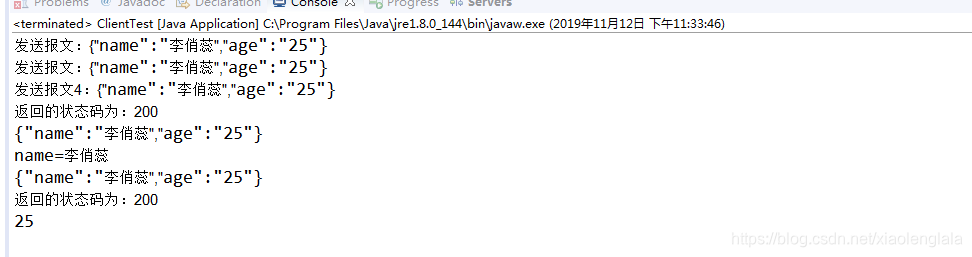
最后总结 springmvc 在处理 请求时 post 使用@RequestBody 接收请求信息
表单 文件可以使用HttpServletRequest接收
GET请求 @RequestParam 接收处理 或者不使用标签
public String dogetserver1(@RequestParam(required=false, defaultValue="-1") String MulStr)
required flase 表示 MulStr非必输字段;
defaultValue -1 表示 MulStr 如果不传值默认是-1处理
可以直接浏览器访问
http://127.0.0.1:8080/SpringMvcService/dogetserver1?MulStr=tttt
http://127.0.0.1:8080/SpringMvcService/dogetserver1
都可以访问
项目代码已打包上传,可以直接下载。
//download.youkuaiyun.com/download/xiaolenglala/11973567





 扫一扫
扫一扫


 2527
2527

 被折叠的 条评论
为什么被折叠?
被折叠的 条评论
为什么被折叠?
 到【灌水乐园】发言





