


 文章介绍了如何在Vue项目中创建一个名为deleteMessageBox.js的文件,用于封装删除数据时的确认弹窗功能。该功能利用$confirm进行提示,根据传入的方法(POST或GET)和路径执行HTTP请求,成功后更新列表并显示成功消息,否则展示错误信息。
在文件夹utils中创建 deleteMessageBox.js 文件
// 删除弹窗封装

export function box(index,methods,path,parameter){
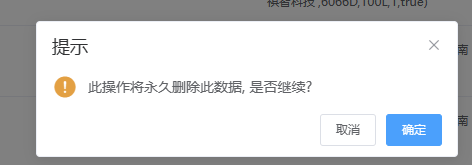
    this.$confirm('此操作将永久删除此数据, 是否继续?', '提示', {
        confirmButtonText: '确定',
        cancelButtonText: '取消',
        type: 'warning'
    }).then(async () => {
        const { data: res } = methods == 'post' ? await this.$http.post(path, [index]) : await this.$http.get(`${path}?${parameter}=${[index]}`)
          if (res.code === 20000) {
              this.getList()
            this.$message.success('删除成功!')
          } else {
            this.$message.error(res.msg);
          }
      })
}
在main.js 中引入 并挂载到原型上
//引入删除弹窗 并挂载到Vue原型上
import { box } from "./utils/deleteMessageBox";
Vue.prototype._box = box;
使用
// 删除功能 封装模块使用
    async deleteHandler(row) {
      if (!(await this._box(row.id, 'post', '/sys-user/delete'))) return;
    },
// 这边传递了三个参数
// row:id -- 要删除的id
// 'post' -- 请求方式
// '/sys-user/delete' -- 请求的地址
4.效果图





 扫一扫
扫一扫


 540
540

 被折叠的 条评论
为什么被折叠?
被折叠的 条评论
为什么被折叠?
 到【灌水乐园】发言





