


 本文介绍了如何在SpringBoot应用中集成HystrixDashboard进行服务监控,包括启动类配置、依赖管理、YAML配置以及如何处理SpringCloud升级后Servlet路径的变化。
仪表盘服务
主启动类
@SpringBootApplication
@EnableHystrixDashboard
public class HystrixDashboardMain9001 {
    public static void main(String[] args) {
        SpringApplication.run(HystrixDashboardMain9001.class, args);
    }
}
POM
    <dependencies>
        <dependency>
            <groupId>org.springframework.cloud</groupId>
            <artifactId>spring-cloud-starter-netflix-hystrix-dashboard</artifactId>
        </dependency>
        <dependency>
            <groupId>org.springframework.boot</groupId>
            <artifactId>spring-boot-starter-actuator</artifactId>
        </dependency>
        <dependency>
            <groupId>org.springframework.boot</groupId>
            <artifactId>spring-boot-starter-actuator</artifactId>
        </dependency>
        <dependency>
            <groupId>org.projectlombok</groupId>
            <artifactId>lombok</artifactId>
        </dependency>
    </dependencies>
YML
server:
  port: 9001

hystrix:
  dashboard:
    proxy-stream-allow-list: "localhost"
服务端provider
主启动
@SpringBootApplication
@EnableEurekaClient
@EnableCircuitBreaker
public class CloudProviderHystrixPayment8001 {
    public static void main(String[] args) {
        SpringApplication.run(CloudProviderHystrixPayment8001.class, args);
    }

    /**
     * 此配置是为了服务监控而配置,与服务容错本身无关,spring cloud升级后的坑
     * ServletRegistrationBean 因为 Springboot的默认路径不是“/hystrix.stream”
     * 只要在自己的项目里配置上下面的servlet就可以了
     */
    @Bean
    public ServletRegistrationBean getServlet(){
        HystrixMetricsStreamServlet streamServlet = new HystrixMetricsStreamServlet();
        ServletRegistrationBean registrationBean = new ServletRegistrationBean(streamServlet);
        registrationBean.setLoadOnStartup(1);
        registrationBean.addUrlMappings("/hystrix.stream");
        registrationBean.setName("HystrixMetricsStreamServlet");
        return registrationBean;
    }
}
监控的方法上
需要加上 @HystrixCommond 注解
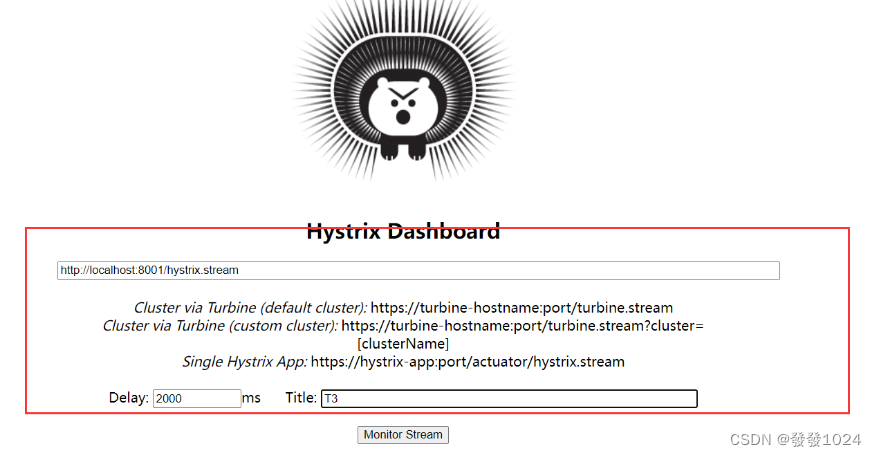
仪表盘使用
浏览访问仪表盘地址:http://ip地址:仪表盘服务端口/hystrix
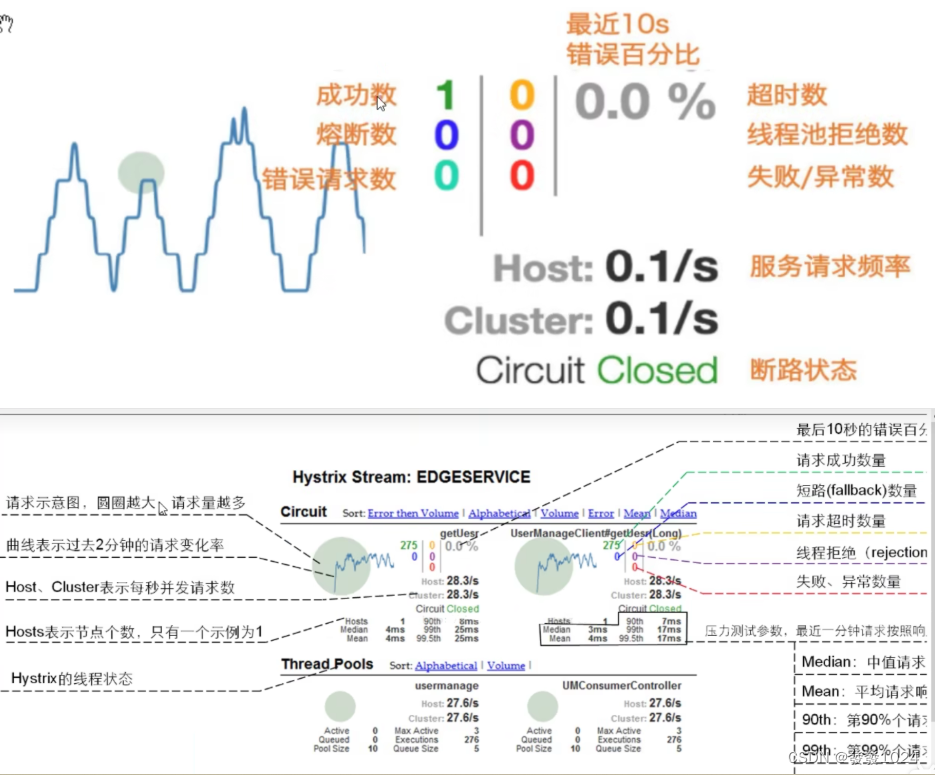
填写对应的信息





 扫一扫
扫一扫


 1616
1616

 被折叠的 条评论
为什么被折叠?
被折叠的 条评论
为什么被折叠?
 到【灌水乐园】发言





