



 这篇博客介绍了如何使用java库poi-tl进行Word模板的替换操作。内容包括poi-tl的基本概念、官方文档简介、POM配置以及简单的代码示例,展示了如何实现模板替换并利用Spring SPEL表达式进行配置。
前言
工作中,需要给word 中的一些标签替换为 指定的数据;暂时来记录一下,并且网上找了一些 ,经典的 poi, itext 等,顺便找了几个比较好用的 尝试使用了下并记录下来
poi-tl
简介: 轻量, 主要针对word的模板引擎,提供了对word的丰富操作。
官网 其实官网很详细了,自己就照搬一下吧。
pom
 <dependency>
            <groupId>com.deepoove</groupId>
            <artifactId>poi-tl</artifactId>
            <version>1.9.1</version>
        </dependency>
代码示例
基本使用
// sourceDoc 模板文件
//obj模板需要替换的数据,map or 一个对象;对象的属性和 模板的标签相对应即可
  XWPFTemplate.compile(sourceDoc).render(Object obj/*可以是一个map 也可以是一个对象*/).writeToFile(targetDoc);
// 构建数据
// 文本类型
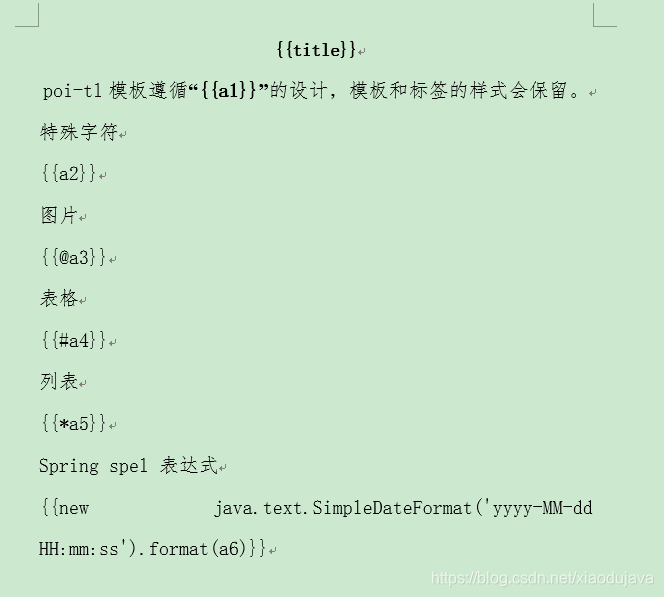
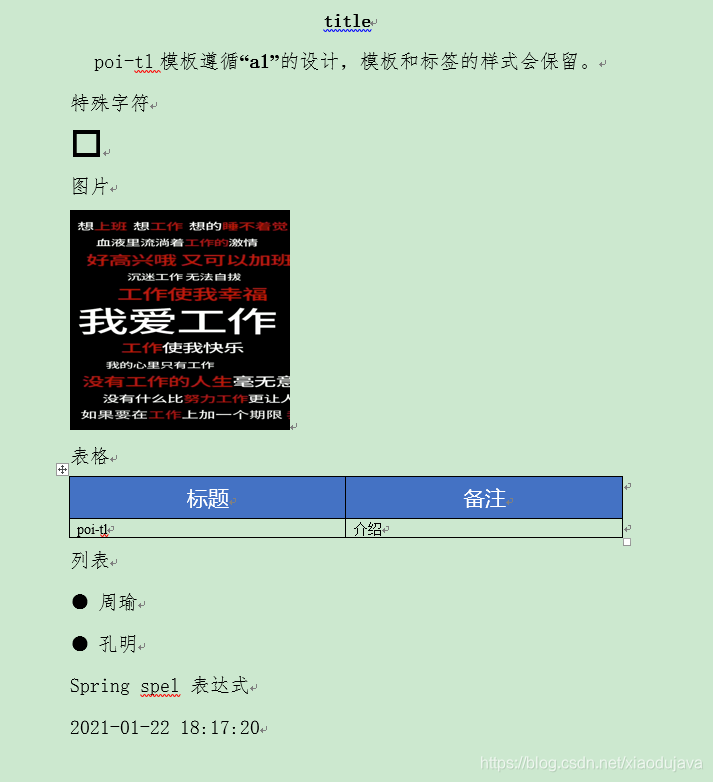
 TextRenderData a2 = Texts.of("o").style(Style.builder().buildFontFamily("wingdings").buildFontSize(28).build()).create();
 // 图片类型
PictureRenderData a3 = Pictures.ofLocal("F:/workSpaces/idea/springboot-test/poi-test/target/classes/test02.jpg").size(220, 220).create();
// 表格类型
TableRenderData a4 = Tables.create(
       Rows.of("标题", "备注").textColor("FFFFFF").textFontFamily("微软雅黑").textFontSize(16).center().bgColor("4472c4").create(),
       Rows.create("poi-tl", "介绍"));
// 列表类型
 NumberingRenderData a5 = Numberings.of("周瑜", "孔明").create();

 Date a6 = new Date();

 templateData = new HashMap<String, Object>() {
            {
                put("title", "poi-tl demo");
                put("a1", "所见即所得");
                put("a2", a2); // 特殊字体
                put("a3", a3); // 图片
                put("a4", a4); // 表格
                put("a5", a5); // 列表
                put("a6", a6); //  使用spel表达式 格式化日期
            }
        };
        poiTlEntity = new PoiTlEntity("title", "a1", a2, a3, a4, a5, a6);


        // 使用map构建数据
        XWPFTemplate.compile(sourceDoc).render(templateData).writeToFile("newTest01.docx");
        // 使用对象构建数据
        XWPFTemplate.compile(sourceDoc).render(poiTlEntity).writeToFile("newTest01.docx");
模板
效果
spring SPEL 表达式配置使用
<dependency>
            <groupId>org.springframework</groupId>
            <artifactId>spring-expression</artifactId>
            <version>4.3.6.RELEASE</version>
        </dependency>

   //配置使用 spring SPEL表达式
        Configure configure = Configure.builder().useSpringEL().build();
        // 使用map构建数据
        XWPFTemplate.compile(sourceDoc, configure).render(templateData).writeToFile("newTest01.docx");
        // 使用对象构建数据
        XWPFTemplate.compile(sourceDoc, configure).render(poiTlEntity).writeToFile("newTest01.docx");
以上简单入门 很容易上手,另外还有其他的比较好的api操作,官网api查看





 扫一扫
扫一扫


 1553
1553

 被折叠的 条评论
为什么被折叠?
被折叠的 条评论
为什么被折叠?
 到【灌水乐园】发言





