



 本文介绍了如何配置gitblit,使用git钩子脚本showdoc.groovy,在每次提交代码后自动将相关文件上传到showdoc进行文档管理。详细步骤包括在gitblit中配置脚本,showdoc的部署以及脚本中的关键参数设置。
应用场景:gitblit提交代码后,使用钩子脚本将文件上传到showdoc
一、 gitblit配置
在gitblit服务器,data>groovy目录下面,新增一个showdoc.groovy脚本文件。
测试的gitblit版本:1.9.2

在仓库编辑里,接收>post-receive脚本,将showdoc.groovy推至selected

二、showdoc部署
官方部署说明:https://www.showdoc.com.cn/help/4087044677189279
按官方部署成功后,进入主页,新建项目test。

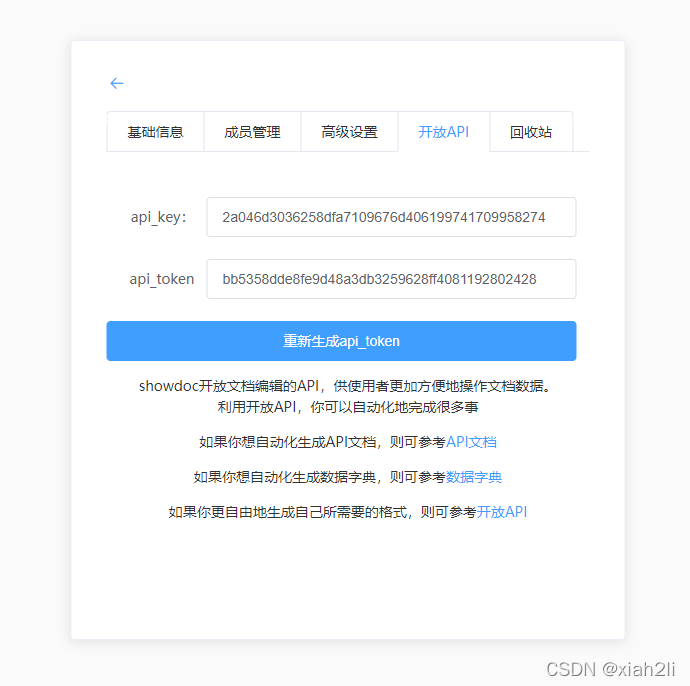
新建项目后,在该项目的设置里能看到开放API,能看到api_key,api_token的值
三 、showdoc.groovy脚本。
修改脚本里的showdocApiUrl、repo_info值。
import com.gitblit.GitBlit
import org.slf4j.Logger
import org.eclipse.jgit.lib.Repository
import org.eclipse.jgit.lib.ObjectReader
import org.eclipse.jgit.lib.ObjectId
import org.eclipse.jgit.lib.ObjectLoader
import org.eclipse.jgit.lib.AbbreviatedObjectId
import org.eclipse.jgit.api.Git
import org.eclipse.jgit.diff.DiffEntry
import org.eclipse.jgit.treewalk.CanonicalTreeParser;
import org.apache.http.NameValuePair
import org.apache.http.client.entity.UrlEncodedFormEntity
import org.apache.http.client.methods.CloseableHttpResponse
import org.apache.http.client.methods.HttpPost
import org.apache.http.impl.client.CloseableHttpClient
import org.apache.http.impl.client.DefaultHttpClient
import org.apache.http.message.BasicNameValuePair
import org.apache.http.util.EntityUtils
import org.jsoup.Jsoup
import org.jsoup.nodes.Document
import groovy.json.JsonSlurper

logger.info("showdoc hook triggered by ${user.username} for ${repository.name}")
// showdoc服务地址
showdocApiUrl = 'http://localhost:80/server/index.php?s=/api/item/updateByApi'
//仓库与showdoc的配置
repo_info = """
{
    "hooktest.git": {
        "api_key": "2a046d3036258dfa7109676d406199741709958274",
        "api_token": "bb5358dde8fe9d48a3db3259628ff4081192802428",
        "cat_name": "hooktest12/接口文档",
        "s_number": "99"
    },
    "hooktest2.git": {
        "api_key": "2a046d3036258dfa7109676d406199741709958274",
        "api_token": "bb5358dde8fe9d48a3db3259628ff4081192802428",
        "cat_name": "hooktest2/接口文档",
        "s_number": "99"
    }
}
"""

//获取仓库与showdoc的配置关联信息
repo_config = getShowdocConfig(repository.name)
// 实例化仓库
Repository r = gitblit.getRepository(repository.name)
for (command in commands){
    // 获取提交的分支名
    String refName = command.refName
    // 上一次提交
    ObjectId oldHead = r.resolve(refName+"^^{tree}")
    // 本次提交
    ObjectId head = r.resolve(refName+"^{tree}")
    ObjectReader reader = r.newObjectReader()
    CanonicalTreeParser oldTreeIter=new CanonicalTreeParser()
    oldTreeIter.reset(reader,oldHead)
    CanonicalTreeParser newTreeIter=new CanonicalTreeParser()
    newTreeIter.reset(reader,head)

    Git git = new Git(r)
    // 获取差异
    List<DiffEntry> diffs = git.diff().setNewTree(newTreeIter).setOldTree(oldTreeIter).call();
    // 获取差异文件
    for(entry in diffs){
        String filePath = entry.getNewPath()
        // 判断是否是md文件
        if(filePath.endsWith("md")){
            AbbreviatedObjectId fileId = entry.getNewId()
            ObjectLoader loader =r.open(fileId.toObjectId())
            byte[] bytes = loader.getBytes();
            if (bytes != null){
                println "待上传文件的路径:"+filePath
                String filename = getFilename(filePath)
                uploadToShowdoc(new String(bytes),filename)
            }
        }
    }
}

// 上传到showdoc,文件名和文件内容
def uploadToShowdoc(page_content,filename){
    CloseableHttpClient httpClient = new DefaultHttpClient()
    HttpPost method = new HttpPost(showdocApiUrl);
    List<NameValuePair> params=new ArrayList<NameValuePair>()
    params.add(new BasicNameValuePair("api_key", repo_config["api_key"]))
    params.add(new BasicNameValuePair("api_token", repo_config["api_token"]))
    params.add(new BasicNameValuePair("cat_name", repo_config["cat_name"]))
    params.add(new BasicNameValuePair("page_title",filename))
    params.add(new BasicNameValuePair("page_content",page_content))
    params.add(new BasicNameValuePair("s_number",repo_config["s_number"]))
    method.setEntity(new UrlEncodedFormEntity(params,"utf-8"));
    CloseableHttpResponse response = httpClient.execute(method);
    //发送Post,并返回一个HttpResponse对象
    String result = EntityUtils.toString(response.getEntity());
    Document doc1 = Jsoup.parse(result)
    // 获取error_code
    body= doc1.select("body").text()
    start=body.indexOf('error_code')
    end=body.indexOf(',"data"')
    error_code =body[start+12..end-1]
    println 'showdoc上传结果:'+error_code
    if(error_code=='0'){
        println filename+'上传成功!!!'
    }else{
        println filename+'上传失败!!!'
    }
}

// 获取该仓库的配置信息
def getShowdocConfig(repoName){
    def JsonSlurper = new JsonSlurper()
    def config = JsonSlurper.parseText(repo_info)
    if(config[repoName]!=null){
        return config[repoName]
    }else{
        throw new Exception( "There is no showdoc config for ${repoName}!!!" );
    }
}

// 获取文件名
def getFilename(filePath){
    int idx = filePath.lastIndexOf("/");
    filenameWithExt = filePath.substring(idx + 1, filePath.length());
    int idx1 = filenameWithExt.lastIndexOf(".");
    filename = filenameWithExt.substring(0, idx1);
    return filename
}





 扫一扫
扫一扫


 1812
1812

 被折叠的 条评论
为什么被折叠?
被折叠的 条评论
为什么被折叠?
 到【灌水乐园】发言





