






背景:
项目升级完成,但接下来的小问题不断,其中SQL优化及处理占了一半,后台抓SQL不难,但是手动拼接SQL,工作量实在太大,还容易出错。在 这位老师的博客(https://blog.youkuaiyun.com/Zale_J/article/details/89402668)基础上进行了修改完善,在此感谢老师。
优化思路:
- 代码结构和可读性优化
- 错误处理和边界情况
- 性能优化
- 用户体验改进
- 安全性增强
开干:
直接上代码spilt_sql.html:
<!DOCTYPE html>
<html lang="zh-CN">
<head>
    <meta charset="UTF-8">
    <meta name="viewport" content="width=device-width, initial-scale=1.0">
    <title>SQL日志转换工具</title>
    <style>
        * {
            box-sizing: border-box;
            margin: 0;
            padding: 0;
        }

        body {
            font-family: -apple-system, BlinkMacSystemFont, 'Segoe UI', Roboto, 'Helvetica Neue', Arial, sans-serif;
            line-height: 1.6;
            color: #333;
            background-color: #f5f7fa;
            padding: 20px;
        }

        .container {
            max-width: 1200px;
            margin: 0 auto;
            background: white;
            border-radius: 8px;
            box-shadow: 0 2px 10px rgba(0, 0, 0, 0.1);
            overflow: hidden;
        }

        header {
            background: linear-gradient(135deg, #667eea 0%, #764ba2 100%);
            color: white;
            padding: 20px 30px;
        }

        h1 {
            font-size: 24px;
            font-weight: 600;
        }

        .subtitle {
            opacity: 0.9;
            font-size: 14px;
            margin-top: 5px;
        }

        main {
            padding: 30px;
        }

        .input-section {
            margin-bottom: 20px;
        }

        label {
            display: block;
            margin-bottom: 8px;
            font-weight: 500;
            color: #555;
        }

        textarea {
            width: 100%;
            min-height: 150px;
            padding: 12px;
            border: 1px solid #ddd;
            border-radius: 4px;
            font-family: 'Consolas', 'Monaco', monospace;
            font-size: 14px;
            resize: vertical;
            transition: border-color 0.3s;
        }

        textarea:focus {
            outline: none;
            border-color: #667eea;
            box-shadow: 0 0 0 3px rgba(102, 126, 234, 0.1);
        }

        .button-group {
            display: flex;
            gap: 10px;
            margin-top: 15px;
        }

        button {
            padding: 10px 20px;
            background: #667eea;
            color: white;
            border: none;
            border-radius: 4px;
            cursor: pointer;
            font-size: 14px;
            font-weight: 500;
            transition: all 0.3s;
        }

        button:hover {
            background: #5a67d8;
            transform: translateY(-1px);
            box-shadow: 0 4px 8px rgba(0, 0, 0, 0.1);
        }

        button:active {
            transform: translateY(0);
        }

        button.secondary {
            background: #e2e8f0;
            color: #4a5568;
        }

        button.secondary:hover {
            background: #cbd5e0;
        }

        .output-section {
            margin-top: 30px;
        }

        .output-container {
            background: #f8fafc;
            border: 1px solid #e2e8f0;
            border-radius: 4px;
            padding: 15px;
            min-height: 100px;
            font-family: 'Consolas', 'Monaco', monospace;
            font-size: 14px;
            white-space: pre-wrap;
            word-break: break-all;
            color: #2d3748;
            max-height: 400px;
            overflow-y: auto;
        }

        .notification {
            padding: 12px 15px;
            border-radius: 4px;
            margin-top: 15px;
            display: none;
            animation: fadeIn 0.3s;
        }

        .notification.success {
            background-color: #f0fff4;
            color: #22543d;
            border: 1px solid #9ae6b4;
        }

        .notification.error {
            background-color: #fff5f5;
            color: #742a2a;
            border: 1px solid #fc8181;
        }

        .notification.info {
            background-color: #ebf8ff;
            color: #2c5282;
            border: 1px solid #90cdf4;
        }

        @keyframes fadeIn {
            from { opacity: 0; transform: translateY(-10px); }
            to { opacity: 1; transform: translateY(0); }
        }

        footer {
            padding: 15px 30px;
            background: #f8fafc;
            font-size: 12px;
            color: #718096;
            text-align: center;
        }

        .copy-button {
            position: absolute;
            top: 10px;
            right: 10px;
            padding: 5px 10px;
            font-size: 12px;
            background: #4a5568;
            opacity: 0;
            transition: opacity 0.3s;
        }

        .output-container:hover .copy-button {
            opacity: 1;
        }

        .output-wrapper {
            position: relative;
        }

        @media (max-width: 768px) {
            .container {
                border-radius: 0;
            }

            body {
                padding: 0;
            }

            main {
                padding: 20px;
            }
        }
    </style>
</head>
<body>
    <div class="container">
        <header>
            <h1>SQL日志转换工具</h1>
            <div class="subtitle">将MyBatis日志中的带参数SQL转换为完整可执行SQL</div>
        </header>

        <main>
            <section class="input-section">
                <label for="sqlLog">请粘贴MyBatis日志内容:</label>
                <textarea id="sqlLog" placeholder="例如:
Preparing: SELECT * FROM user WHERE id = ? AND name = ?
Parameters: 123(Integer), '张三'(String)"></textarea>

                <div class="button-group">
                    <button id="convertBtn">转换</button>
                    <button id="clearBtn" class="secondary">清空</button>
                    <button id="sampleBtn" class="secondary">使用示例</button>
                </div>

                <div id="notification" class="notification"></div>
            </section>

            <section class="output-section">
                <label for="sqlOutput">转换结果:</label>
                <div class="output-wrapper">
                    <div id="sqlOutput" class="output-container">转换后的SQL将显示在这里...</div>
                    <button id="copyBtn" class="copy-button">复制</button>
                </div>
            </section>
        </main>

        <footer>
            © 2025 SQL日志转换工具 | 当前时间: <span id="currentTime"></span>
        </footer>
    </div>

    <script>
        // 显示当前时间
        function updateTime() {
            const now = new Date();
            const options = {
                year: 'numeric',
                month: '2-digit',
                day: '2-digit',
                hour: '2-digit',
                minute: '2-digit',
                second: '2-digit',
                hour12: false
            };
            document.getElementById('currentTime').textContent = now.toLocaleString('zh-CN', options);
        }

        updateTime();
        setInterval(updateTime, 1000);

        // 显示通知
        function showNotification(message, type = 'info') {
            const notification = document.getElementById('notification');
            notification.textContent = message;
            notification.className = `notification ${type}`;
            notification.style.display = 'block';

            setTimeout(() => {
                notification.style.display = 'none';
            }, 3000);
        }

        // 转换SQL日志
        function convertSqlLog() {
            const logText = document.getElementById('sqlLog').value.trim();

            if (!logText) {
                showNotification('请输入SQL日志内容', 'error');
                return;
            }

            try {
                // 提取SQL语句
                const statementMatch = logText.match(/Preparing:\s*(.*?)(?:\n|$)/);
                if (!statementMatch) {
                    showNotification('未找到有效的SQL语句', 'error');
                    return;
                }

                let sqlStatement = statementMatch[1].trim();

                // 提取参数
                const parametersMatch = logText.match(/Parameters:\s*(.*?)(?:\n|$)/);
                if (!parametersMatch) {
                    showNotification('未找到参数信息', 'error');
                    return;
                }

                const parametersStr = parametersMatch[1].trim();
                const parameters = parametersStr.split(',').map(param => param.trim());

                // 处理每个参数
                for (const param of parameters) {
                    if (!param) continue;

                    // 提取值和类型
                    const valueMatch = param.match(/^(.*?)\((.*?)\)$/);
                    if (!valueMatch) {
                        // 如果没有类型信息,假设是字符串
                        const value = param.trim();
                        sqlStatement = sqlStatement.replace('?', `'${value}'`);
                        continue;
                    }

                    const value = valueMatch[1].trim();
                    const type = valueMatch[2].trim();

                    // 根据类型处理值
                    if (type === 'String' || type === 'Timestamp' || type === 'Date') {
                        // 字符串类型需要加引号
                        sqlStatement = sqlStatement.replace('?', `'${value}'`);
                    } else if (type === 'null') {
                        // 处理null值
                        sqlStatement = sqlStatement.replace('?', 'NULL');
                    } else {
                        // 数值类型直接替换
                        sqlStatement = sqlStatement.replace('?', value);
                    }
                }

                // 显示结果
                document.getElementById('sqlOutput').textContent = sqlStatement;
                showNotification('转换成功!', 'success');

            } catch (error) {
                console.error('转换错误:', error);
                showNotification('转换过程中发生错误: ' + error.message, 'error');
            }
        }

        // 清空输入和输出
        function clearAll() {
            document.getElementById('sqlLog').value = '';
            document.getElementById('sqlOutput').textContent = '转换后的SQL将显示在这里...';
            showNotification('已清空', 'info');
        }

        // 使用示例
        function useSample() {
            const sampleLog = `DEBUG [main] - ==>  Preparing: SELECT id, username, email, create_time FROM user WHERE status = ? AND create_time > ? ORDER BY id DESC
DEBUG [main] - ==> Parameters: 1(Integer), 2025-01-01 00:00:00(Timestamp)`;

            document.getElementById('sqlLog').value = sampleLog;
            showNotification('已加载示例数据', 'info');
        }

        // 复制到剪贴板
        function copyToClipboard() {
            const outputText = document.getElementById('sqlOutput').textContent;

            if (outputText === '转换后的SQL将显示在这里...') {
                showNotification('没有可复制的内容', 'error');
                return;
            }

            navigator.clipboard.writeText(outputText)
                .then(() => {
                    showNotification('已复制到剪贴板', 'success');
                })
                .catch(err => {
                    console.error('复制失败:', err);
                    showNotification('复制失败,请手动复制', 'error');
                });
        }

        // 事件监听
        document.getElementById('convertBtn').addEventListener('click', convertSqlLog);
        document.getElementById('clearBtn').addEventListener('click', clearAll);
        document.getElementById('sampleBtn').addEventListener('click', useSample);
        document.getElementById('copyBtn').addEventListener('click', copyToClipboard);

        // 支持Ctrl+Enter快捷键转换
        document.getElementById('sqlLog').addEventListener('keydown', function(e) {
            if (e.ctrlKey && e.key === 'Enter') {
                convertSqlLog();
            }
        });
    </script>
</body>
</html>
效果展示:
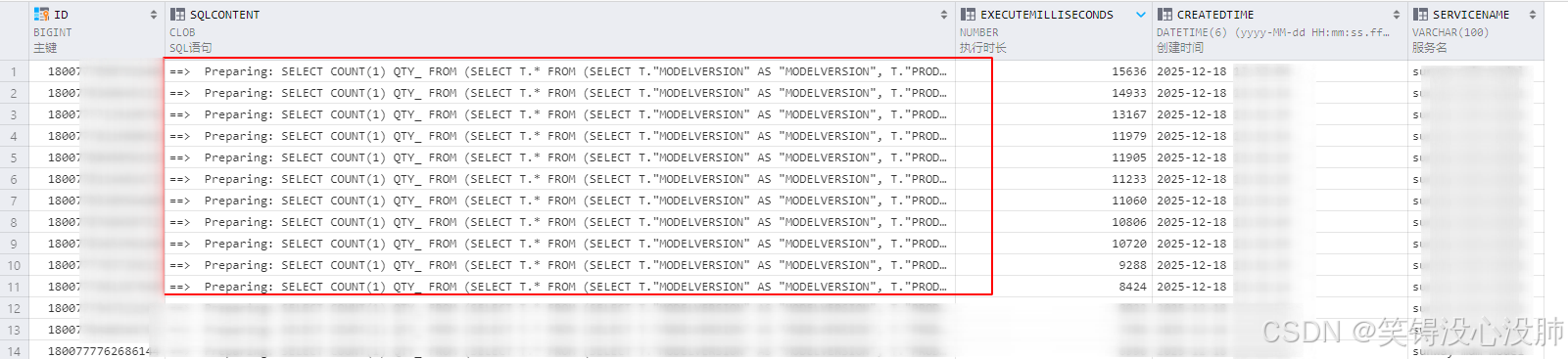
原业务SQL:

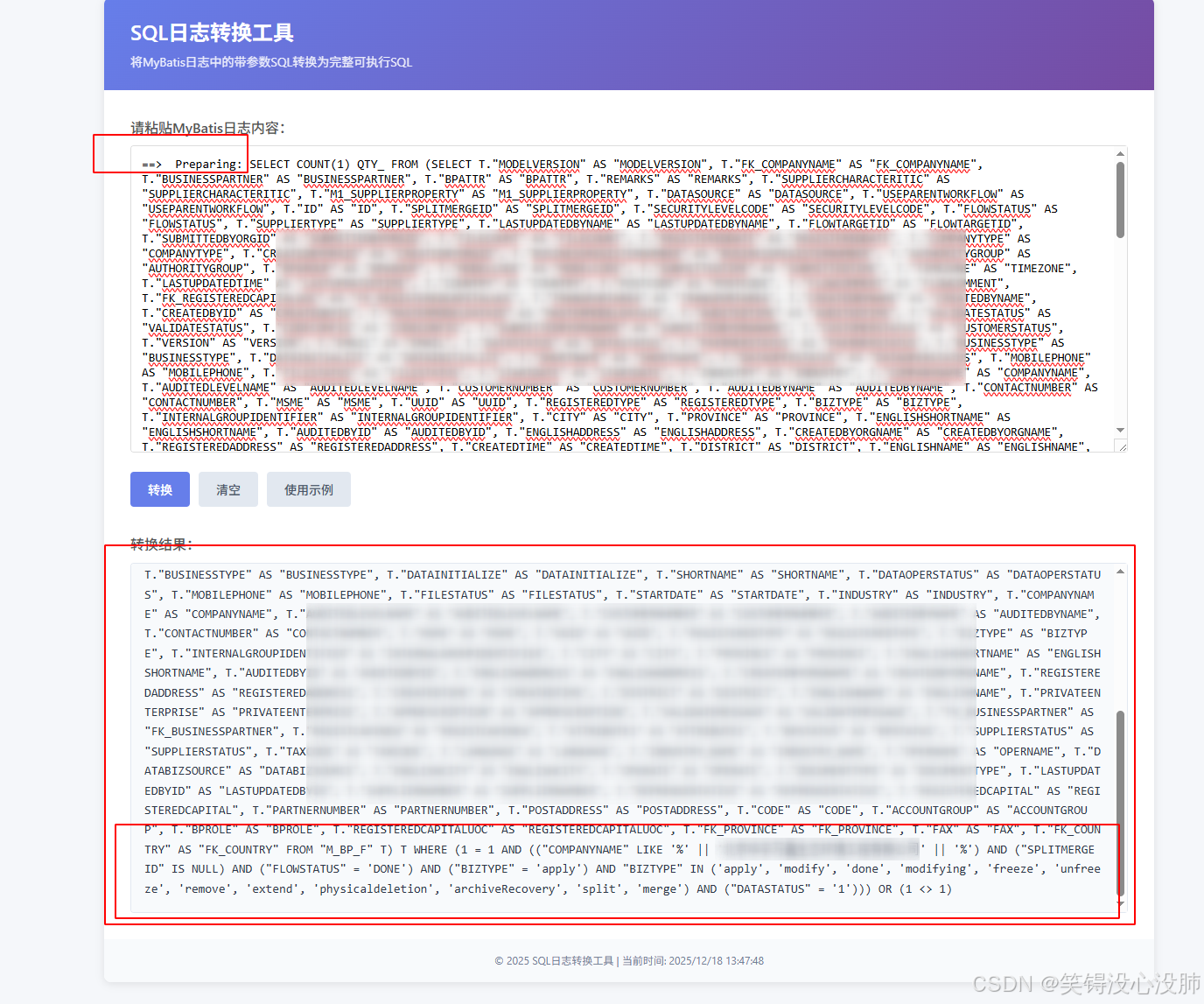
转换后的
通过file:///E:/Desktop/%E6%96%B0%E6%96%87%E4%BB%B6%2091.html
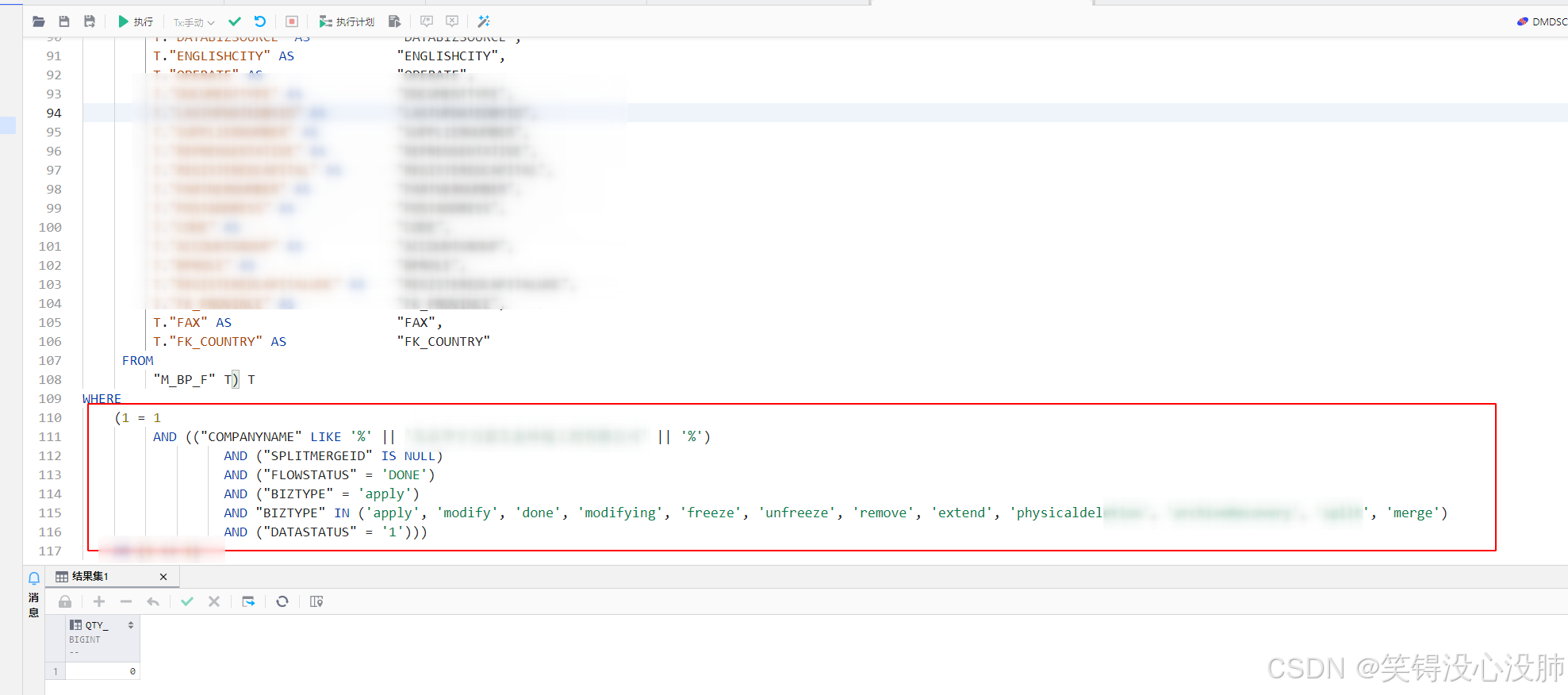
直接复制到工具里执行。
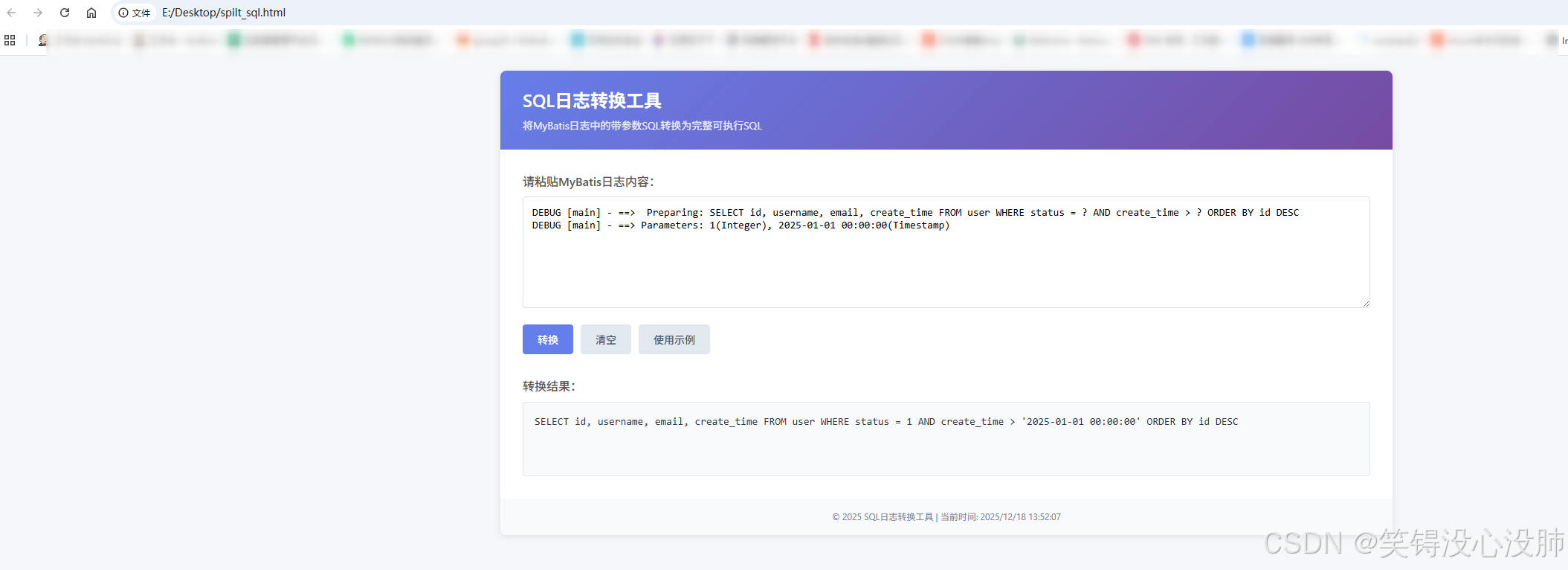
页面展示:






 扫一扫
扫一扫


 3182
3182

 被折叠的 条评论
为什么被折叠?
被折叠的 条评论
为什么被折叠?
 到【灌水乐园】发言





