




 本文介绍了一种解决SQL数据库镜像同步过程中遇到的问题的方法。通过详细的步骤指导如何备份数据库、复制备份文件并进行恢复操作,特别强调了使用NORECOVERY及NOUNLOAD选项的重要性。
Steps:
1. backup database TestMirror on Pricipal server
2. backup database log of TestMirror on Pricipal server
3. copy db and log backup files to Mirror server
4. restore db with norecovery
5. restore log with norecovery
6. create endpoints on both Pricipal serverand Mirror server
Issue:
If you use sql command or Mirror wizard to set mirror machine.
It will show error: "The remote copy of database "DBmirrorTest" has not been rolled forward to a point in time that is encompassed in the local copy of the database log."
Or
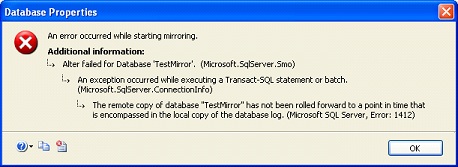
1. ALTERDATABASETestBackup01SETPARTNER='TCP://isrv04.xxx:50221';
2. Tasks -> Mirror ->Mirroring -> Config Security
Solutions:
RESTORE DATABASE @dbname FROM DISK = @backupfile WITH FILE = 1, NORECOVERY, NOUNLOAD;
RESTORE LOG @dbname FROM DISK = @backupfile WITH FILE = 2, NORECOVERY, NOUNLOAD;
These did the trick for me. I generated the commands through the "Script"-menu within the "Restore Database"-dialog of the Management Studio, because enabling mirroring was no problem when I restored through the "Restore Database"-dialog. My manually written
SQL-commands were missing the "NOUNLOAD" part.





 扫一扫
扫一扫


 8万+
8万+


 被折叠的 条评论
为什么被折叠?
被折叠的 条评论
为什么被折叠?
 到【灌水乐园】发言




