
SpringBoot整合Swagger

本文介绍了如何在SpringBoot项目中集成Swagger,包括引入依赖、配置类设置、API注解使用,以及如何通过Swagger UI进行接口文档的查看。示例展示了用户API接口的创建和验证过程。

SpringBoot简单整合Swagger,会陆陆续续的继续完善

SprngBoot整合Swagger步骤

  1. 引入依赖
<dependency>
  <groupId>io.springfox</groupId>
    <artifactId>springfox-swagger2</artifactId>
    <version>2.9.2</version>
</dependency>
<dependency>
    <groupId>io.springfox</groupId>
    <artifactId>springfox-swagger-ui</artifactId>
    <version>2.9.2</version>
</dependency>
  1. 编写配置类
@Configuration
@EnableSwagger2
public class SwaggerConfig {
    @Bean
    public Docket createRestApi() {
        return new Docket(DocumentationType.SWAGGER_2)
                .pathMapping("/")
                .select()
                .apis(RequestHandlerSelectors.basePackage("com.wx.springboottest.controller"))
                .paths(PathSelectors.any())
                .build().apiInfo(new ApiInfoBuilder()
                        .title("SpringBoot整合Swagger")
                        .description("SpringBoot整合Swagger,详细信息......")
                        .version("9.0")
                        .contact(new Contact("啊啊啊啊","blog.youkuaiyun.com","aaa@gmail.com"))
                        .license("The Apache License")
                        .licenseUrl("http://www.baidu.com")
                        .build());
    }
}
  1. 加上注解
@RestController
@Api(tags = "user的API接口")
@RequestMapping("/user")
public class UserController {
@PostMapping("/insert")
    @ApiOperation("插入用户接口")
    @ApiImplicitParams({
            @ApiImplicitParam(name = "name", value = "姓名", defaultValue = "lisi"),
            @ApiImplicitParam(name = "age", value = "年龄", defaultValue = "18")
    })
    public String insert(@RequestBody @Valid User user, BindingResult bindingResult){
        String s="";
        if (bindingResult.hasErrors()){
            List<ObjectError> allErrors = bindingResult.getAllErrors();
            for (ObjectError error : allErrors) {
                String name = error.getObjectName();
                String message = error.getDefaultMessage();
                s+=name+message;
            }
        }else {
            userService.inserUser(user);
            s = "插入成功";
        }
        return s;
    }
}
  1. bean加上注解
@Data
@ApiModel
@TableName(value = "user")
public class User {

    @TableId(value = "id", type = IdType.ID_WORKER_STR)
    @ApiModelProperty(value = "主键id")
    private String id;

    @NotBlank(message = "姓名不能为null")
    @ApiModelProperty(value = "姓名")
    private String name;

    @NotNull
    @ApiModelProperty(value = "年龄")
    @Min(value = 0, message = "age必须大于0")
    private Integer age;
}

访问地址:http://localhost:8080/swagger-ui.html
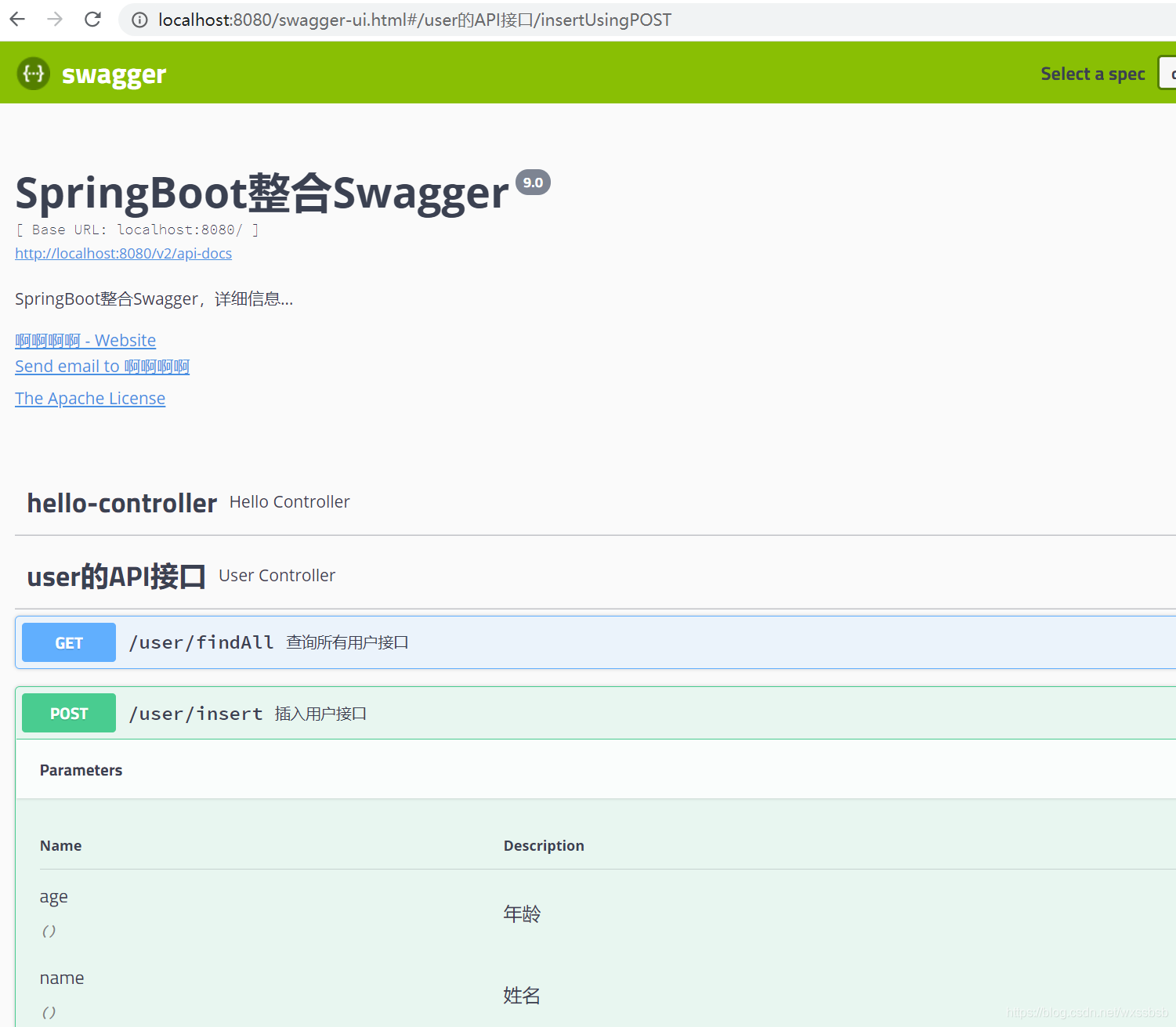
在这里插入图片描述

<think>好的,我现在需要帮助用户了解如何在Spring Boot项目中集成Swagger来生成API文档。根据用户提供的引用内容,我需要整理出一个清晰的步骤指南,同时确保遵循系统级指令,比如正确使用LaTeX格式和生成相关问题。 首先,我需要回顾用户提供的引用内容。引用[1]介绍了Spring Boot和Swagger的基本概念,以及整合的必要性。引用[3]提到了准备工作,比如JDK版本、IDE、构建工具和所需依赖。引用[5]提到了依赖版本的问题,特别是Spring Boot与Swagger版本的兼容性。引用[2]和[4]则涉及配置类中的注解以及如何在生产环境禁用Swagger。 接下来,我需要组织这些信息,按照步骤说明整合过程。第一步应该是创建Spring Boot项目,然后添加Swagger依赖。这里需要注意版本兼容性,比如引用[5]提到的使用2.9.2版本的springfox-swagger2和springfox-swagger-ui。然后,配置Swagger,创建配置类,添加必要的注解如@Configuration、@EnableSwagger2,可能还有@EnableSwaggerBootstrapUI(引用[2])。接着,配置API文档的基本信息,如标题、描述、版本等,这通常在Docket bean中设置。 还需要考虑生产环境的安全措施,如引用[4]提到的使用@Profile限制环境,或者整合权限管理。这部分可能需要简要提及,但用户的问题主要集中在配置方法,所以重点在配置步骤。 同时,我需要确保所有行内数学表达式正确使用$...$格式,但这里可能涉及较少数学内容,不过如果有版本号或其他代码内的变量,可能需要处理。例如,Maven依赖中的版本号可能需要用行内代码块而非LaTeX,但根据示例,代码部分应该用代码块包裹,所以可能不需要LaTeX处理。 检查是否有需要单独成段的公式,但问题主要涉及配置步骤和代码,可能不需要独立公式。确保使用中文回答,结构清晰,分步骤说明,每个步骤有代码示例或配置示例。 最后,生成相关问题,根据用户提供的引用内容,可能涉及版本兼容性、生产环境配置、UI增强、权限管理整合等。 现在整理步骤: 1. 创建Spring Boot项目:使用IDE或Spring Initializr,确保JDK8+,Maven/Gradle。 2. 添加Swagger依赖:根据引用[5],添加springfox-swagger2和springfox-swagger-ui的2.9.2版本。 3. 创建Swagger配置类:使用@Configuration和@EnableSwagger2注解,可能包括@EnableSwaggerBootstrapUI(引用[2])。 4. 配置Docket Bean:设置API信息,扫描的包路径等。 5. 访问Swagger UI:运行项目后通过特定URL访问。 6. 生产环境配置:使用@Profile限制环境(引用[4])。 在回答中需要引用对应的引用来源,如配置类中的注解引用[2],环境配置引用[4],依赖版本引用[5]等。 现在检查是否有遗漏或错误,比如版本兼容性问题,确保代码示例正确,特别是配置类和依赖部分。确认所有引用正确标注,问题部分涵盖用户可能关心的其他方面,如优化、安全、版本问题等。</think>### Spring Boot 整合 Swagger 配置方法及教程 #### **1. 创建 Spring Boot 项目** - 使用 **Spring Initializr** 或 IDE(如 IntelliJ IDEA)创建项目,选择 **Maven/Gradle** 作为构建工具。 - 确保 JDK 版本为 **8 及以上**,并添加 Spring Web 依赖[^3]。 #### **2. 添加 Swagger 依赖** 在 `pom.xml` 中添加以下依赖(注意版本兼容性[^5]): ```xml <dependency> <groupId>io.springfox</groupId> <artifactId>springfox-swagger2</artifactId> <version>2.9.2</version> </dependency> <dependency> <groupId>io.springfox</groupId> <artifactId>springfox-swagger-ui</artifactId> <version>2.9.2</version> </dependency> ``` #### **3. 创建 Swagger 配置类** 新建配置类 `SwaggerConfig.java`,添加注解并配置 API 信息[^2][^4]: ```java @Configuration @EnableSwagger2 @EnableSwaggerBootstrapUI // 可选:增强UI界面 @Profile({"dev", "test"}) // 仅在开发/测试环境启用 public class SwaggerConfig { @Bean public Docket api() { return new Docket(DocumentationType.SWAGGER_2) .apiInfo(apiInfo()) .select() .apis(RequestHandlerSelectors.basePackage("com.example.controller")) // 扫描的包路径 .paths(PathSelectors.any()) .build(); } private ApiInfo apiInfo() { return new ApiInfoBuilder() .title("API 文档") .description("接口说明") .version("1.0") .build(); } } ``` #### **4. 配置生产环境禁用 Swagger** 在 `application.properties` 中设置环境为 `prod`[^4]: ```properties spring.profiles.active=prod ``` #### **5. 访问 Swagger UI** 启动项目后,通过以下 URL 访问: - 默认 UI:`http://localhost:8080/swagger-ui.html` - 增强 UI(需添加 `@EnableSwaggerBootstrapUI`):`http://localhost:8080/doc.html` --- ### **关键配置说明** | 配置项 | 说明 | |-------------------------|--------------------------------------------------------------------| | `@EnableSwagger2` | 启用 Swagger 核心功能 | | `RequestHandlerSelectors` | 指定扫描的 Controller 包路径 | | `@Profile({"dev","test"})` | 限制 Swagger 仅在开发/测试环境生效 | ---
评论
添加红包

请填写红包祝福语或标题

红包个数最小为10个

红包金额最低5元

当前余额3.43前往充值 >
需支付:10.00
成就一亿技术人!
领取后你会自动成为博主和红包主的粉丝 规则
hope_wisdom
发出的红包
实付
使用余额支付
点击重新获取
扫码支付
钱包余额 0

抵扣说明:

1.余额是钱包充值的虚拟货币,按照1:1的比例进行支付金额的抵扣。
2.余额无法直接购买下载,可以购买VIP、付费专栏及课程。

余额充值


