






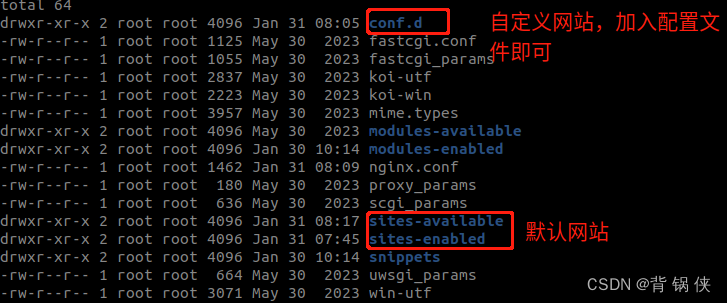
1. 自定义项目,需要在 conf.d 目录中增加一个 .conf 配置文件:
# /etc/nginx/conf.d/hik_cam_media.conf

server {
    listen  9200;                      # 端口号
    server_name	localhost;             # 服务名称
    location / {
       root  /home/imx6q/media;        # 项目根目录(需要修改 nginx.conf 的用户)
       index index.html index.htm;     #
       autoindex on;                   # 没有找到 index 配置时,自动列出文件列表
    }
}
nginx 的默认根目录在 /var/www/html 目录中,默认用户为 www-data,无法访问 /var/www/html 之外的资源,因此需要修改 /etc/nginx/nginx.conf 中的 user ,让它能够访问其它路径。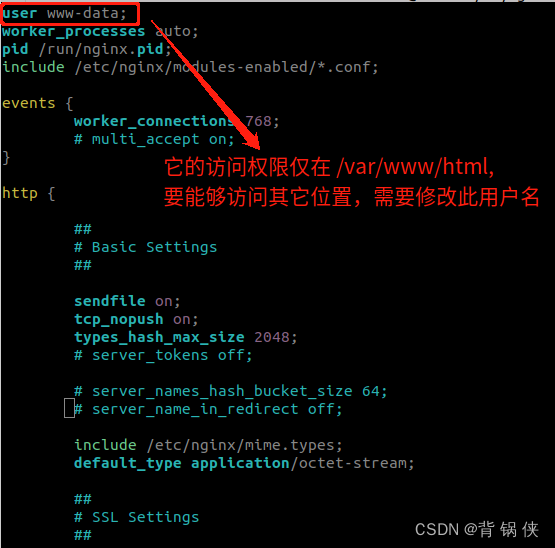
2. nginx 配置 http 反向代理
# /etc/nginx/conf.d/hik_cam_webproxy.conf

server {
    listen  9201;
    server_name	localhost;
    location / {
       index index.html index.htm;
       proxy_set_header Host $proxy_host;
       proxy_set_header X-Real-IP $remote_addr;
       proxy_set_header X-Forwarded-For $proxy_add_x_forwarded_for;
       # proxy_set_header X-NginX-Proxy true;
       proxy_pass  http://192.168.1.64:80;
    }
}





 扫一扫
扫一扫


 2635
2635

 被折叠的 条评论
为什么被折叠?
被折叠的 条评论
为什么被折叠?
 到【灌水乐园】发言





