





 文章描述了在Vue.js应用中使用VXE-Table组件实现弹框表格的结构,以及两种不同的数据加载和回显默认选中状态的方法。第一种方法是通过预处理数据并设置`checkboxConfig.checkRowKeys`,而第二种方法则是通过过滤和设置`$refs.qualityTable.setCheckboxRow`来实现。此外,还展示了异步获取数据并在加载完成后设置表格状态的完整流程。
1.弹框表格结构
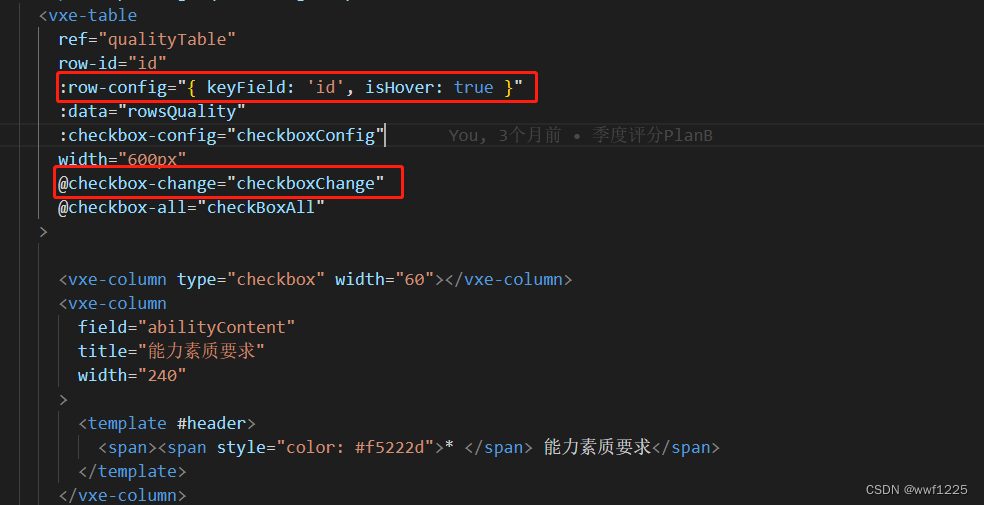
<a-modal
v-if="visibleQuality"
title="请选择需要提高的能力素质要求"
:maskClosable="false"
:visible="visibleQuality && switchStatus"
@ok="handleOkQuality"
@cancel="handleCancelQuality"
cancelText="取消"
okText="确定"
width="600px"
>
<a-spin :spinning="quaLoading" tip="加载中...">
<vxe-table
ref="qualityTable"
row-id="id"
:row-config="{ keyField: 'id', isHover: true }"
:data="rowsQuality"
:checkbox-config="checkboxConfig"
width="600px"
@checkbox-change="checkboxChange"
@checkbox-all="checkBoxAll"
>
<vxe-column type="checkbox" width="60"></vxe-column>
<vxe-column
field="abilityContent"
title="能力素质要求"
width="240"
>
<template #header>
<span><span style="color: #f5222d">* </span> 能力素质要求</span>
</template>
</vxe-column>
<vxe-column
field="explain"
title="能力素质要求说明"
width="240"
></vxe-column>
</vxe-table>
</a-spin>
</a-modal>
2. 数据
data() {
return {
checkboxConfig: {}, // 默认选中
}
}
3. 实现方法,首先要异步处理,等待数据加载完毕,再去回显
3.1 第一种方法:
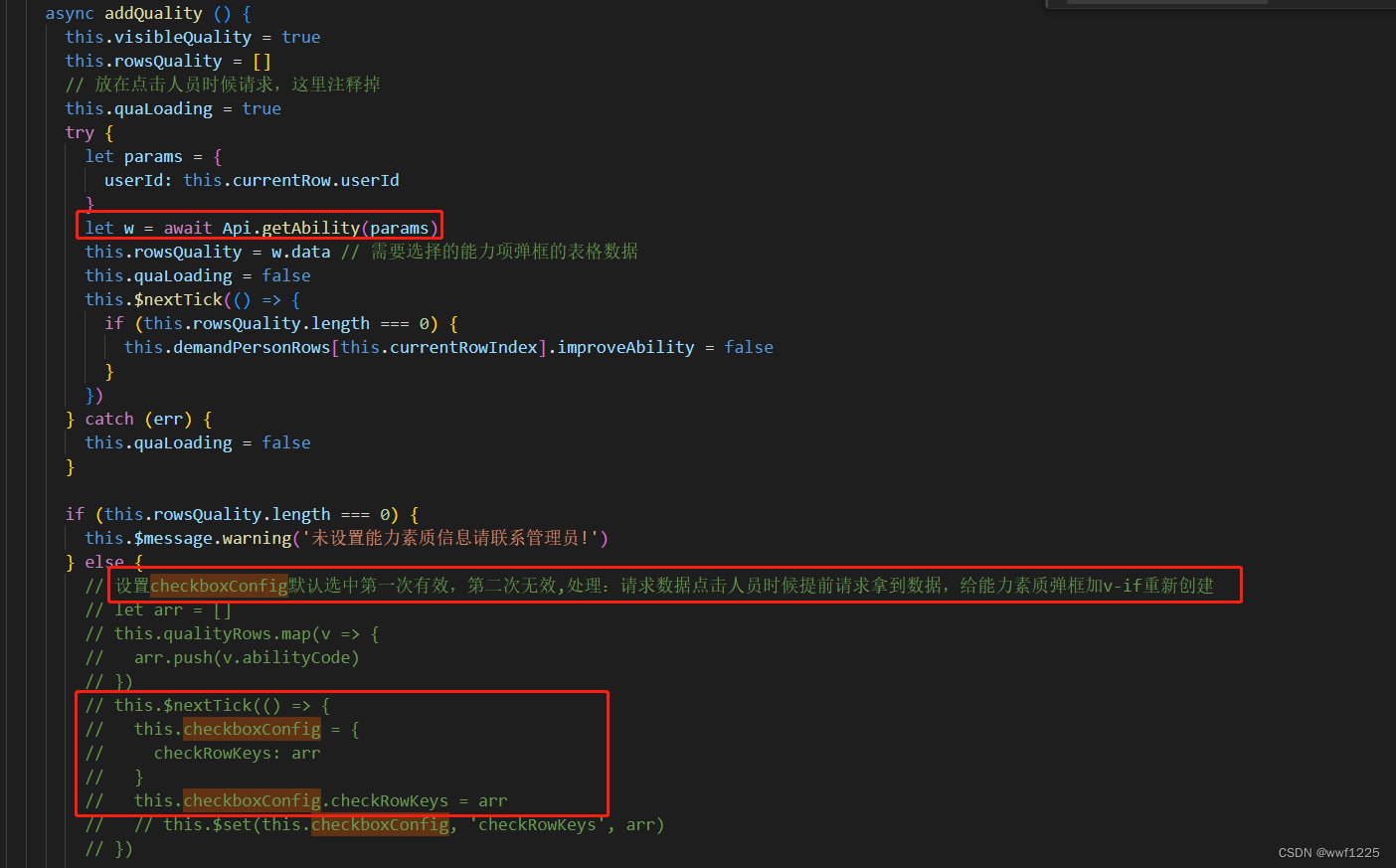
ps:(重要提示)设置checkboxConfig默认选中第一次有效,第二次无效,处理:请求数据点击人员时候提前请求拿到数据,给能力素质弹框加v-if重新创建
let arr = []
this.qualityRows.map(v => {
arr.push(v.abilityCode)
})
this.$nextTick(() => {
this.checkboxConfig = {
checkRowKeys: arr
}
this.checkboxConfig.checkRowKeys = arr
// this.$set(this.checkboxConfig, 'checkRowKeys', arr)
})
3.2 第二种方法:
// 第二种方法过滤得到新数组arr
let arr = []
if (this.rowsQuality && this.qualityRows) {
this.rowsQuality.map(v => {
this.qualityRows.map(item => {
if (item.abilityCode === v.id) {
arr.push(v)
}
})
})
}
this.$nextTick(() => {
this.$refs.qualityTable.clearCheckboxRow()
this.$refs.qualityTable.setCheckboxRow(arr, true)
})
3.3 异步处理和回显完整方法:(try,catch 配合async,await 异步处理)
async addQuality () {
this.visibleQuality = true
this.rowsQuality = []
// 放在点击人员时候请求,这里注释掉
this.quaLoading = true
try {
let params = {
userId: this.currentRow.userId
}
let w = await Api.getAbility(params)
this.rowsQuality = w.data // 需要选择的能力项弹框的表格数据
this.quaLoading = false
this.$nextTick(() => {
if (this.rowsQuality.length === 0) {
this.demandPersonRows[this.currentRowIndex].improveAbility = false
}
})
} catch (err) {
this.quaLoading = false
}
if (this.rowsQuality.length === 0) {
this.$message.warning('未设置能力素质信息请联系管理员!')
} else {
// 设置checkboxConfig默认选中第一次有效,第二次无效,处理:请求数据点击人员时候提前请求拿到数据,给能力素质弹框加v-if重新创建
// let arr = []
// this.qualityRows.map(v => {
// arr.push(v.abilityCode)
// })
// this.$nextTick(() => {
// this.checkboxConfig = {
// checkRowKeys: arr
// }
// this.checkboxConfig.checkRowKeys = arr
// // this.$set(this.checkboxConfig, 'checkRowKeys', arr)
// })
// rowsQuality:需要选择的能力项弹框的表格数据(id),qualityRows:第三个表格能力素质项表格数据(abilityCode)
// 第一种方法过滤 得到条件item.abilityCode === v.id 为true 的新数组arr
// let arr = this.rowsQuality.filter(v => {
// let flag = false
// this.qualityRows.map(item => {
// if (item.abilityCode === v.id) {
// return (flag = true)
// }
// });
// if (flag) {
// return true;
// }
// })
// 第二种方法过滤得到新数组arr
let arr = []
if (this.rowsQuality && this.qualityRows) {
this.rowsQuality.map(v => {
this.qualityRows.map(item => {
if (item.abilityCode === v.id) {
arr.push(v)
}
})
})
}
this.$nextTick(() => {
this.$refs.qualityTable.clearCheckboxRow()
this.$refs.qualityTable.setCheckboxRow(arr, true)
})
}
}





 扫一扫
扫一扫


 1022
1022

 被折叠的 条评论
为什么被折叠?
被折叠的 条评论
为什么被折叠?
 到【灌水乐园】发言





