


 本文详细解读了Android 11中Activity的启动流程,涉及Task、BackStack概念,以及Activity启动方式(standard和FLAG_ACTIVITY_NEW_TASK)的应用。通过adbdumpsys信息展示了启动过程中的关键步骤,包括ActivityStarter的作用和任务分配,以及启动参数的准备。深入剖析了Activity启动的启动器(ActivityStarter)、任务堆栈和Activity记录的过程。
Android11 Acvitity启动流程1-ActivityStarter:
一、回顾
在学习Android app开发的时候,最先要学习的就是关于Activity的启动方式,Task和Back Stack的知识。因此在学习framework如何管理启动的activity之前,有必要回顾一下。
1.1.Task和Back Stack
Google官方文档里有这么一篇文档《Understand Tasks and Back Stack》https://developer.android.com/guide/components/activities/tasks-and-back-stack
1.1.1定义:
在这篇文章的开头就给task和Back Stack下了定义:
- Task: A task is a collection of activities that users interact with when performing a certain job.
- Stack: The activities are arranged in a stack—the back stack—in the order in which each activity is opened.
1.1.2举例说明:
For example, an email app might have one activity to show a list of new messages. When the user selects a message, a new activity opens to view that message. This new activity is added to the back stack. If the user presses the Back button, that new activity is finished and popped off the stack.
1.1.3图示:
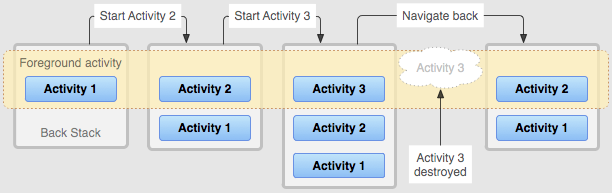
Figure 1. A representation of how each new activity in a task adds an item to the back stack. When the user presses the Back button, the current activity is destroyed and the previous activity resumes.
When the current activity starts another, the new activity is pushed on the top of the stack and takes focus. The previous activity remains in the stack, but is stopped. When an activity stops, the system retains the current state of its user interface. When the user presses the Back button, the current activity is popped from the top of the stack (the activity is destroyed) and the previous activity resumes (the previous state of its UI is restored). Activities in the stack are never rearranged, only pushed and popped from the stack—pushed onto the stack when started by the current activity and popped off when the user leaves it using the Back button. As such, the back stack operates as a “last in, first out” object structure. Figure 1 visualizes this behavior with a timeline showing the progress between activities along with the current back stack at each point in time.
1.1.4Task切换
A task is a cohesive unit that can move to the “background” when users begin a new task or go to the Home screen, via the Home button. While in the background, all the activities in the task are stopped, but the back stack for the task remains intact—the task has simply lost focus while another task takes place, as shown in figure 2. A task can then return to the “foreground” so users can pick up where they left off. Suppose, for example, that the current task (Task A) has three activities in its stack—two under the current activity. The user presses the Home button, then starts a new app from the app launcher. When the Home screen appears, Task A goes into the background. When the new app starts, the system starts a task for that app (Task B) with its own stack of activities. After interacting with that app, the user returns Home again and selects the app that originally started Task A. Now, Task A comes to the foreground—all three activities in its stack are intact and the activity at the top of the stack resumes. At this point, the user can also switch back to Task B by going Home and selecting the app icon that started that task (or by selecting the app’s task from the Recents screen).
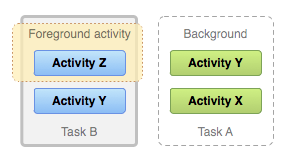
Figure 2. Two tasks: Task B receives user interaction in the foreground, while Task A is in the background, waiting to be resumed.
1.1.5进一步理解:
英文task的意思是“任务,工作”。所以,可以从用户使用场景来理解Google设计task的目的:
例如:接着上面说过的那个例子:用户打开email应用程序查看电子邮件。当查阅某一封邮件详情时,会启动一个新的activity来显示。
这时候用户对当前字体大小不满意。点击email这个应用设置进入设置页,email的设置直接启动了系统Settings的字体设置页面。
这个时候有三个activity:
- email首页
- email详情页
- Settings字体设置页
这三个页面是一件事情或一份工作,用来完成用户的查看邮件和设置字符的任务。所以,当用户点back 键时,回退到email详情页是最合理的。
当用户想干中别的事情,比如听音乐,这又会是一个新的task任务,关于听音乐应用的页面都会在这个task里。
这时候就有两个task:
- 查看邮件task
- 听音乐task
当用户再次点击email应用程序时,查看邮件task里的所有activity就会整体切到前台。听音乐task里的所有activity就会整体切到后台。
1.2 Activity的启动方式(launchMode)
由于Activity的启动方式有很多,增加了分析问题的复杂度,因此我们只考虑启动方式为standard和 Intent flags为FLAG_ACTIVITY_NEW_TASK的情况。
1.2.1standard启动方式
It is a the default mode. The system creates a new instance of the activity in the task from which it was started and routes the intent to it. The activity can be instantiated multiple times, each instance can belong to different tasks, and one task can have multiple instances.
上面Figure 1 就展示的standard的启动方式。
另外还要注意standard的启动方式在一个task里一个Activity可以被实例化多次。如下图:
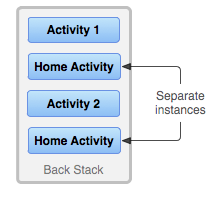
Figure 3. A single activity is instantiated multiple times.
1.2.2 FLAG_ACTIVITY_NEW_TASK
When starting an activity, you can modify the default association of an activity to its task by including flags in the intent that you deliver to startActivity().
FLAG_ACTIVITY_NEW_TASK:Start the activity in a new task. If a task is already running for the activity you are now starting, that task is brought to the foreground with its last state restored and the activity receives the new intent in onNewIntent().
二、通过adb dumpsys 信息来说明
2.1 demo
我写了一个demo,程序里实现了三个Activity:
- MainActivity
- ActivityA
- ActivityB
启动流程是:
- 点击桌面图标启动MainActivity
- MainActivity再启动ActivityA
- startActivity(new Intent(MainActivity.this,ActivityA.class));
- ActivityA再启动ActivityB
- startActivity(new Intent(ActivityA.this,ActivityB.class));
- ActivityB启动ActivityA后,再用FLAG_ACTIVITY_NEW_TASK的方式启动系统Settings的设置wifi界面
- Intent intent1 = new Intent(“android.settings.WIRELESS_SETTINGS”);
intent1.setFlags(Intent.FLAG_ACTIVITY_CLEAR_TASK);
startActivity(intent1);
- Intent intent1 = new Intent(“android.settings.WIRELESS_SETTINGS”);
图示:
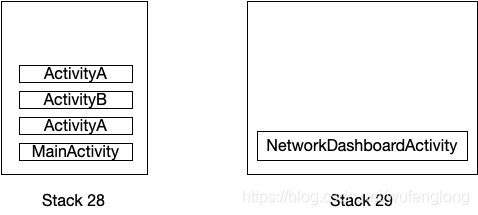
2.2 dumpsys 信息
这个流程中framework是怎么设计实现的呢?我们先看看adb dumpsys activity的信息:
ACTIVITY MANAGER ACTIVITIES (dumpsys activity activities)
Display #0 (activities from top to bottom):
Stack #29: type=standard mode=fullscreen
isSleeping=false
mBounds=Rect(0, 0 - 0, 0)
mResumedActivity: ActivityRecord{b9474dc u0 com.android.settings/.Settings$NetworkDashboardActivity t29}
* Task{7f8f9e5 #29 visible=true type=standard mode=fullscreen translucent=false A=1000:com.android.settings U=0 StackId=29 sz=1}
mBounds=Rect(0, 0 - 0, 0)
mMinWidth=-1 mMinHeight=-1
userId=0 effectiveUid=1000 mCallingUid=u0a201 mUserSetupComplete=true mCallingPackage=com.tblenovo.wufl2.startactivitydemo mCallingFeatureId=null
affinity=1000:com.android.settings
intent={act=android.settings.WIRELESS_SETTINGS flg=0x10000000 cmp=com.android.settings/.Settings$NetworkDashboardActivity}
mActivityComponent=com.android.settings/.Settings$NetworkDashboardActivity
autoRemoveRecents=false isPersistable=true activityType=1
rootWasReset=false mNeverRelinquishIdentity=true mReuseTask=false mLockTaskAuth=LOCK_TASK_AUTH_PINNABLE
Activities=[ActivityRecord{b9474dc u0 com.android.settings/.Settings$NetworkDashboardActivity t29}]
askedCompatMode=false inRecents=true isAvailable=true
mRootProcess=ProcessRecord{66202c8 23153:com.android.settings/1000}
taskId=29 stackId=29
mHasBeenVisible=true
mResizeMode=RESIZE_MODE_RESIZEABLE_VIA_SDK_VERSION mSupportsPictureInPicture=false isResizeable=true
lastActiveTime=102874561 (inactive for 0s)
Hist #0: ActivityRecord{b9474dc u0 com.android.settings/.Settings$NetworkDashboardActivity t29}
Intent { act=android.settings.WIRELESS_SETTINGS flg=0x10000000 cmp=com.android.settings/.Settings$NetworkDashboardActivity }
ProcessRecord{66202c8 23153:com.android.settings/1000}
Stack #28: type=standard mode=fullscreen
isSleeping=false
mBounds=Rect(0, 0 - 0, 0)
* Task{19ea3e1 #28 visible=false type=standard mode=fullscreen translucent=true A=10201: 最低0.47元/天 解锁文章






 扫一扫
扫一扫


 4254
4254


 到【灌水乐园】发言



