





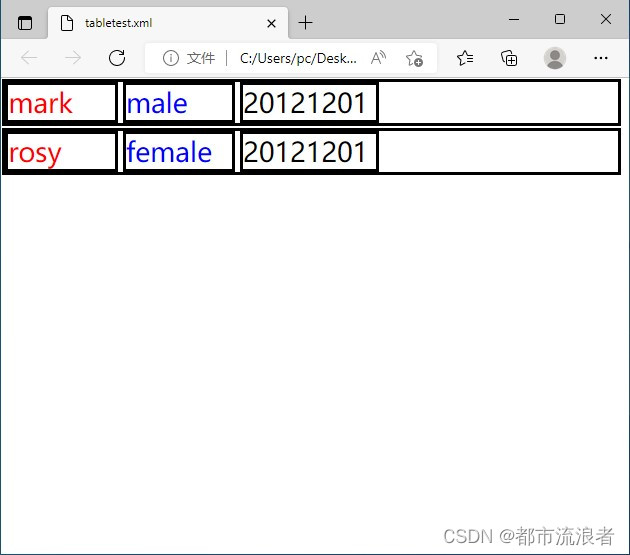
 本文展示了如何利用CSS将XML文件内容模拟显示成表格形式,通过定义不同的样式来呈现Student、Name、Gender和Birthday等元素,实现清晰的布局效果。在微软Edge浏览器中可以看到最终的显示结果。
xml文件如下:
<?xml version="1.0" encoding="utf-8" standalone="yes"?>
<?xml-stylesheet type="text/css" href="tabletest.css"?>
<!--- this file is a test for two-dimension table . -->
<Students>
<Student Id="101">
<Name>mark</Name>
<Gender>male</Gender>
<Birthday>20121201</Birthday>
</Student>
<Student Id="102">
<Name>rosy</Name>
<Gender>female</Gender>
<Birthday>20121201</Birthday>
</Student>
</Students>
css文件如下:
/* this file is a test for two-dimension table . */
Students
{
background-color: #ffffff;
width: 99%;
}
Student
{
display: block;
border-style: solid;
border-color: black;
border: 1;
margin-top: 1pt;
margin-bottom: 1pt;
margin-left: 1pt;
margin-right: 1pt;
}
Name
{
display: inline-block;
border-style: solid;
border-color: black;
border: 1;
color: #FF0000;
font-size: 20pt;
width: 80pt;
}
Gender
{
display: inline-block;
border-style: solid;
border-color: black;
border: 1;
color: #0000FF;
font-size: 20pt;
width: 80pt;
}
Birthday
{
display: inline-block;
border-style: solid;
border-color: black;
border: 1;
color: #000000;
font-size: 20pt;
width: 100pt;
}
显示效果如下:(在微软edge浏览器中显示)





 扫一扫
扫一扫


 122
122

 被折叠的 条评论
为什么被折叠?
被折叠的 条评论
为什么被折叠?
 到【灌水乐园】发言





