



HTML5 <svg>:
<svg> :用来定义 SVG 图片。<svg> 提供了 width 和 height 两个属性来定义 SVG 图片的高度和宽度。
<svg>和 <canvas>的区别:
<svg> 和 <canvas> 都可以实现绘图、动画。
<svg>是一种使用 XML 描述 2D 图形的语言;<canvas>通过 JavaScript 来绘制 2D 图形。<svg>中属性改变时,浏览器可以重新呈现它,适用于矢量图,而<canvas>是逐像素进行渲染的,一旦图形被绘制完成,如果它的位置发生了变化,那么整个场景都需要重新绘制,更适合视频游戏等。<svg>可以为某个元素附加事件处理程序;而<canvas>不支持。<canvas>画图基于像素点,放大会失真 ;<svg>绘制出来的都是矢量图,放大不会失真。
rect 矩形:
<rect>:绘制矩形。属性有:
- x:定义矩形距离左边的距离。
- y:定义了矩形距离上边的距离。
- rx、ry:定义了矩形四个角的圆角效果。
- opacity:定义了整个图形元素的不透明度。
- fill:定义了矩形填充的颜色。
fill-opacity:定义了填充颜色的不透明度,值范围为 0 到 1。- stroke:定义了矩形的边线的颜色。
stroke-width:定义了矩形边线的宽度。stroke-opacity:定义了边线颜色的不透明度,值范围为 0 到 1。
<svg width="400" height="400">
    <rect x="50" y="20" rx="20" ry="20" width="150" height="150" style="fill:yellow;stroke:purple;stroke-width:2"  />
</svg>
circle 圆形:
<circle>:绘制圆形。属性有:
- cx、cy:定义圆心的坐标。如果没有提供 cx 和 cy 的值,则缺省圆心是
(0,0)。 - r:定义圆的半径长度
<svg height="100" width="100">
    <circle cx="50" cy="50" r="40" stroke="black" stroke-width="3" fill="red" />
</svg>
ellipse 椭圆:
<ellipse >:绘制椭圆。属性有:
- cx:定义椭圆的 x 坐。
- cy:定义椭圆的 y 坐标。
- rx:定义椭圆的横向半径。
- ry:定义椭圆的纵向半径。
<svg height="400" width="400">
  <ellipse cx="200" cy="80" rx="100" ry="50" style="fill:yellow;stroke:purple;stroke-width:2" />
</svg>
line 直线:
<line >:绘制直线。属性有:
- x1:定义了直线的 x 轴起始坐标。
- y1:定义了直线的 y 轴起始坐标。
- x2:定义了直线的 x 轴终止坐标。
- y2:定义了直线的 y 轴终止坐标。
<svg height="200" width="200">
    <line x1="0" y1="0" x2="200" y2="200" style="stroke:rgb(255,0,0);stroke-width:2" />
</svg>
polyline 折线:
<polyline>:绘制直线。属性有:
- points:定义各个点的坐标,x 和 y 坐标之间用逗号分别,多个坐标之间用空格分割。
<svg height="500" width="500">
    <polyline points="20,20 40,25 60,40 80,120 120,140 200,180" style="fill:none;stroke:black;stroke-width:3" />
</svg>
polygon 多边形:
<polygon>:绘制多边形。属性有:
- points:定义各个点的坐标,x 和 y 坐标之间用逗号分别,多个坐标之间用空格分割。
<svg height="300" width="300">
  <polygon points="100,10 40,198 190,78 10,78 160,198" style="fill:lime;stroke:purple;stroke-width:5;fill-rule:nonzero;" />
</svg>
path 路径:
<path>:绘制路径。path 元素的形状是通过属性 d 来定义的,属性 d 的值是一个 命令+参数 的序列。
每一个命令都用一个关键字母来表示,跟在命令字母后面的是一个点的 x 轴和 y 轴坐标。当解析器解析完这一段字符后,就会去读下一段命令。
每一个命令都有两种表示方式,一种是用大写字母,表示采用绝对定位;另一种是用小写字母,表示采用相对定位,相对于上个移动距离。
因为属性 d 采用的是用户坐标系统,所以不需要表明单位。
直线命令:
- M/m:moveTo,移动到的点的 x 轴和 y 轴的坐标。在使用 M 命令移动画笔后,只会移动画笔,但不会在两点之间画线。所以 M 命令经常出现在路径的开始处,用来指明从何处开始画。
- L/l:lineTo,在两点之间画一条线段。
- H/h:绘制平行线。
- V/v:绘制垂直线。
- Z/z:从当前点画一条线段到路径的起点。
// 从点 150,0 开始,连直线到点 75,200,然后连直线到点 225,200,最后闭合这个路径,连直线回到点 150,0:
<svg height="200" width="400">
  <path d="M150 0 L75 200 L225 200 Z" />
</svg>
曲线命令:
- C/c:三次贝塞尔曲线,需要定义一个点和两个控制点,
C x1 y1,x2 y2,x y,x1 y1 是起点的控制点,x2 y2 是终点的控制点,x y 是曲线的终点。
<svg width="500" height="500">
    <path d="M130 110 C 120 140, 180 140, 170 110" stroke="black" fill="transparent"/>
</svg>

2. Q/q:二次贝塞尔曲线,只需要一个控制点和一个终点坐标。Q x1 y1, x y ,x1 y1 用来确定起点和终点的曲线斜率。
<svg width="500" height="500">
    <path d="M10 80 Q 95 10 180 80" stroke="black" fill="transparent"/>
</svg>
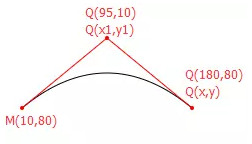
3. A/a:弧形。A rx ry x-axis-rotation large-arc-flag sweep-flag x y,前两个参数分别是 x 轴半径和 y 轴半径;第三个参数 x-axis-rotation 表示 x 轴的旋转角度;第四个参数 large-arc-flag 表示角度大小,1表示大角弧度,大于 180 度;0 表示小角弧度,小于 180 度;第五个参数 sweep-flag 表示弧线方向,0 表示从起点到终点沿逆时针画弧,1 表示从起点到终点沿顺时针画弧;第六个参数 x 表示弧线终点 x 坐标;第七个参数 y 表示弧线终点 y 坐标。
<svg width="500" height="500">
    <path d="M100 0 A100 100 0 0 1 200 100 " stroke="lime" stroke-width="3" fill-opacity="0.5" />
</svg>

text 文本:
<text></text>:绘制文本。属性有:
- fill:填充色,默认为黑色。
- stroke:描边的颜色,默认为黑色。
stroke-width:描边线条的宽度。stroke-linecap:线条末尾的样式,默认为为 butt。属性值有 butt、round 圆角、square 方形。stroke-linejoin:路径拐角的形状,默认值为 miter。属性值有 miter、round 光滑连接、beve 折线连接。opacity:不透明度 0~1,可以设置填充的fill-opacaty,也可以设置描边的stroke-opacity。
<svg width="500" height="500">
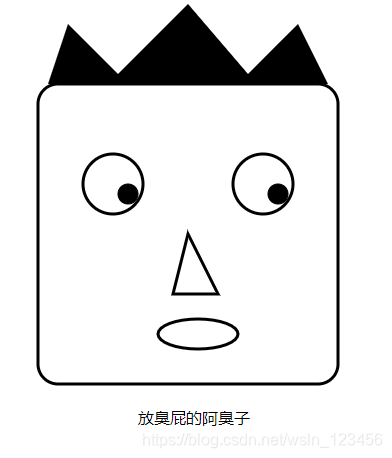
    <rect x="100" y="100" rx="20" ry="20" width="300" height="300" style="fill:#fff;stroke:#000000;stroke-width:3;" />
    <circle cx="175" cy="200" r="30" stroke="#000000" stroke-width="3" fill="#fff" />
    <circle cx="325" cy="200" r="30" stroke="#000000" stroke-width="3" fill="#fff" />
    <circle cx="190" cy="210" r="10" stroke="#000000" fill="#000000" />
    <circle cx="340" cy="210" r="10" stroke="#000000" fill="#000000" />
    <polygon points="250 250,280 310,235 310,250 250" style="fill:#fff;stroke:#000000;stroke-width:3;fill-rule:evenodd  ;" />
    <ellipse cx="260" cy="350" rx="40" ry="15" style="fill:#fff;stroke:#000000;stroke-width:3;" />
    <polygon points="110 100,130 40,180 90,250 20,310 90,360 40,390 100" />
    <text x="200" y="440">放臭屁的阿臭子</text>
</svg>





 扫一扫
扫一扫


 1485
1485


 到【灌水乐园】发言




