



 本文介绍了一个基于UIView封装的WSLScrollView组件,支持循环轮播、自动轮播等功能,并详细阐述了其实现原理,包括解决触摸事件响应问题、循环轮播连贯性问题及自动轮播实现。
WSLScrollView功能描述:这是在继承UIView的基础上利用UIScrollerView进行了封装,支持循环轮播、自动轮播、自定义时间间隔、图片间隔、当前页码和图片大小,采用Block返回当前页码和处理当前点击事件的一个View。
直接上总的效果图,需要或感兴趣的各路大神朋友请指教:
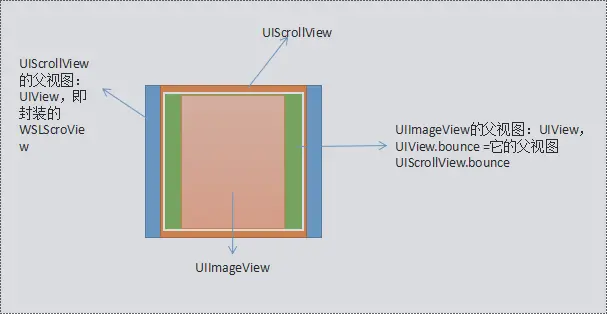
①、首先像往常一样写一个基本的UIScrollerView,会得到下图:
    _scrollerView = [[UIScrollView alloc] init];
    _scrollerView.frame = CGRectMake((SELF_WIDTH - _currentPageSize.width) / 2, 0,    _currentPageSize.width, _currentPageSize.height);
    _scrollerView.delegate = self;
    _scrollerView.pagingEnabled = YES;
    _scrollerView.showsHorizontalScrollIndicator = NO;
    [self addSubview:_scrollerView];
然后设置我们通常会忽略UIScrollerView的一个属性clipsToBounds为NO,默认是Yes,你会看到_scrollerView其它部分相邻的图片,但是你会发现那部分相邻的图片不会响应在它上面的任何触摸事件,因为那部分子视图超出了它的父视图,可以用响应链机制解决这个问题:
_scrollerView.clipsToBounds = NO;

//处理超过父视图部分不能点击的问题,重写UIView里的这个方法
- (UIView *)hitTest:(CGPoint)point withEvent:(UIEvent *)event {
    if ([self pointInside:point withEvent:event]) {
        CGPoint newPoint = [_scrollerView convertPoint:point fromView:self];
        for (UIImageView * imageView in _scrollerView.subviews) {
            if (CGRectContainsPoint(imageView.frame, newPoint)) {
                CGPoint newSubViewPoint = [imageView convertPoint:point fromView:self];
                return [imageView hitTest:newSubViewPoint withEvent:event];
            }
        }
    }
    return nil;
}

②、接下来实现循环的功能:我相信好多人也都会想到 《 4 + 0 - 1 - 2 - 3 - 4 + 0 》这个方案,也就是先在数组的最后插入原数组的第一个元素,再在第一个位置插入原数组的最后一个元素;得到如下图效果:(注意看:第一个向最后一个,最后向第一个循环过渡的时候有个Bug哦)
    self.imageArray = [NSMutableArray arrayWithArray:_images];
    [self.imageArray addObject:_images[0]];
    [self.imageArray insertObject:_images.lastObject atIndex:0];
    //初始化时的x偏移量要向前多一个单位的_currentPageSize.width
    _scrollerView.contentOffset = CGPointMake(_currentPageSize.width * (self.currentPageIndex + 1), 0);
解决上述Bug的方案就是利用UIScrollView的两个代理方法;在前后循环过渡处,刚开始拖拽时就在Bug的位置画上对应的视图;即《 3 + 4 + 0 - 1 - 2 - 3 - 4 + 0 + 1》,结束拖拽之后,再改变UIScrollView的contentOffset,不带动画;
//开始拖拽时执行
- (void)scrollViewWillBeginDragging:(UIScrollView *)scrollView{

   //开始拖拽时停止计时器
    [self.timer invalidate];
    self.timer = nil;

    // 3 + 4 + 0 - 1 - 2 - 3 - 4 + 0 + 1
    NSInteger index = scrollView.contentOffset.x/_currentPageSize.width;

    //是为了解决循环滚动的连贯性问题
    if (index == 1) {
        [self.scrollerView addSubview:self.lastView];
    }
    if (index == self.imageArray.count - 2) {
        [self.scrollerView addSubview:self.firstView];
    }
}

//结束拖拽时执行
- (void)scrollViewDidEndDecelerating:(UIScrollView *)scrollView{

    NSInteger index = scrollView.contentOffset.x/_currentPageSize.width;
   //停止拖拽时打开计时器
    if (_isTimer) {
        [self statrScroll:_second];
    }
  //是为了解决循环滚动的连贯性问题
    if (index == 0) {
        scrollView.contentOffset = CGPointMake(_currentPageSize.width * (self.imageArray.count - 2) , 0);
    }
    if (index == self.imageArray.count - 1) {
        scrollView.contentOffset = CGPointMake(_currentPageSize.width  , 0);
    }
}
③实现定时器自动循环轮播功能,需要解决的问题就是首尾过渡的时候,
如下图所示:解决的思路和上述类似,主要代码已标明→WSLScrollView

- (void)statrScroll:(CGFloat)second{
    if (_timer == nil && _isTimer) {
        _timer = [NSTimer scheduledTimerWithTimeInterval:second target:self selector:@selector(autoNextPage) userInfo:nil repeats:YES];
    }
}

- (void)autoNextPage{
    [_scrollerView setContentOffset:CGPointMake( _currentPageSize.width * (_currentPageIndex + 1 + 1), 0) animated:YES];

 if (_currentPageIndex + 2 == self.imageArray.count - 1) {
        //是为了解决自动滑动到最后一页再从头开始的连贯性问题
        [_scrollerView addSubview:self.firstView];
    }
}
- (void)scrollViewDidScroll:(UIScrollView *)scrollView{

    CGFloat index = scrollView.contentOffset.x/_currentPageSize.width;
    if (index == 0 ) {
        _currentPageIndex = self.imageArray.count - 1- 2;
    }else if(index < 1){

    }else if(index == self.imageArray.count - 1 || index == 1){
        _currentPageIndex = 0;
        //是为了解决自动滑动到最后一页再从头开始的连贯性问题
        [_scrollerView setContentOffset:CGPointMake( _currentPageSize.width , 0) animated:NO];
    }else if(index == ceil(index)){
        _currentPageIndex = index - 1 ;
    }
    if (self.scrollEndBlock != nil) {
        self.scrollEndBlock(_currentPageIndex);
    }
}






 扫一扫
扫一扫


 3306
3306

 被折叠的 条评论
为什么被折叠?
被折叠的 条评论
为什么被折叠?
 到【灌水乐园】发言





