



 本文详细介绍了华为AC和AP的基本配置步骤,包括Switch和AC的VLAN、接口、DHCP配置,以及WLAN的ESS、服务集、安全、流量模板等设置,确保AP能正常上线并提供无线服务。

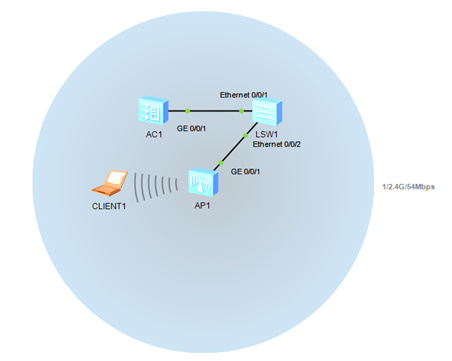
配置Switch
[Switch]vlan batch 100 101 //管理Vlan100 业务vlan101
[Switch]interface GigabitEthernet0/0/1
[Switch-GigabitEthernet0/0/1]port link-type trunk
[Switch-GigabitEthernet0/0/1]port trunk pvid vlan 100
//给接AP的端口打上管理vlan100的PVID
[Switch-GigabitEthernet0/0/1]port trunk allow-pass vlan 100 101
[Switch-GigabitEthernet0/0/1]quit
[Switch]interface GigabitEthernet0/0/2
[Switch-GigabitEthernet0/0/2]port link-type trunk
[Switch-GigabitEthernet0/0/2]port trunk allow-pass vlan 100 101
[Switch-GigabitEthernet0/0/2]quit
配置AC
1. 配置接口和VLAN信息,AC为DHCP Server,为AP和client分配地址
[AC]vlan batch 100 101
[AC]interface GigabitEthernet0/0/1
[AC-GigabitEthernet0/0/1]port link-type trunk
[AC-GigabitEthernet0/0/1]port trunk allow-pass vlan 100 101
[AC-GigabitEthernet0/0/1]quit
[AC]dhcp enable
[AC]interface vlanif 100 //配置管理vlan100的IP地址 并且开启DHCP
[AC -Vlanif100]description for-ap
[AC -Vlanif100]ip address 192.168.100.1 24
[AC -Vlanif100]dhcp select interface
[AC-Vlanif100]quit
[AC]interface vlanif 101 //配置业务vlan101的IP地址 并且开启DHCP
[AC -Vlanif101]description for-STA
[AC -Vlanif101]ip address 192.168.101.1 24
[AC -Vlanif101]dhcp select interface
[ACVlanif101]quit
2. 配置AC WLAN基础配置
[AC]wlan ac-global ac id 1 carrier id other
[AC]wlan ac-global country-code CN
[AC]wlan
[AC -wlan-view]wlan ac source interface Vlanif 100
// 配置AP的管理VLAN,从哪个VLAN下拿地址
[AC-wlan-view]ap-auth-mode no-auth // 将AP上线模式改为不认证‘
此配置做完后在全局查询AP display ap all 查看AP是否上线
ap id 0 type-id 38 mac 0006-f468-91a0 sn 21500821798W47001474 (AP上线后会自动生成)
3.配置AC WLAN 业务参数 #创建wlan-ess接口
[AC]interface Wlan-Ess 1 //之后会与下面 service-set(服务集)绑定
[AC-Wlan-Ess0]port hybrid pvid vlan 101 //打上业务vlan101的PVID
[AC-Wlan-Ess0]port hybrid untagged vlan 101 //打上业务vlan101的PVID
[AC-Wlan-Ess0]quit
#创建WMM模板,采用默认参数
[AC-wlan-view]wmm-profile name wmm-profile-0
[AC -wlan-wmm-prof-wmm-profile-0]quit
//之后会与下面 radio-profile(射频)模板绑定
#创建安全模板,采用默认参数
[AC-wlan-view]security-profile name security-profile-0
[AC-wlan-sec-prof-security-profile-0]quit /之后会与下面service-set(服务集)绑定
{如果需要为无线设置密码则:
security-policy wpa-wpa2 设置无线的加密方式
wpa-wpa2 authentication-method psk pass-phrase cipher 12344321 encryption-method tkip-ccmp 设置加密算法,密码,密文处为密码}
#创建流量模板,采用默认参数
[AC-wlan-view]traffic-profile name traffic-profile-0
[AC-wlan-traffic-prof-traffic-profile-0]quit //之后会与下面 service-set(服务集)绑定
#创建服务集并绑定WLAN-ESS接口、安全模板和流量模板
[AC-wlan-view]service-set name service-set-0
[AC-wlan-service-set-service-set-0]ssid SSID-Temp1
[AC-wlan-service-set-service-set-0]wlan-ess 1
[AC-wlan-service-set-service-set-0]service-vlan 101
[AC-wlan-service-set-service-set-0]security-profile name security-profile-0
[AC-wlan-service-set-service-set-0]traffic-profile name traffic-profile-0
#创建射频模板,并绑定WMM模板
[AC-wlan-view]radio-profile name radio-profile-0
[AC-wlan-radio-prof-radio-profile-0]wmm-profile name wmm-profile-0
[AC-wlan-radio-prof-radio-profile-0]quit
#配置VAP并下发
[AC-wlan-view]ap 0 radio 0
[AC-wlan-radio-0/0]radio-profile name radio-profile-0
[AC-wlan-radio-0/0]service-set name service-set-0
[AC-wlan-radio-0/0]quit
[AC-wlan-view]commit ap 0






 扫一扫
扫一扫


 3936
3936

 被折叠的 条评论
为什么被折叠?
被折叠的 条评论
为什么被折叠?
 到【灌水乐园】发言





