



 本文详细介绍了Java 8中引入的新日期时间API,包括LocalDate、LocalTime、LocalDateTime、Instant的使用,以及日期时间的格式化和解析。新API解决了旧版日期时间类的可变性、偏移量和格式化问题,提供了更直观、线程安全和易于操作的日期时间处理方式。示例代码展示了如何创建、修改和格式化日期时间,以及如何利用Instant处理时间戳。
文章目录
JAVA常用类——JDK8中新日期时间API的测试
1、新日期时间API出现的背景
如果我们可以跟别人说:“我们在1502643933071见面,别晚了!”那么就再简单不过了。但是我们希望时间与昼夜和四季有关,于是事情就变复杂了。JDK 1.0中包含了一个java.util.Date类,但是它的大多数方法已经在JDK 1.1引入Calendar类之后被弃用了。而Calendar并不比Date好多少。它们面临的问题是:
可变性:像日期和时间这样的类应该是不可变的,Calendar却是可变的。
偏移性:Date中的年份是从1900开始的,而月份都从0开始。
比如我们想要创建一个2021年10月3日的Date:
Date date4 = new Date(2021, 10, 3);
System.out.println(date4);
但是输出后并不是我们希望看见的时间:

这是因为存在偏移量:
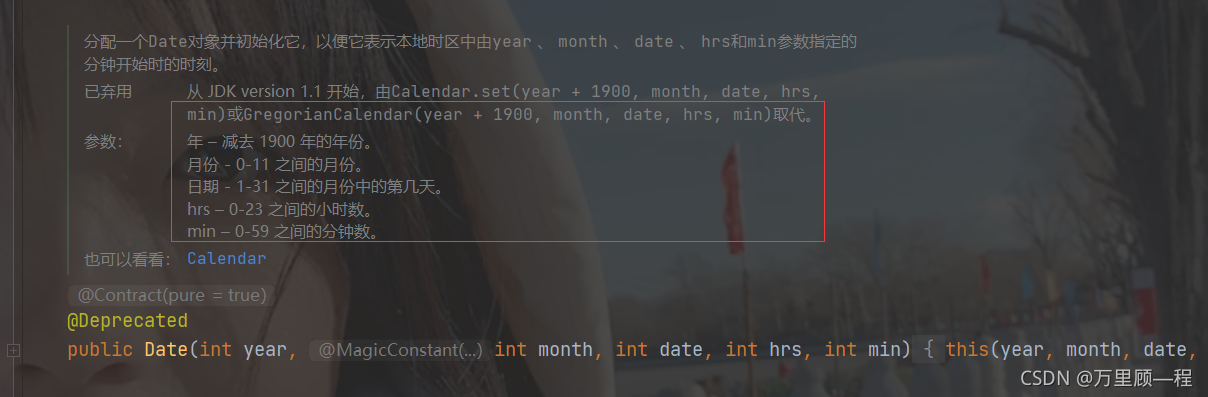
正常创建一个2021年10月3日的 Date 应该为:
Date date4 = new Date(2021 - 1900, 10 - 1, 3);
System.out.println(date4);
格式化:格式化只对Date有用,Calendar则不行。
此外,它们也不是线程安全的(SimpleDateFormat多线程情况下不安全);不能处理闰秒等。
2、新时间日期时间API
第三次引入的API是成功的,并且Java 8 中引入的java.time.API 已经纠正了过去的缺陷,将来很长一段时间它都会为我们服务。
Java8吸收了Joda-Time 的精华,以一个新的开始为Java创建优秀的API。新的 java.time 中包含了所有关于本地日期(LocalDate)、本地时间(LocalTime)、本地日期时间(LocalDateTime)、时区(ZonedDateTime)和持续时间(Duration)的类。历史悠久的Date类新增了tolnstant()方法,用于把 Date转换成新的表示形式。这些新增的本地化时间日期API大大简化了日期时间和本地化的管理。
新时间日期API
java.time 包含值对象的基础包(常用)
java.time.chrono 提供对不同的日历系统的访问
java.time.format 格式化和解析时间和日期(常用)
java.time.temporal 包括底层框架和扩展特性
java.time.zone 包含时区支持的类
3、LocalDate、LocalTime、LocalDateTime的使用
LocalDate、LocalTime、LocalDateTime 的介绍
LocalDate、LocalTime、LocalDateTime类是其中较重要的几个类,它们的实例是不可变的对象,分别表示使用ISO-8601日历系统的日期、时间、日期和时间。它们提供了简单的本地日期或时间,并不包含当前的时间信息,也不包含与时区相关的信息。
LocalDate代表IOS格式(yyyy-MM-dd)的日期,可以存储生日、纪念日等日期。>LocalTirke表示一个时间,而不是日期。
LocalDateTime是用来表示日期和时间的,这是一个最常用的类之一。
LocalDateTime是用来表示日期和时间的,这是一个最常用的类之一。
注:ISO-8601日历系统是国际标准化组织制定的现代公民的日期和时间的表示法,也就是公历。
LocalDate、LocalTime、LocalDateTime 的使用
LocalDateTime 相较于 LocalDate 和 LocalTime,使用频率较高
package StringDate;

import java.time.LocalDate;
import java.time.LocalDateTime;
import java.time.LocalTime;

public class StringDateTest3 {
    public static void main(String[] args) {
        //now():获取当前日期、时间、日期时间:
        LocalDate localDate = LocalDate.now();
        LocalTime localTime = LocalTime.now();
        LocalDateTime localDateTime = LocalDateTime.now();
        System.out.println(localDate);// 2021-10-03
        System.out.println(localTime);// 13:01:29.793
        System.out.println(localDateTime);// 2021-10-03T13:01:29.793

        //of():设置指定的日期时间,没有偏移量
        LocalDateTime of = LocalDateTime.of(2021, 10, 3, 12, 01, 29);
        System.out.println(of);//2021-10-03T12:01:29

        //getXxx(),获得某一日期时间
        System.out.println(localDateTime.getDayOfWeek());//SUNDAY
        System.out.println(localDateTime.getDayOfMonth());//3
        System.out.println(localDateTime.getDayOfYear());//276
        System.out.println(localDateTime.getMonth());//OCTOBER

        //==================================体现不可变性==================================
        //withXxx(),设置相关的日期时间,
        LocalDateTime localDateTime1 = localDateTime.withDayOfMonth(10);//设置今天为这个月的10号
        System.out.println(localDateTime);//2021-10-03T17:19:11.842
        System.out.println(localDateTime1);//2021-10-10T17:19:11.842
        //plusXxx(),在原先基础上加上日期时间
        LocalDateTime localDateTime2 = localDateTime.plusDays(10);
        System.out.println(localDateTime);//2021-10-03T17:35:04.127
        System.out.println(localDateTime2);//2021-10-13T17:35:04.127

        //在原先基础上减去日期时间
        LocalDateTime localDateTime3 = localDateTime.minusDays(10);
        System.out.println(localDateTime);//2021-10-03T17:37:12.125
        System.out.println(localDateTime3);//2021-09-23T17:37:12.125


    }
}
4、Instant 瞬时
Instant:时间线上的一个瞬时点。这可能被用来记录应用程序中的事件时间戳。
在处理时间和口期的时候,我们通常会想到年,月,日,时,分,秒。然而,这只是时间的一个模型,是面向人类的。第二种通用模型是面向机器的,或者说是连续的。在此模型中,时间线中的一个点表示为一个很大的数,这有利于计算机处理。在UNIX中,这个数从1970年开始,以秒为的单位;同样的,在Java中,也是从1970年开始,但以毫秒为单位。
java.time包通过值类型Instant提供机器视图,不提供处理人类意义上的时间单位。Instant表示时间线上的一点,而不需要任何上下文信息,例如,时区。概念上讲,它只是简单的表示自1970年1月1日0时0分0秒(UTC)开始的秒数。因为java.time包是基于纳秒计算的,所以Instant的精度可以达到纳秒级。(1 s = 10^9 ns)
Instant 的使用
//==================================Instant 的使用==================================
Instant instant = Instant.now();
System.out.println(instant);//返回中时区的日期时间:2021-10-03T10:30:44.865Z
//根据时区添加偏移量,返回东八区日期时间:2021-10-03T18:30:44.865+08:00
System.out.println(instant.atOffset(ZoneOffset.ofHours(8)));

//toEpochMilli(),获取时间戳,类似Date的getTime()
System.out.println(instant.toEpochMilli());

//ofEpochMilli(),通过给定的时间戳获取instant实例
Instant instant1 = Instant.ofEpochMilli(1633257249731L);
System.out.println(instant1);//2021-10-03T10:34:09.731Z
5、日期时间的格式化和解析
java.time.DateTimeFormatter 类,该类提供了格式化和解析的方法,如下:
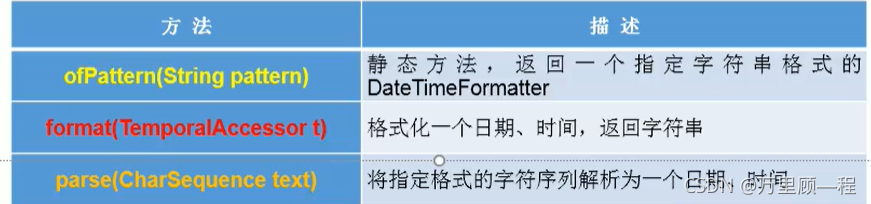
日期时间的格式化和解析测试
方法一:预定义的标准格式,如ISO_LOCAL_DATE_TIME,ISO_DATE_TIME
DateTimeFormatter isoLocalDateTime = DateTimeFormatter.ISO_LOCAL_DATE_TIME;
LocalDateTime localDateTime = LocalDateTime.now();
System.out.println(localDateTime);//2021-10-03T21:22:41.316
//格式化,format(),传一个localDateTime实例
System.out.println(isoLocalDateTime.format(localDateTime));//2021-10-03T21:22:41.316
//解析,parse(),需传入和DateTimeFormatter对应的字符串格式
TemporalAccessor parse = isoLocalDateTime.parse("2021-10-03T21:22:41.316");
System.out.println(parse);//{},ISO resolved to 2021-10-03T21:22:41.316
方法二:本地化相关的格式,ofLocalizedDateTime、ofLocalizedDate或ofLocalizedTime
//ofLocalizedDateTime,参数可选:FormatStyle.LONG、FormatStyle.MEDIUM、FormatStyle.SHORT,适用于localDateTime
DateTimeFormatter formatter = DateTimeFormatter.ofLocalizedDateTime(FormatStyle.LONG);
//格式化
System.out.println(formatter.format(localDateTime));//2021年10月3日 下午09时32分36秒
//解析
System.out.println(formatter.parse("2021年10月3日 下午09时32分36秒"));//},ISO resolved to 2021-10-03T21:32:36

//ofLocalizedDate,参数可选:FormatStyle.LONG、FormatStyle.MEDIUM、FormatStyle.SHORT,适用于localDate
DateTimeFormatter formatter1 = DateTimeFormatter.ofLocalizedDate(FormatStyle.MEDIUM);
LocalDate localDate = LocalDate.now();
//格式化
System.out.println(formatter1.format(localDate));//2021-10-3
//解析
System.out.println(formatter1.parse("2021-10-3"));//{},ISO resolved to 2021-10-03

//ofLocalizedTime,参数可选:FormatStyle.LONG、FormatStyle.MEDIUM、FormatStyle.SHORT,适用于localTime
DateTimeFormatter formatter2 = DateTimeFormatter.ofLocalizedTime(FormatStyle.SHORT);
LocalTime localTime = LocalTime.now();
//格式化
System.out.println(formatter2.format(localTime));//下午9:39
//解析
System.out.println(formatter2.parse("下午9:39"));//{},ISO resolved to 21:39
方法三(常用):自定义格式,如:yyyy-MM-dd hh:mm:ss
DateTimeFormatter formatter3 = DateTimeFormatter.ofPattern("yyyy-MM-dd hh:mm:ss");
//格式化
System.out.println(formatter3.format(localDateTime));//2021-10-03 09:46:28
//解析
System.out.println(formatter3.parse("2021-10-03 09:46:28"));//{SecondOfMinute=28, MilliOfSecond=0, MicroOfSecond=0, MinuteOfHour=46, NanoOfSecond=0, HourOfAmPm=9},ISO resolved to 2021-10-03





 扫一扫
扫一扫


 505
505

 被折叠的 条评论
为什么被折叠?
被折叠的 条评论
为什么被折叠?
 到【灌水乐园】发言





