



 本文介绍了一种通过Java程序实现获取微信小程序Scheme码的方法,适用于短信、邮件等多种场景下的小程序唤起需求。文中提供了完整的代码示例,包括获取微信access_token及生成Scheme链接的过程。
获取小程序 scheme 码,适用于短信、邮件、外部网页、微信内等拉起小程序的业务场景。
import cn.hutool.http.HttpRequest;
import cn.hutool.http.HttpUtil;
import com.alibaba.fastjson15.JSONObject;
import com.http.HttpClient;

import java.io.IOException;
import java.net.URLDecoder;
import java.util.HashMap;
import java.util.Map;

public class demo {

    public static String encoding = "UTF-8";
    //微信APPID
    private static String weiXinAppId="";
    //微信秘钥
    private static String weiXinSecret="";

    private static String getAccessToken(){
        String url = "https://api.weixin.qq.com/cgi-bin/token";
        Map<String, String> reqMap = new HashMap<String, String>();
        reqMap.put("grant_type","client_credential");
        reqMap.put("appid",weiXinAppId);
        reqMap.put("secret",weiXinSecret);
        String result="";
        try {
            result = HttpClient.doGet(url,reqMap);
            result = URLDecoder.decode(result, encoding);
        } catch (IOException e) {
            e.printStackTrace();
        }
        JSONObject jsonObject = JSONObject.parseObject(result);
        System.out.print("微信获取accessToken回调报文"+jsonObject);
        return jsonObject.getString("access_token");
    }

    private static String getOpenLink(String redirectUrl){
        String token = getAccessToken();
        String url = "https://api.weixin.qq.com/wxa/generatescheme?access_token="+token;
        JSONObject jumpWxa = new JSONObject();
        jumpWxa.put("path","");
        jumpWxa.put("query","action=epPay&payUrl="+redirectUrl);

        JSONObject reqMap = new JSONObject();
        reqMap.put("jump_wxa",jumpWxa);
        String result="";
        try {
            HttpRequest request = HttpUtil.createPost(url);
            request.contentType("application/json");
            request.body(reqMap.toJSONString());
            result = request.execute().body();
            result = URLDecoder.decode(result, encoding);
            System.out.print("微信获取getOpenLink回调报文"+result);
        } catch (IOException e) {
            e.printStackTrace();
        }
        return result;
    }
}
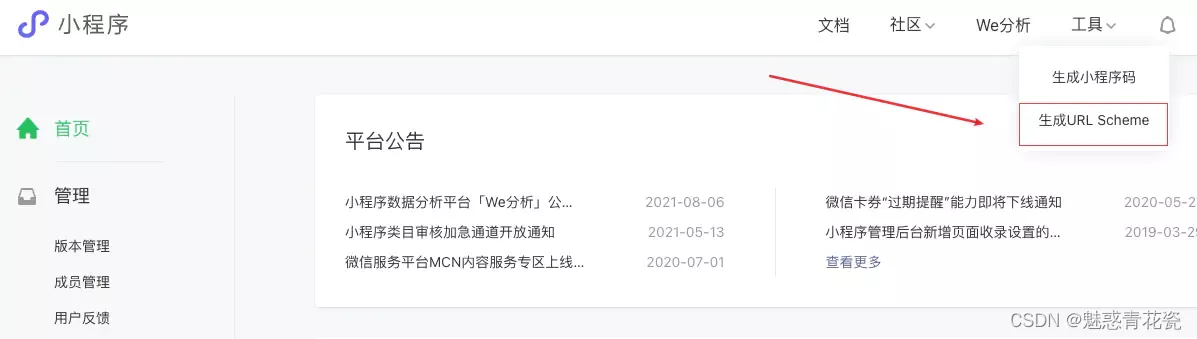
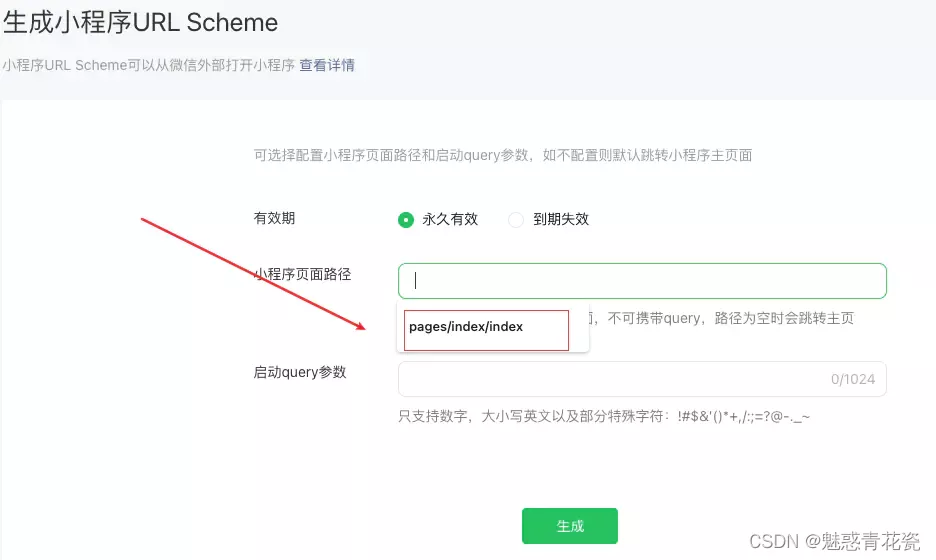
注意事项(getOpenLike中的redirectUrl参数是在小程序内设置,参考下图)
在小程序页面路径中填入需要跳转过来页面的路径





 扫一扫
扫一扫


 275
275

 被折叠的 条评论
为什么被折叠?
被折叠的 条评论
为什么被折叠?
 到【灌水乐园】发言





