

Fragment切换的两种不同的写法

本文详细介绍了在Android应用中使用Fragment进行界面切换的两种方法。一种是通过RadioGroup的选中状态改变来动态显示或隐藏Fragment,另一种是记录当前显示的Fragment以便于后续操作。此策略有助于提高应用程序的响应速度和用户体验。


方式一:

 @Override
    public void onCheckedChanged(RadioGroup group, int checkedId) {
        Fragment currentFragment = fragmentManager.findFragmentByTag(fragmentTag);
        FragmentTransaction tr = fragmentManager.beginTransaction();
        tr.hide(currentFragment);
        switch (checkedId) {
            case R.id.rb_home:

                fragment = fragmentManager.findFragmentByTag(ChildHomeFragment.TAG);
                fragmentTag = ChildHomeFragment.TAG;
                if (fragment == null) {
                    fragment = new ChildHomeFragment();
                }

                break;
            case R.id.rb_msg:
                fragment = fragmentManager.findFragmentByTag(MessageFragment.TAG);
                fragmentTag = MessageFragment.TAG;
                if (fragment == null) {
                    fragment = new MessageFragment();
                }
                break;
            case R.id.rb_service:
                fragment = fragmentManager.findFragmentByTag(CustomerServiceFragment.TAG);
                fragmentTag = CustomerServiceFragment.TAG;
                if (fragment == null) {
                    fragment = new CustomerServiceFragment();
                }
                break;

            case R.id.rb_mine:
                fragment = fragmentManager.findFragmentByTag(MineFragment.TAG);
                fragmentTag = MineFragment.TAG;
                if (fragment == null) {
                    fragment = new MineFragment();
                }
                break;
        }
        if (fragment != null && fragment.isAdded()) {
            tr.show(fragment);
        } else {
            tr.add(R.id.content, fragment, fragmentTag);
        }
        Constant.SWITCH_FLAG = false;
        tr.addToBackStack(null);
        tr.commitAllowingStateLoss();
    }


    //初始化
    private void initFragmentManager() {
        fragmentTag = ChildHomeFragment.TAG;
        fragmentManager = getSupportFragmentManager();
        ft = fragmentManager.beginTransaction();
        fragment = fragmentManager.findFragmentByTag(ChildHomeFragment.TAG);
        fragment = new ChildHomeFragment();
        ft.add(R.id.content, fragment, fragmentTag);
        ft.addToBackStack(null);
        ft.commitAllowingStateLoss();
    }

    @Override
    public void onAttachFragment(Fragment fragment) {
        super.onAttachFragment(fragment);
        Constant.SWITCH_FLAG = false;
        if (homeFragment == null && fragment instanceof ChildHomeFragment) {
            homeFragment = (ChildHomeFragment) fragment;
        } else if (msgFragment == null && fragment instanceof MessageFragment) {
            msgFragment = (MessageFragment) fragment;
        } else if (csFragment == null && fragment instanceof CustomerServiceFragment) {
            csFragment = (CustomerServiceFragment) fragment;
        } else if (userFragment == null && fragment instanceof MineFragment) {
            userFragment = (MineFragment) fragment;
        }

    }

方式二:
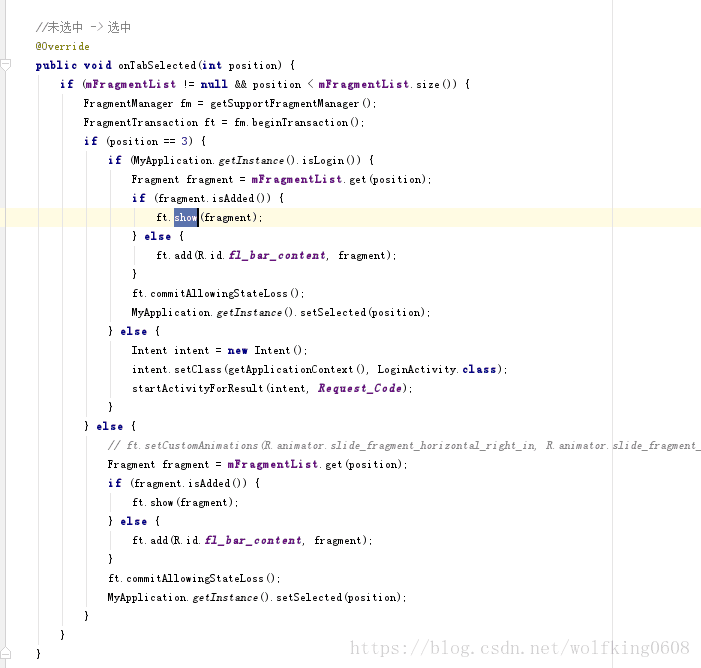
 做个记录

private fun initView(savedInstanceState: Bundle?) { val navView: BottomNavigationView = binding.dashboardBottomTab navView.setOnItemSelectedListener { if (it.itemId != R.id.tab_network) { if (securityGuideTipView?.visibility == View.VISIBLE) { securityGuideTipView?.visibility = View.GONE TPLog.i(LOG_TAG, "initView remove tip") } } when (it.itemId) { R.id.tab_network -> { switchFragment(TAG_FRAGMENT_NETWORK, TAG_FRAGMENT_NETWORK) return@setOnItemSelectedListener true } R.id.tab_family -> { showFamilyTab() return@setOnItemSelectedListener true } R.id.tab_security -> { showSecurityTab() return@setOnItemSelectedListener true } R.id.tab_more -> { switchFragment(TAG_FRAGMENT_MORE, TAG_FRAGMENT_MORE) return@setOnItemSelectedListener true } R.id.tab_usb -> { switchFragment(TAG_FRAGMENT_USB, TAG_FRAGMENT_USB) return@setOnItemSelectedListener true } } false } private fun switchFragment(key: String, tag: String) { switchFragment(key, tag, arguments) } private fun switchFragment(key: String, tag: String, args: Bundle?) { if (context == null || (currentFragment != null && currentFragment!!.javaClass.name == key)) { return } val fragmentManager = childFragmentManager var fragment: Fragment? = fragmentMap[key] if (fragment == null) { fragment = fragmentManager.fragmentFactory.instantiate(requireContext().classLoader, key) (fragmentMap as ArrayMap)[key] = fragment } if (args != null) { fragment.arguments = args } val transaction = fragmentManager.beginTransaction() if (currentFragment != null) { transaction.hide(currentFragment!!) } if (fragment.isAdded) { transaction.show(fragment) } else { transaction.add(R.id.dashboard_container_view, fragment, tag) } transaction.commitAllowingStateLoss() currentFragment = fragment }这是什么写法
最新发布
09-27
<think>嗯,用户这次问的是LiveData在Fragment的什么状态下不响应更新。结合用户之前的问题历史,ta似乎一直在探索Fragment和ViewPager的生命周期管理问题,现在又延伸到LiveData的响应机制,说明ta可能在开发中遇到了数据更新不触发UI刷新的情况。 从提供的引用来看,关键信息集中在[^3]和[^4]:LiveData只会通知活跃生命周期状态的观察者。需要明确几个概念: 1. STARTED和RESUMED状态属于活跃状态(onStart到onStop之间) 2. Fragment的视图销毁但实例仍在时(onDestroyView之后)是非活跃的 3. Fragment被移除但未销毁时(onDetach之前)也是非活跃的 用户可能遇到的典型场景是: - Fragment在ViewPager中滑出后,其LiveData更新不触发onChanged() - 使用add+hide管理的Fragment在隐藏状态下不响应数据 - 旋转屏幕导致Fragment重建过程中出现更新丢失 特别要注意引用[^4]提到的机制:非活跃状态的观察者重新活跃时会立即收到最新数据。这意味着如果用户在Fragment的onStart()里订阅LiveData,即使之前漏过更新,也能在重回前台时拿到最新值。 考虑到用户之前研究过ViewPager的Fragment状态,可以推测ta可能是在嵌套Fragment或ViewPager场景下遇到问题。建议ta重点检查两种情况: 1. 父Fragment非活跃导致子Fragment无法响应 2. 多个Fragment共享同一个LiveData实例时的订阅冲突 对于解决方案,除了生命周期状态监控,还需要提醒用户: - 避免在onCreateView()之外订阅LiveData - 使用viewLifecycleOwner替代this避免视图销毁后的更新 - 对于共享LiveData,考虑使用SingleLiveEvent防止重复通知 </think>根据引用内容,LiveData在Fragment特定生命周期状态下**不会响应更新**,具体机制如下: ### 一、LiveData响应规则 1. **活跃状态响应** LiveData仅在观察者(Fragment)处于**STARTED或RESUMED**状态时(即`onStart()`至`onStop()`之间)响应数据更新: ```java // 生命周期状态判断源码片段 boolean shouldBeActive() { return mOwner.getLifecycle().getCurrentState().isAtLeast(STARTED); } ``` 此时Fragment对用户可见(如ViewPager当前页),LiveData触发`onChanged()`[^3][^4]。 2. **非活跃状态不响应** 当Fragment进入以下状态时,LiveData**暂停响应**: - `onPause()`或`onStop()`:Fragment部分可见或完全不可见(如ViewPager相邻页) - `onDestroyView()`:Fragment视图已销毁但实例仍在(如ViewPager缓存页) - `onDetach()`:Fragment被移除[^1][^4] > 示例:若Fragment在ViewPager中滑出屏幕,其LiveData将暂停更新UI,但数据变更仍会被记录。 ### 二、状态恢复机制 1. **重返活跃状态时的补偿更新** 当非活跃的Fragment重新变为活跃(如切换回ViewPager页面),LiveData会**立即推送最新数据**: ```java // 源码逻辑 void activeStateChanged(boolean newActive) { if (newActive) { dispatchingValue(this); // 重新激活时触发数据分发 } } ``` 确保Fragment总能获取最新值[^3][^4]。 2. **避免内存泄漏的设计** LiveData自动解除非活跃状态的观察者绑定(通过`LifecycleRegistry`),无需手动取消订阅[^4]。 ### 三、特殊场景验证 1. **Fragment视图销毁时** - ❌ 在`onDestroyView()`后调用`LiveData.setValue()`:不触发UI更新 - ✅ 解决方案:使用**viewLifecycleOwner**替代Fragment实例 ```kotlin // 正确写法 viewModel.liveData.observe(viewLifecycleOwner) { data -> updateUI(data) } ``` 避免视图销毁后尝试更新不存在的UI[^4]。 2. **跨Fragment共享LiveData** 当多个Fragment观察同一个`static LiveData`(如引用[^2][^5])时: - 活跃Fragment响应更新 - 非活跃Fragment暂存数据,待激活后响应最新值 - ⚠️ 需注意:活跃状态的多个Fragment会同时响应更新 --- ### 关键结论表格 | Fragment状态 | LiveData是否响应 | 后续补偿更新 | |--------------------|-----------------|--------------| | **RESUMED**(完全可见) | ✅ 立即响应 | - | | **STARTED**(部分可见) | ✅ 立即响应 | - | | **PAUSED**(即将退出) | ❌ 不响应 | ✅ 恢复时更新 | | **STOPPED**(完全隐藏) | ❌ 不响应 | ✅ 恢复时更新 | | **视图销毁**(onDestroyView) | ❌ 不响应 | ✅ 重建视图后更新 | ---
评论
添加红包

请填写红包祝福语或标题

红包个数最小为10个

红包金额最低5元

当前余额3.43前往充值 >
需支付:10.00
成就一亿技术人!
领取后你会自动成为博主和红包主的粉丝 规则
hope_wisdom
发出的红包
实付
使用余额支付
点击重新获取
扫码支付
钱包余额 0

抵扣说明:

1.余额是钱包充值的虚拟货币,按照1:1的比例进行支付金额的抵扣。
2.余额无法直接购买下载,可以购买VIP、付费专栏及课程。

余额充值


